Production budget softwareA film budget that follows the schedule.
Most film budgets are a spreadsheet that stops matching the shoot the day the schedule changes. In Spring Pro the budget reads the schedule, the crew's deals and the breakdown, so the forecast moves when the plan moves, and the producer sees where the money is going while there is still time to act.
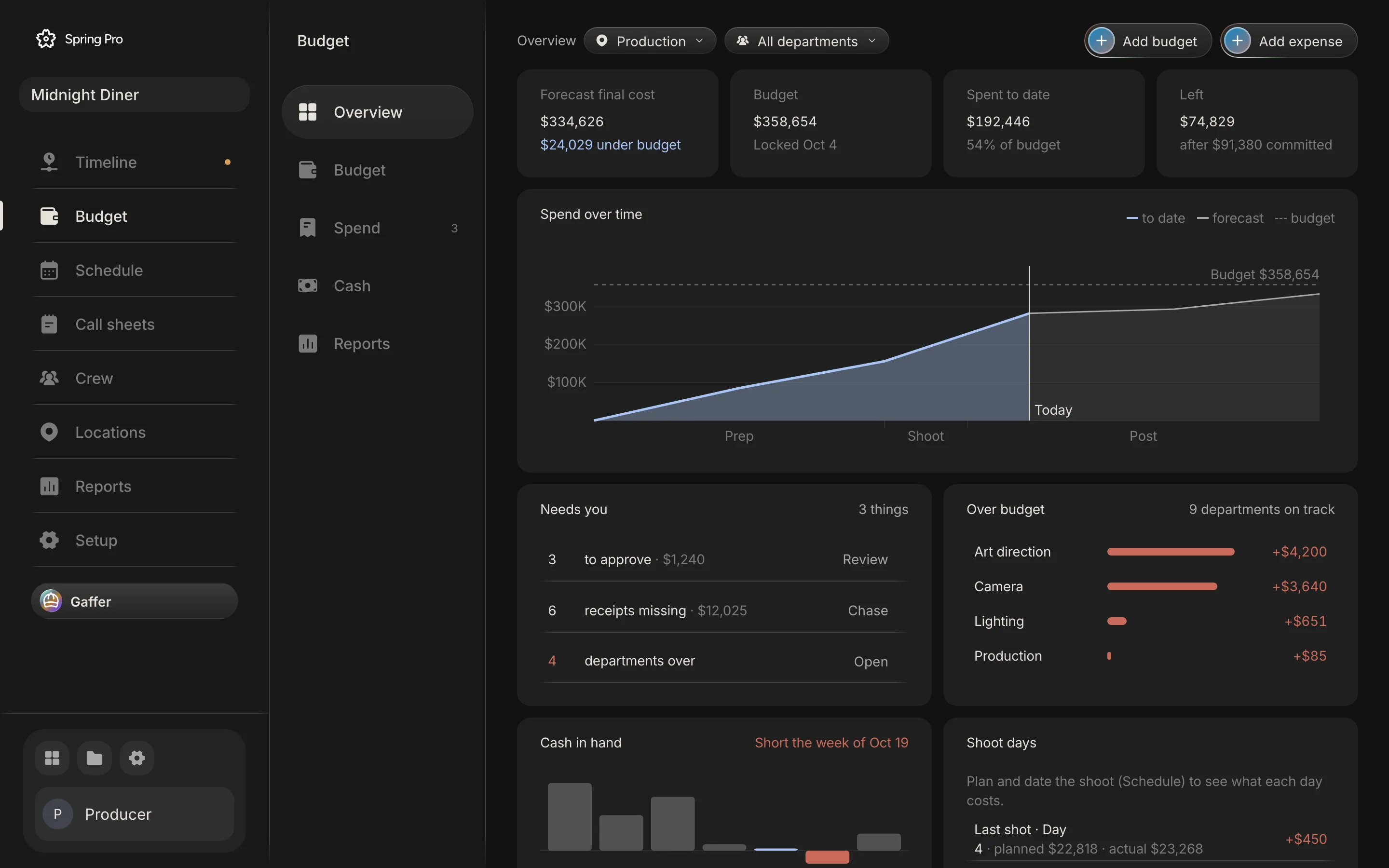
Updated 2026-10-12. Every screen is Spring Pro running Midnight Diner, our demo production.
Built from the plan
The budget is organised by the industry chart of accounts, from story and rights to camera, grip, art, wardrobe, locations, catering and post. Crew lines come from each person's deal: a day, week, hourly or flat rate, their prep and wrap days, overtime past the working day, fringes and their kit. Rentals that run every shoot day follow the number of shoot days, and the breakdown's props, vehicles and locations wait in a list to be priced.
Every number can be seen for the whole production, for one set, one scene or one department.
Lock it, then see every change
When the budget is approved, lock it. From then on every change to an estimate is logged with who made it, what changed, by how much and why, and the overview shows the forecast final cost against the locked budget, what is committed, what is spent and what is left.
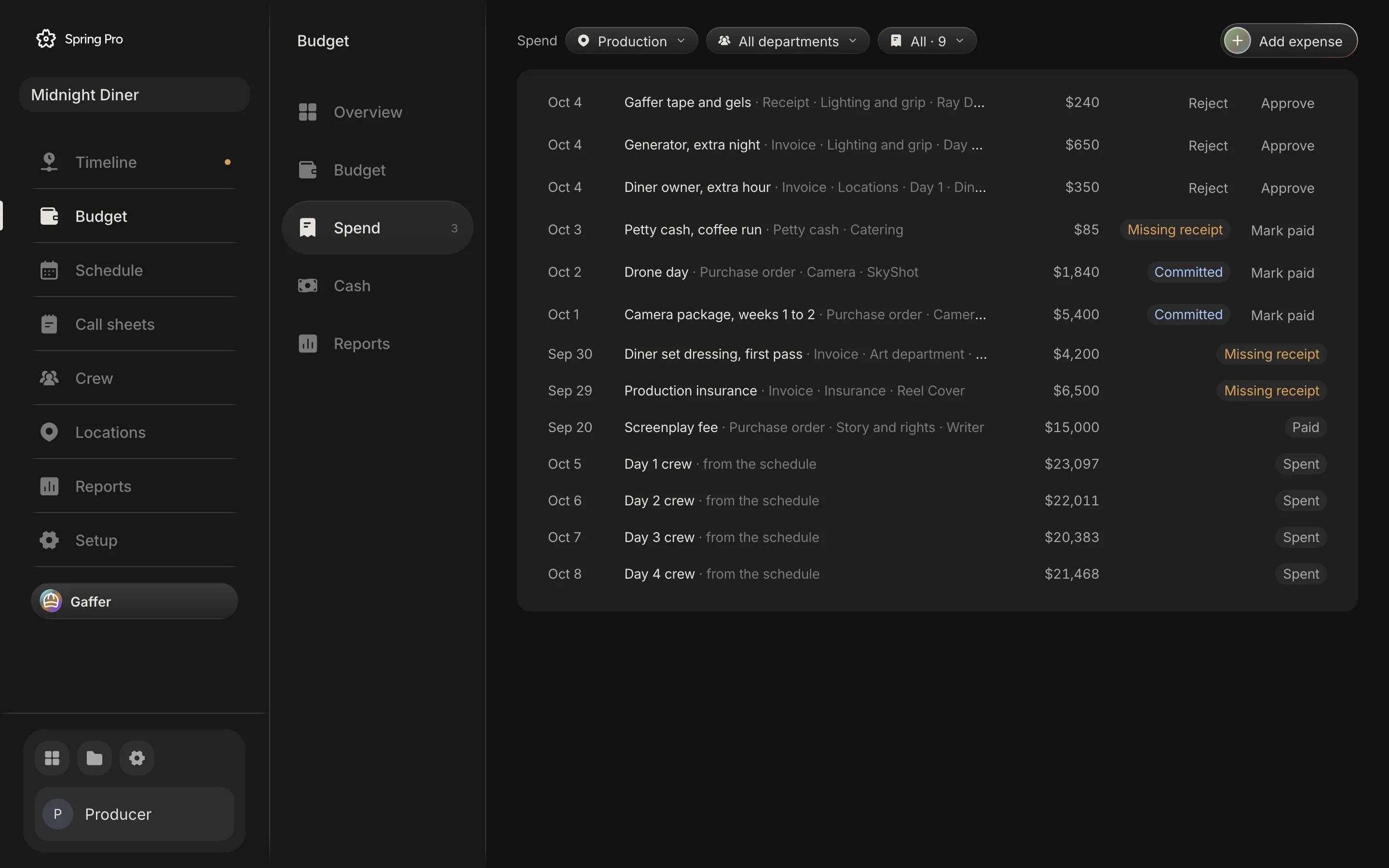
Spend, approved in one list
Purchase orders, invoices, receipts and petty cash are logged against their account, their scene or shoot day and the budget line they pay. Each one is requested, approved or rejected, then paid. Automatic rules approve small expenses, fill the account and line for a vendor you have used before, and mark a bill paid when its receipt is attached.
Cash, what-ifs and cost per day
Cash flow shows money out by week against funding coming in, and the week the production runs short. A what-if shows what an extra shoot day or a different contingency would cost before you change anything. Because the budget reads the schedule, every shoot day and every scene has its own cost.
Who uses the budget
The producer and the line producer build and lock the budget. Department heads filter to their own accounts and log their spend against them. The production accountant approves, rejects and marks bills paid, and everyone sees the same forecast, committed, spent and left.
Overtime that becomes real money
Each crew member's deal sets their working day. When a shoot day wraps, the wrap time turns planned hours into actual hours, and any overtime past the working day is added at the overtime rate you set. The overview shows what each finished day really cost against what it was planned to cost, so an overrun is seen after one day, not at the end of the shoot.
Questions
Does the budget update when the schedule changes?
Yes. Crew days, daily rentals and the cost of each day follow the schedule.
Can I lock the budget?
Yes. After the lock every change is logged with who, what, how much and why.
Does it handle overtime and fringes?
Yes. Overtime starts after the working day you set, at the rate you set, and fringes are a percentage on top of labour.
More about budget and spend
A budget that stops matching the schedule is a guess with a total on it.
Set up your
production today.
The script, the storyboard, the schedule, the call sheets and the budget in one project.