How to track film budget spend, from the first receipt to the week cash runs short.
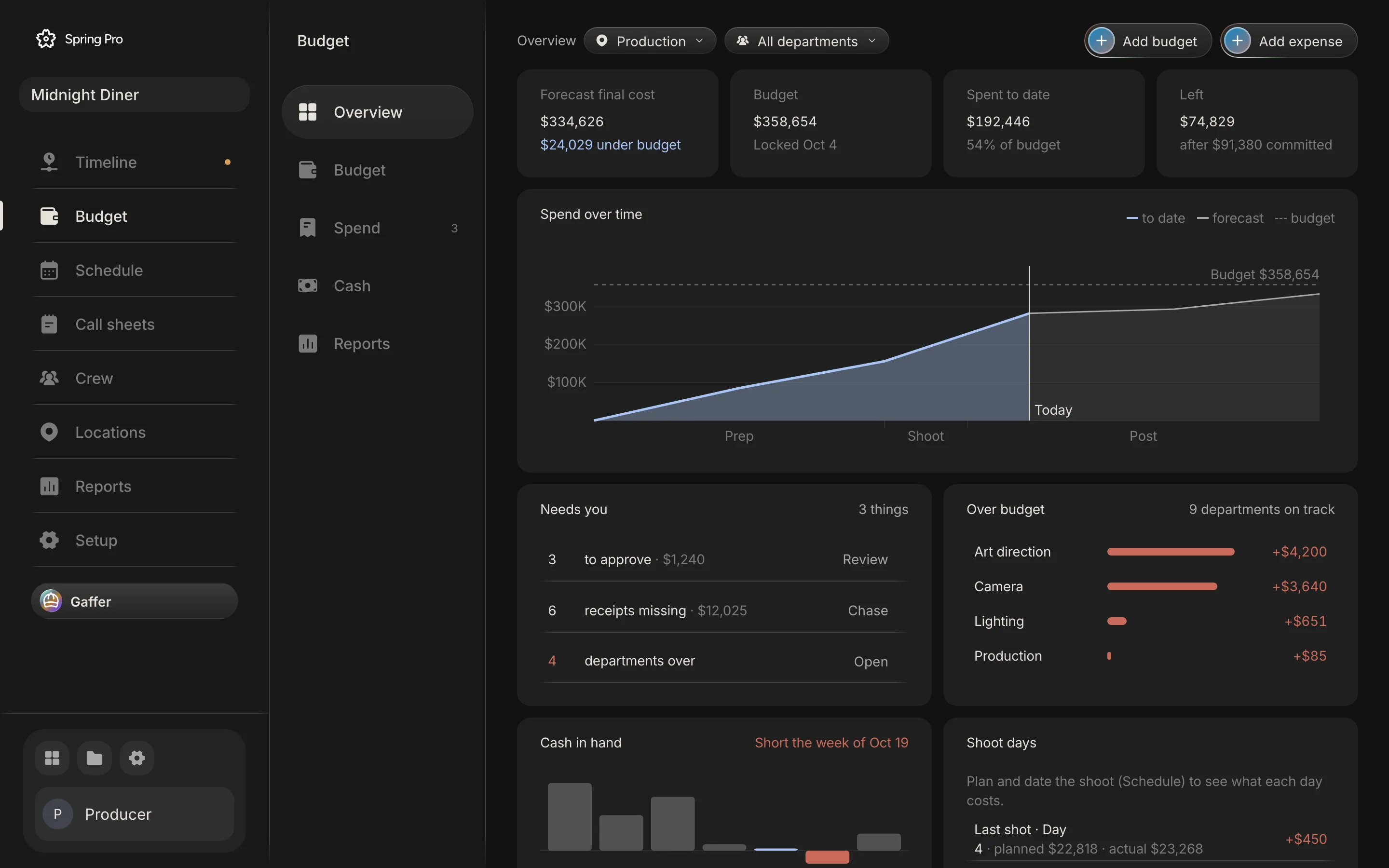
Real screen: Midnight Diner, our demo production, in Spring Pro.
The short answer. Log every purchase order, invoice, receipt and petty cash spend against an account, and against a budget line, scene or day when it belongs to one. Approve it, and count a purchase order as committed until it is paid. Then read budget, committed, spent and left, each shoot day's hot cost, the weekly cost report and cash by week.
Most budgets are tracked in a spreadsheet that is right on the day it is made and wrong a week later. This guide tracks spend the other way: every bill logged against the budget when it arrives, so the number you read is today's. It runs on a demonstration production, Midnight Diner, and explains the figures on its budget screens, from the purchase order that is only committed to the week the cash runs short. The numbers come from the app's own engine, and the outside facts come from sources read and dated below.
In this guide 25 sections
- Quick answers
- Why tracking spend is where a budget stops being a plan
- The film we are tracking
- Step 1: Sort every bill into one of four kinds
- Step 2: Log it, and say what it is against
- Step 3: Approve, reject, mark paid
- What approving the three waiting bills would do
- Step 4: Let the small ones approve themselves
- Step 5: Chase the receipts
- Step 6: Read committed, spent and left
- Where the spent, committed and still-to-come money sits
- The rest of the Overview, panel by panel
- Step 7: Watch each shoot day with the hot cost
- What a wrap time does to a day
- Step 8: Read the cost report, account by account
- Step 9: Watch cash by week, and the week it runs short
- Why a fully funded film still runs short
- What Spring Pro does not do yet
- How people track spend today, and what breaks when something changes
- From a short to a feature: what changes
- Doing it in Spring Pro
- The checklist
- How these numbers were made
- Questions people ask
- Sources
Quick answers
What does it mean to track spend? Compare three things for every part of the budget: what you planned, what you have promised and what you have paid. Then say where the film will land. Saturation, a budgeting software vendor, lists budget, actual to date, committed and estimated final cost as the columns of a cost report.
What is the difference between committed and spent? Committed is money you have agreed to spend and have not yet been billed for, such as an approved purchase order. Spent is what has been paid or invoiced, as Saturation defines it. In Spring Pro an approved purchase order is committed until you mark it paid, and any other approved bill is spent at once.
What is a hot cost? The daily comparison of what one shoot day cost against what it was budgeted to cost. Pease Bell, a firm of accountants, says the hot cost report pulls its labour and shooting data from the daily production report, and that it covers the variable costs that move on set, such as labour, overtime, meal penalties and catering. The word is not used the same way everywhere. One article keeps it for a budget line whose actuals plus the estimate to complete pass the authorised amount and breach set tolerances, and says it is not a casual word for over budget. This guide uses the daily meaning.
What is a cost report? The weekly report that sets budget, spent to date, committed and forecast side by side for every account. Saturation says it goes to producers, executive producers, studio business affairs, the completion bond company and investors, where they apply. Spring Pro's is Budget, Reports, Cost report.
Who approves a bill? The sources name a person. Saturation's example has the line producer sign a purchase order before the money is committed, and one studio's procedures have the department head approve before a purchase order reaches accounting. In Spring Pro anyone on the project can approve, and it records who did.
How often? The hot cost every shoot day and the cost report every week. Pease Bell calls the hot cost a much faster cycle than the weekly cost report, and Saturation has the line producer review the daily hot cost each morning and produce the cost report weekly during principal photography. Neither gives a rhythm for cash by week. Saturation advises tracking open post invoices weekly and checking that cash flow can cover what is due, and this guide suggests a weekly look at cash too. Spring Pro works the numbers out each time you open the page, so they are as current as the last bill you logged.
Where does this fit? Tracking is the second half of a budget. The first half, building and locking it, is in how to budget a short film, and the film budget template is a spreadsheet to start from.
Why tracking spend is where a budget stops being a plan
A locked budget is a promise made before the work. Spend is the evidence that arrives after it, one bill at a time. An overrun does not need one big mistake. Many small bills that nobody added up until wrap are enough.
Three things can go wrong, and each has a source. A purchase order is forgotten until the invoice lands, and a cost report that ignores open purchase orders understates the real position. A department looks underspent when it has simply not been billed yet, and Saturation warns that a low actual beside a high committed figure is not underspending. And money runs out on a funded film, because financiers usually pay in instalments and the production covers what falls between them.
Small misses are not cheap. One extra hour on Day 1 of Midnight Diner costs $2,993 in crew and cast labour (the working is in film production scheduling). The camera package purchase order came in $1,800 above the line it pays for. Both are easy to miss when bills live in an inbox.
| Reader | What they need | What goes wrong if the numbers are late or wrong |
|---|---|---|
| Producer | What waits for approval, and the forecast against the budget | Approves into a hole, or pays for the same thing twice |
| Line producer or UPM | Yesterday's hot cost and this week's commitments | Finds an overrun at wrap, not on the third day |
| Production accountant | Every bill matched to its purchase order and receipt | Receipts are missing at wrap-out and duplicates get paid |
| Department head | What is left in their own account | Spends past the account without knowing |
| Financier or bond company | The weekly cost report and cash by week | The forecast is stale, and there is less on paper to show a lender |
The film we are tracking
Midnight Diner is a demonstration production, not a case study. Its budget was locked on 4 October 2026 at $358,654: $326,049 of accounts plus 10% contingency, $32,605. Days 1 to 4 of the schedule (5 to 8 October) are shot, and nine bills are logged. Everything below is as the data stood on 12 October 2026.
The app reads today's date from your clock, so a few figures move as the weeks pass: the This week column of the cost report, the week marked this week on the Cash page and the balance now, and the part of the spend curve up to today. Here they are as of that day.
Money in is four funding rows adding up to $420,000. $300,000 of it is marked received. The rest is a pre-sale due on 16 November and a tax rebate with no date.
| Date | What | Kind | Account | Status | Amount | Counts as |
|---|---|---|---|---|---|---|
| 4 Oct | Gaffer tape and gels | Receipt | Lighting and grip | Requested | $240 | Waiting, not counted yet |
| 4 Oct | Generator, extra night | Invoice | Lighting and grip | Requested | $650 | Waiting, not counted yet |
| 4 Oct | Diner owner, extra hour | Invoice | Locations | Requested | $350 | Waiting, not counted yet |
| 3 Oct | Petty cash, coffee run | Petty cash | Catering | Approved | $85 | Spent |
| 2 Oct | Drone day | Purchase order | Camera | Approved | $1,840 | Committed |
| 1 Oct | Camera package, weeks 1 to 2 | Purchase order | Camera | Approved | $5,400 | Committed |
| 30 Sep | Diner set dressing, first pass | Invoice | Art department | Paid | $4,200 | Spent |
| 29 Sep | Production insurance | Invoice | Insurance | Paid | $6,500 | Spent |
| 20 Sep | Screenplay fee | Purchase order | Story and rights | Paid | $15,000 | Spent |
Three bills wait for approval ($1,240 together), three are approved and three are paid. The Spend page also lists four "Day N crew" rows. They are not bills. They are the crew and cast days already shot, posted as spent from the schedule.
Step 1: Sort every bill into one of four kinds
Spring Pro has four kinds of bill: purchase order, invoice, receipt and petty cash. The kind decides how the money is counted, so pick it honestly. Saturation describes a purchase order as a pre-approval for a specific spend before it happens, and it is the only kind Spring Pro holds as committed.
Petty cash needs care. A float, a log and an envelope of receipts are how productions control it, and Saturation suggests reconciling each float weekly so that receipts plus the cash left equal the float. Spring Pro logs each petty cash spend. It does not hold the float or do that sum, so keep the envelope.
| Kind | What it is | Use it for | How it counts |
|---|---|---|---|
| Purchase order | A promise to buy, approved before the money is spent | A rental, a big purchase, anything you want signed off first | Committed once approved, spent when marked paid |
| Invoice | A vendor's bill for goods or work | Vendors who bill you after the fact | Spent once approved |
| Receipt | Proof that someone has already paid | A crew member's reimbursement, a small buy | Spent once approved |
| Petty cash | A small cash spend from a float | Craft service, parking, the hardware store | Spent once approved |
Spring Pro has no field for a purchase order number. Put the PO or invoice number in the Notes box, which is what the box asks for.
Step 2: Log it, and say what it is against
Add expense, on the Overview or the Spend page, opens a form: what, amount, kind, account, the budget line it is against, vendor, date, due date, scene, shoot day, receipt and notes. Every new bill starts as requested, unless an automatic rule approves it on the spot. Account is the one choice that is always set. The rest says where the money belongs.
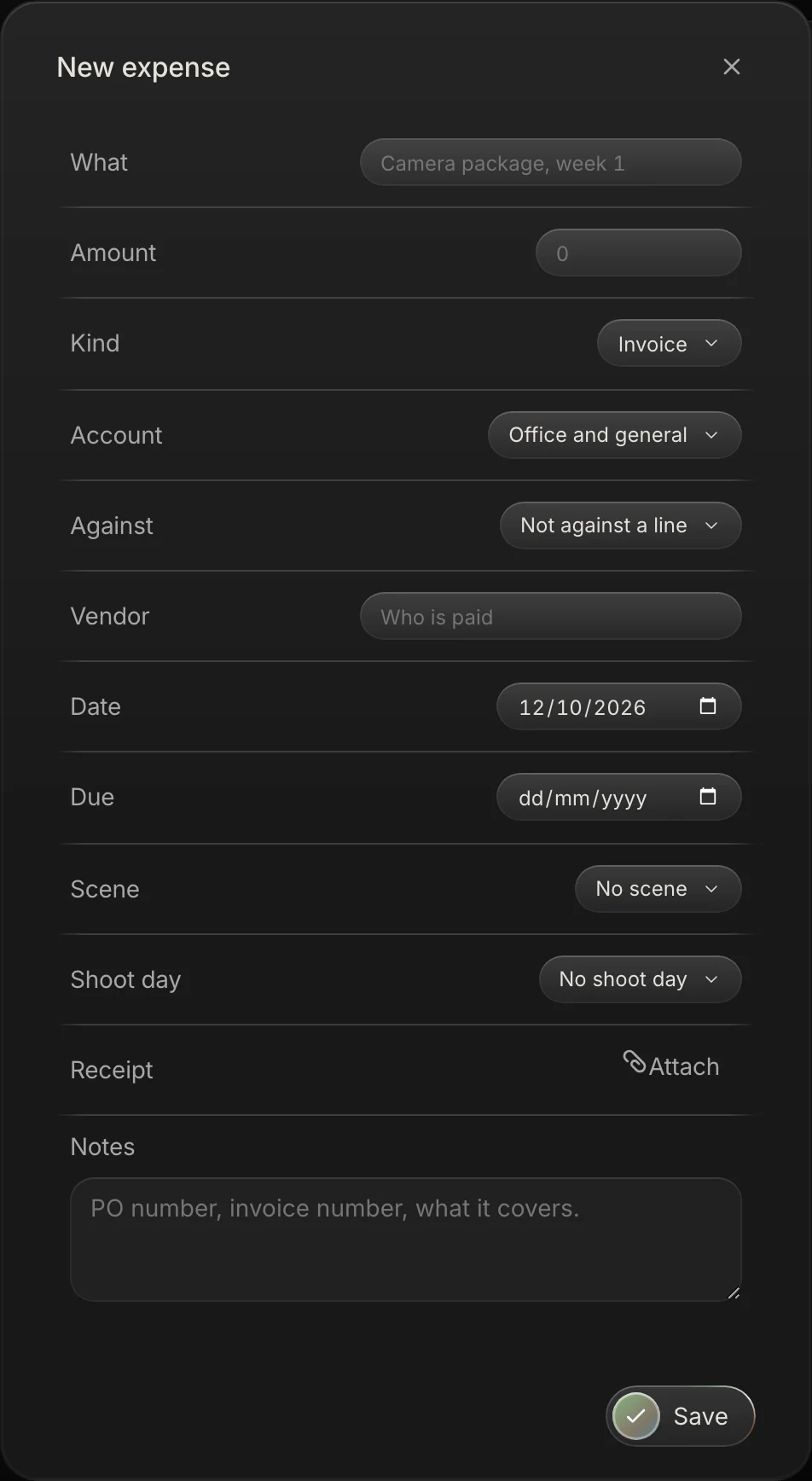
Against a line means the bill pays for something you already priced on a budget line. The line's actual comes from the bill, and its forecast is the larger of the plan and what has been logged. No line means the bill is outside the plan, and it adds to the forecast on top of the budget. The Against list shows only the budget lines in the account you picked. It does not list people or vendors on a flat deal, so a bill cannot be logged against a deal (see the limits below).
| Bill | Against | What the engine does | Effect on the forecast |
|---|---|---|---|
| Camera package, weeks 1 to 2, $5,400 purchase order | The line Camera package: $900 a day for four shoot days, $3,600 | The bill is larger than the line, so the line's forecast becomes the bill | $1,800 above the plan, shown as $450 on each shoot day |
| Drone day, $1,840 purchase order | No line | Outside the plan | Adds $1,840 to Camera |
| Diner set dressing, first pass, $4,200 invoice | No line | Outside the plan | Adds $4,200 to Art department |
| Gaffer tape and gels, $240 receipt, still waiting | No line | Counts nowhere until approved, then it is outside the plan | Would add $240 to Lighting and grip, on top of the $1,200 Expendables, gels and tape line |
Add a scene or a shoot day when the cost belongs to one. Once a bill with no line is approved, one tagged to a day lands in that day's hot cost and one tagged to a scene lands in the cost by scene. If you set both, the scene wins. A bill against a line is counted through that line, on the line's own days and scene, so the scene and day on the bill change nothing.
Step 3: Approve, reject, mark paid
A new bill waits as requested. On the Spend page it shows two buttons, Reject and Approve, and Approve records who approved it, which the side panel shows as Approved by. A filter beside the scope chips narrows the list to To approve, All, Committed, Paid or Missing receipt, with a count for each.
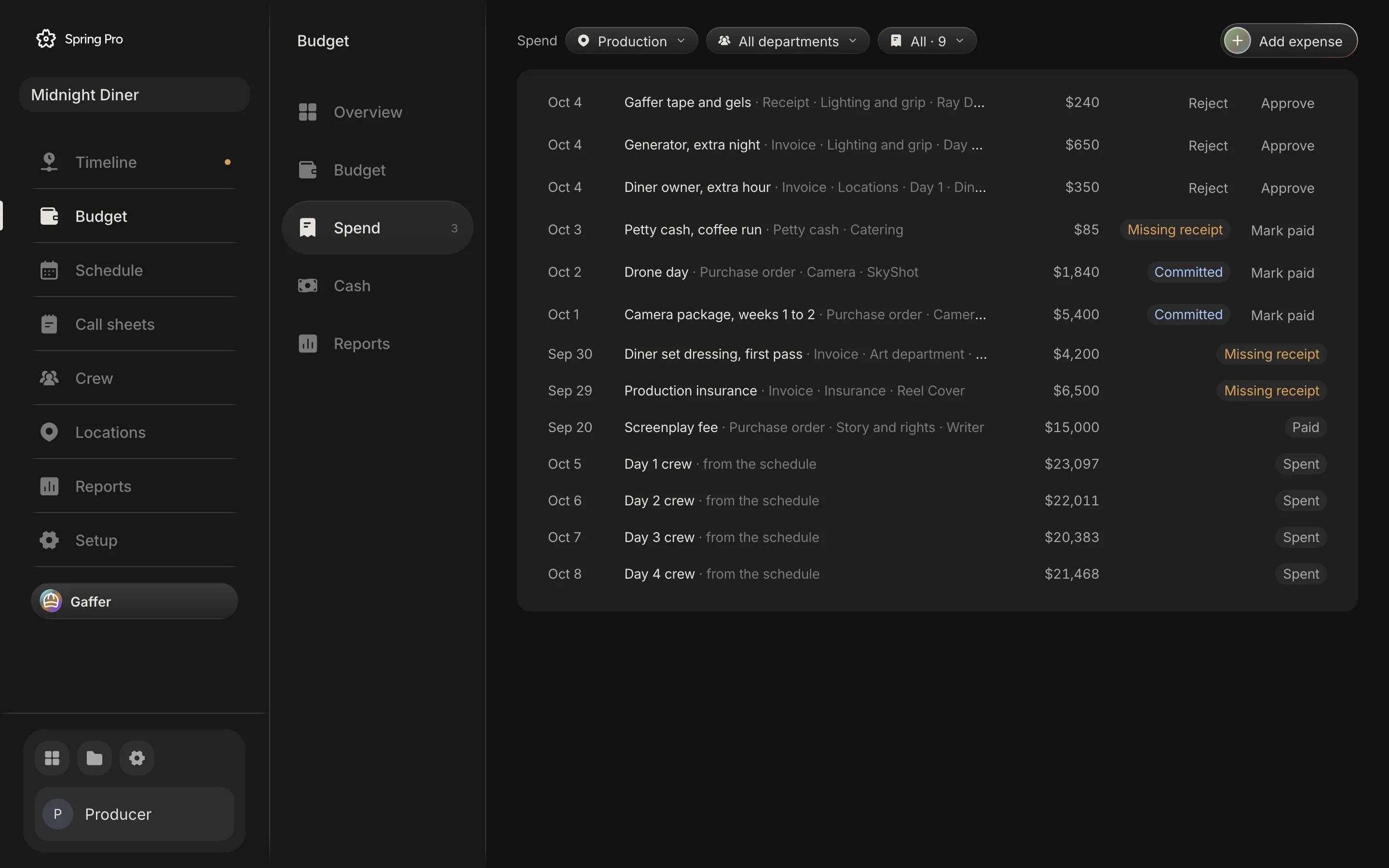
Once a bill is approved it shows Mark paid. Marking a purchase order paid moves it from committed to spent. Marking an invoice, receipt or petty cash spend paid changes its label only, because approval had already counted it as spent.
A rejected bill stays on the list with a Rejected label and counts nowhere. The Spend page has no button to reopen it, so log it again if you reject one by mistake.
| State | What the row shows | In the totals |
|---|---|---|
| Requested | Reject and Approve | Not spent and not committed. Counted as waiting on the Overview |
| Approved purchase order | A Committed label and Mark paid | Committed |
| Approved invoice, receipt or petty cash | An Approved label (Missing receipt if none is attached) and Mark paid | Spent |
| Paid | A Paid label (Missing receipt if none is attached) | Spent |
| Rejected | A Rejected label | Nowhere |
What approving the three waiting bills would do
The three requests are "Gaffer tape and gels" ($240), "Generator, extra night" ($650) and "Diner owner, extra hour" ($350). Approve them as they stand and every number moves. This table is the engine run on a copy of the project. The sample itself is unchanged.
| Number | Now | After approving | Change |
|---|---|---|---|
| Waiting for approval | $1,240 | $0 | -$1,240 |
| Spent to date | $192,446 | $193,686 | +$1,240 |
| Left | $74,829 | $73,589 | -$1,240 |
| Forecast final cost | $334,626 | $335,866 | +$1,240 |
| Against the budget | $24,029 under | $22,789 under | -$1,240 |
| Lighting and grip | $651 over | $1,541 over | -$890 |
| Locations | On budget | $350 over | -$350 |
| Day 1 actual cost | $26,697 | $27,047 | +$350 |
| Day 4 actual cost | $23,268 | $23,918 | +$650 |
Two of the three carry a day, so they move that day's hot cost. The tape carries neither a day nor a line, so it adds $240 on top of the plan. Logged against the Expendables, gels and tape line instead, it would use up part of that line's $1,200 and add nothing to the forecast. Rejecting a bill takes it out of waiting and changes no total.
Step 4: Let the small ones approve themselves
Most productions set a limit above which a bill needs a purchase order or a signature. Saturation's example limits run from $100 to $250 on a micro-budget film (under $50,000) up to $500 to $1,000 on a mid-budget one ($500,000 to $2 million). They are one vendor's figures, not a standard. Spring Pro turns the limit round: under it, an expense approves itself.
The Automatic section, at the foot of the Budget page, has four switches. All four are on until you turn them off.
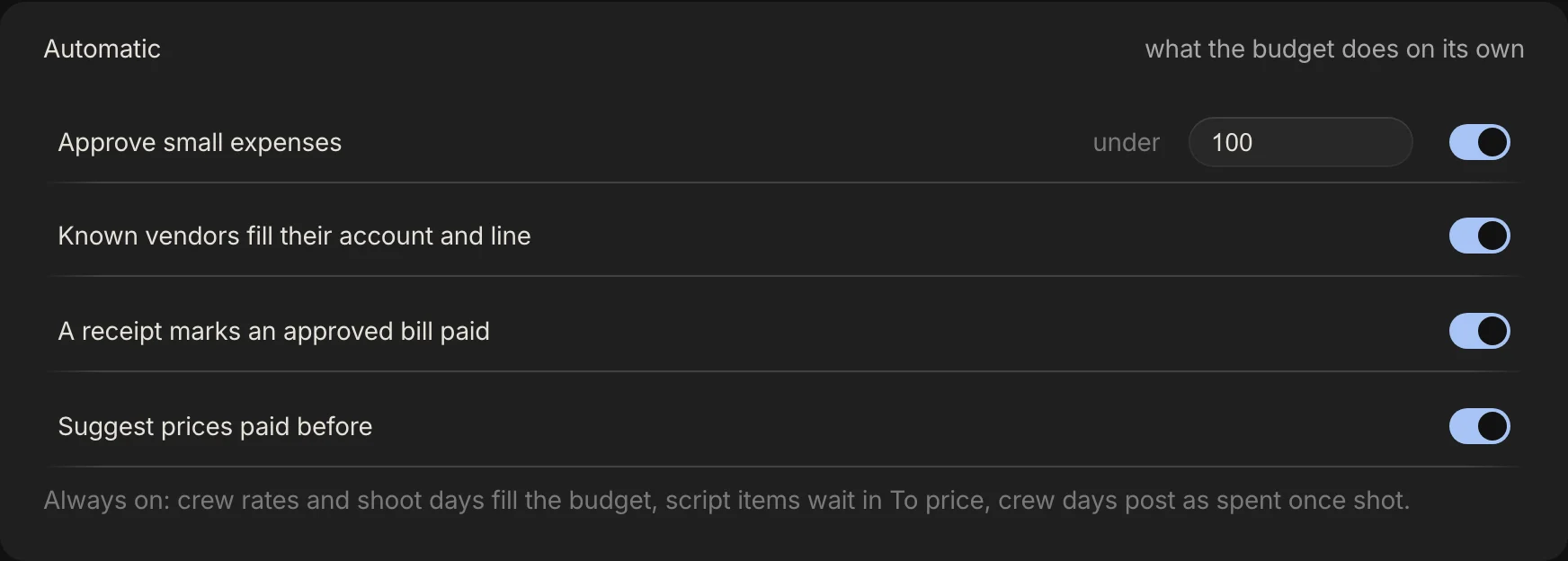
- Approve small expenses. A new bill under the limit is approved on its own and recorded as approved by Automatic. The limit starts at $100 and you can change it.
- Known vendors fill their account and line. A new bill from a vendor you have logged before, with no line chosen, copies the account and line of your most recent bill from that vendor.
- A receipt marks an approved bill paid. Attach the receipt to an approved invoice, receipt or petty cash spend and it becomes paid. Purchase orders are left alone.
- Suggest prices paid before. When you price a script item, the rate of a budget line with the same name is offered as one click. Despite the label, it reads rates already in the budget, not the amount on a paid bill.
| A new bill | What Spring Pro does |
|---|---|
| Petty cash, $85 | Approved on its own (this is the size of the sample's coffee run) |
| Invoice, $99.99 | Approved on its own |
| Invoice, $100 | Requested: the limit is "under", not "up to" |
| Purchase order, $99.99 | Approved on its own, and then committed |
| Invoice, $60, from Lens House, no line chosen | Account set to Camera, line set to Camera package, approved by Automatic |
| Receipt, $240, from Ray Dunn, the first bill from that vendor | Requested, with nothing filled in. This is the sample's tape and gels as it was first logged |
| The next bill from Ray Dunn, $240, no line chosen | Account set to Lighting and grip. There is no line to copy, because the tape bill has none, and it is requested |
| An approved invoice, $240, with its receipt attached | Paid |
| An approved purchase order, $240, with its receipt attached | Stays approved, so it stays committed |
The rules do not look at who logs a bill, and the limit is one number for the whole production. One studio's procedures have the department head approve a purchase order first. Spring Pro has no per-person approval to enforce that, so do it by agreement. That document is one studio's rule for its television productions, dated 2023, so use it as an example of a rule, not as the rule.
Gaffer, the assistant, follows the same rules. Ask it to log an expense and the expense starts as requested, then the limit and the vendor rule apply. It does not pay anyone: paid is a status in Spring Pro, whoever sets it.
Step 5: Chase the receipts
The sources treat the receipt as the control. Saturation's example policy is that every purchase has a receipt, receipts are due within 48 hours and unsubmitted receipts are not reimbursed. One studio's rules go further: petty cash receipts must be dated within 14 calendar days of the envelope date or they are not reimbursed, and must show the vendor's name, address and phone number (or have a business card or menu attached) and each item's value. Both are policy choices, not standards.
Spring Pro cannot enforce a deadline, but it shows what is missing. Once a bill is approved or paid, it shows Missing receipt if it is not a purchase order and has no receipt file. The Overview counts them from the start, waiting bills included (six receipts missing, $12,025), and its Chase button opens the Spend list filtered to them.
Attach the receipt in the bill's form, as an image or a PDF. With the paid-on-receipt switch on, an approved invoice, receipt or petty cash spend with its receipt attached becomes paid. Spring Pro does not read the receipt or check the amount. In the sample all six bills that are not purchase orders are missing theirs: the three waiting bills, the coffee run, the set dressing and the insurance.
Wrapbook's petty cash report lists the submission and approval dates, the amounts, the purpose and the linked receipts for each petty cash item, and suggests running it weekly to catch duplicate reimbursements. Spring Pro has no separate petty cash report. Petty cash is one kind of bill among four in the Spend list.
Step 6: Read committed, spent and left
Four cards open the Overview. They are the whole budget in one glance, and each is made of something you can name.

| Card | Reads | How it is made |
|---|---|---|
| Forecast final cost | $334,626, $24,029 under budget | Where the film lands if nothing else changes: spent, plus committed, plus the plan for what is still to come, plus anything logged above the plan |
| Budget | $358,654, locked 4 Oct | The frozen accounts, $326,049, plus 10% contingency, $32,605. Until you lock it, the budget is the current estimate |
| Spent to date | $192,446, 54% of budget | Approved and paid bills, plus crew days and the lines that run on shot days (rentals, purchases and fees), plus prep days once a person starts shooting and wrap days once they finish. The next table adds it up |
| Left | $74,829, after $91,380 committed | The budget minus spent minus committed. Committed is what is promised and not yet spent |
Where the spent, committed and still-to-come money sits
Add up the Spend page and you will not reach $192,446. The page lists $112,744 of it, the bills and the four crew rows, because the rest posts itself from the schedule. The table below is every dollar of the three numbers, from the app's own engine.
| Number | Part | Amount |
|---|---|---|
| Spent | Crew and cast on the four shot days: the "Day N crew" rows | $86,959 |
| Spent | Prep days of people who have started shooting | $64,906 |
| Spent | Wrap days of people who have finished shooting, dated 17 Oct | $11,195 |
| Spent | Lines that run on shot days: radio mics, craft service, fuel and parking and diner fee | $3,600 |
| Spent | Lines paid by a bill: Screenplay fee and Production insurance | $21,500 |
| Spent | Bills outside the plan: the coffee run and the set dressing | $4,285 |
| Spent, in all | The Spent to date card | $192,446 |
| Committed | Flat deals: ten people and vendors on a flat fee | $84,140 |
| Committed | Two approved purchase orders: the camera package ($5,400) and the drone day ($1,840) | $7,240 |
| Committed, in all | The committed figure under Left | $91,380 |
| Still to come | Post-production lines: editing, colour, sound, music and deliverables | $40,400 |
| Still to come | Lines not yet bought or booked: Media and DIT; Legal and accounting; Office and general; Publicity and festivals | $9,200 |
| Still to come | The Expendables, gels and tape line, with no bill against it | $1,200 |
| Still to come, in all | Forecast minus spent minus committed | $50,800 |
Figures are rounded, so a column can differ from its total by a dollar. Left is $74,829. Of that, $50,800 is already planned for the lines above, and $24,029 is the gap between the budget and the forecast. Left is not money to spend freely: most of it has a job.
That gap has a simple reading. The $32,605 of contingency, less the $8,576 that four accounts are over, leaves $24,029. Put another way, the overs have used about 26% of the contingency. Spring Pro shows contingency as one row in the budget table and does not track draws on it, so this is arithmetic, not a feature.
The rest of the Overview, panel by panel
The Overview shows more than the four cards. Three more panels carry numbers, and the other two, Cash in hand and Shoot days, have their own steps below.
| Panel | Reads | How it is made |
|---|---|---|
| Needs you | 3 to approve, $1,240. 6 receipts missing, $12,025. 4 departments over | The waiting bills. The bills that are not purchase orders and have no receipt. The departments whose forecast is above their budget. Each row has a button that opens the list behind it |
| Over budget | Art direction +$4,200, Camera +$3,640, Lighting +$651, Production +$85. 9 departments on track | The overs from the cost report below, grouped by department. Here Art direction is the Art department account, Lighting is Lighting and grip, and Production is Catering |
| Spend over time | A curve up to $334,626, under a dashed line at the budget, $358,654 | The Out column of the Cash page, added up week by week, so it ends at the forecast. The part up to today is $283,031. That is more than Spent because it includes everything dated up to today, committed deals too. Prep, Shoot and Post mark the phases |
Step 7: Watch each shoot day with the hot cost
The hot cost is the day-by-day check. Pease Bell says the hot cost report takes its labour and shooting data from the daily production report. Saturation adds the other sources: timecards, petty cash envelopes, daily equipment charges and the day's purchases, reviewed by the line producer the next morning. Its value, Saturation says, is speed: you see a problem within 24 hours, not at the end of the week.
Spring Pro's version is Budget, Reports, Hot cost. Each shoot day gets a row: planned, actual, difference and overtime. A day counts as shot once its date has passed or you enter a wrap time, and until then Actual reads Not shot. The wrap time can be entered on the call sheet, in the Reports daily report or on the Overview's next shoot day card, and the daily production report is where it is normally written down.
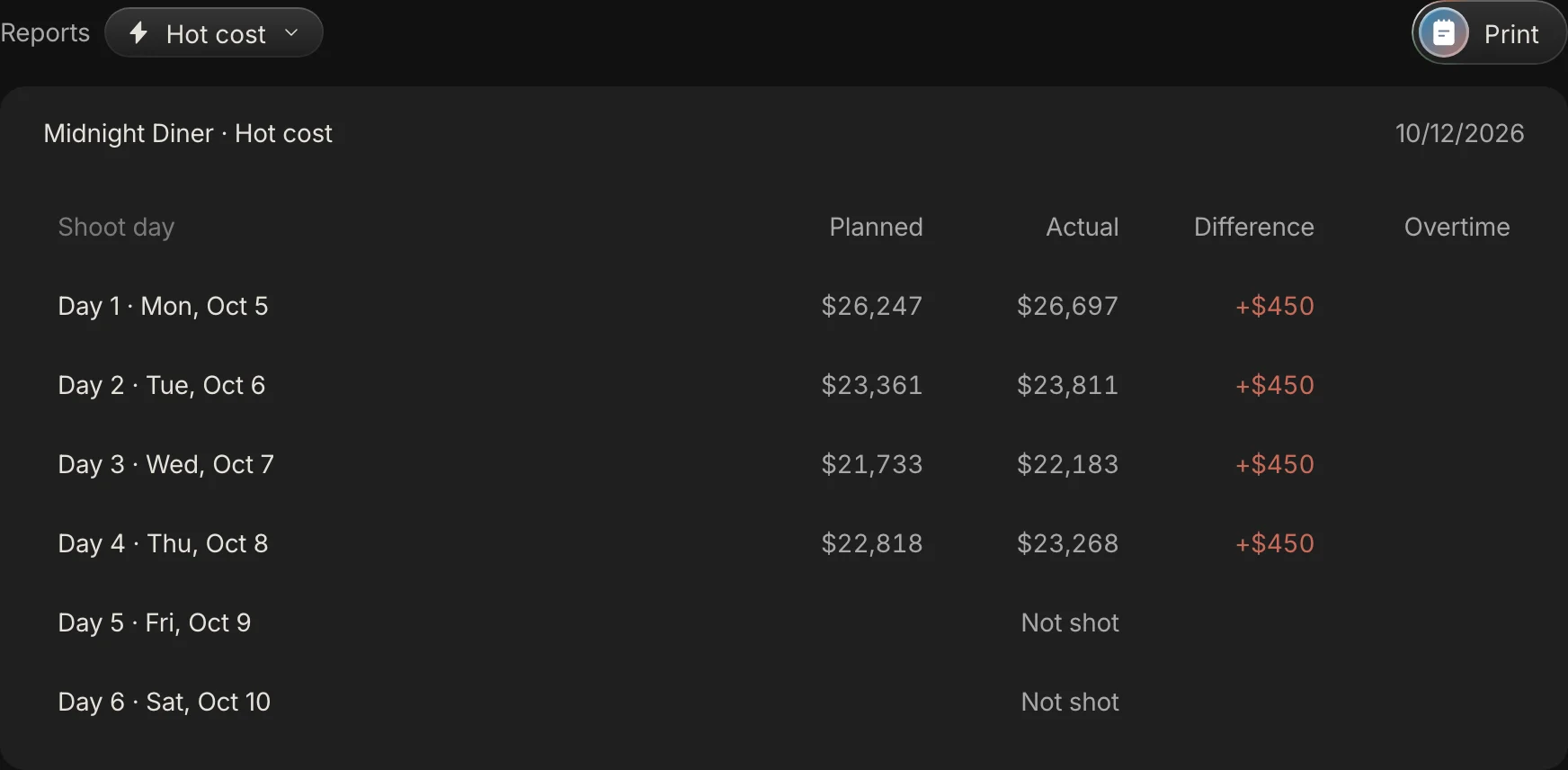
Planned is the day's crew and cast at the planned hours (an 11-hour day, overtime after hour 10), plus the lines that run on that day: rentals, purchases such as craft service and fuel, and location fees. Actual is the same day at the wrapped hours if you entered a wrap time, plus any approved bill with no line that you tagged to that day, and any overage on a line that runs on that day. It is not built from timecards.
Pease Bell's hot cost report is narrower than this. It covers the variable costs that move on set and does not try to capture every fixed cost in the budget. Spring Pro's Planned and Actual take in the day's rentals, purchases and fees as well, so it is a wider daily view than the accountant's report.
| Shoot day | Date | Planned | Actual | Difference | Overtime |
|---|---|---|---|---|---|
| Day 1 | 5 Oct | $26,247 | $26,697 | +$450 | |
| Day 2 | 6 Oct | $23,361 | $23,811 | +$450 | |
| Day 3 | 7 Oct | $21,733 | $22,183 | +$450 | |
| Day 4 | 8 Oct | $22,818 | $23,268 | +$450 | |
| Day 5 | 9 Oct | Not shot | |||
| Day 6 | 10 Oct | Not shot |
Every shot day reads +$450. That is the camera package: the purchase order is $5,400 against a line worth $3,600 ($900 a day for four shoot days), so each of the four days carries $450 of the $1,800 overage. No wrap time is entered in the sample, so the hours are the plan and Overtime is blank. Days 5 and 6 have no scenes, so Planned is blank and Actual reads Not shot.
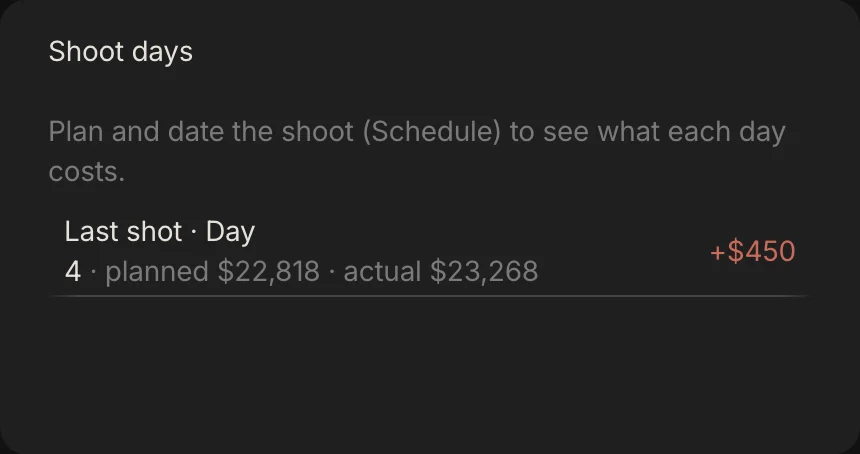
The Overview card tells the same story for the last shot day: Day 4, planned $22,818, actual $23,268.
What a wrap time does to a day
A wrap time turns a planned day into an actual one. Spring Pro takes the hours from the crew call to the wrap and reprices everyone on a day or hourly rate at those hours, with overtime after hour 10 at 1.5 times the hourly rate.
Try Day 1, which calls at 07:00. The plan already carries one hour of overtime, because the planned day is 11 hours and overtime starts after hour 10. One more hour on Day 1 costs $2,993 in crew and cast labour.
| Wrap on Day 1 | Hours worked | Overtime | Actual cost | Against the plan |
|---|---|---|---|---|
| 17:00 | 10 | 0 h | $23,704 | -$2,543 |
| Not entered, as in the sample | 11, the plan | Blank | $26,697 | +$450 |
| 19:00 | 12 | 2 h | $29,690 | +$3,443 |
Finishing at 17:00 comes in under plan even with the camera overage, because the plan already pays for an eleventh hour. Finishing at 19:00 puts 2 hours of overtime on the day. That is the figure the line producer reads the next morning.
Meal penalties and turnaround penalties are not worked out in the budget. If one lands, log it as an expense against the day and it joins the actual. The turnaround and meal breaks guide has the rules and a calculator for the earliest legal call.
Step 8: Read the cost report, account by account
The cost report is the weekly view of the same money, by account. Saturation lists its columns as budget, actual to date, committed, estimated final cost and variance, and Filmmaking Lifestyle describes it as the report that producers, financiers and sometimes bond companies review.
Spring Pro's version is Budget, Reports, Cost report, and the Print button on the same page prints it. The same Reports page also holds the top sheet and the cost by scene, set and department. These are the columns of the cost report:
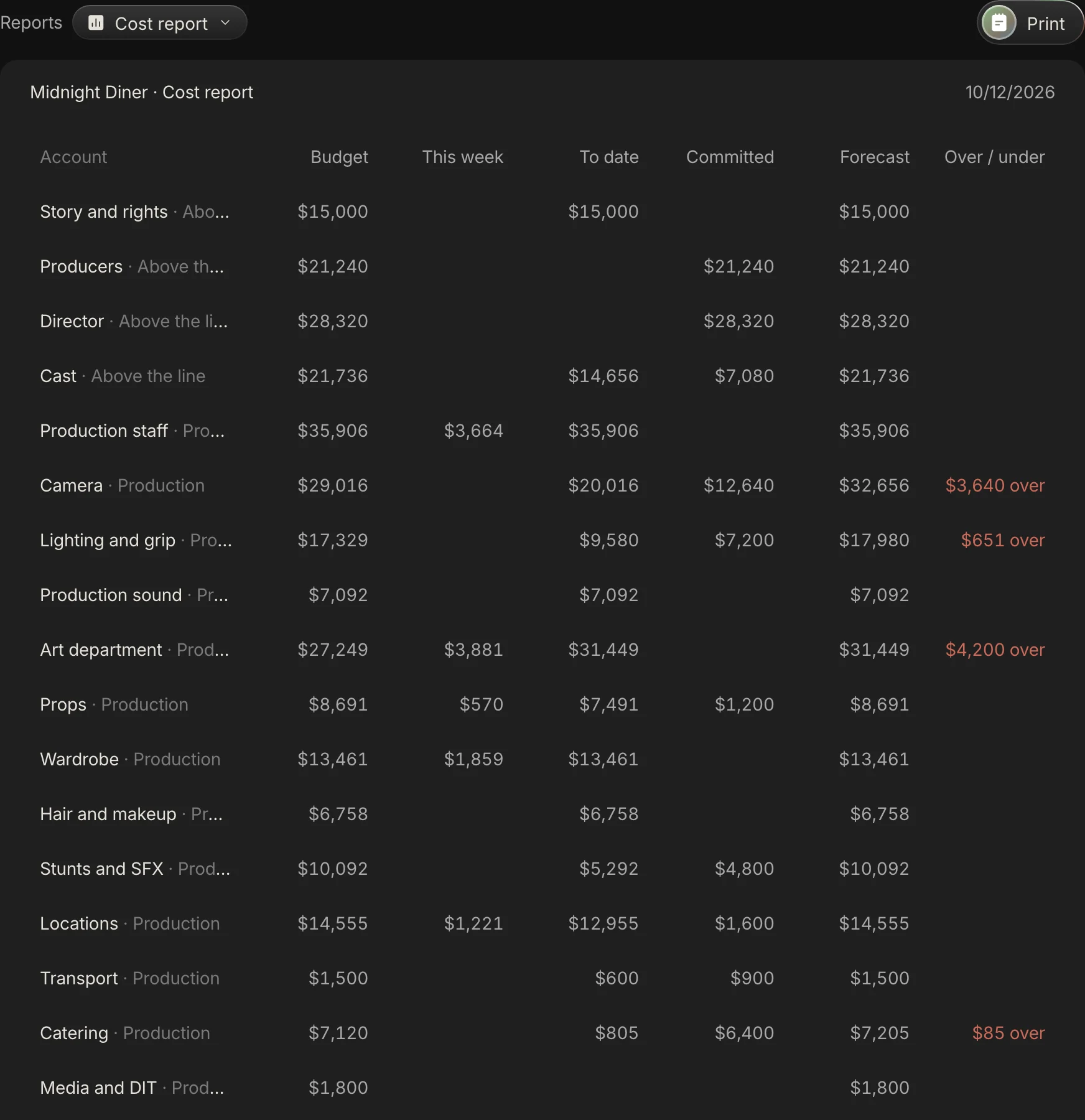
- Budget: what was frozen for the account at the lock.
- This week: spent money dated in the current week.
- To date: spent so far, the same figure as Spent on the Overview.
- Committed: promised and not yet spent.
- Forecast: where the account lands: the plan, or the bills logged against it if they are larger, plus any bill outside the plan.
- Over / under: the budget minus the forecast.
| Account | Budget | This week | To date | Committed | Forecast | Over / under |
|---|---|---|---|---|---|---|
| Art department | $27,249 | $3,881 | $31,449 | $0 | $31,449 | $4,200 over |
| Camera | $29,016 | $0 | $20,016 | $12,640 | $32,656 | $3,640 over |
| Lighting and grip | $17,329 | $0 | $9,580 | $7,200 | $17,980 | $651 over |
| Catering | $7,120 | $0 | $805 | $6,400 | $7,205 | $85 over |
| The other 23 accounts | $245,336 | $7,314 | $130,596 | $65,140 | $245,336 | On budget |
| Contingency 10% | $32,605 | |||||
| Total | $358,654 | $11,195 | $192,446 | $91,380 | $334,626 | $24,029 under |
Camera is $3,640 over. $1,800 of that is the purchase order against its line, and $1,840 is the drone day, which sits outside the plan. Art department is $4,200 over because of one bill, the set dressing invoice, which has no line.
Lighting and grip is $651 over with no bill behind it: its plan sits $651 above what was frozen at the lock. After a lock Spring Pro logs each change to an estimate with who, what, how much and why, and the site's sample data does not carry that log. A further $890 waits for approval. Catering is $85 over from the coffee run.
The Total row reads $24,029 under. Add the four overs, $8,576, to that and you have the $32,605 of contingency. On 12 October 2026 the This week total, $11,195, is all wrap days for people who have finished shooting, dated 17 October, which Spring Pro posts as spent once a person's last shoot day is shot. The column follows your clock, so it changes each week.
Step 9: Watch cash by week, and the week it runs short
Cash flow is the question the cost report does not answer: when does the money leave, and is there money in hand that week? Wrapbook points out that cash gaps can happen even on a funded production, because financiers usually release money in instalments and the production has to cover what falls between them.
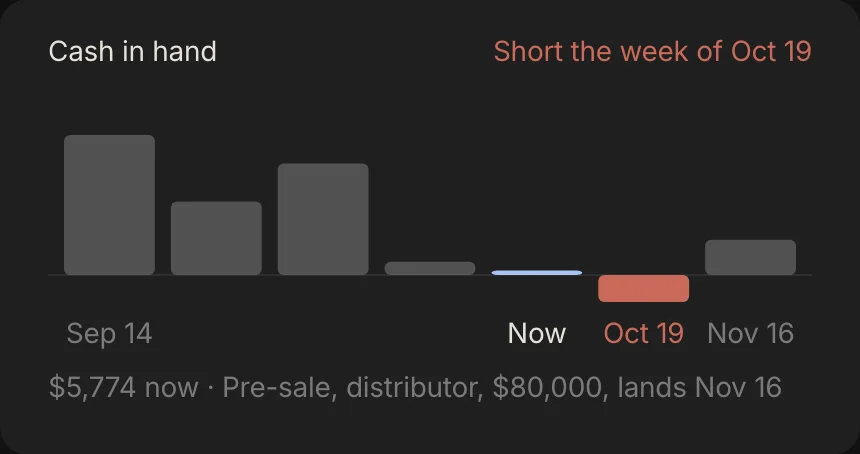
Spring Pro's Cash page lists each week in which money moves, with Out, In and In hand, and the Overview draws the same weeks as bars. Out is the forecast money that moves that week, In is funding by its date, and In hand is the running balance.
The dates come from rules, not from your bank:
- A bill with no budget line moves on its due date, or its bill date if it has none. A bill against a line has no date of its own: its money moves with the line, on the line's dates.
- A crew or cast day moves on its shoot day. Prep days move 7 days before the first day on the schedule, and wrap days 7 days after the last day on the schedule.
- A budget line that runs on shoot days, such as a rental for every shoot day or a location fee for a set, moves on each of those days. Any other line moves on its Paid on date if you set one.
- Anything else with no day of its own, a flat deal included, moves by its group: above-the-line and other accounts 14 days before the first day on the schedule, production accounts on the first day on the schedule, and post-production 14 days after the last day on the schedule.
- Funding moves on its due date. A funding row with no date is left out.
| Week of | Out | In | In hand | What lands that week |
|---|---|---|---|---|
| 14 Sep | 0 | 180,000 | 180,000 | Equity, first tranche in 180,000 |
| 21 Sep | 85,540 | 0 | 94,460 | Above-the-line and other fees and deals 85,540 |
| 28 Sep | 71,031 | 120,000 | 143,429 | Prep days 64,906; Bills outside the plan, on their due or bill date 6,125; Equity, second tranche in 120,000 |
| 5 Oct | 126,459 | 0 | 16,969 | Crew and cast on shoot days 86,959; Flat deals and lines dated the first day of the schedule 30,500; Rentals, purchases and fees on shoot days 9,000 |
| 12 Oct | 11,195 | 0 | 5,774 | Wrap days 11,195 |
| 19 Oct | 40,400 | 0 | -34,626 | Post-production lines 40,400 |
| 16 Nov | 0 | 80,000 | 45,374 | Pre-sale, distributor in 80,000 |
On 12 October 2026 the week of 12 October is this week, and it reads 5,774 in hand. The Cash page marks this week from your clock, so on any other date the week marked, and the balance now, will differ. The week of 19 October is the first with a negative balance, -34,626, and the Overview draws it in red under the words Short the week of Oct 19.
Only weeks in which money moves are listed, so the sample goes from the week of 19 October to the week of 16 November, and the weeks of 26 October, 2 November and 9 November are not listed.
Why a fully funded film still runs short
Funding adds up to $420,000 and the forecast is $334,626, so the Funding header on the Cash page reads fully funded. It is the weeks that fail. Out in the week of 19 October is $40,400, all of it post-production lines dated 24 October, and the next money in is the pre-sale on 16 November.
Two details change the picture. The header adds up every funding row, received or not, so it says $420,000 raised while only $300,000 is marked received. And the tax rebate, $40,000, has no date, so the weeks leave it out.
Date the rebate. Give it a due date of 14 October and the week of 12 October reads 45,774 in hand and the week of 19 October reads 5,374, so no week is short. That is a what-if on a date, not a forecast of when a rebate pays. Marking a row received does not change the weeks either, because cash counts funding by its date.
When a week is short, the Cash page says what it knows: the next money in is Pre-sale, distributor, $80,000 on 16 November, so bring it forward or hold $34,626 of spend. A third lever, a bridge loan, is the producer's call, and Wrapbook notes that cash flow records and the purchase order log may decide whether a lender agrees.
| Source | Kind | Amount | Due | Received |
|---|---|---|---|---|
| Equity, first tranche | Equity | $180,000 | 14 Sep | Yes |
| Equity, second tranche | Equity | $120,000 | 28 Sep | Yes |
| Pre-sale, distributor | Pre-sale | $80,000 | 16 Nov | No |
| Tax rebate | Tax rebate | $40,000 | No date | No |
What Spring Pro does not do yet
These are the limits, read from the code. Check them against how your production works before you rely on the numbers.
- No payroll, timecards or accounting ledger. The hot cost is not built from timecards. It is the plan, plus the bills you log, plus the hours from a wrap time if you enter one. Meal and turnaround penalties are not worked out either, so log them as expenses.
- Everyone on a project can approve. Spring Pro records who approved or rejected a bill. It cannot stop anyone doing it.
- A bill cannot be logged against a person's or vendor's deal. The Against list holds budget lines only. In the sample, ten flat deals make up $84,140 of the $91,380 committed. A bill logged for one of them, with no line, counts as a bill outside the plan on top of the deal, so the same money is counted twice. Log only what is extra to the deal.
- No bank link. Paid is a status you set. The cash weeks come from dates in the budget, not from a bank balance.
- A flat deal stays committed. A person or vendor on a flat fee is committed from the start, and the engine never moves them to spent, even after the work is done. In the sample that is $84,140 of the $91,380 committed, including the caterer's flat fee. Left is not affected, but the split between spent and committed is.
- Wrap days post as spent early. A person's wrap days count as spent once their last shoot day is shot, so Spent to date includes $11,195 dated 17 October, which is still to come.
- Cash is dated by rules. Funding counts by its date whether or not you mark it received, and a funding row with no date is left out.
- Small things the Spend page does not do. It does not hold petty cash floats, read a receipt or reopen a rejected bill.
How people track spend today, and what breaks when something changes
Two guides came up when we searched for this, and both explain the reports in general terms. Filmmaking Lifestyle's cost report guide gives a general illustration on a $10 million budget with no line-by-line working. Beancount.io's guide, from an accounting tool vendor, does not treat committed money as a thing apart from actual. As we read them on 12 October 2026, neither follows one bill through to the totals, which is what this guide does.
The table is our view of the three usual ways of working, not a test of products. Wrapbook, a payroll vendor, describes one tool for payroll, purchase orders and petty cash, whose budget tracker reflects each transaction as it posts.
| Way of working | Good for | When a bill, a day or a date changes you must |
|---|---|---|
| A spreadsheet with budget and actual columns | A short with few bills and one person doing the books | Retype the bill, keep committed money apart from spent by hand, and keep your own record of who approved it |
| Production accounting software or an accountant's system | A financed feature with payroll, a bond company and a production accountant | Carry a schedule change into the budget by hand unless the system reads the schedule, and have someone run it |
| One project where spend reads the schedule and the crew list (Spring Pro) | A short or a small indie where the producer approves and watches the numbers | Look at the new number. It has no payroll, timecards or ledger, its hot cost uses planned hours until a wrap time is entered, and anyone on the project can approve |
In Spring Pro the plan side of every number is worked out again from the schedule and the crew list each time you open the page. The budget side stays frozen at the lock. That is why a moved scene shows up as a different planned day, and a changed rate shows up as an account over its budget.
From a short to a feature: what changes
The job does not change with size. What grows is the number of people who approve, the number of bills, and who is waiting for the report. These sizes are rough labels, not industry definitions.
| Size | How spend is usually tracked | What to add |
|---|---|---|
| Solo or YouTube video | A list of what you paid, in one sheet | Nothing more. A receipt folder is enough |
| Short film | One person logs and approves. Receipts in a folder. Petty cash for small buys | Log each bill against its account, chase receipts weekly, and read the Overview each shoot day |
| Indie feature | A line producer and an accountant. Purchase orders above a limit, petty cash floats, a hot cost each shoot day and a cost report each week, as the sources describe | Keep the accountant's payroll and ledger. Use Spring Pro as the producer's day-by-day view |
| Financed or bonded feature | A weekly cost report to the bond company and investors, and cash by instalment | Payroll, timecards and a ledger, which Spring Pro does not have. Use it as a working view and not as the books |
| Series | Many units and episodes | Not in Spring Pro yet: one unit and one script per project |
Doing it in Spring Pro
Everything above sits under Budget, in a second navigation with five pages. The scope chips at the top (Production, a set or a scene, and a department) narrow the Overview, Budget and Spend pages. Click any bill to open its side panel: amount, kind, account, the line it is against, vendor, dates, where it belongs, who logged and approved it, the receipt, the buttons and a comment box.
Ask Gaffer what is waiting for approval, or when cash runs short, and it reads the same numbers. It can log an expense, or approve, reject or mark one paid, when you ask, and one undo reverts what it did in a run. See production budget software for the tool, and the film budget template to start in a spreadsheet.
- Overview: the four cards, the spend curve, Needs you, Over budget, Cash in hand and Shoot days.
- Budget: the plan by account, with the rules and the Automatic switches below it.
- Spend: the list of bills, with the filters and the Add expense button.
- Cash: the weeks, and the funding rows.
- Reports: the cost report, hot cost, top sheet, and cost by scene, set and department, with Print.
The checklist
Copy this. Tick it each week of the shoot.
- Every bill is logged the day it arrives, with its kind and its account.
- A bill that pays for something you priced on a budget line is logged against that line. A bill for work a flat deal already covers is not logged, or it counts twice.
- A cost that belongs to a day or a scene says so.
- Purchase orders are approved before the money is spent, and marked paid when the vendor is.
- The limit for small expenses is a number you chose, not the default you never looked at.
- Every bill that is not a purchase order has its receipt, checked weekly.
- Each shoot morning: read yesterday's hot cost, and enter the wrap time.
- Each week: read the cost report and the Over budget list, and check what Left is made of.
- Each week: read the cash weeks, and give every funding row a date.
- After the lock, every change to an estimate has a reason.
How these numbers were made
Every number about Midnight Diner comes from the project itself, run through the same budget engine the app uses (the code behind the Overview, Spend, Cash and Reports pages). The before-and-after tables run the same functions on a changed copy of the project, and the sample itself is not changed. Midnight Diner is a demonstration production, not a case study of a real shoot.
When the site is built, a check stops the build if the project changes so that a Midnight Diner figure, or the story told about it, is no longer true. That check does not read the sentences about what the app does or what the outside sources say. Those were written from the app's code and the sources on 12 October 2026.
The sample's data does not include receipts, who approved each bill or the change log, so the receipt counts come from the Needs you card and the Spend screen. The outside facts come from the sources below, read on 12 October 2026. Most are vendors or a firm of accountants, the purchase order limits are one vendor's examples and the studio rules are one studio's. The sources use the word hot cost in different ways (a daily on-set report in one, a flagged budget line in another), so treat each as an example of practice, not a standard.
Questions people ask
How do you track film budget spend?
Log every bill against an account (and a line, scene or day when it belongs to one), approve it, and read committed, spent and left. Then check each shoot day's hot cost, the weekly cost report and cash by week. The budget template is a spreadsheet to start from, and production budget software does it from the schedule.
What is the difference between committed and spent?
Committed is promised and not yet billed or paid, such as an approved purchase order. Spent is paid or invoiced, as Saturation defines it. In Spring Pro an approved purchase order is committed until it is marked paid, and any other approved bill is spent.
What is a hot cost report in film?
A daily comparison of one shoot day's cost with its budget, built from the daily production report. In Spring Pro it is Budget, Reports, Hot cost: planned, actual, difference and overtime for each day. See also the daily production report.
What is a film cost report and how often is it made?
The report that sets budget, actual to date, committed and forecast side by side for every account. Saturation says it is produced weekly during principal photography. In Spring Pro it is Budget, Reports, Cost report, and it prints.
Do you need a purchase order for a small expense?
Many productions set a limit under which department heads spend and send receipts, and Saturation gives example limits that rise with the size of the budget. Spring Pro does it the other way round: an expense under your limit approves itself, and $100 is the default. Check your own production's policy.
How do you track petty cash on a film?
Give each department a float, a log and a receipt envelope, and reconcile weekly, as Saturation suggests. In Spring Pro each petty cash spend is a bill of the kind Petty cash: it counts as spent once approved, and a spend under the limit approves itself.
What do you do when a bill pushes an account over budget?
In Spring Pro the account turns over, the Overview's Over budget list names it, and the cost report shows how much. Then decide whether the contingency covers it or something else gives. If you change an estimate after the lock, give the reason, so the change log can say why.
Why does cash run short when the film is fully funded?
Because money arrives in instalments and leaves on dates, and financiers usually release money in instalments. On Midnight Diner, funding is $420,000 against a $334,626 forecast, yet the week of 19 October is short by $34,626 until the pre-sale lands.
Can I track film spend in a spreadsheet?
Yes, for a short. The risks are that every bill is retyped, committed money gets mixed with spent, and nobody can say who approved a bill. See how to budget a short film for the budget half.
Does Spring Pro do payroll or accounting?
No. It has no payroll, timecards or accounting ledger, and everyone on a project can approve. It is the producer's working view of the budget and spend, not the books.
Can Gaffer log or approve expenses?
Yes, when you ask. A logged expense starts as requested, and the automatic rules apply. Gaffer can approve, reject or mark a bill paid, and one undo reverts a run. It does not pay anyone.
Sources
Every outside claim that names a source comes from one of these, read on the date shown. Standard conventions, such as the eighths rule and the usual specialist cases, are common practice. Figures from agreements and summaries change at each negotiation, so check the current text before you rely on a number.
- Saturation.io, production cost report: the complete guide (a budgeting software vendor, 21 February 2026, updated 8 September 2026). Checked 2026-10-12.
- Saturation.io, how to manage film production expenses (a budgeting software vendor, 21 February 2026, updated 25 August 2026). Checked 2026-10-12.
- Pease Bell, production accounting 101: cost reports, hot costs and audits (a firm of accountants, 10 September 2026). Checked 2026-10-12.
- Wrapbook help centre, petty cash report (a payroll vendor, updated 11 September 2026). Checked 2026-10-12.
- Wrapbook, how to manage cash flow and your PO log (a payroll vendor, 2 December 2022). Checked 2026-10-12.
- Wrapbook, you can now actualize budgets with Wrapbook (a payroll vendor, 21 July 2021). Checked 2026-10-12.
- Standard accounting procedures, attachment C (one studio's rules for its television productions, a PDF dated 19 October 2023 on an NBCUniversal domain). Checked 2026-10-12.
- Global Producers, hot cost in film production finance (a blog article by Manav Paul, 17 February 2026). Checked 2026-10-12.
- Filmmaking Lifestyle, what is a cost report in film (a blog article, 3 March 2024). Checked 2026-10-12.
- Beancount.io, independent film production accounting: above and below the line and the cost report (an accounting tool vendor, published July 2026 according to its address). Checked 2026-10-12.
More about budget and spend
A budget that stops matching the schedule is a guess with a total on it.