How to do a script breakdown, with the colours, the sheet and a real sample.
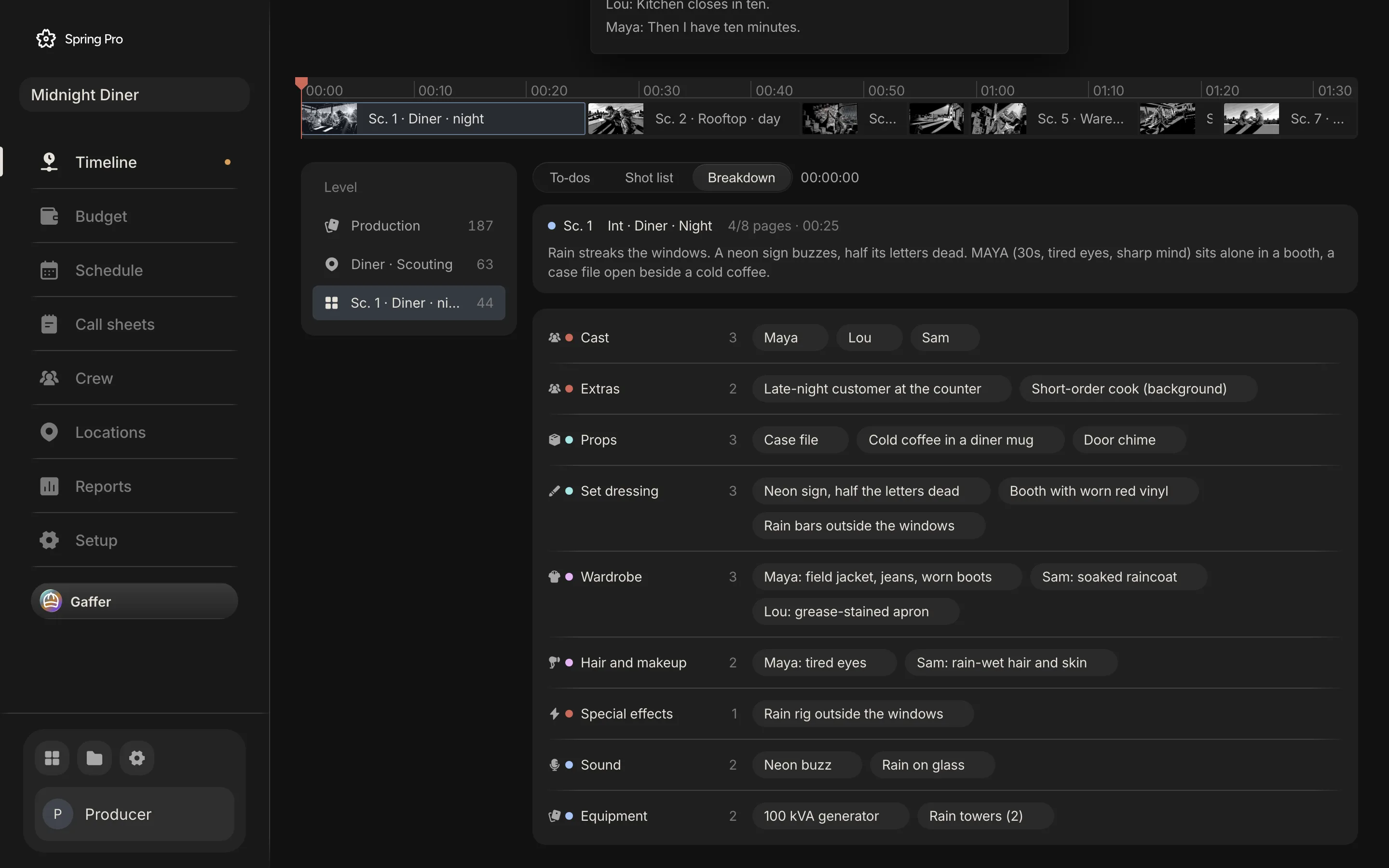
Real screen: Midnight Diner, our demo production, in Spring Pro.
The short answer. A script breakdown reduces a screenplay to lists of what each scene needs. Read it once for story, then scene by scene note the set, light, length in eighths and cast, and list every element by category: props, wardrobe, vehicles, effects, sound and more. Put each scene on a sheet and give each department its own list.
A breakdown is the plain step that makes everything after it possible. The schedule, the budget and the call sheets all start from it, and a missed element costs money on the day it turns up. This guide does one on a real production, Midnight Diner: 7 scenes and 84 element entries in 12 categories, with the lists shown. The numbers come from the project and the rules come from sources read and dated below.
In this guide 21 sections
- Quick answers
- Why a breakdown matters, and where it goes wrong
- The film we are breaking down
- Before you start
- Step 1: Read it for the story, with no marks
- Step 2: Write down the facts of each scene
- Step 3: Mark the elements, by category
- Step 4: A real scene, broken down
- Step 5: Read what the script implies
- Step 6: Check it across scenes, not just within them
- Step 7: Review for gaps
- Five things almost every first pass misses
- Step 8: Hand each department its list, with a date
- Step 9: Put the lists to work
- How people do a breakdown today, and what breaks when a scene changes
- From a short to a feature: what changes
- Doing it in Spring Pro
- The checklist
- How these numbers were made
- Questions people ask
- Sources
Quick answers
What is a script breakdown? An analysis of a screenplay in which the production elements are reduced to lists, per Wikipedia's article. Those lists are the basis for the production board, the schedule and the budget.
Who does it? Usually the 1st assistant director. Producers and directors contribute, and department heads often add their own detail: the DP for camera and lighting, the costume designer for wardrobe.
When do you do it? When the script is stable enough to schedule from, and again for every scene a revision changes. It does not have to be locked, but it has to stop changing every day.
Do you need software? No. A highlighter, the script and printed breakdown sheets are the classic way. Tagging software exists, and in Spring Pro you pick the elements on each scene's checklist. There is no tag-the-script button and nothing tags on its own; you can ask Gaffer, the assistant, to add a scene's elements, and you check them.
What is the difference between a breakdown and a schedule? The breakdown lists what each scene needs. The schedule arranges the scenes into shoot days using that list, as shown in how to make a shooting schedule.
Why a breakdown matters, and where it goes wrong
Everything after the breakdown reads from it. The lists become a production board, then the schedule and the budget. A breakdown lets the schedule group scenes by location, cast availability and technical needs, and its per-scene estimates feed both the schedule and the budget.
That is why a miss is expensive. An element nobody listed turns up on the day as a missing prop, an unbooked vehicle or a person with no handler, and the crew waits. A line producer interviewed by Film Independent gives two small cases: an untrained animal that can put a shoot behind by hours, and child performers whose limited hours and studio teacher change the day.
The hour is the unit that costs. On Day 1 of Midnight Diner, one extra hour of crew and cast labour is $2,993 (the working is in film production scheduling). Here is who reads the breakdown and what goes wrong when it is missing.
| Reader | What they take from it | What goes wrong if it is missing |
|---|---|---|
| The schedule | Set, light, length in eighths, cast, per scene | Days are built from guesses |
| The cast report | Who is in each scene | Holds are miscounted, and an actor is called for nothing or missed |
| The call sheet | The elements needed on set that day | A prop, a coat or a rig is not on the truck |
| The budget | Elements that cost money, by account | The cost turns up later as an overspend |
| Each department | Its own list of elements | It finds out on the day |
A breakdown also gets revised. Revision pages are coloured so everyone can tell the material has changed, and each revision means the lists change too. The routine for that is in the scheduling guide.
The film we are breaking down
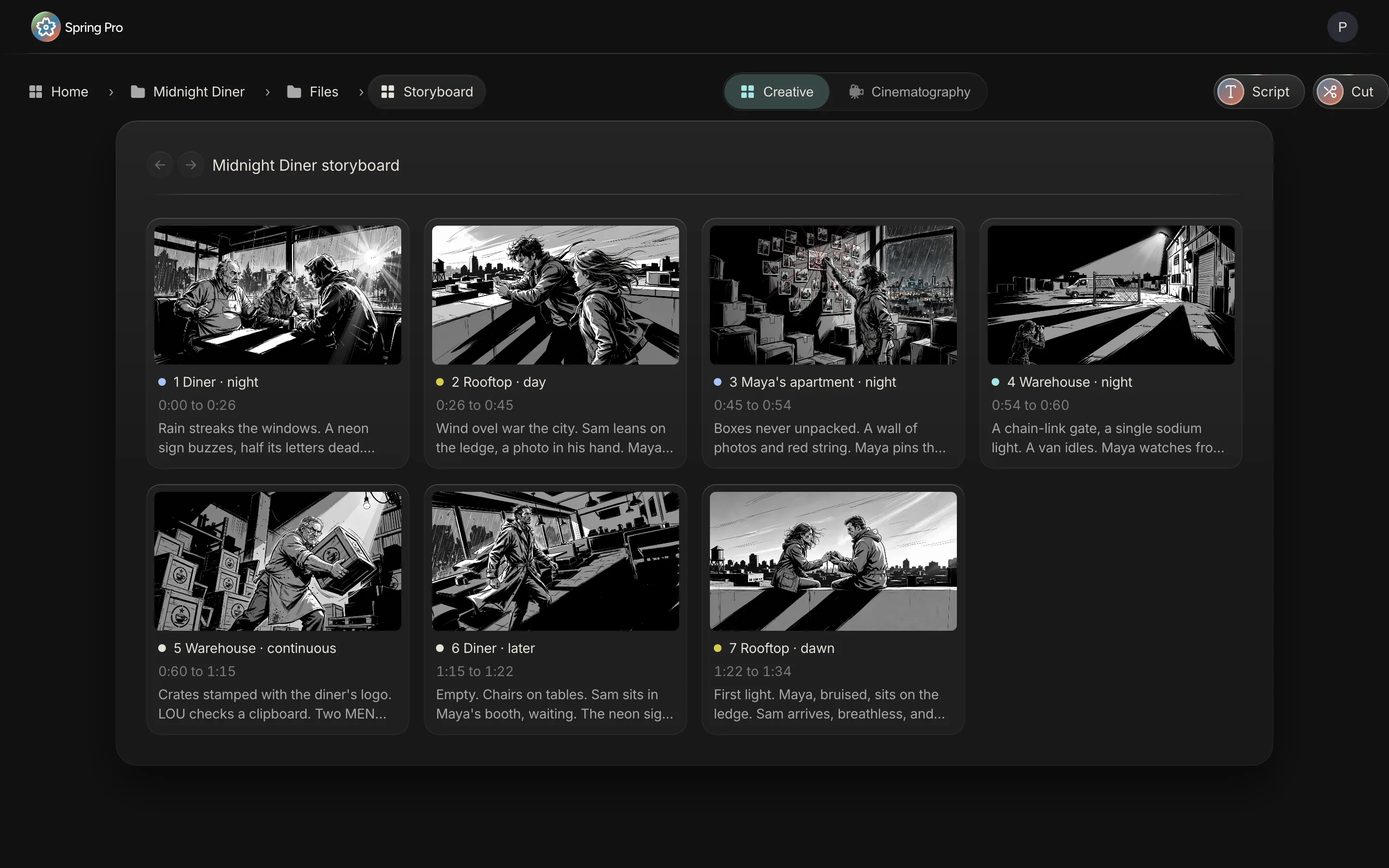
Midnight Diner is a short crime film. A burned-out investigator uses herself as bait to expose the night diner owner running contraband off the river, and pulls her old partner back in.
Seven scenes, 2 1/8 pages, four sets, three speaking characters. Its breakdown holds 84 element entries in 12 categories, of which 72 are distinct, because a character counts once for each scene they are in and a few other elements recur. Here is every scene with the facts a scheduler sorts by, and how many elements each carries.
| Sc | Set | I/E | Time | Pages | Cast | Elements |
|---|---|---|---|---|---|---|
| 1 | Diner | INT | Night | 4/8 | Maya, Lou, Sam | 21 |
| 2 | Rooftop | EXT | Day | 3/8 | Sam, Maya | 11 |
| 3 | Maya's apartment | INT | Night | 2/8 | Maya | 9 |
| 4 | Warehouse | EXT | Night | 1/8 | Maya | 12 |
| 5 | Warehouse | INT | Continuous | 2/8 | Lou, Maya | 15 |
| 6 | Diner | INT | Later | 2/8 | Sam | 8 |
| 7 | Rooftop | EXT | Dawn | 3/8 | Maya, Sam | 8 |
Before you start
A breakdown is only as good as what you give it. If you cannot tick the list below, wait. You will be listing elements for a script that is about to change.
- A script that is stable enough. It does not have to be locked, but a rewrite of half the scenes means doing half the breakdown again.
- One owner for the master breakdown. Usually the 1st AD. Everyone else adds to it, they do not keep their own copy.
- Your categories, agreed. The twelve below work for most films. Add more only if a department asks.
- Somewhere the lists live that the schedule can read. A breakdown in a file nobody else opens helps nobody.
- Your production office's colour key. If you mark the script by hand, agree the colours first (see Step 3).
Step 1: Read it for the story, with no marks
The first read is for the story. Do not pick up a pencil. If you break down a script you have not understood, you will list props nobody needs and miss the one the story turns on.
This is the first step in Filmustage's guide too: a read-through for story only, then a second read for the work. Read it on paper or on a screen, in one sitting if you can.
Step 2: Write down the facts of each scene
On the second read, stop at every scene and write down six facts: the number, the set, interior or exterior, day or night, the length in eighths of a page, and who is in it. These are the facts the schedule sorts by.
Eighths are how you size a scene. Divide each page into eight parts, so a scene that fills half a page is 4/8. The usual rule is that one page is about a minute of screen time, and the glossary entry on eighths has the convention.
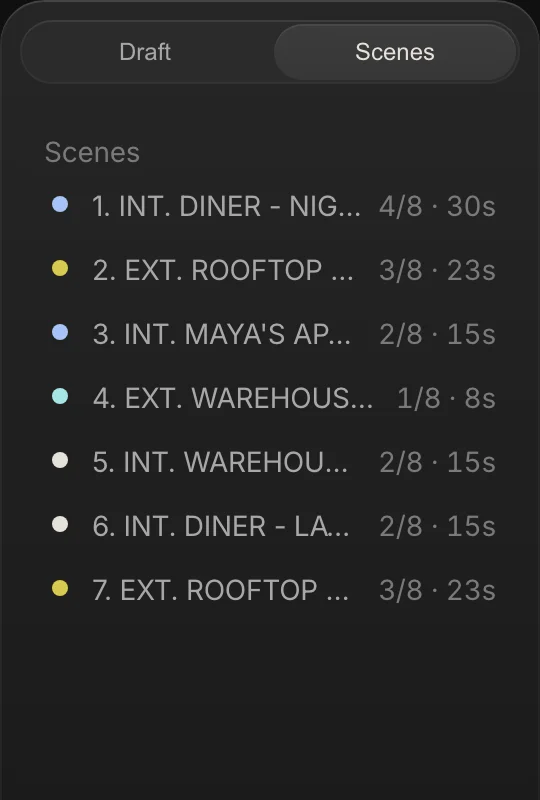
Midnight Diner's 7 scenes run from 1/8 of a page to 4/8, and add up to 2 1/8. Rounding every scene up to a whole page would call it a 7-page film.
Step 3: Mark the elements, by category
Now go back through every scene and mark everything that has to physically exist for it to be shot. The classic way is a highlighter: each category gets its own colour, and a symbol where colours run out.
Spring Pro lists twelve categories. The table shows each one, what goes in it, the traditional mark from Wikipedia's table and the department that reads it in the app.
| Category | What goes in it | Traditional mark | Department |
|---|---|---|---|
| Cast | Every character who appears or speaks | Red (speaking actors) | Casting |
| Extras | Background people the scene implies, named or not | Yellow (silent), green (atmosphere) | Casting |
| Stunts | Anything that may need a stunt performer or a coordinator | Orange | Stunts |
| Props | Objects a character handles, or the story turns on | Purple | Props |
| Set dressing | What makes the place look lived in: signs, furniture, clutter | Not in that table | Art direction |
| Wardrobe | What each character wears, scene by scene | A circle | Costume |
| Hair and makeup | Looks, wounds, rain or sweat, ageing | An asterisk | Hair and makeup |
| Vehicles | Anything driven, ridden in or parked in shot, and who drives it | Pink (with animals) | Production |
| Special effects | Rain, fire, smoke, breakaways: effects made on set | Blue | Stunts |
| VFX | What is added or removed after the shoot | Not in that table | VFX |
| Sound | Sounds the script calls for, and what must be recorded clean | Brown (sound effects and music) | Sound |
| Equipment | Special gear the scene needs: generators, rigs, cranes, towers | A box (special equipment) | Production |
Colours are a convention, and practice differs. Filmustage's guide uses blue for props and pink for costumes, which is not Wikipedia's scheme. Agree one key in your production office and print it on the sheet. What matters is that every type has one mark.
Spring Pro does not highlight your script; each category carries a department colour dot instead. You add each element to the scene's checklist under its category, and the category's department reads it. A Final Draft import brings in the scenes and their lines, but not Final Draft's own element tags, so you pick the elements in Spring Pro.
Step 4: A real scene, broken down
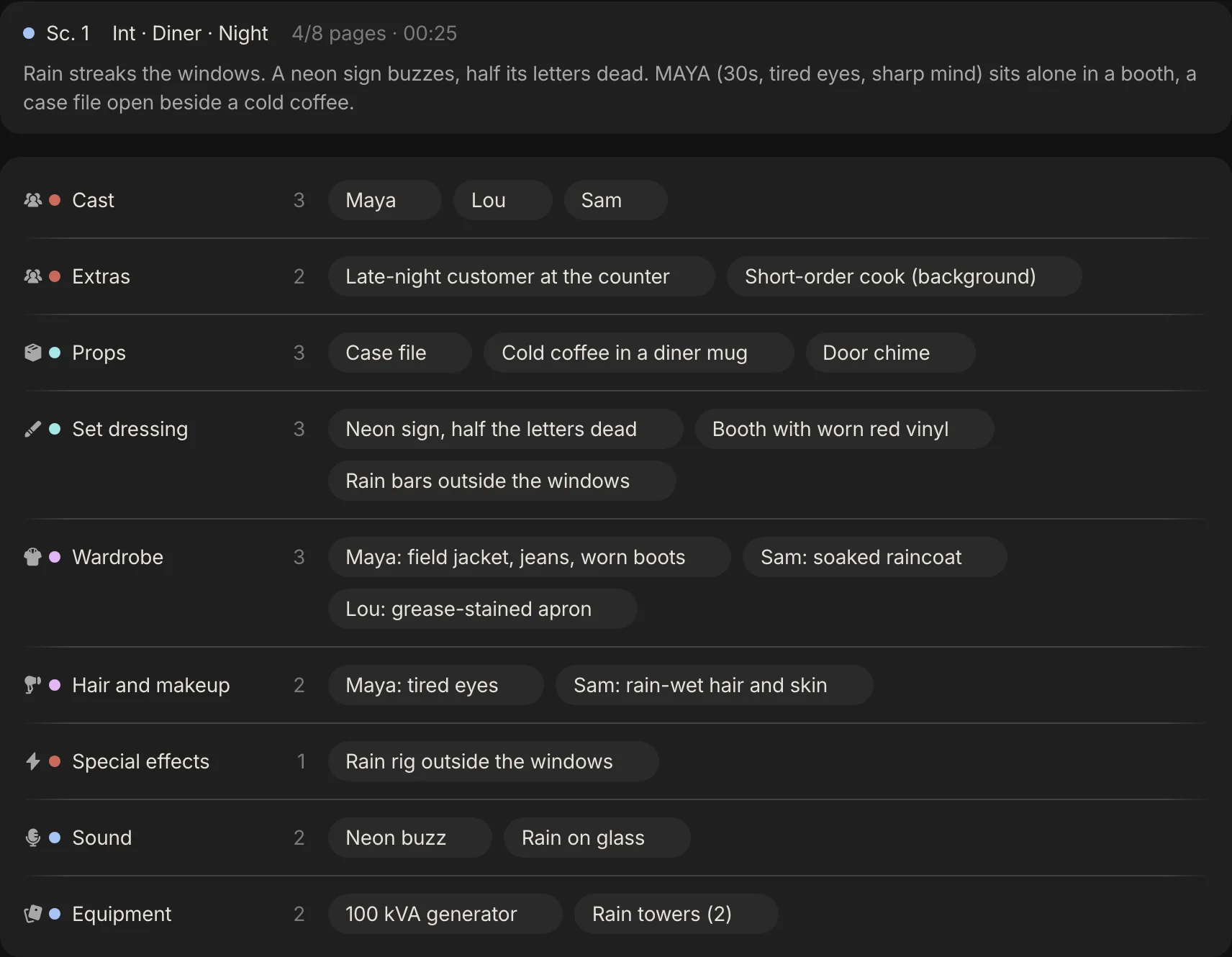
Here is scene 1 of Midnight Diner: an interior diner at night, 4/8 of a page, with Maya, Lou and Sam. Its breakdown has 21 entries in 9 of the 12 categories. Nothing here is a decision. It is careful reading.
| Category | Elements |
|---|---|
| Cast | Maya; Lou; Sam |
| Extras | Late-night customer at the counter; Short-order cook (background) |
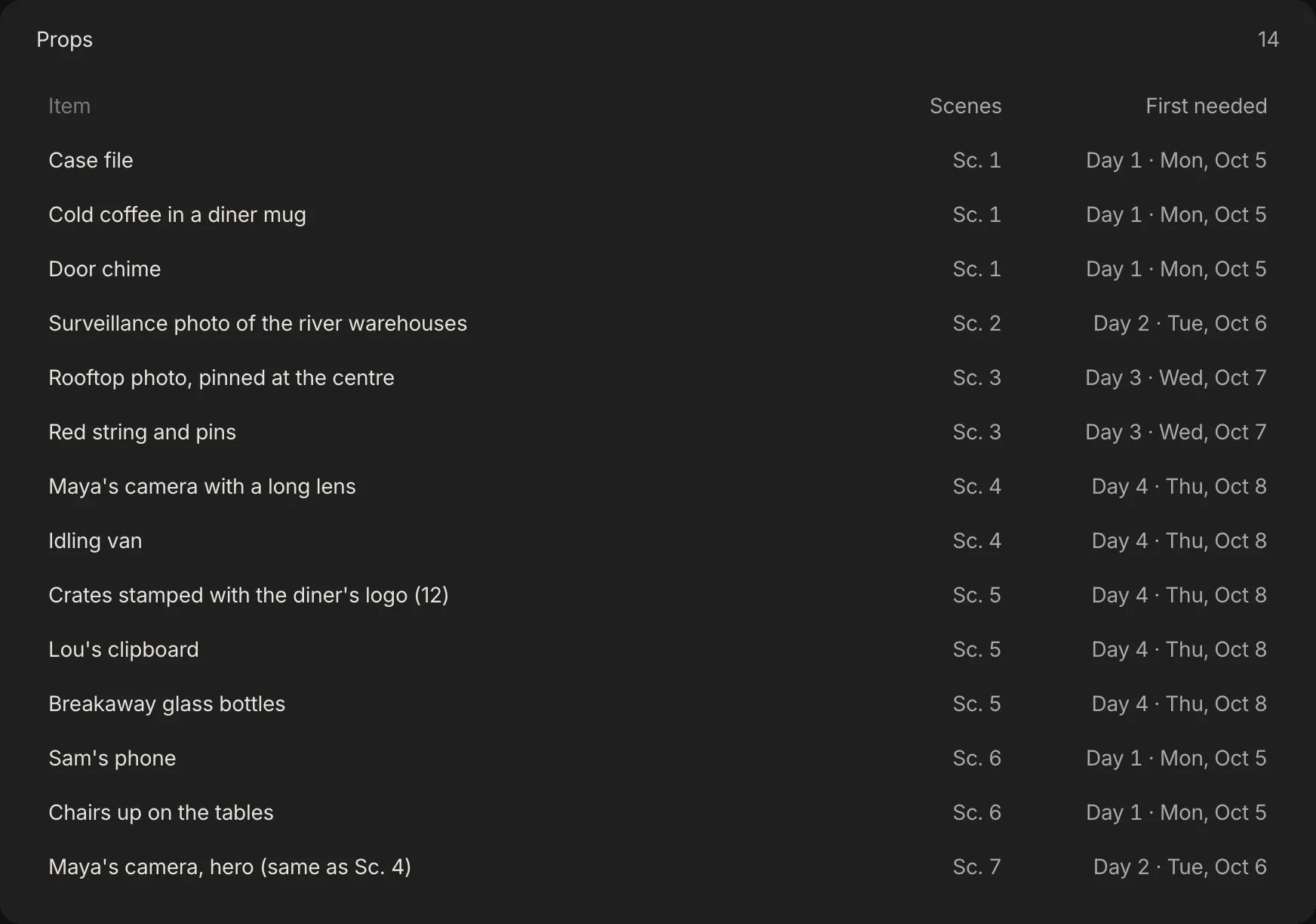
| Props | Case file; Cold coffee in a diner mug; Door chime |
| Set dressing | Neon sign, half the letters dead; Booth with worn red vinyl; Rain bars outside the windows |
| Wardrobe | Maya: field jacket, jeans, worn boots; Sam: soaked raincoat; Lou: grease-stained apron |
| Hair and makeup | Maya: tired eyes; Sam: rain-wet hair and skin |
| Special effects | Rain rig outside the windows |
| Sound | Neon buzz; Rain on glass |
| Equipment | 100 kVA generator; Rain towers (2) |
The three categories missing here, stunts, vehicles and VFX, are not an oversight. Scene 1 has none of them. A category with nothing in it is a finding too.
Step 5: Read what the script implies
A good breakdown lists what is implied, not only what is written. A character who comes in wet needs a way to be wet. A crowded diner at night needs people in it. A spilled coffee needs the cup, the coffee and a clean one for the next take.
In Midnight Diner the breakdown caught exactly that. One to-do reads "Case file hero plus two doubles (coffee spill take)" and another reads "Sam's coat: two matching coats, one wet-down". A script rarely spells either out, and each can cost a take.
Every addition from a department head gets the same treatment: it goes on the scene as an element or a to-do, with a department, a priority and a due date.
Step 6: Check it across scenes, not just within them
A breakdown that is right scene by scene can still be wrong across them. Continuity is the usual casualty: the same coat in three states, shot on days that are not in story order.
Look at Maya. Her wardrobe is listed in five scenes, and the scenes do not shoot in order.
| Scene | Shoots on | Maya wears |
|---|---|---|
| 1 | Day 1 | field jacket, jeans, worn boots |
| 2 | Day 2 | field jacket, collar up |
| 3 | Day 3 | home clothes, cardigan |
| 4 | Day 4 | dark layers, hood |
| 7 | Day 2 | torn, dusty field jacket |
Now Sam's raincoat. In scene 1 (Day 1) it is soaked, in scene 2 (Day 2) it is dry, in scene 6 (Day 1) it is soaked and in scene 7 (Day 2) it is just "raincoat".
Grouping scenes by set puts the two soaked scenes on the same day, which makes the wardrobe department's job simpler, but only if every sheet says which state the coat is in.
Step 7: Review for gaps
Before you hand anything on, read the lists against the script once more, scene by scene. Two gaps in the sample above are the kind a review finds.
- Scene 7 says only "raincoat" for Sam. Is it wet or dry? One word decides whether a second coat is needed on the day.
- Maya is in scene 5 with no wardrobe line. Scene 5 is headed continuous after scene 4, so the answer is probably the look from scene 4, but the sheet should say so and not leave a department guessing.
The next section lists what almost every first pass misses.
Five things almost every first pass misses
Look for these on every sheet:
- Continuity. A prop or a costume that has to match across scenes shot days apart.
- Background. Extras the scene implies but does not name.
- Sound. Wild lines and room tone that have to be recorded after the take.
- Vehicles. Anything a character drives, rides in or parks, and who drives it.
- Safety and special cases. Weapons, fire, water, heights, animals and child performers, which need specialists. The line producer in the Film Independent interview also advises over-budgeting special effects from the start rather than relying on an effects company's deal, and cutting the number of effects scenes where you can, because each takes time.
Step 8: Hand each department its list, with a date
Give each department its own categories: props gets props, art direction gets set dressing, costume gets wardrobe, and sound gets its column. They will add what the script cannot tell you, such as a coat that needs a matching spare, or a prop that needs a double for a spill.
Give every addition a department, a priority from 1 to 3, a due date and an owner. Without those, the list is a wish. Midnight Diner carries 90 to-dos across 13 departments: 82 have a due date and 27 are priority 1.
| Department | To-dos | Priority 1 | First one |
|---|---|---|---|
| Locations | 9 | 4 | Lock the diner for two nights (Sc. 1 and 6) |
| Production | 12 | 4 | Night shoot permit for the street rain rig |
| Camera | 11 | 1 | Rain rig test through the diner windows |
| Lighting | 10 | 2 | Neon and practicals only, test the night look |
| Costume | 6 | 1 | Sam's coat: two matching coats, one wet-down |
| Hair and makeup | 4 | 2 | Maya tired-eyes look, continuity photos |
| Sound | 7 | 0 | Kill the fridge hum, record room tone |
| Direction | 7 | 2 | Lock the shot list for the diner nights with the DP |
| Art direction | 7 | 0 | Dress the diner: menus, ketchup, sugar jars, 1990s fixtures |
| Props | 3 | 2 | Case file hero plus two doubles (coffee spill take) |
| VFX | 4 | 0 | Tracking markers on the windows for the rain plates |
| Casting | 4 | 3 | Contracts signed: Maya, Sam, Lou |
| Stunts | 6 | 6 | Safety line for the ledge work |
The size of a breakdown is not the point. The point is that every element has an owner who knows by when.
Step 9: Put the lists to work
A finished breakdown does three jobs, and each is a handoff. The cast per scene becomes the day out of days. The set, light, length and cast become the shooting schedule. And the elements flow to the call sheet and to the budget.
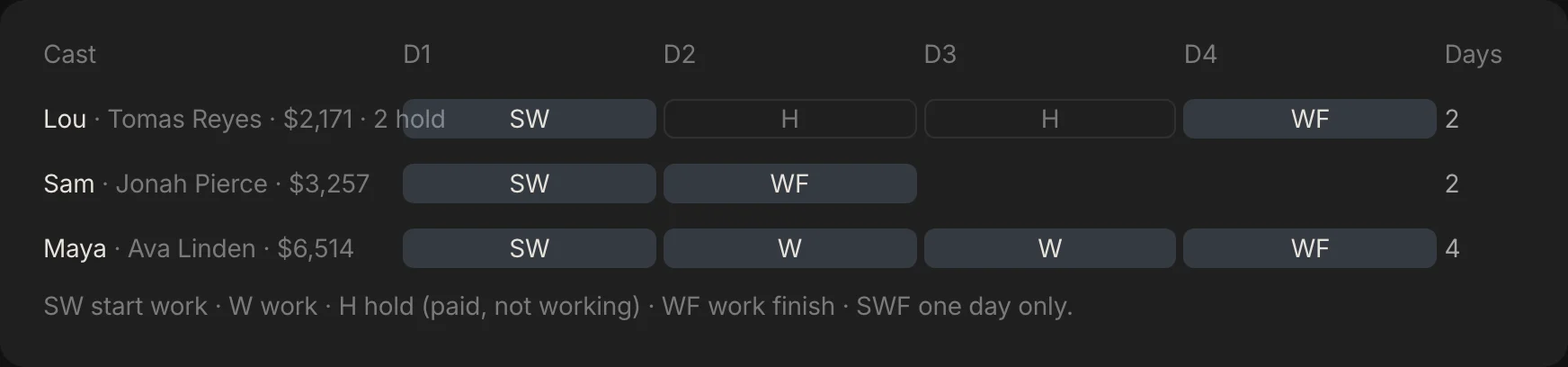
In Spring Pro those handoffs are reads of the same data, so nothing is retyped. Here is where each category goes, checked against the app's own code.
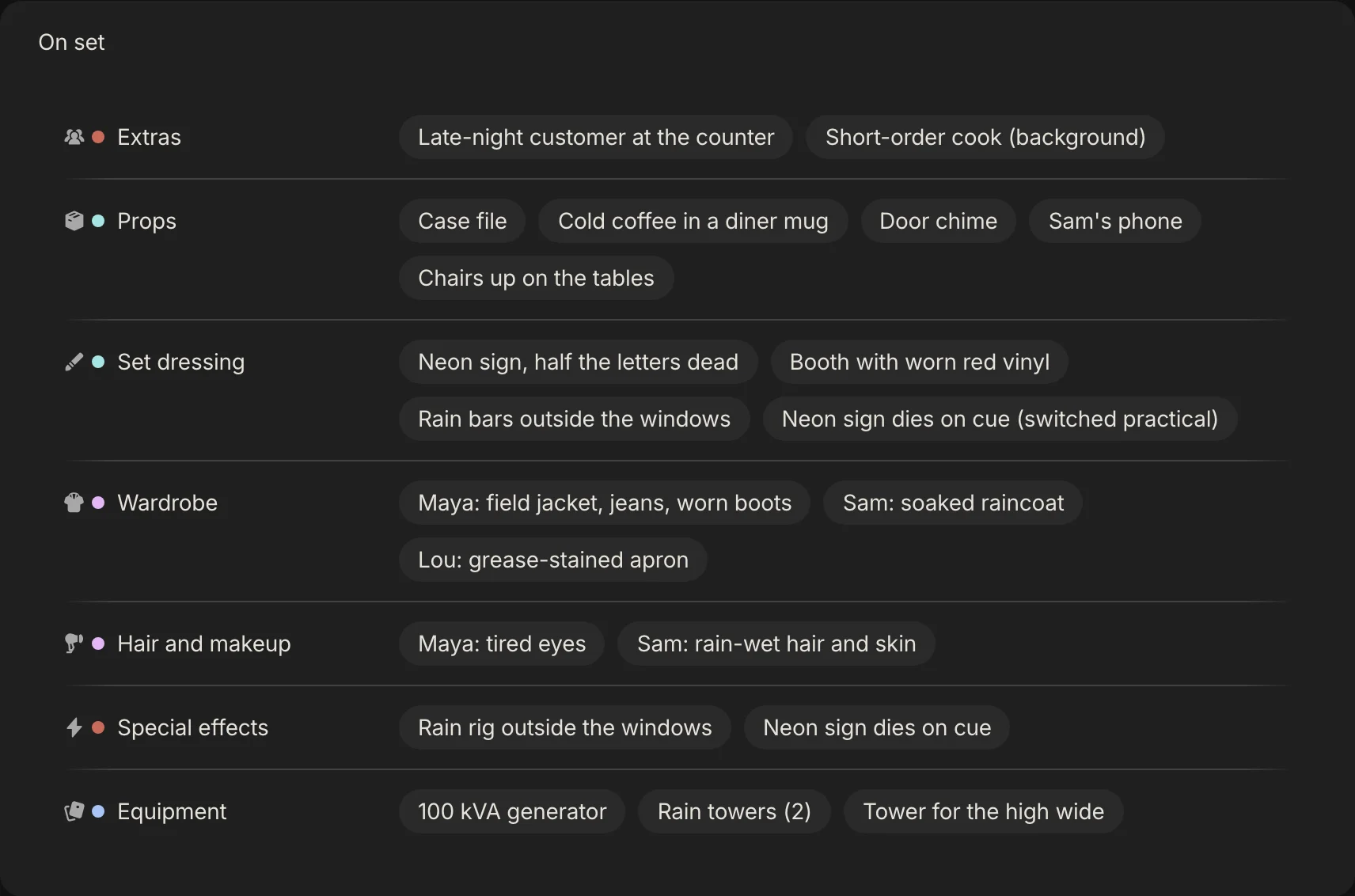
| Category | Budget account it can fill | On the call sheet | In Reports, Elements (with the first day it is needed) |
|---|---|---|---|
| Cast | None; cast is priced from the crew list | In the Cast block, with each actor's call | Yes |
| Extras | Extras | On set | Yes |
| Stunts | Stunts and SFX | On set | Yes |
| Props | Props | On set | Yes |
| Set dressing | Art department | On set | Yes |
| Wardrobe | Wardrobe | On set | Yes |
| Hair and makeup | Hair and makeup | On set | Yes |
| Vehicles | Transport | On set | Yes |
| Special effects | Stunts and SFX | On set | Yes |
| VFX | None from the breakdown | Not on the sheet | Yes |
| Sound | None from the breakdown | Not on the sheet | Yes |
| Equipment | Lighting and grip | On set | Yes |
Locations come from the set list: each set can become a location fee line. After the budget is locked, the budget flags items in the nine budget categories added since the lock as new items to price, so a late prop does not slip in unpriced.
The call sheet can also be filtered by department, so the props master sees props. The cast report is built from the same cast per scene, and the schedule from the same facts; see how to make a shooting schedule and the day out of days guide.
How people do a breakdown today, and what breaks when a scene changes
There are three common ways, and they differ in what you redo when a scene changes. This is our view from our own work, not a test of products.
| Way of working | Good for | When a scene changes you must |
|---|---|---|
| A highlighter and printed sheets | One person, one short script, no software | Re-highlight the scene, rewrite its sheet, reprint and redistribute it |
| Tagging in screenplay software, then importing into a scheduling program | Faster lists that move into a schedule | Re-tag the scene, then update wherever the lists went. A budget or call sheet kept in another file needs the change too |
| A spreadsheet | A short with few elements, and it is free | Edit the rows, recount, and retype into the call sheet and the budget |
| One project where the lists sit on the scenes (Spring Pro) | A script that changes weekly, read by many people | Edit the scene. The schedule reads the set, light, length and cast, and the call sheet, reports and budget read the elements. You still pick the elements by hand |
Tagging software is real. Wikipedia names Final Draft's tagger and Movie Magic Screenwriter's tagging mode, with the data imported into scheduling programs. Spring Pro does not do that part: there is no tag-the-script button, so the first pass is slower by hand and the changes are cheaper after.
From a short to a feature: what changes
The method does not change with size. What grows is the number of people who add to the lists, and the cost of a miss. These sizes are rough labels, not industry definitions.
| Size | Who does it | How deep | What to watch |
|---|---|---|---|
| Solo or YouTube video | You | A shot list and a list of props and places | A forgotten shot or location |
| Short film | The 1st AD or producer, with the director | Every category, one pass, one reviewer | Continuity across days shot out of order |
| Commercial | The 1st AD, with the director and the producer | A tight list, many versions of the same scenes | Approvals that change a scene late |
| Indie feature | The 1st AD for the master breakdown, department heads for their own | Master plus specialised breakdowns, and a script supervisor to check quality | Revisions: each one changes lists across every department |
| Series or episodes | Several breakdowns, one per script | Not Spring Pro yet: one script and one unit per project | Cross-boarding and shared elements across scripts |
For a feature, the Filmustage guide describes the 1st AD making the master breakdown, department heads making specialised ones, and the script supervisor checking quality. That layering is what a larger film adds.
Doing it in Spring Pro
In Spring Pro each scene holds its elements in the twelve categories. You add each element to a scene's checklist: pick the category from the Add menu (Character, Prop, Set dressing and the rest) and type the name or pick the character. The Breakdown tab on the Timeline then shows the elements by category, for one scene, one set or the whole production, and you open a chip to edit it. The scene's sheet shows its heading, its length and its first action line, then each category with its elements.
The elements are the same kind of item as the to-dos and the shot list, so each can carry a department, a priority and a due date. The schedule, the call sheets, the day out of days, Reports and the budget read the same scenes.
What it does not do yet: there is no tag-the-script button (you can ask Gaffer to add a scene's elements and then check them), it does not highlight your script, and it handles one script and one unit per project. If you want tagging inside the script today, tag in screenplay software, and expect to pick the elements again here.
The checklist
Copy this. Tick it before you hand the breakdown to anyone.
- Every scene has its number, set, interior or exterior, day or night, length in eighths and cast
- Every category has been read for, even if the answer is none
- Every implied element is listed: wet, crowded, spilled, broken, driven
- Anything that has to match across scenes is checked scene to scene
- Every gap is a question with an owner
- Each department has its own list, and every addition has a department, a priority and a due date
- The lists live where the schedule, call sheets and budget can read them
- After a revision, only the changed scenes are redone and the change is logged with a date and a reason
How these numbers were made
Every number about Midnight Diner comes from the project itself, read from the app's own data and matched to the screens on this page. The counts of entries, distinct elements, to-dos and departments are computed, and the build stops if the project changes so that the story no longer holds. The hour cost uses Spring Pro's own cost engine with a planned 11-hour day.
Midnight Diner is a demonstration production, not a case study of a real shoot, and its two gaps in Step 7 are real ones in the sample. The colour table and the descriptions of other tools come from the sources below, read on 2026-10-12, and practice differs between productions.
Questions people ask
What is a script breakdown?
An analysis of a screenplay in which the production elements are reduced to lists, which are then the basis for the production board, the schedule and the budget, as Wikipedia describes.
Who does a script breakdown?
Usually the 1st assistant director, with producers and directors contributing. On a larger film the department heads make specialised breakdowns for their own areas.
What is a breakdown sheet?
One sheet per scene: its number, set, light, length in eighths and every element listed by category. The sheets are then filled out for the crew. The free breakdown template has the same rows as a spreadsheet.
What do the script breakdown colors mean?
By one common convention, from Wikipedia: red for speaking cast, yellow for silent extras, green for atmosphere extras, orange for stunts, blue for special effects, purple for props and pink for vehicles and animals. Other sources use different colours, so agree a key in your production office.
How do you calculate eighths of a page?
Divide each page into eight equal parts and count how many a scene fills. A page is about a minute of screen time, so 4/8 is about half a minute. See script eighths.
How long does a breakdown take?
It depends on the script and on how many people add to it. Plan a careful pass for every scene, and expect to redo the scenes each revision changes.
Do I break down the script before it is locked?
You can, but it has to be stable enough to schedule from. A rewrite of half the scenes means redoing half the breakdown, so wait until the changes slow down.
What is the difference between a breakdown and a schedule?
The breakdown lists what each scene needs. The schedule arranges the scenes into shoot days using those lists. See how to make a shooting schedule.
Can I do a script breakdown in a spreadsheet?
Yes, for a short with few elements. You have to edit and recount it by hand after every change, and retype the lists into the call sheet and the budget.
Does Spring Pro tag my script automatically?
No. You add each element to the scene's checklist under its category. Importing a Final Draft file brings in the scenes and their lines, not Final Draft's own tags. See script breakdown software for what the tool does.
Sources
Every outside claim that names a source comes from one of these, read on the date shown. Standard conventions, such as the eighths rule and the usual specialist cases, are common practice. Figures from agreements and summaries change at each negotiation, so check the current text before you rely on a number.
- Wikipedia, script breakdown. Checked 2026-10-12.
- Filmustage, how to do a script breakdown: a film producer's step-by-step guide (a vendor). Checked 2026-10-12.
- Filmustage, the role of script breakdown in scheduling (a vendor). Checked 2026-10-12.
- No Film School, how to create a script breakdown (a video page that describes the StudioBinder method). Checked 2026-10-12.
- Film Independent, a line producer on building a better budget. Checked 2026-10-12.
- Scriptation, script revision colors (an app vendor). Checked 2026-10-12.
More about script breakdown
What each scene needs is listed once, by the people who know, and every other document should read it.