The daily production report: a template outline, and what the numbers do after wrap.
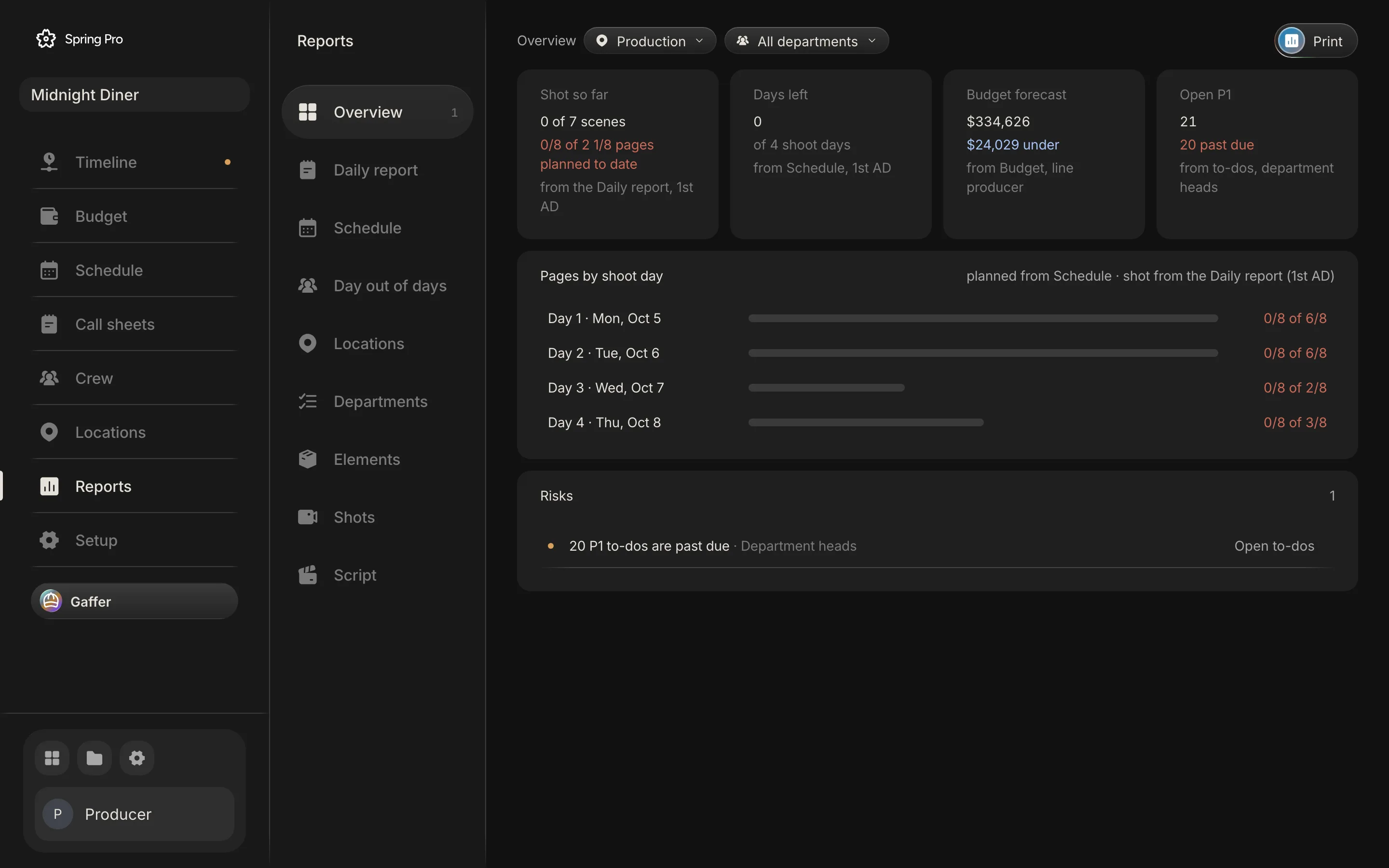
Real screen: Midnight Diner, our demo production, in Spring Pro.
The short answer. A daily production report records one shoot day after it ends: crew call, first shot, lunch and wrap, the scenes and pages shot, and any delays. It sets the real day against the plan: pages behind, days to catch up, and the day's cost, planned against actual. The 2nd AD often fills it in, and the 1st AD and line producer approve it.
A daily production report template is mostly a form to fill in. The guides we read say why the numbers matter, but they do not work them through on a real day. What a producer needs comes after the form: how far behind the day left you, how many days that is at the target pace, and what the hours cost. This page is an outline of the fields and a checklist, not a download. It builds the report on a real production, Midnight Diner, and shows what Spring Pro computes from each field. The numbers come from the project and the app's own code, and the outside facts come from sources read and dated below.
In this guide 25 sections
- Quick answers
- Why the report matters, and where it goes wrong
- A production report template: what goes on it, field by field
- Who fills it in, and who checks it
- The film we are reporting on
- Nothing is shot, and the app still counts four shot days
- What the sample shows today, and why
- Before you start
- Step 1: Set the target the day is measured against
- Step 2: Type the times, call, first shot, lunch and wrap
- Step 3: Tick the scenes that were shot
- Step 4: Write down what happened
- Step 5: Read the schedule health
- A worked evening: what changes when Day 1 is reported
- Step 6: Read the cost, planned against actual
- What a run of long days does, and what catching up costs
- Reading the Reports overview, and what its risks do not check
- How the report reaches tomorrow
- How people do the report today, and what breaks when the day changes
- From a short to a feature: what changes
- Doing it in Spring Pro
- The checklist
- How these numbers were made
- Questions people ask
- Sources
Quick answers
What is a daily production report? The form filled out each day of a shoot to summarise what happened, as Wikipedia describes it. It tracks the day's progress and expenses, and goes by DPR or production report. The glossary entry has the short definition.
Who fills it in? It depends on the show. Wikipedia names a script supervisor, an assistant director, a Paperwork PA or a DGA trainee, and StudioBinder says the 2nd AD often does it, with the 1st AD and the unit production manager (UPM) or line producer approving. Spring Pro has no per-person permissions, so anyone on the project can edit it.
When? At the end of each shoot day. HowToFilmSchool draws the line with a call sheet: the report records what happened, and the call sheet looks ahead.
Is there a template to download here? No. The field table below is an outline to build your own from, and StudioBinder and HowToFilmSchool both offer a template download.
What does it feed? Progress against the schedule, and the day's cost against the budget. Entertainment Partners says the hot cost report, the daily comparison of the day's shooting costs with the budget, takes its data from the daily report. Saturation, a software vendor, describes the same daily cost report as compiled by the production accountant from timecards, petty cash, equipment charges and same-day purchases, so the two sources name different inputs. Spring Pro turns the report's times and ticks into pages behind, forecast wrap, extra days, and planned against actual cost.
What does Spring Pro's report leave out? The time sheets, media counts, releases, meal counts and signatures of the full two-sided form. It is the producer's page: times, scenes, pages, delays, notes and cost. Keep your own forms for the rest.
Do you need software? Not for a short, where a one-page form can be enough. It earns its place when pages behind, the cost of the hours and tomorrow's schedule must move together, as in shooting schedule software.
Why the report matters, and where it goes wrong
A schedule is a plan and a call sheet is an instruction. The daily report is the first time the plan meets the day. If it is late or missing, the next decision is made on the plan, and the plan is already wrong.
The cost is in the hours. On Day 1 of Midnight Diner the plan is $26,247, and one hour past the planned 11 adds $2,993 of crew and cast labour (the working is in film production scheduling). A producer who hears about a 14-hour day from a report that arrives days later has already paid for it.
| Reader | What they take from it | What goes wrong if it is late or wrong |
|---|---|---|
| Producer, line producer | Pages behind and the cost of the day | Decisions are made on the plan, not on the day |
| 1st AD | Which scenes were not shot | A missed scene drops out of sight, then turns up as an extra day |
| Production accountant | The day's hours, for the hot cost | Overtime is found at payroll, not the next morning |
| Financier, insurer | The record of what happened | No evidence for a claim or a dispute |
| Tomorrow's call sheet | An up to date schedule | The next day starts from yesterday's plan |
A finished report is also a record. StudioBinder calls a polished one a legal record kept for the life of the film, and says insurance adjusters may ask for a copy after a work-related claim. What yours must hold is for your production office or lawyer to say.
A production report template: what goes on it, field by field
There is no standard form. Wikipedia says each show usually has its own, often made by an assistant director before production, and most are Excel tables printed double-sided. The sources overlap on the core and differ on the detail, so the table lists what they name and what Spring Pro holds.
| Part of the form | What it holds | Named by | In Spring Pro |
|---|---|---|---|
| Header | Production, title, date, day number | Wikipedia, StudioBinder | Yes: the title, the day and its date |
| Times | Crew call, first shot, meal in and out, wrap. Longer forms add shoot call, camera wrap and last man out | StudioBinder, Wikipedia | Four: crew call, first shot, lunch and wrap. Hours are worked out from call to wrap |
| Scenes and pages | Scenes and pages completed, or not | Wikipedia, HowToFilmSchool | Yes: a tick per scene, and pages shot of pages planned |
| Progress against the schedule | Whether the day kept to plan | StudioBinder, HowToFilmSchool | Yes: pages behind, days left, forecast wrap and extra days |
| Delays and incidents | Delays, absences, equipment failures, weather, accidents and injuries | StudioBinder, HowToFilmSchool | One text box, a record only |
| Notes | Anything for the office, such as a theft, a fire or an accident | Wikipedia | One text box, the same one as Notes on the call sheet |
| Cost of the day | Hours and money against the budget (the hot cost) | Entertainment Partners | Yes: planned against actual |
| Time sheets | Each person's in and out, overtime and its reason, meal penalties | Wikipedia, StudioBinder | No. One crew call and one wrap for the day, with no per-person in and out times and no automatic meal penalty or turnaround check |
| Cast and background | Cast work status, in and out times, meal penalties, background count, pay rates | Wikipedia | The day's cast by name. The call sheet holds a call time for each actor. No wrap or in and out times, and no pay rates on the report |
| Media, releases, meals, equipment | Cards used, sound notes, releases, small payments, meals ordered, equipment rented | Wikipedia, StudioBinder, HowToFilmSchool | No. The budget logs spend on its own pages, and rentals sit in its lines |
| Signatures | The on-set representative, the AD and UPM, then the production manager | StudioBinder | No. Nothing is signed, and the page prints |
Much of the form is time sheets, releases, meals and payments, and on a large show the Paperwork PA gathers the other forms and drops the report at the production office, as Wikipedia describes. This guide is built around the producer's page of it: the times, the scenes, what went wrong and the cost. The rest of the guide computes that part.
Who fills it in, and who checks it
The sources name different people, because each production splits the work its own way. Spring Pro does not model roles: the Reports overview labels the daily report as the 1st AD's, which is a label and not a permission.
| Role | Part in the report | Source |
|---|---|---|
| 2nd AD | Often fills it in | StudioBinder, HowToFilmSchool |
| Script supervisor | Scenes and pages completed or not, and the official lunch time | Wikipedia |
| Paperwork PA, production office | Counts the meals, collects the other forms, drops the report at the office | Wikipedia |
| 1st AD, UPM or line producer | Check and approve it. Copies go to the UPM and ADs the next day for checking | StudioBinder, Wikipedia |
| Production accountant | Works the day's hot cost, from the report (Entertainment Partners) or from timecards and receipts (Saturation) | Entertainment Partners, Saturation |
On a short film one person does all of it. StudioBinder advises that the 1st AD, the line producer and the producer agree the template before the shoot, so agree your own list the same way.
The film we are reporting on
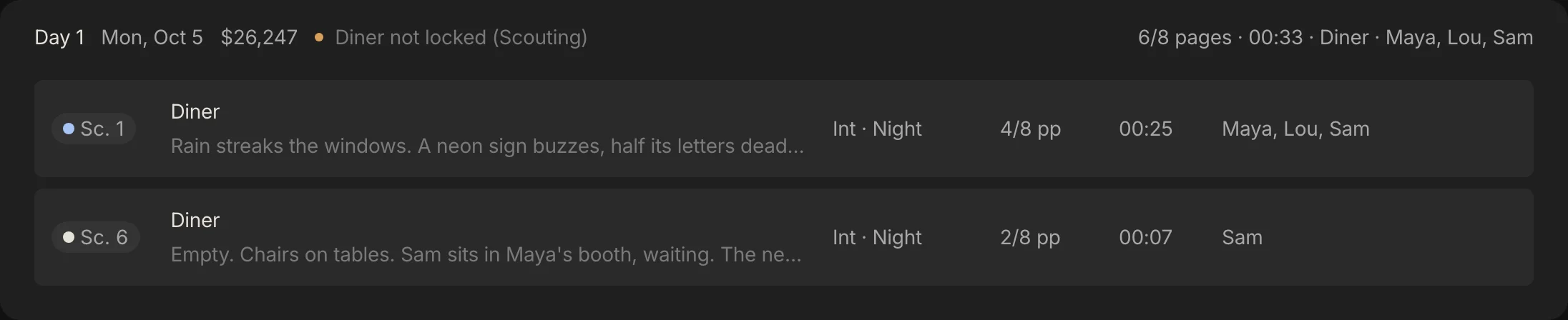
Midnight Diner is a short crime film: 7 scenes, 2 1/8 pages, 4 shoot days. The table is the plan each day's report is read against, with what one hour past the planned 11 would add.
| Day | Date | Scenes | Pages | Cast | Planned cost | One extra hour |
|---|---|---|---|---|---|---|
| 1 | Mon 5 Oct | 1, 6 | 6/8 | Maya, Lou, Sam | $26,247 | +$2,993 |
| 2 | Tue 6 Oct | 2, 7 | 6/8 | Sam, Maya | $23,361 | +$2,851 |
| 3 | Wed 7 Oct | 3 | 2/8 | Maya | $21,733 | +$2,639 |
| 4 | Thu 8 Oct | 5, 4 | 3/8 | Lou, Maya | $22,818 | +$2,781 |
The plan assumes an 11-hour day, with overtime after hour 10 at 1.5 times the rate and 18% fringes.
Now the honest part. Nobody has filled in a daily report for Midnight Diner: no scene is ticked as shot, and no first shot, lunch, wrap, delay or note is stored on any day. No crew call is stored either, because the call sheet's 07:00 is a default. So where this guide shows what the app computes from a report, the times are made up and the numbers are the app's own engine on them.
Nothing is shot, and the app still counts four shot days
One rule shapes what you see. The app does not wait for a report to call a day shot: a day also counts as shot once its date has passed. On 12 October 2026, when the data and these screens were taken, all four of Midnight Diner's days, Monday 5 October to Thursday 8 October, are in the past. Reports and the budget apply the rule a little differently.
| Part of the app | A day counts as shot when | If only scenes are ticked | If nothing is entered and the date has passed |
|---|---|---|---|
| Reports: shot so far, days left, pages behind, forecast wrap | A scene is ticked, a wrap is typed, or its date is before today | Counts as shot | Counts as shot, with every page missed |
| Budget: actual cost, hot cost, spent to date, and the cost line of the daily report | A wrap is typed, or its date is before today | Not shot: the cost stays planned | Counts as shot at the planned hours, so actual follows the plan |
So a day nobody reported looks late in Reports and on plan in the budget. Type the wrap and tick the scenes on the day, and the two agree. The date used is the UTC date, so a day counts as shot from the day after its date.
What the sample shows today, and why
Here is the sample as the app reads it today, with nothing entered.
| Where | What it shows | Why |
|---|---|---|
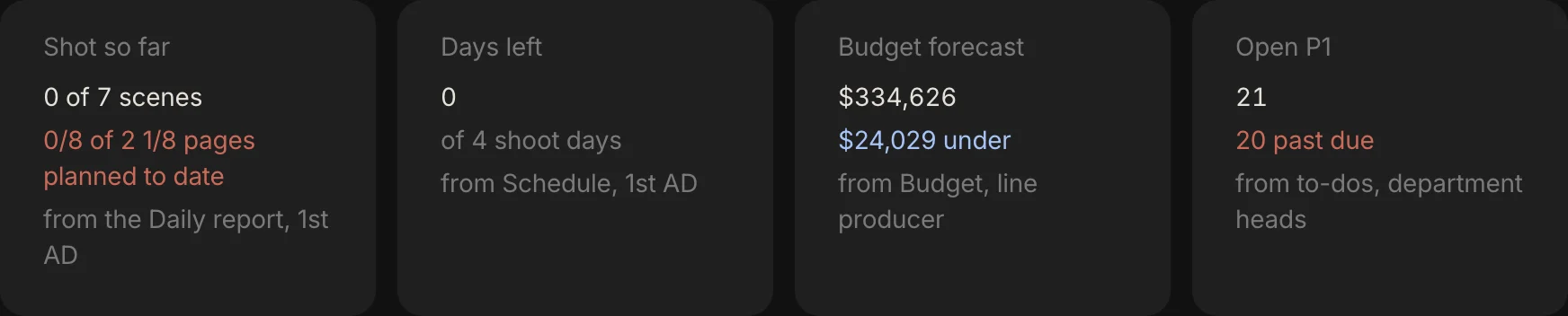
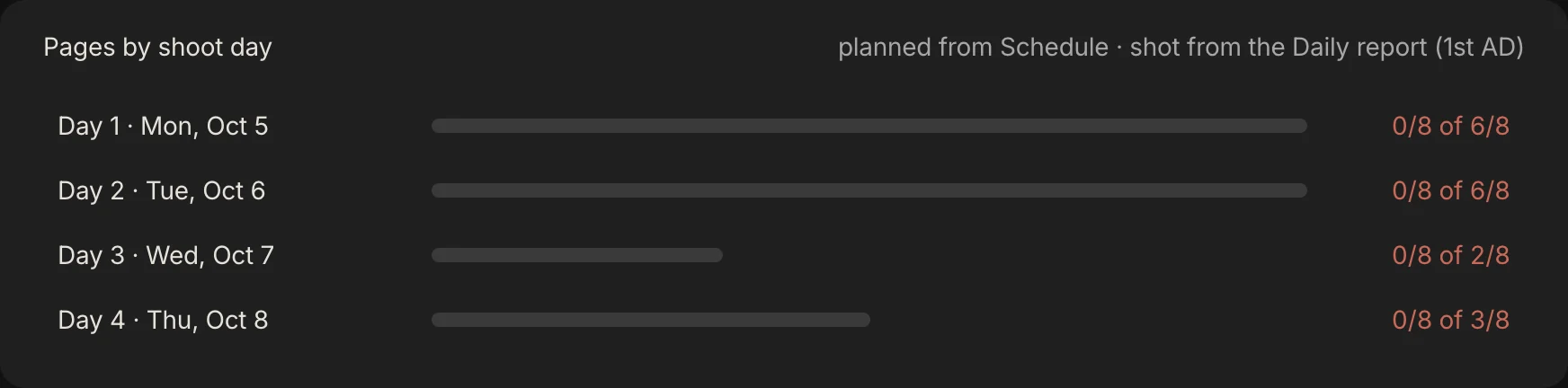
| Reports, Shot so far and Days left | 0 of 7 scenes shot, 0 of 4 days left | No scene is ticked, and all four dates are past |
| Reports, Pages behind | 2 1/8 | Every page of every past day is unticked |
| Reports, Forecast wrap | 8 Oct, +1 day at this pace | The date of the last planned day, Thursday 8 October, which the card writes short and in your browser's date format. 17 eighths against the 40 in a day is under one day, which rounds up to 1 |
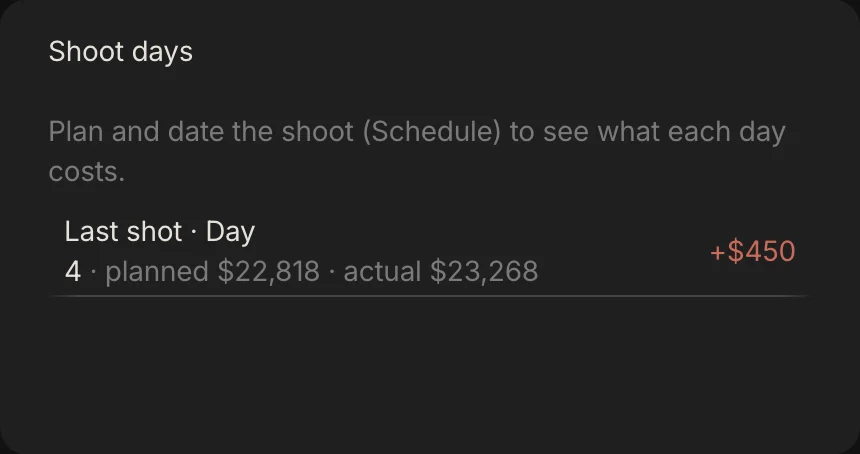
| Budget, Last shot | Day 4, planned $22,818, actual $23,268, +$450 | Not hours. See below |
The +$450 is on every one of the four days, and none of it is hours: no wrap is typed. It is the camera package, planned at $900 a shoot day, $3,600 over four days, with a $5,400 purchase order logged against it, $1,800 more. The app spreads that $1,800 evenly over the four shoot days, $450 each, and shows it on any day counted as shot. It is a fair way to carry a bill that belongs to no one day, but it did not happen on Day 4, so keep that in mind when you read a difference.
Before you start
The report compares the day with a plan, so it is only as good as the plan. If you cannot tick the list below, fix that first.
- A dated schedule. Reports read the days, their scenes and their dates. See how to make a shooting schedule.
- Scenes sized in eighths. Pages shot and pages behind are sums of eighths of a page. The glossary entry on eighths has the convention.
- A target for pages a day. Extra days are worked out from it.
- A crew call stored on every shoot day. The Daily report's Hours line needs one. Step 2 has the detail.
- A priced budget. Without one the cost line says Not priced. See how to budget a short film and the film budget template.
Step 1: Set the target the day is measured against
Pages behind and extra days use one setting: the pages a day the schedule aims for. Spring Pro starts at 5, and the Edit the plan panel offers 3, 4, 5, 6 and 8. The sources give ranges that depend on the budget, and they disagree at the low end.

| Source | Studio or major | Well-funded indie | Low or micro budget |
|---|---|---|---|
| StudioBinder (2019) | About 1 | About 4 to 5 | 8 or more |
| Wolfcrow (September 2025) | 1 to 2 | 4 to 5 | 5 to 8 or more, only if scenes are simple and setups few |
The ranges come from StudioBinder and Wolfcrow. Wolfcrow's own later step puts a disciplined low-budget shoot at 4 to 6, so even that one source gives a spread. Use them as a starting range, not a rule: a page of dialogue in one room and a page of stunts are not the same day. Set your target from your own plan, then let the first two days say whether it was right.
Midnight Diner is the opposite case. The whole film is 2 1/8 pages and its busiest day is 6/8 of a page, so the target of 5 never bites: no day is over it, and any miss rounds up to one extra day.
Step 2: Type the times, call, first shot, lunch and wrap
Open Reports, then Daily report. It opens on the latest day the app counts as shot, or the next day if none is, and a day picker at the top switches days. The top block has four time boxes: crew call, first shot, lunch and wrap.
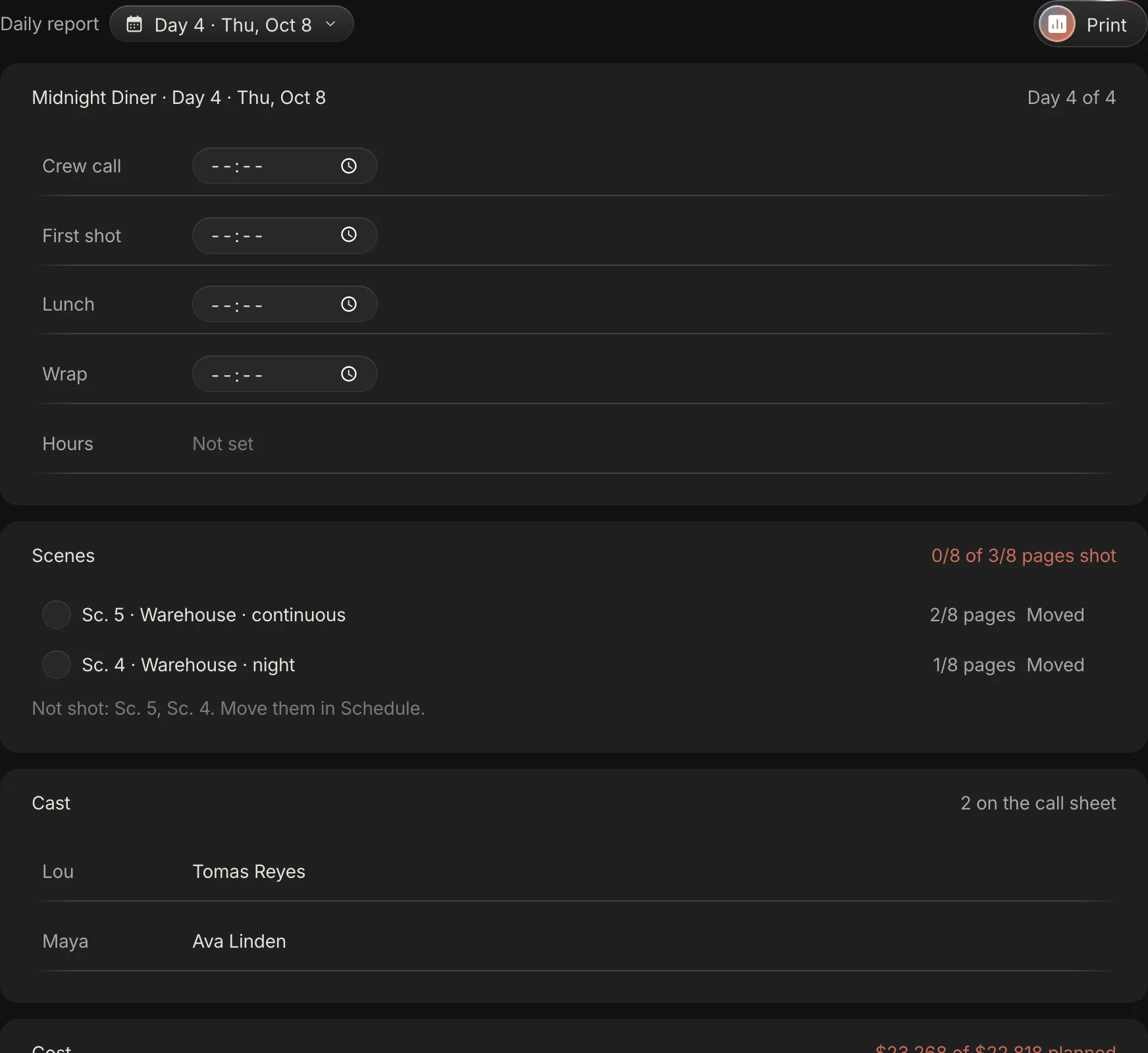
Wrap is the one that moves money. Type it and the Hours line shows crew call to wrap, with the overtime past hour 10. A wrap after midnight is read correctly: a 15:00 call and a 05:00 wrap is 14 hours.
The wrap is typed once and shown in three places: the Daily report, that day's call sheet header and, for the next shoot day, the Budget overview. First shot and lunch are records only: no number is worked out from them, so a late first shot is not flagged and no meal penalty is calculated.
One trap. The call sheet and the budget treat a day with no stored crew call as 07:00, and the call sheet shows 07:00 in its box. The Daily report does not: with no stored call its Hours line reads Not set, even with a wrap. Type the crew call on the Daily report once for each day, even when it is 07:00.

Step 3: Tick the scenes that were shot
Under Scenes, each planned scene has a tick box. Tick it when the scene is shot and the header reads pages shot of pages planned. A scene left unticked on a day the app counts as shot is labelled Moved.
Ticking is by scene, with no partial credit, so agree one rule on day one (shot means the scene is covered, say) and use it every day. The Shots report counts shot list items ticked done, which is a different count.
A line below the scenes names what was not shot and tells you to move it in Schedule. Spring Pro does not move it for you, but Gaffer can if you ask.
Step 4: Write down what happened
Delays and incidents is a text box, prompted with a rain stop, a generator swap and a late actor. Write what happened, how long it cost and who was affected. The app counts nothing from the words, so the lost time has to be in the wrap time and not only in the text.
The sources overlap on what belongs here. StudioBinder lists absences, delays, weather, equipment malfunctions and any injury, and HowToFilmSchool lists accidents, equipment failures and missing cast or crew. StudioBinder advises listing every injury, because one that looks minor can develop complications, noting anything unusual even when you caught up, and answering the questions production will ask, such as why there was overtime.
Notes sits under it, and it is the same box as Notes on the call sheet, so text typed there for the producer prints on the crew's sheet. Keep what only the producer should read in Delays and incidents.
Step 5: Read the schedule health
Reports shows the position in two places: the cards on the Overview and the Schedule tab. Here is what each number is, from the app's own code.

| Number | What it is | How it is worked out |
|---|---|---|
| Shot so far | Scenes ticked shot, of all scenes | Scenes in any day's shot list, and their pages against the pages of every day counted as shot |
| Days left | Shoot days not yet counted as shot | Days with scenes that the Reports rule above does not count as shot |
| Pages behind | Pages that past days planned and did not shoot | For each day counted as shot, planned pages minus the pages of ticked scenes, added up. Zero reads as on pace |
| Forecast wrap | The date of the last shoot day in the plan | The extra days are written beside the date. The date itself does not move |
| Extra days at this pace | Days to shoot the missed pages at the target rate | Pages behind divided by the target pages a day, rounded up |
| Target | Pages a day the plan aims for | 5 unless changed in the plan |
Two things to read carefully. The label says at this pace, but the sum uses the target, not the pace you actually shot, and it rounds up, so any shortfall shows as +1 day. Read it as a flag that you owe the schedule time, not as a forecast.
Here is a made-up Day 1, a long day: crew call 07:00, first shot 08:10, meal 13:00, wrap 21:00. Scene 1 (4/8 of a page) is shot and scene 6 (2/8) is not. These times are invented, and nothing in the sample has them.
A worked evening: what changes when Day 1 is reported
The table sets the same numbers before and after that report on the evening of Day 1. Before is the app on Day 1 itself, while the UTC date is still Day 1's. The right column is the app's engine run on the invented times.
| Number | Before the report | After the report |
|---|---|---|
| Shot so far | 0 of 7 scenes | 1 of 7 scenes, 4/8 of 6/8 pages planned to date |
| Days left | 4 of 4 shoot days | 3 of 4 shoot days |
| Pages behind | 0, on pace | 2/8 of a page |
| Forecast wrap | 8 Oct, as planned | 8 Oct, +1 day at this pace |
| Day 1 hours | Not set | 14 h, 4 h overtime |
| Day 1 cost | Planned $26,247 | $35,676 of $26,247 planned |
| Budget forecast | $334,626, $24,029 under | $343,605, $15,049 under |
The extra day is the rounding: 2 eighths against the 40 in a day is a small fraction of a day, and it rounds up to 1. The film is too small for the target to mean much, which is why Step 1 matters on your own film.
The Before column holds only while the UTC date is still Day 1's. Once it turns over, which happens in the evening in the Americas, the app counts Day 1 as shot with nothing typed, and Pages behind already reads 6/8.
Move scene 6 to a later day in Schedule and pages behind returns to 0. The miss reappears as a heavier later day, which the schedule flags if it is over the page target, has two sets or mixes day and night.
Step 6: Read the cost, planned against actual
The money side of the report is the wrap time. Once a day has a wrap, the budget replaces its planned hours with the actual ones: for people paid by the day or the hour, the day's pay is straight time up to hour 10 (a day rate covers all of it), plus overtime past hour 10 at 1.5 times the hourly rate, plus fringes. A day rate is divided by the 10 hours before overtime to give that hourly rate, and weekly rates and flat fees do not change with the hours. The planned figure stays beside it, and the difference is the hot cost.
Entertainment Partners describes the hot cost report the same way: it takes labour-related variable costs from the daily report, compares the day's shooting costs with the budget and gives a running picture of how the production is tracking. Saturation, a software vendor, describes a daily cost report, built by the accountant from timecards and receipts, that the line producer reviews each morning, and a weekly one, produced on Fridays or the Monday after, for producers, financiers and bond companies.
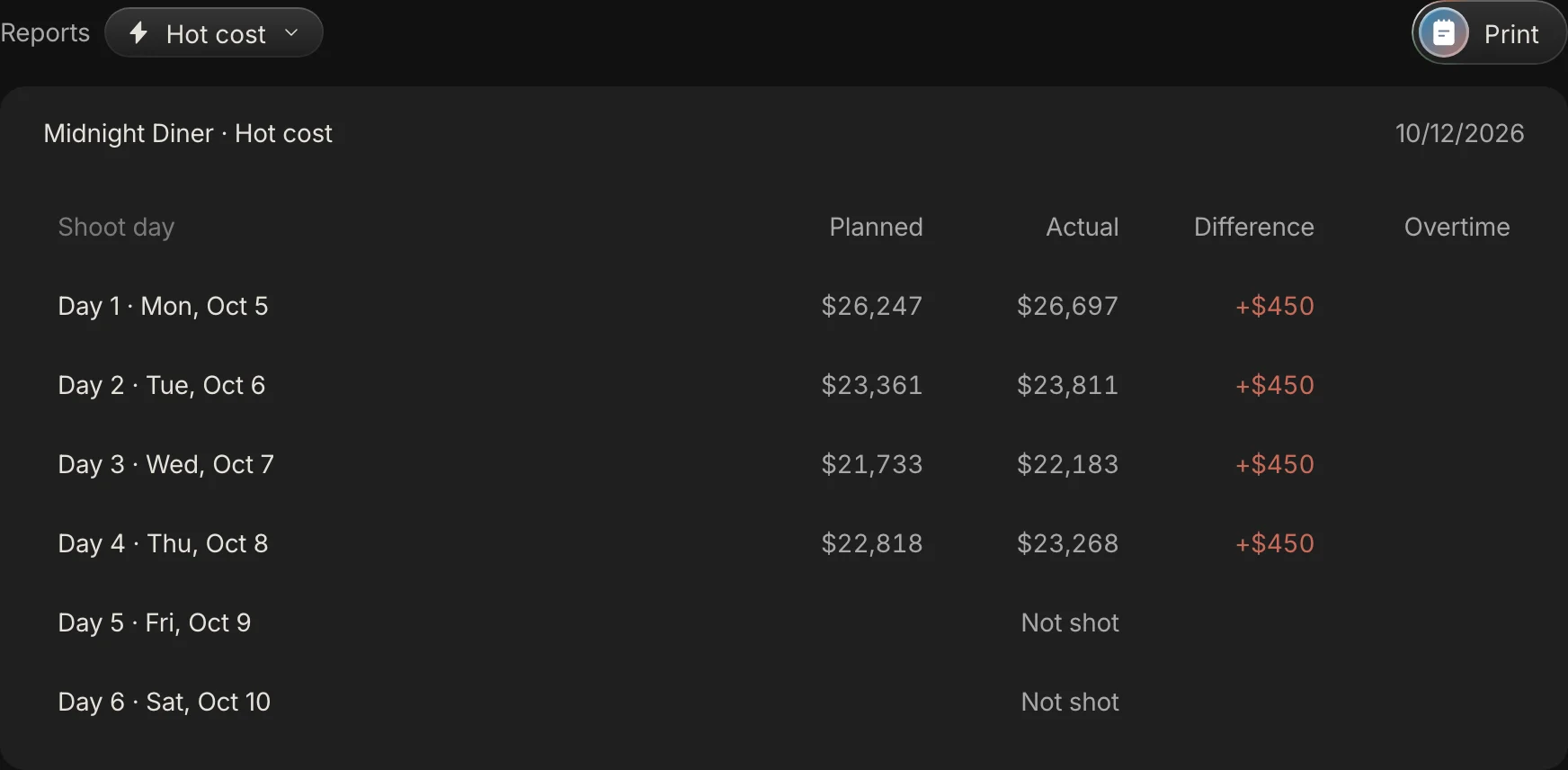
In Spring Pro the hot cost is Budget, then Reports, then Hot cost: a row for each day of the schedule (6 on the sample, 2 of them with no scenes) with planned, actual, the difference and the overtime hours. A day not yet shot reads Not shot. Here is what a wrap time costs on Day 1.
| Hours worked | Overtime hours shown | Actual | Difference from plan | Of which hours |
|---|---|---|---|---|
| 11 (the plan) | 1 | $26,697 | +$450 | +$0 |
| 12 | 2 | $29,690 | +$3,443 | +$2,993 |
| 13 | 3 | $32,683 | +$6,436 | +$5,986 |
| 14 | 4 | $35,676 | +$9,429 | +$8,979 |
Read the last two columns together. A day that wraps on its planned 11 hours still shows $450 of difference and one hour in the overtime column. The hour is already in the plan, because overtime starts after 10, and the $450 is the camera package. Each hour past the plan then adds $2,993.
The calculator opens on the real Day 1 and runs the engine's formula, checked at build. Put in your own crew and rules.
What a run of long days does, and what catching up costs
One long day is a line in the report. A run of them is the budget. If every shoot day of Midnight Diner ran 14 hours, the forecast final cost would rise by $33,793, from $334,626 ($24,029 under the locked budget) to $368,419 ($9,764 over it).

The locked contingency is $32,605, so four 14-hour days cost more than all of it. That is our reason to read the hot cost the morning after the first day, and not at the end of the week.
Catching up has a price too. Four levers are open. The hot cost prices the hours you have paid and the budget's what-if prices an extra day. The other two are schedule and creative calls.
- Move the scene to a later day. Cost follows the scene, and the schedule flags the day it lands on. See how to make a shooting schedule.
- Add a shoot day. The budget's what-if prices one as an average planned day plus 10% contingency: $25,894 here. In Budget, open the version menu, pick New what if and set Shoot days to 1 more. Read the day out of days first, because the scenes you put on it change who works.
- Cut the work. A scene or a shot goes. That is a creative call, and Cost by scene in the Budget shows what a scene costs.
- Pay the hours. Overtime on Day 1 is $2,993 an hour. Nothing in Spring Pro flags rest to the next call (Gaffer is told to weigh turnaround when you ask it, but nothing checks it), so work it out by hand with turnaround and meal breaks.
Reading the Reports overview, and what its risks do not check
The Overview is the page a producer opens first: four cards, pages by shoot day and a Risks panel. Shot so far and the bars come from the daily report, days left from the schedule, and Open P1 from the to-dos.
Risks lists four kinds of problem, each with an owner: a location needed this week and not locked, a day this week with no crew call, priority 1 to-dos past due, and scenes not scheduled. None of them reads the daily report, so a 14-hour day or a scene left behind is not a risk in that list. It shows in the cards and in the hot cost. The no-crew-call check reads the stored call, so a day that shows only the default 07:00 on its call sheet is flagged.

In the sample the panel lists one risk, and it is not about the shoot: it is the priority 1 to-dos that are past due.
How the report reaches tomorrow
A report is useful when it changes tomorrow. In Spring Pro the daily report is saved on the shoot day itself, and the same days feed the rest of the project, so four things move without retyping.
- The budget. A wrap turns the day's planned hours into actual ones, and the forecast final cost and the over or under move at once.
- The schedule. Moving the missed scene changes the days, their pages, their warnings and their planned costs.
- The call sheet. The sheet reads the schedule, so a moved scene appears on the call sheet of the day it lands on. The wrap you typed shows in the header of that day's own sheet, and the next day's wrap box starts empty. The call sheet guide has the rest.
- Reports. The cards and bars recount from the same ticks.
What does not move on its own: nothing is sent to anyone, and the missed scene stays where it is until you move it. You can also ask Gaffer to record a day. Its tools set a day's times, delays and notes, tick scenes shot and move scenes, and one undo reverts what it did, but it has no tool that sends a message. Read what it changed before you rely on it.
How people do the report today, and what breaks when the day changes
Wikipedia says most forms are tables made in Excel and printed double-sided, and Saturation describes the accountant compiling the daily cost report from timecards, petty cash, daily equipment charges and same-day purchases, so the report and the cost can live in separate files. This is our view from our own work, not a test of products. StudioBinder, whose guide we cite, is a competitor, and our StudioBinder alternative page says what it does well.
| Way of working | Good for | When a day changes you must |
|---|---|---|
| A paper form or a spreadsheet from a template | Any size, and the signed record | Add up the pages by hand and retype the hours into the cost sheet and the schedule |
| Production accounting software with timecards | A feature with payroll and an accountant | Check its hot cost against the schedule, which may live in another file |
| A separate hot cost sheet beside the report | A line producer who watches cost daily | Retype the day's hours and compare with the budget by hand |
| One project where the report reads the schedule and the budget (Spring Pro) | A short or an indie where the producer needs the pages and the cost that night | Type the wrap and the ticks. It has no time sheets, signatures or email, so keep your paper form for those |
From a short to a feature: what changes
The report's job does not change with size. What grows is the number of people who write into it, and the cost of a late one. These sizes are rough labels, not industry definitions.
| Size | What the report is | What to add | Where Spring Pro stops |
|---|---|---|---|
| Solo or YouTube video | A note: what you shot and what you missed | Nothing more | A note is enough |
| Short film | One page: times, scenes shot, delays and the cost, read by the producer that night | One rule for what shot means | Nothing yet |
| Commercial | The same page, with the changes the client asked for in Delays and incidents | Overtime reasons, written down | No client sign-off |
| Indie feature | The full two-sided form with time sheets, media counts and releases, signed, and a hot cost the next morning | Time sheets, meal penalties, media logs, signatures | No payroll, timecards or signatures. Use it for pages and cost |
| Series or episodes | One report for each unit and day, across many scripts | A report for each unit | Not Spring Pro yet: one unit and one script per project |
Doing it in Spring Pro
The daily report is in Reports, under Daily report, with a day picker and a Print button. The wrap also sits in the call sheet's header, and the hot cost is in Budget, under Reports. Nothing is retyped: the day, its scenes and its cast come from the schedule, and the cost comes from the budget. What it does not do yet:
- No time sheets: one crew call and one wrap for the whole crew. The call sheet holds a call time for each actor, but there are no per-person wrap or in and out times, and no automatic meal penalty or turnaround check.
- No media counts, release logs, meal counts or signatures. It prints, and it does not email the report.
- First shot, lunch, delays and notes are not counted in any number. Gaffer can read them.
- A day nobody reported counts as shot once its date passes, late in Reports and on plan in the budget.
- Extra days use your target, not your pace, and round up. The Risks panel does not read the report.
See call sheet software for the sheet that comes before the report, and production budget software for the budget that reads it.
The checklist
Copy this. Tick it at the end of every shoot day.
- The plan has a target for pages a day, and every shoot day has a stored crew call
- One person fills in the report the same evening, and the 1st AD or line producer checks it
- Wrap is typed, and first shot and lunch are recorded
- Every planned scene is ticked shot or left unticked, by one agreed rule
- Delays and incidents say what happened and how long it cost
- Notes hold only what the crew should see, because the call sheet prints them
- Missed scenes are moved to a day in the schedule, and the days they land on are checked
- The hot cost is read the next morning: planned, actual, difference and overtime
- Time sheets, signed forms, media logs and releases are kept in the form your production uses
- Rest to the next call is checked by hand
How these numbers were made
Every number about Midnight Diner comes from the project itself and from Spring Pro's own budget engine, matched to the screens on this page. The sample holds no daily report entries, so the evening of Day 1, the wrap table and the long-day figures use times we made up, and they are labelled where they appear. The build stops if the project changes so that the story no longer holds, and, when it can read the app's source, it checks the formulas quoted from the app against it.
Midnight Diner is a demonstration production, not a case study of a real shoot. The descriptions of the form, who fills it in and the hot cost come from the sources below, read on 12 October 2026, and they differ in places. We found no reliable figure for how long the report takes or for how many productions still use paper, so we state neither.
Questions people ask
What is a daily production report?
The form filled out each day of a shoot to summarise what happened, as Wikipedia describes it. It tracks the day's progress and expenses. See the glossary entry.
What does DPR stand for in film?
Daily production report. It is also called a production report, or PR.
Is there a daily production report template?
Yes, many, and no standard one: Wikipedia says each show usually has its own. The field table in this guide is a starting outline with no download, and StudioBinder and HowToFilmSchool both offer a template download. Spring Pro holds the producer's page of the report, not the time sheets.
Who fills in the daily production report?
A script supervisor, an assistant director, a Paperwork PA or someone in the production office, depending on the show. StudioBinder says the 2nd AD often does it, and that the 1st AD and the UPM or line producer approve it.
What goes in a film production report template?
The day's times (call, first shot, meal, wrap), the scenes and pages shot, who worked and for how long, media used, delays and incidents, and notes. Spring Pro holds the times, scenes, delays, notes and cost, and not the time sheets or media counts.
What is the difference between a daily production report and a call sheet?
The call sheet looks ahead to the next shoot day, and the daily report records the one just finished, as HowToFilmSchool puts it. In Spring Pro the two share the crew call and the wrap. See how to make a call sheet.
What is a hot cost report?
The daily comparison of a shoot day's costs with the budget. Entertainment Partners says it takes its data from the daily production report, and Saturation describes it as compiled by the accountant from timecards, petty cash and daily charges. In Spring Pro it is Budget, Reports, Hot cost: planned, actual, difference and overtime for each day of the schedule.
How do you know if a shoot is behind schedule?
Count the pages that past days planned and did not shoot. In Spring Pro, tick the scenes shot on each day and Reports shows pages behind and the extra days to catch up at your target pages a day. See film production scheduling.
How many pages a day should a film shoot?
It depends on the budget. StudioBinder gives about 1 for major films, 4 to 5 for well-funded indies and 8 or more for micro budgets, and Wolfcrow gives 5 to 8 or more for low budgets with simple scenes.
Does Spring Pro replace the full daily production report?
No. It records the times, the scenes and pages, the delays, the notes and the cost of the day, and computes pages behind and planned against actual cost. Keep your own time sheets, signed forms, media logs and releases.
Sources
Every outside claim that names a source comes from one of these, read on the date shown. Standard conventions, such as the eighths rule and the usual specialist cases, are common practice. Figures from agreements and summaries change at each negotiation, so check the current text before you rely on a number.
- Wikipedia, daily production report (a short article that lists one book as its source). Checked 2026-10-12.
- StudioBinder, the daily production report explained (a competitor's guide with a template, January 2025). Checked 2026-10-12.
- HowToFilmSchool, daily production report (a template site that also sells a paid kit). Checked 2026-10-12.
- Entertainment Partners, 35 production accounting terms (a payroll and production services vendor, January 2022). Checked 2026-10-12.
- Saturation, the production cost report (a production finance software vendor, February 2026). Checked 2026-10-12.
- StudioBinder, film budget planning from a script breakdown (a competitor's guide, 2019). Checked 2026-10-12.
- Wolfcrow, how to schedule a film (a film-craft blog, September 2025). Checked 2026-10-12.
More about the shoot day and reports
What happened today is the budget’s actuals and tomorrow’s schedule.