Film budgeting: how to budget a short film, from script to locked budget.
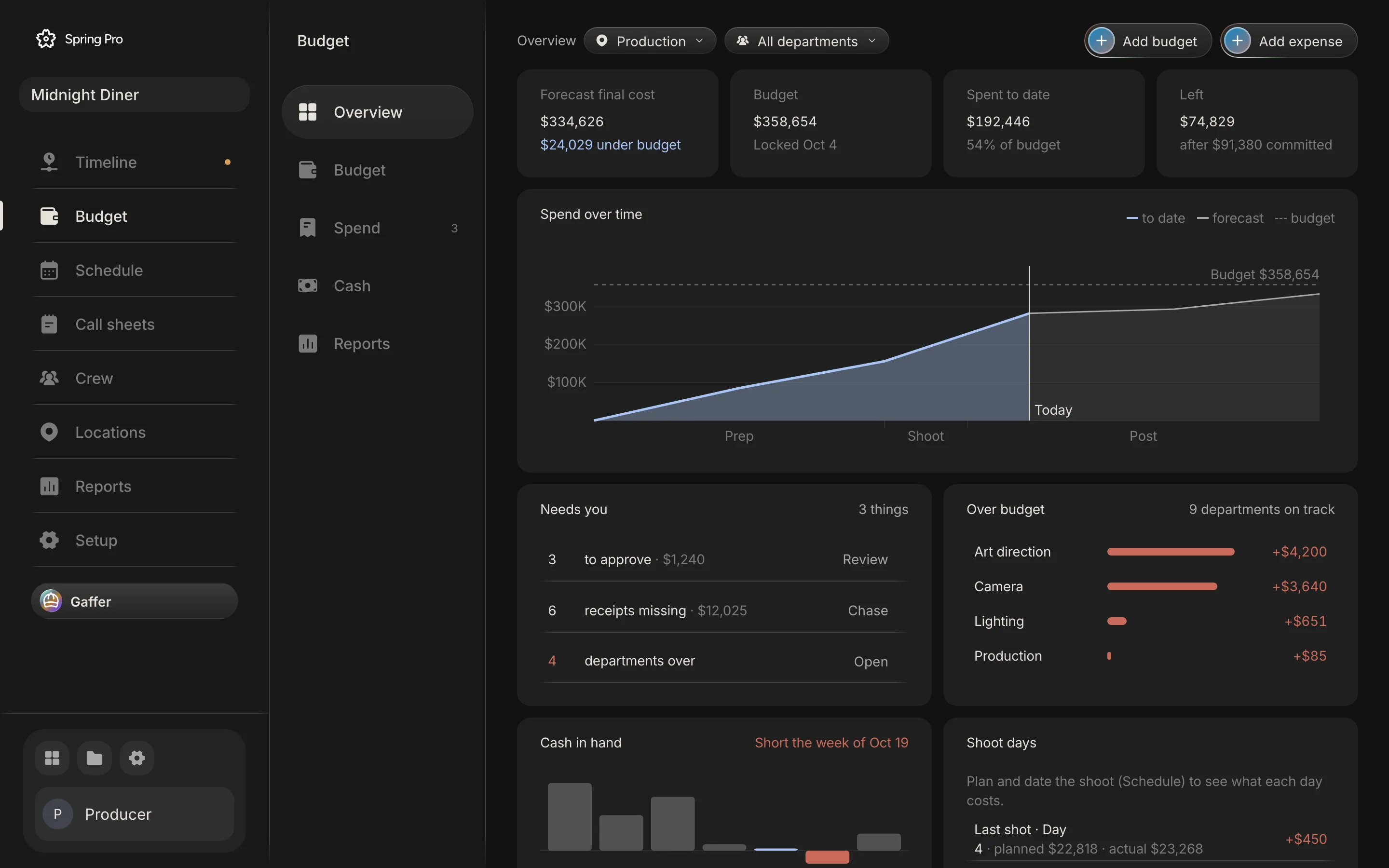
Real screen: Midnight Diner, our demo production, in Spring Pro.
The short answer. A film budget is built after the breakdown and the schedule, not before. Price people from their deals and things from the breakdown, add contingency last, and lock the budget when it is approved. After the lock, log every change with a reason, approve every expense, and check cash by week, because a funded film can still be short in one week.
This guide builds a film budget from the schedule up, not from a total down, on a worked example, the demonstration production Midnight Diner: 7 scenes, 2 1/8 pages, 4 shoot days, 44 people and a locked budget of $358,654. It follows the money from the script to the last invoice: the chart of accounts, the deals, the rules, contingency, the lock, spend, cash and the what-ifs. The numbers come from Spring Pro's own budget engine, and the rules of thumb come from sources we read and dated below.
In this guide 26 sections
- Quick answers
- Why a budget goes stale, and who pays for it
- The film we are budgeting
- Before you start
- Step 1: Break down the script and schedule it first
- Step 2: Set up the chart of accounts, the film budget breakdown
- Step 3: Price people from their deals
- The rules: hours, overtime and fringes
- Step 4: Price the things: rentals, fees and the breakdown
- Step 5: Let the schedule carry the cost
- Step 6: Add contingency last
- Step 7: Lock it when it is approved
- After the lock: log every change, with a reason
- Step 8: Spend, approved in one list
- Step 9: Compare plan and actual while there is time to act
- Hot costs: the camera package, day by day
- Step 10: Check the cash, not only the total
- Step 11: Try a what-if before you change the budget
- How people do film budgeting today, and what breaks when the schedule changes
- Micro-budget filmmaking: what changes when there is almost no money
- From a short to a feature: what changes
- Doing it in Spring Pro
- The checklist
- How these numbers were made
- Questions people ask
- Sources
Quick answers
What is film budgeting? Putting a cost on everything the script needs, sorting the costs into accounts and adding them up to a top sheet. A budget has two halves: above the line (the writer, director, producer and cast) and below the line, which is everything else you buy or rent, post-production included.
In what order? Script, breakdown, schedule, then money. In a Film Independent interview, a line producer builds a realistic schedule and a rough line-by-line budget once the script is ready, and PremiumBeat's guide says to start from your scope and schedule. A budgeting software vendor is blunter: without a breakdown and a schedule the numbers are guesses, and guesses become overages.
How much contingency? The sources we read disagree. A study outline says a completion guarantor usually has the producer set aside 10% of the budget, and vendors say 10% to 20% or 10% as standard and 15% for complex productions. If a financier or a guarantor is involved, read your agreement, because they may set it.
How much does a short film cost? We found no reliable average, so we quote none. One vendor guide gives $50 to $100 a minute in its opening and $700 to $1,500 a minute further down, and micro-budget has no agreed ceiling.
Do you need software? Not for a short with a few people. A spreadsheet works, and the film budget template is a filled-in start. Software earns its place when the schedule changes every week and the budget has to follow, which is what production budget software is for.
Who builds it? In the Film Independent interview, a line producer is usually called on once the script is ready, to make a realistic schedule and a rough line-by-line budget. If your short has no line producer, whoever produces it takes on that work. Either way the schedule comes first.
Where does this guide fit? It is the complete guide to budget and spend. The schedule the budget depends on is in film production scheduling, what it prices is in how to do a script breakdown, and the spreadsheet start is the film budget template.
Why a budget goes stale, and who pays for it
A budget is a forecast, so it starts to age the day it is done. What matters is whether it stays tied to the things that change. The cost of a shoot day follows its scenes, a crew member costs a rate times the days they work, and a prop is a line the breakdown created. When those live in different files, every change to the schedule is a retyping job, and the budget is the file that gets forgotten.
The scheduling guide calls these the seven handoffs, and the last two are the budget's: schedule to budget, and shoot day to actuals. A day that moves, an actor who loses a day or a location that says no shifts money between days. Here is who reads the budget and what a stale one does to them.
| Reader | What they take from it | What goes wrong if it is stale |
|---|---|---|
| Financier or investor | The top sheet: the total, the contingency, what is left | They release money against a number that is no longer true |
| Producer | The forecast against the locked budget, and what needs approving | An overspend is found at wrap, not in week two |
| Line producer | Every account, the cost of each day, hot costs | Overtime and extra days are priced after they happen |
| Department heads | Their own account and what they may spend | They overspend without knowing, or hold back money they have |
| Production accountant | Purchase orders, invoices, receipts and petty cash | Bills with no account, no approval or no receipt |
| Completion guarantor, if there is one | The schedule and the budget, reviewed before it signs | It reviews a plan that no longer matches the shoot |
The guarantor row comes from a study outline on completion bonds, which says the guarantor reviews the schedule and the budget closely before it signs. A weekly cost report exists to catch the rest: a CPA firm that does production accounting describes it as costs to date against the approved budget, plus a projected final cost.
The film we are budgeting
Midnight Diner is a short crime film. A burned-out investigator uses herself as bait to expose the night diner owner running contraband off the river, and pulls her old partner back in.
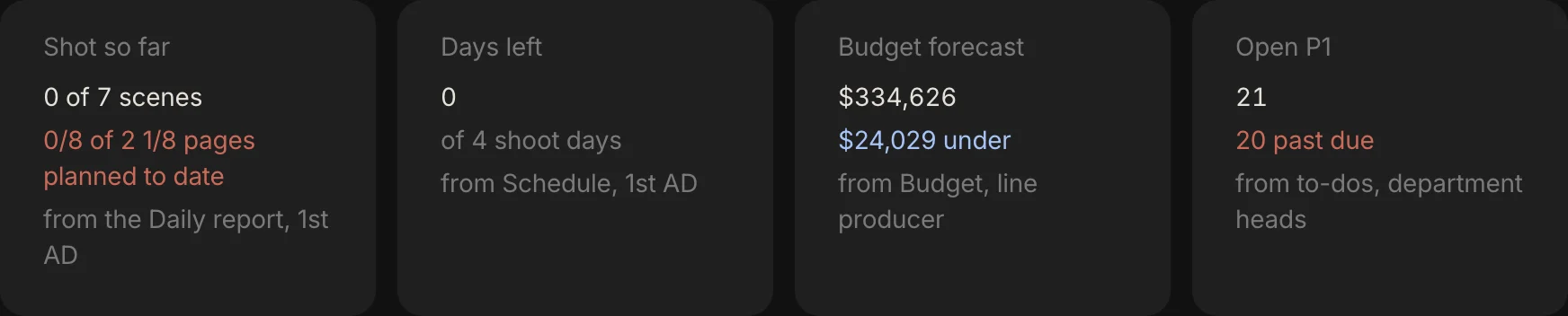
It has 7 scenes, 2 1/8 pages, 4 sets and 4 shoot days, and 44 people on its list: 5 cast, 32 crew and 7 vendors. Its budget was locked on 4 October 2026 at $358,654, which is $326,049 of accounts plus $32,605 of contingency. As of 12 October 2026 it forecasts $334,626 and has spent $192,446.
It is a demonstration production, not a case study, and its budget has gaps that we point out as we go. At $358,654 it is about seven times the $50,000 ceiling of SAG-AFTRA's short project agreement (see the micro-budget section), so read it as a worked example of the method, not as a target for a short. Here is its top sheet.
| Group | Accounts with money | Locked budget | Forecast | Spent |
|---|---|---|---|---|
| Above the line | 4 of 4 | $86,296 | $86,296 | $29,656 |
| Production | 13 of 14 | $180,569 | $189,145 | $151,405 |
| Post production | 6 of 6 | $45,285 | $45,285 | $4,885 |
| Other | 4 of 4 | $13,900 | $13,900 | $6,500 |
| Contingency 10% | A reserve | $32,605 | Not a cost | |
| Total | 27 of 28 | $358,654 | $334,626 | $192,446 |
Above the line is 26% of the accounts, which is no rule: it is what this film's deals add up to. The forecast has no contingency row because contingency is a reserve in the budget, not a cost. The sections below show where each of these numbers comes from.
Before you start
A budget is only as good as what feeds it. If you cannot tick the list below, build a rough budget to raise money and expect to redo it. Saturation, a budgeting vendor, describes the same two passes: a preliminary budget for fundraising, then a detailed one once the money is raised and the key decisions are made.
- A script that has stopped changing every day. You can price a draft, but a rewrite of half the scenes means pricing half again.
- A breakdown. The elements in each scene are what you price. The method is in how to do a script breakdown.
- A schedule. The days decide the cost of every person and rental. See how to make a shooting schedule.
- A list of people with their deals. A rate and its unit, the days worked, prep and wrap days, and any kit or box rental.
- Your rules. The planned day, when overtime starts, the overtime multiplier, fringes and contingency. Write them down before you price anyone.
- A funding list with dates. Who pays what, and when. Without it you can balance a budget and still run out of cash.
- Someone who approves. One name for expenses, and one for changes after the lock.
Step 1: Break down the script and schedule it first
The breakdown tells you what the script needs, and the schedule tells you for how many days. A crew member costs a rate times the days they work, so you cannot price anyone before you know the days. PremiumBeat gives a rule of thumb for them, at least one shooting day for every three to five script pages, and it is a floor, not a plan.
Midnight Diner shows why. At 2 1/8 pages the rule says less than one day, but the film has 4 sets and the schedule gives each its own day, so it needs four. Spring Pro's budget does not apply a pages rule: it prices the days the schedule gives scenes to, so it follows the schedule you make.
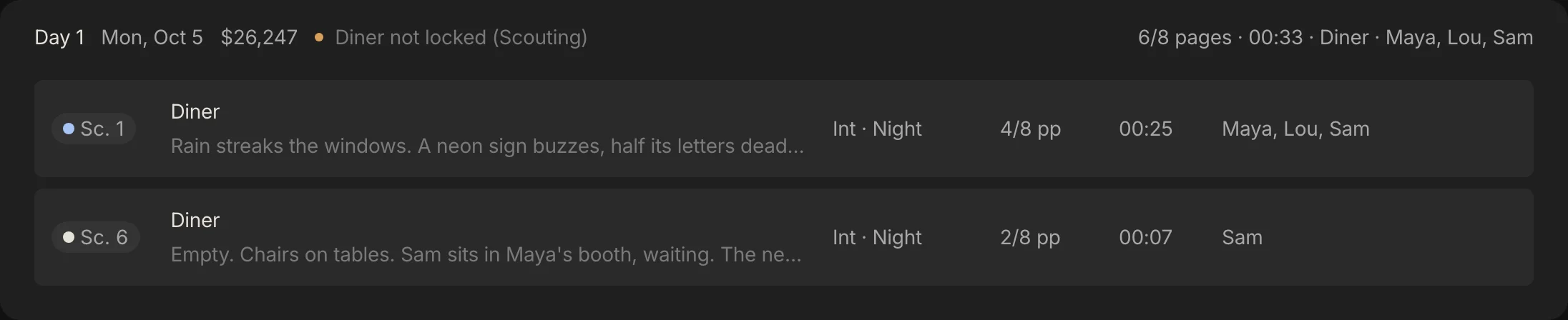
Day 1 puts scenes 1 and 6 in the diner, 6/8 pages, and the budget already prices it at $26,247. The method is in how to make a shooting schedule, and the whole picture, including what a change does to the cost of each day, is in film production scheduling.
Step 2: Set up the chart of accounts, the film budget breakdown
A chart of accounts is the list of buckets every cost goes into, so that the same kind of money always lands in the same place. Spring Pro's chart has 28 accounts in four groups: above the line (4), production (14), post production (6), other (4). Every person, line and expense is coded to one account, and each account belongs to one department, which is how the budget narrows to the props master or the sound department.
The split follows the usual top sheet. NYWIFT's indie producer puts the writer, director, producer and cast above the line and everything else, post-production included, below it, and a Lensrentals guide lays its top sheet out as above the line, below the line, post production and other. The chart has no account numbers and no sub-accounts: detail lines sit directly under their account, and contingency is a row under the accounts, not an account.
| Group | Account | What goes in it | Locked budget | Forecast |
|---|---|---|---|---|
| Above the line | Story and rights | Script, option, rights | $15,000 | $15,000 |
| Above the line | Producers | Producer fees | $21,240 | $21,240 |
| Above the line | Director | Director fee | $28,320 | $28,320 |
| Above the line | Cast | Principal cast, casting | $21,736 | $21,736 |
| Production | Production staff | Managers, ADs, coordinators | $35,906 | $35,906 |
| Production | Extras | Background, stand-ins | Nothing priced | Nothing priced |
| Production | Camera | Crew, bodies, lenses | $29,016 | $32,656 |
| Production | Lighting and grip | Electrics, grip, generator | $17,329 | $17,980 |
| Production | Production sound | Mixer, boom, kit | $7,092 | $7,092 |
| Production | Art department | Design, set dressing, construction | $27,249 | $31,449 |
| Production | Props | Purchase, rental, picture vehicles | $8,691 | $8,691 |
| Production | Wardrobe | Costumes, fittings, laundry | $13,461 | $13,461 |
| Production | Hair and makeup | Artists, supplies, prosthetics | $6,758 | $6,758 |
| Production | Stunts and SFX | Coordinator, performers, effects | $10,092 | $10,092 |
| Production | Locations | Fees, permits, security, power | $14,555 | $14,555 |
| Production | Transport | Vans, trucks, fuel, parking | $1,500 | $1,500 |
| Production | Catering | Meals, craft service | $7,120 | $7,205 |
| Production | Media and DIT | Cards, drives, data | $1,800 | $1,800 |
| Post production | Editing | Editor, assistant, suite | $14,400 | $14,400 |
| Post production | VFX | Shots, artists | $4,885 | $4,885 |
| Post production | Colour | Grade, conform | $6,500 | $6,500 |
| Post production | Sound post | Edit, mix, foley, ADR | $9,000 | $9,000 |
| Post production | Music | Composer, licences | $7,000 | $7,000 |
| Post production | Deliverables | Masters, subtitles, DCP | $3,500 | $3,500 |
| Other | Insurance | Production, equipment, liability | $6,500 | $6,500 |
| Other | Legal and accounting | Contracts, clearances, bookkeeping | $3,500 | $3,500 |
| Other | Office and general | Phones, software, travel | $2,400 | $2,400 |
| Other | Publicity and festivals | Stills, EPK, fees | $1,500 | $1,500 |
Look at Extras. The sample's breakdown lists four background entries and the budget prices none of them, so the account is empty. An empty account is a finding, the same way an empty category is in a breakdown.
Do not copy this chart as a standard. Your financier, your guild or a completion guarantor may ask for its own, and Spring Pro does not import one. Keep your own accounts and map them to these four groups when you report.
Step 3: Price people from their deals
People are the biggest cost, and they are priced from deals, not guessed. In the sample, cast, crew and vendor deals add up to $247,201, which is 76% of the $326,701 of accounts at today's prices. A deal has a rate, a unit (hour, day, week or one flat fee), a working day, prep days, wrap days and any kit.
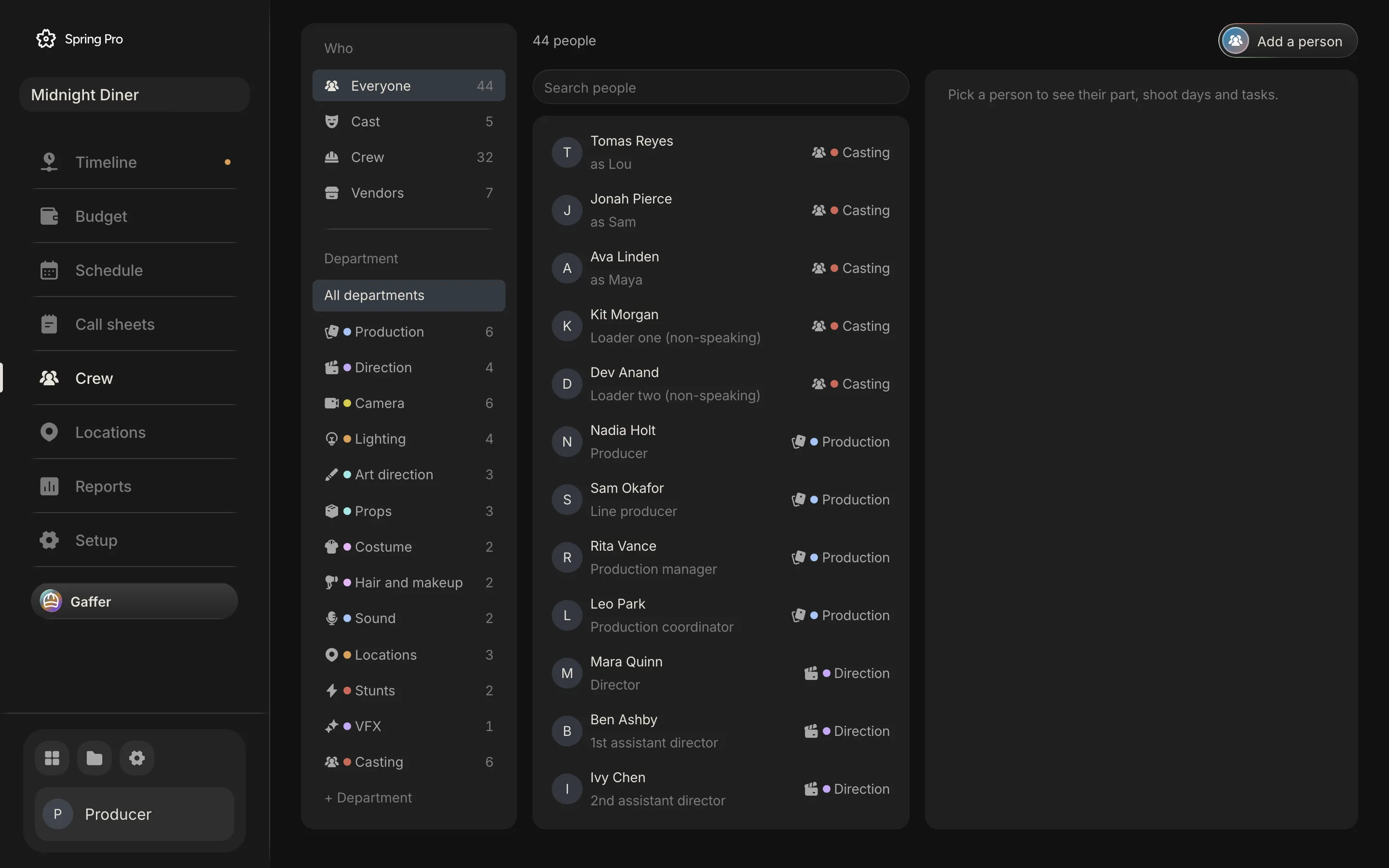
Each person becomes one cost for every day they work. Cast work the days their character is in a scene, everyone else works every shoot day, and prep and wrap days are added on top. Change the schedule and the days change with it.
| Person | Deal | How it is priced | Days | Planned cost |
|---|---|---|---|---|
| Ava Linden, lead (plays Maya) | $1,200 a day | The day rate covers 10 hours, so an hour is $120. The planned 11th hour is overtime at 1.5 times that, $180, so labour is $1,380. Fringes of 18% make a day $1,628 | 4 shoot days | $6,514 |
| Sam Okafor, line producer | $520 a day, with 10 prep and 3 wrap days | The same sums. Prep and wrap days are priced like shoot days, at $706 a day | 17 days | $11,996 |
| Pete Nolan, sound mixer | $560 a day plus $150 a day of kit | Kit is added to each working day after fringes, so it carries none | 5 days (4 shoot, 1 prep) | $4,550 |
| Nadia Holt, producer | $18,000 flat | One fee, however many days. Fringes are added because she is not a vendor | One fee | $21,240 |
| Spark Lighting, generator vendor | $7,200 flat | A vendor is one fee with no fringes | One fee | $7,200 |
Two things to notice. The planned day already includes an hour of overtime, because the sample plans 11-hour days and starts overtime after hour 10. And a flat fee does not grow when the schedule does: the producer, the director, the casting director and the seven vendors add up to $84,140, 26% of the accounts, and do not move with the days.
A weekly deal is priced as a fifth of the week for each working day, with no overtime added. An hourly deal is paid by the hour, with overtime past the threshold. The sample has only day and flat deals.
Cast are priced only on the days their character is in a scene, so a paid hold day is not in the number. In the sample, Lou has two hold days between his first and last scene, which at his $800 day rate would add $1,600 before fringes if holds are paid. Add them as a line, and read the day out of days guide for how holds are counted.
The rules: hours, overtime and fringes
Five numbers price every person and every line. They live in one place on the Budget page, and changing one reprices the whole budget. The first is labelled Work day in the app, and this guide also calls it the planned day.
The sample's numbers are its own choices, not benchmarks. Real fringes differ by country, state, union and role, so use your payroll company's figure. A producer on the NYWIFT blog estimated about 30% for non-union crew and about 47% for actors under a US guild agreement, in 2014, and a budgeting vendor gives 35% to 45% for union crew. Neither is Midnight Diner's 18%.
Overtime is where hours turn into money. On Day 1, one more hour for everyone on the day costs $2,993, and a 14-hour day costs $8,979 more than the plan. The budget does not price meal or rest penalties, so allow for them in a line or in contingency, and read turnaround and meal breaks on a film shoot for what they cost.
| Rule | Midnight Diner | What it does |
|---|---|---|
| Work day | 11 hours | The length a working day is priced at, prep and wrap days included. A person's own hours a day overrides it |
| Overtime after | 10 hours | Hours past this are overtime, and a day rate is spread over the hours it covers to get an hourly rate |
| Overtime pays | 1.5 times | The multiplier on that hourly rate |
| Fringes | 18% | Added to labour for cast and crew, not to vendors and not to kit |
| Contingency | 10% | A percentage of the accounts, added last |
The calculator opens on the real Day 1. It uses one average day rate for everyone, set so that it matches the engine on Day 1, and the build checks that match. Away from Day 1 it is an estimate, not the app's budget. Put in your own crew and rules to see roughly what an overrun costs you.
Step 4: Price the things: rentals, fees and the breakdown
Everything that is not a person is a budget line: a quantity times a rate, with a type (labour, rental, purchase or fee) and an account. A rental that runs every shoot day follows the schedule, so adding a day adds its cost. The sample has 17 lines worth $79,500, and four of them run every shoot day: camera package, radio mics, craft service, fuel and parking. Together they cost $1,350 a day.
The breakdown is the other source of lines. Props, set dressing, wardrobe, hair and makeup, vehicles, equipment, effects, stunts and background each wait in a to-price list, and you price an item by giving it a rate. Each set can carry a location fee for the days it is needed, and Spring Pro suggests the price you paid for the same thing before.
| Line | Account | How it is priced | Planned cost |
|---|---|---|---|
| Screenplay fee | Story and rights | $15,000 flat | $15,000 |
| Camera package | Camera | $900 a day, every shoot day (4 days) | $3,600 |
| Radio mics | Production sound | $120 a day, every shoot day (4 days) | $480 |
| Expendables, gels and tape | Lighting and grip | $1,200 flat | $1,200 |
| Craft service | Catering | $180 a day, every shoot day (4 days) | $720 |
| Fuel and parking | Transport | $150 a day, every shoot day (4 days) | $600 |
| Drives and cards | Media and DIT | $1,800 flat | $1,800 |
| Diner fee | Locations | $900 a day, 2 days | $1,800 |
| Editor | Editing | $1,800 a week, 8 weeks | $14,400 |
| Grade and conform | Colour | $6,500 flat | $6,500 |
| Sound edit and mix | Sound post | $9,000 flat | $9,000 |
| Composer and licenses | Music | $7,000 flat | $7,000 |
| DCP and masters | Deliverables | $3,500 flat | $3,500 |
| Production insurance | Insurance | $6,500 flat | $6,500 |
| Clearances and contracts | Legal and accounting | $3,500 flat | $3,500 |
| Production office and software | Office and general | $2,400 flat | $2,400 |
| Festival fees | Publicity and festivals | $1,500 flat | $1,500 |
Here the sample is honest about its limits. Its breakdown has 63 elements that can be priced, and the budget prices none of them. Only the diner has a location fee, so three of the four sets have none. That is why art and wardrobe hold only crew deals, and why the first set dressing invoice reads as over budget in the sections below.
Price the breakdown before you lock. After the lock, the to-price list shows only what the script has gained since, so an item that was already in the script and still unpriced is no longer listed. A prop with no price is not free, it is unknown.
Step 5: Let the schedule carry the cost
Because people and rentals are priced by the day, each shoot day has a cost. Here are Midnight Diner's four, split into the people paid by the day and everything else on that day.
| Day | Set | Pages | People paid by the day | Rentals and fees | Planned cost |
|---|---|---|---|---|---|
| 1 | Diner | 6/8 | $23,097 (34 people) | $3,150 | $26,247 |
| 2 | Rooftop | 6/8 | $22,011 (33 people) | $1,350 | $23,361 |
| 3 | Maya's apartment | 2/8 | $20,383 (32 people) | $1,350 | $21,733 |
| 4 | Warehouse | 3/8 | $21,468 (33 people) | $1,350 | $22,818 |
Only some of the money sits on the shoot days. Of the $326,701 of accounts, 29% is on the four shoot days, 26% is flat deals, 23% is prep and wrap days and 22% is fixed lines such as post, insurance and fees. Add a shoot day and you add the first group, not the others.
So an extra shoot day costs about an average one: $23,540 before contingency, $25,894 with it. We found no reliable industry average for the cost of a shoot day at a given budget, so we quote none.
Cost per page is not flat either. Scene 3 is 2/8 of a page and carries a forecast of $22,183 because it needs a day of its own, while scene 1 is 4/8 and carries $17,798 because it shares Day 1 with scene 6. The Cost by scene report shares a day between its scenes by page length, so a short scene that needs its own day is the expensive kind.
Step 6: Add contingency last
Contingency goes in last, as a percentage of everything above it. It pays for what you cannot list: a broken lens, a day lost to weather, a scene that takes longer. It does not pay for what you forgot to price. A software vendor's blog puts it well: contingency is not extra money, it is money already spent and not yet identified.
How much? The sources we read give different answers, and none is a rule.
| Source | What it says | What kind of source it is |
|---|---|---|
| Lexplug, completion bonds | A guarantor has the producer set aside a contingency, usually 10% of the budget | A law-school study outline, no author or date shown |
| Saturation.io, how to create a film budget (2026) | 10% as standard, 15% for complex productions, and never below 10% | A budgeting software vendor |
| Lensrentals, budgeting a short film (2020) | Adds 10% to 20% of its funding on top of the total estimated cost | A gear rental vendor, describing one filmmaker's practice |
| Filmustage, planning a short film budget (2025) | 10% in its split of a short film budget | A software vendor |
| Film Independent, NYWIFT, PremiumBeat | Name no percentage | A line producer interview, a producer's blog post, a stock music library's blog |
Our reading: in the sources we read, 10% is the common floor. Every one that names a figure uses it, either as the figure or as the bottom of a range, and it is the one a guarantor is described as asking for. Only four of our sources name a figure and three of those are vendors, so this is a sample, not a survey. Start there and move up when the film is complex.
In Spring Pro contingency is a percentage of the accounts, set in the rules, and you can try another figure in a what-if before you change the budget.
Now see what it did on Midnight Diner. The contingency is $32,605. By today's forecast the four accounts that are over add up to $8,576, so the film is $24,029 under budget only because the contingency covers the difference. About 26% of the reserve is already spoken for, with every shoot day behind the sample's date.
Step 7: Lock it when it is approved
The lock freezes the plan so that everything after it is measured against something. Wrapbook, a payroll vendor, defines a locked budget in its help centre as the final approved budget, signed off by the producer, the line producer or UPM, the production accountant and the studio, and used for cost reporting and variance. On a short, that is you and whoever is paying.
In Spring Pro the lock stores the total, the contingency, the money in every account by scene, the cost of every person and line, and the list of script items at that moment. After it, the Budget column shows the locked number, the forecast keeps moving, and the difference is the variance. There are no roles for who may lock or approve: everyone on the project can.
Lock the budget you want to be held to. Locking again replaces the lock and clears the change log, so do it when a financier approves a revised budget, not to tidy up a variance. Midnight Diner was locked on 4 October 2026 at $358,654.
After the lock: log every change, with a reason
After the lock, a change to an estimate is logged: a line added, changed or removed on the Budget page, or a rate edited in its row. Changes Gaffer makes to lines and people are logged the same way. Each entry records who, what, how much and, once you give it, why, and the page asks for the reason as soon as the change is saved.
Without a reason a change is only a number. A locked budget turns an argument about what the budget was into arithmetic about why it moved, and the log is the answer when someone asks why the total changed.
Script changes are caught too. After the lock, any new prop, set dressing, wardrobe, hair and makeup, vehicle, equipment, effects, stunt or background item in the breakdown, and any new location, is listed as a new script item to price, so a late prop cannot slip in unpriced. Elements of other kinds are not listed. That is the same handoff described in how to do a script breakdown: the breakdown feeds the budget.
Four kinds of change are not logged today: a deal edited on the Crew page (rate, unit, prep or wrap days, hours or kit), a what-if applied with Make this the budget, a change to the rules, and a schedule change that moves cost. The lock still shows what they did to the totals, because it keeps the original cost of every person and line, but nothing records why. After the lock, change a rate in its Budget page row so it is logged, and write down the other changes yourself.
The sample shows the gap. Its change log is empty, yet the gaffer's deal now costs $4,885 against $4,234 at the lock, a drift of $651. It shows as Lighting over budget by $651, and no entry says why.
Step 8: Spend, approved in one list
Spend is money going out, and every expense has a kind and a state. The four kinds are purchase order, invoice, receipt and petty cash. Each starts as requested, then is approved or rejected, then marked paid.
Four automatic rules are on by default and remove the small chores. Expenses under $100 approve themselves, a vendor you used before fills its account and line, a receipt marks an approved bill paid, and the price you paid for the same thing before is suggested. Turn any of them off in the Budget page's Automatic section.
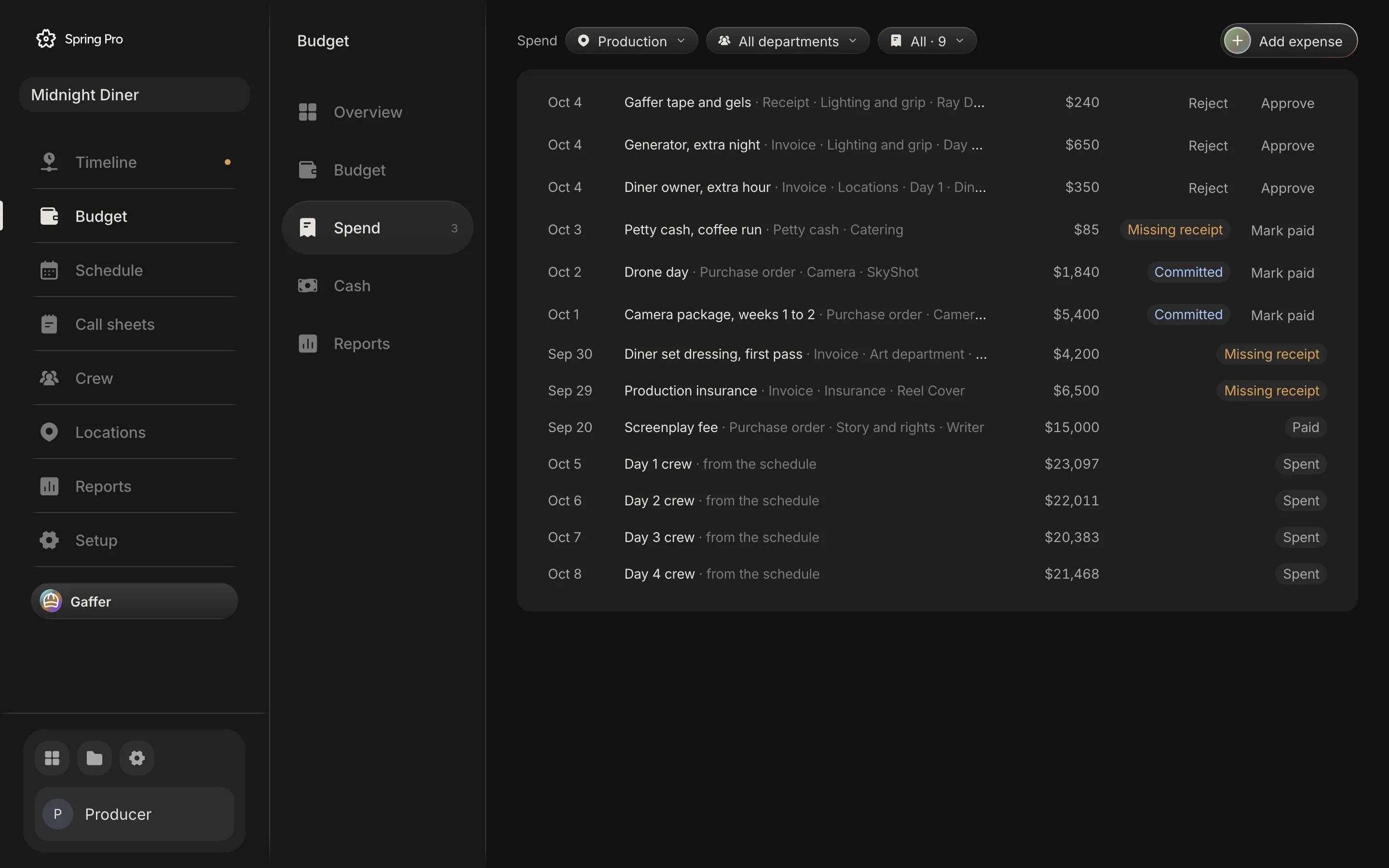
Approval is by anyone on the project, because Spring Pro has no roles for who may approve what. Agree that in your production, and keep payroll and ledgers in a payroll or accounting system.
| Kind | What it is | When it counts |
|---|---|---|
| Purchase order | A promise to pay a vendor, raised before the work | Committed once approved, spent once paid |
| Invoice | A vendor's bill | Spent once approved |
| Receipt | Proof of a purchase already made | Spent once approved |
| Petty cash | Small cash buys | Spent once approved |
| Requested or rejected | Waiting, or turned down | Not counted, though waiting money is shown as waiting |
In the sample, nine expenses are logged. Three wait for approval ($1,240), two purchase orders are committed ($7,240), and six bills have no receipt attached ($12,025): the three still waiting for approval, which show Approve and Reject, and three approved or paid ones ($10,785) that carry the Missing receipt flag. The Needs you panel on the Overview counts the first and the last. A missing receipt is a flag, not a block: approved and paid bills count whether or not the receipt is there.
Where an expense is logged matters. An expense logged against a line makes that line's forecast the larger of its estimate and the money logged. The camera package line is $900 a day for 4 days, $3,600, and a $5,400 purchase order is logged against it, so the line forecasts $5,400.
An expense with no line, like the $1,840 drone day, is added on top as money outside the plan. The same goes for the $4,200 set dressing invoice, which has no line to sit against because the breakdown's set dressing was never priced.
Step 9: Compare plan and actual while there is time to act
Two reports do this job at two speeds. A weekly cost report compares costs to date with the approved budget and projects the final cost. A hot cost report, built from the daily production report, estimates the day's cost so an overage can be fixed within a day. Pease Bell is a CPA firm that does production accounting, and the definitions are theirs.
Spring Pro keeps both on the budget's Reports page: a cost report with every account, this week and to date, a hot cost report with each shoot day planned against actual, a top sheet, and cost by scene, by set and by department. They print.
A day counts as actual when its wrap time is entered or its date has passed. The wrap time is one field, which the budget Overview offers for today or the next day still to shoot and the day's call sheet offers for any day. It turns planned hours into the real ones, and hours past the overtime rule are priced at the overtime multiplier. There are no timecards in the app, so it prices hours and not meal penalties.

| Number | Midnight Diner | What it means |
|---|---|---|
| Budget | $358,654 | The locked plan, contingency included |
| Committed | $91,380 | Promised and not yet spent: flat deals, days not yet shot and approved purchase orders |
| Spent | $192,446 | Approved and paid bills, and the days already shot. Prep days count once the first shoot day is shot, and wrap days once the last is |
| Left | $74,829 | Budget, minus spent, minus committed |
| Forecast | $334,626 | Where the film lands if nothing else changes. A line forecasts the larger of its plan and the money logged, a shot crew day its actual cost (which can be below plan), and an expense with no line is added on top |
| Variance | $24,029 under | Budget minus forecast. Negative means over |
Two cautions about the sample's spent figure. It is as of 12 October 2026, all four shoot days are behind that date, and no wrap time is entered, so their crew counts as spent at the planned hours. And because every shoot day is shot, the engine also counts the prep days ($64,906) and the wrap days ($11,195) as spent, although the wrap days are dated 17 October, after the 12 October export. The Reports overview counts scenes shot from the daily report instead, and reads zero.
Hot costs: the camera package, day by day
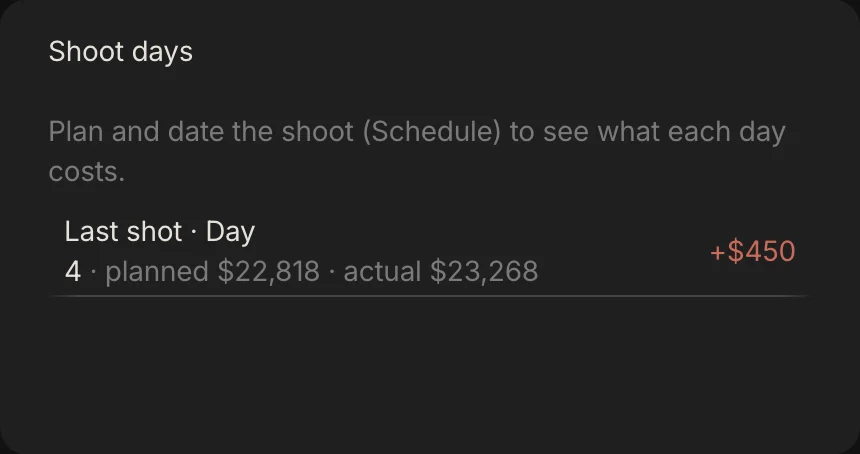
The Hot cost report lists every day of the schedule with its planned cost, its actual, the difference and the overtime. In the sample the two days with no scenes read Not shot, and each of the four shoot days reads $450 over. The cause is not overtime.
The camera purchase order is $1,800 bigger than the camera line, and the engine spreads that $1,800 over the four shoot days, $450 a day. A hot cost is only as good as the spend logged against its line.
The Overview also lists the departments heading over budget. The four accounts that are over (camera, art, lighting and grip, and catering) show up there by department: art direction $4,200, camera $3,640 (that $1,800 plus the $1,840 drone day, which has no line), lighting $651 and production $85. The other nine departments are on track.
| Day | Planned | Actual | Difference |
|---|---|---|---|
| Day 1, 5 Oct | $26,247 | $26,697 | +$450 |
| Day 2, 6 Oct | $23,361 | $23,811 | +$450 |
| Day 3, 7 Oct | $21,733 | $22,183 | +$450 |
| Day 4, 8 Oct | $22,818 | $23,268 | +$450 |
Step 10: Check the cash, not only the total
A budget can balance and the bank account can still be empty in one week. Cash flow puts each cost in the week the money leaves and each funding source in the week it arrives, then keeps a running balance. A software vendor's blog lists cash flow schedules among the outputs a line producer builds from the budget.
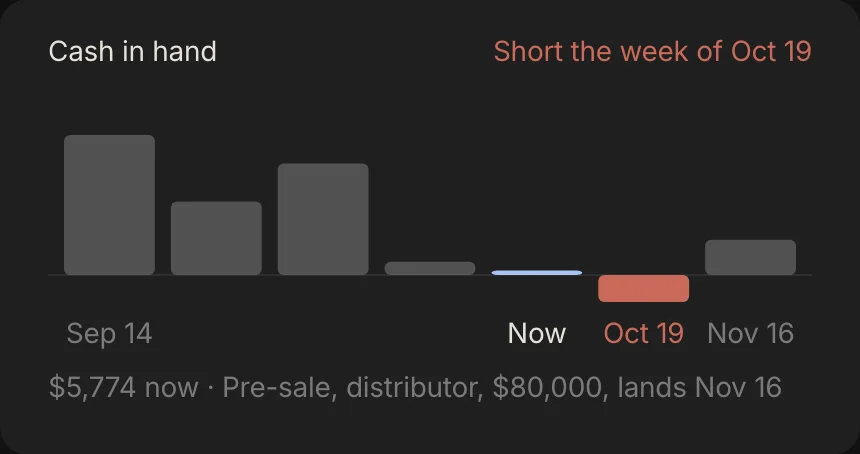
Midnight Diner is funded on paper. Its four funding lines add up to $420,000, more than the $334,626 forecast. But two equity tranches ($300,000) arrive first, the post bills fall in the week of 19 October, and the $80,000 pre-sale does not land until 16 November. In the week of 19 October the balance is short by $34,626.
| Week of | Money out (USD) | Money in (USD) | In hand (USD) |
|---|---|---|---|
| 14 Sep | none | 180,000 | 180,000 |
| 21 Sep | 85,540 | none | 94,460 |
| 28 Sep | 71,031 | 120,000 | 143,429 |
| 5 Oct | 126,459 | none | 16,969 |
| 12 Oct | 11,195 | none | 5,774 |
| 19 Oct | 40,400 | none | short by 34,626 |
| 16 Nov | none | 80,000 | 45,374 |
Spring Pro times money by simple rules. A crew day is paid on its day, prep days a week before the first shoot day and wrap days a week after the last day on the schedule. Money in the above-the-line and other accounts moves two weeks before the first shoot day, production lines on the first shoot day, and post two weeks after the last day on the schedule, unless a line has its own paid-on date.
There are three ways out of a short week. The app names two: bring the next funding forward, or hold that much spend. The third is to move bills: the $40,400 due in that week is five post lines (the edit, grade, sound mix, music and deliverables), and paid-on dates after the pre-sale lands would clear the gap, if the people owed agree.
One more catch. The $40,000 tax rebate has no date, so the Funding header counts it as raised but no week shows it arriving. Date every funding line, or the weekly picture leaves it out.
Step 11: Try a what-if before you change the budget
Change a copy, not the budget. A what-if copies the lines and the rules, lets you move four things (the number of shoot days, the work day, fringes and contingency) and shows the new total next to the budget. Lines can be repriced inside the copy too, and "Make this the budget" applies the copy's lines and rules, but not a changed number of shoot days, which come from the schedule. After the lock it writes no change log entry, so note the reason yourself.
Here is what moves Midnight Diner's total, computed by the same function the what-if panel calls. The overtime row is the one exception: the panel has no overtime input, and only Gaffer's what-if can change the overtime rules. The total is the accounts as they stand plus contingency, so it is about $716 above the locked budget: the gaffer's drift of $651 plus its contingency. The totals in the table are rounded to the dollar, so they differ by $717.
| What changes | New total (USD) | Change (USD) | Change |
|---|---|---|---|
| Nothing: the total now | 359,371 | 0 | 0% |
| One more shoot day (an average day, with contingency) | 385,265 | +25,894 | +7.2% |
| One fewer shoot day | 333,477 | -25,894 | -7.2% |
| Contingency of 15% instead of 10% | 375,706 | +16,335 | +4.5% |
| A work day of 12 hours instead of 11 | 382,659 | +23,288 | +6.5% |
| Overtime at 2 times instead of 1.5 | 367,134 | +7,763 | +2.2% |
| Fringes of 20% instead of 18% | 363,453 | +4,082 | +1.1% |
Read down the column. A shoot day is the biggest of these, then the length of the work day, then contingency, and two points of fringes barely move the total. The work day matters more than it looks because prep and wrap days are priced at it too.
Gaffer, the assistant, can run the same what-if from a sentence such as "what if we add a day?", and it changes nothing unless you ask. If you ask it to apply a change, one "undo that" reverts what it did.
How people do film budgeting today, and what breaks when the schedule changes
There are four common ways, and they differ in what you redo when the schedule moves. This is our view, not a test of products.
| Way of working | Good for | When the schedule changes you must |
|---|---|---|
| A spreadsheet or template | A short with few people. A vendor guide agrees that sheets work for shorts and micro-budget films | Recount the days, retype the rentals and crew days, re-add the top sheet and remember the fringes. Version control is yours |
| Budgeting software kept apart from scheduling | Features and built-in fringe calculation, which a vendor guide says sheets lack. PremiumBeat lists Celtx Budget and Movie Magic Budgeting among the apps | Update the days in the budget by hand, and the other way round when the budget forces a cut |
| A production accountant or a payroll service | Cost reports, purchase orders, payroll and audits | Tell them. Their reports follow actuals, and the plan lives in your file |
| One project where the budget reads the schedule and the crew list (Spring Pro) | A production whose schedule changes weekly and is read by many people | Look at the new number. You still price breakdown items and set the rules by hand, and payroll and ledgers stay elsewhere |
A software vendor says the schedule and the budget must be built together, so a change to one updates the other. That is a vendor's view, and it is also true: the cost of a day follows its scenes, so a budget that cannot see the schedule is only a snapshot. See shooting schedule software for how the schedule side works.
If you are choosing, production budget software lists what Spring Pro does and does not do. For a spreadsheet start, the film budget template has the same rows.
Micro-budget filmmaking: what changes when there is almost no money
"Micro-budget" has no agreed ceiling. In a 2014 survey, Stephen Follows asked 542 film professionals for the maximum budget of a micro-budget film, and the average answer was $396,000 ($2.12 million for low budget). Those are opinions, not definitions.
In the United States, SAG-AFTRA's agreements, as Wrapbook relays them, set budget limits in two families. The theatrical agreements cover a short project (a total budget under $50,000 and at most 40 minutes) and ultra low budget films ($300,000 or less). Under the separate New Media rates, a project of $20,000 or less per picture or episode may be eligible for the Micro-Budget agreement. We could not open SAG-AFTRA's own pages, which refused our request, so check these limits with the union before you rely on them.
They matter to a budget because, as Wrapbook describes them, pay under the short project agreement is negotiable, with a preferred minimum, where the ultra low budget agreement sets a day rate. The ceiling you work under can come from a contract, a grant or a tax scheme, and each sets its own.
Three habits carry over from the sources we read. First, price everything you would like, then swap, do not delete. A filmmaker in a Lensrentals guide crossed out a $21,780 budget for a short and found $5,000 good enough to greenlight it, with cuts such as starring in it himself, a deferred rate for his partner and family providing locations and catering, though it does not say what the film finally cost. The guide's "Plan B" step then swaps in cheaper options without yet eliminating line items.
Second, price gear you already own, even if you discount it later. Third, do not assume a free location costs nothing: a Film Independent line producer says shooting for free in a familiar neighbourhood can still need a police officer, a film monitor, a fire safety officer and a truck-parking permit.
Spring Pro prices people who have a rate. It has no deferred-pay or in-kind field, so someone working for a share or a favour has to be given a nominal rate or left unrated, with a note. A budget with unpaid people in it is a promise, so write down what it is.
From a short to a feature: what changes
The method does not change with size. What grows is the number of people who read the budget, and the cost of a miss. These sizes are rough labels, not industry definitions.
| Size | What the budget is | What hurts most | What to add |
|---|---|---|---|
| Solo or YouTube video | A list of costs and a total | Forgotten costs: music, insurance, gear you own | A priced list from the breakdown and a small reserve |
| Micro-budget short | Few people, borrowed gear and favours | Favours that turn into costs | Every favour written down with a value, and a contingency |
| Short with a crew | Deals, a few shoot days, post | One more day than planned, and late post bills | Day rates priced by the day, the rules, contingency, a lock |
| Commercial | One tight day and a client | Approvals that change the scope after the number is agreed | The change log, with a reason for every change |
| Indie feature | A line producer, payroll and a financier | Fringes, overtime, weekly cost reports and cash | A cost report, hot costs and cash flow. A guarantor may read the budget, and tax-credit audits read the accounts |
| Series or episodes | Many scripts and units | Shared costs across episodes | Not Spring Pro yet: one script and one unit per project |
The indie feature row draws on the completion bond outline and on Pease Bell, which says production accounting also prepares a production to claim film tax incentives. A short rarely needs either, but its budget should be built so it could.
Doing it in Spring Pro
The budget has five pages: Overview (forecast, budget, spent and left, the spend curve, what needs you, the departments over and cash in hand), Budget (the plan by account, the rules, the lock and the what-ifs), Spend, Cash and Reports. On Overview, Budget and Spend, a scope menu narrows every number to the whole production, one set or one scene, and a second menu narrows it to one department. Cash and Reports always use the whole production.
Less is retyped. People come from the crew list and their deals, the days from the schedule, breakdown items and locations wait to be priced, and the day cost on the schedule reads the same engine, so a change to the schedule or the crew list reaches the budget without retyping. Rates, deals, funding, expenses, rules and breakdown prices are still entered by hand. Gaffer can read the money, run a what-if without changing anything and, when you ask, price a line or log an expense, and its changes after the lock are logged the same way, with one undo.
What it does not do yet: payroll, timecards and accounting ledgers; roles for who may approve (everyone on a project can); more than one currency in a budget; account numbers and sub-accounts; deferred pay and in-kind items; meal and rest penalties; a change log that catches Crew page deal edits, applied what-ifs, rule changes and schedule moves; and a spreadsheet export from the Budget page, though every report prints. It handles one script and one unit per project, so series are not covered yet.
The checklist
Copy this. Tick it before you lock the budget, and again before each shoot week.
- The script is stable enough, and the breakdown and the schedule are done
- Every person has a rate, a unit, their days, and their prep and wrap days
- The rules are written down: planned day, overtime, fringes and contingency
- Every breakdown element and every location is priced, or marked unknown on purpose
- Rentals that run every shoot day follow the schedule
- Contingency is added last, as a percentage you can defend to a financier
- Someone with authority has approved the budget, and then it is locked
- After the lock, every change has a reason
- Every expense has an account, an approver and a receipt
- Cash is checked by week against dated funding
- Plan against actual is read after each shoot day, not at wrap
How these numbers were made
Every number about Midnight Diner comes from the project, computed with Spring Pro's own budget engine and matched to the screens on this page. They are as of 12 October 2026, the date the project was exported: a day counts as shot once its date has passed, so the spent and forecast figures move with the date. The build stops if the project changes so that a number or a story about Midnight Diner here is no longer true, and the cost calculator is checked against the engine on Day 1. It cannot check what we say Spring Pro does or does not do, which is read from its code as it stood on that date.
Midnight Diner is a demonstration production, not a case study of a real shoot, and its rules (an 11-hour day, 18% fringes, 10% contingency) are its own, not benchmarks. The outside figures come from the sources below, read on 12 October 2026. Several are vendors and are labelled as such. We found no reliable source for an average cost per minute, per shoot day or by budget level, so we quote none.
Questions people ask
What is film budgeting?
Putting a cost on everything a film needs, sorting the costs into accounts and adding them up to a total with contingency. It runs from a rough budget to raise money, to a locked budget, to tracking actual spend against it. See the film budget template for the layout.
How do you start a film budget?
Start from the breakdown and the schedule, not from a total. List who works which days, price people from their deals, price things from the breakdown, then add contingency. The methods are in how to do a script breakdown and how to make a shooting schedule.
How do you budget a short film?
The same way as a feature, with fewer lines: break down the script, schedule the days, price the people and things, add contingency, lock the budget and track spend. The difference is who reads it, which on a short is often one producer and one financier.
How much contingency should a film budget have?
The sources we read give 10% as the common figure: a study outline on completion bonds says usually 10%, and vendors say 10% to 20% or 15% for complex productions. A financier or guarantor may set it, so check your agreement.
What are fringes in a film budget?
Employer costs on top of wages: taxes, workers compensation, payroll fees and union contributions. A producer's blog post estimated about 30% for non-union crew and 47% for SAG actors in 2014, and a vendor guide gives 35% to 45% for union crew. Your payroll company gives the real figure.
What is a top sheet?
The one-page summary of a budget: the total of each account, grouped, with contingency and a grand total. A financier can read the budget from this page, and the detail sits underneath. The film budget template is a real one, filled in.
What do above the line and below the line mean?
Above the line is the fees paid to the writer, director, producer and cast. Below the line is everything else you buy or rent to make the film, post-production included. Spring Pro groups its 28 accounts as above the line, production, post production and other.
What is the difference between a budget and a cost report?
The budget is the plan. A cost report, usually weekly, compares costs to date with the approved budget and projects the final cost. The budget's Reports page in Spring Pro has a cost report, a hot cost report and four more.
What is a film budget breakdown?
The budget split into its accounts, with the detail lines under each. Spring Pro shows it by account, and on its Overview, Budget and Spend pages narrows every number to one set, one scene or one department. The sample's 28 accounts are listed above with their real numbers.
What counts as micro budget filmmaking?
There is no agreed line. A 2014 survey averaged $396,000 as the most a micro-budget film could cost, and Wrapbook, relaying SAG-AFTRA's New Media rates, says a project of $20,000 or less per picture or episode may be eligible for the Micro-Budget agreement. A grant or a tax scheme can set its own.
Can I budget a film in Excel or Google Sheets?
Yes, for a short. A budgeting vendor says sheets work for shorts but lack built-in fringe calculation and version control once several people edit. The risk is that the file goes stale when the schedule changes. The template is a filled-in start.
Does Spring Pro do payroll?
No. It prices people from their deals and counts overtime from the wrap time, but it has no payroll, timecards or accounting ledgers. See production budget software for what it does cover.
Sources
Every outside claim that names a source comes from one of these, read on the date shown. Standard conventions, such as the eighths rule and the usual specialist cases, are common practice. Figures from agreements and summaries change at each negotiation, so check the current text before you rely on a number.
- Film Independent, a line producer on building a better budget (an interview). Checked 2026-10-12.
- NYWIFT, advice from an indie producer: budgets line by line (a producer's blog post, 2014). Checked 2026-10-12.
- PremiumBeat, build a foolproof budget for your short film or video (a stock music library's blog, 2022). Checked 2026-10-12.
- Saturation.io, how to create a film budget (a budgeting software vendor, 2026). Checked 2026-10-12.
- Lexplug, completion bonds and guarantors (a law-school study outline, no author or date shown). Checked 2026-10-12.
- Lensrentals, a guide to budgeting and financing your short film (a gear rental vendor, 2020). Checked 2026-10-12.
- Filmustage, how to plan a budget for short films (a software vendor, 2025). Checked 2026-10-12.
- Celtx blog, what is a line producer (a software vendor, 2025). Checked 2026-10-12.
- Wrapbook help centre, lock a project budget (a payroll vendor). Checked 2026-10-12.
- Wrapbook, the essential guide to SAG-AFTRA rates (a payroll vendor relaying the union's budget limits, updated 1 September 2026). Checked 2026-10-12.
- Pease Bell, production accounting 101: cost reports, hot costs and audits (a CPA firm, September 2026). Checked 2026-10-12.
- Stephen Follows, the average budget of a low or micro-budget film (a survey of 542 professionals, 2014). Checked 2026-10-12.
More about budget and spend
A budget that stops matching the schedule is a guess with a total on it.