A shot list and a storyboard for film, built from the script, with a worked sample.
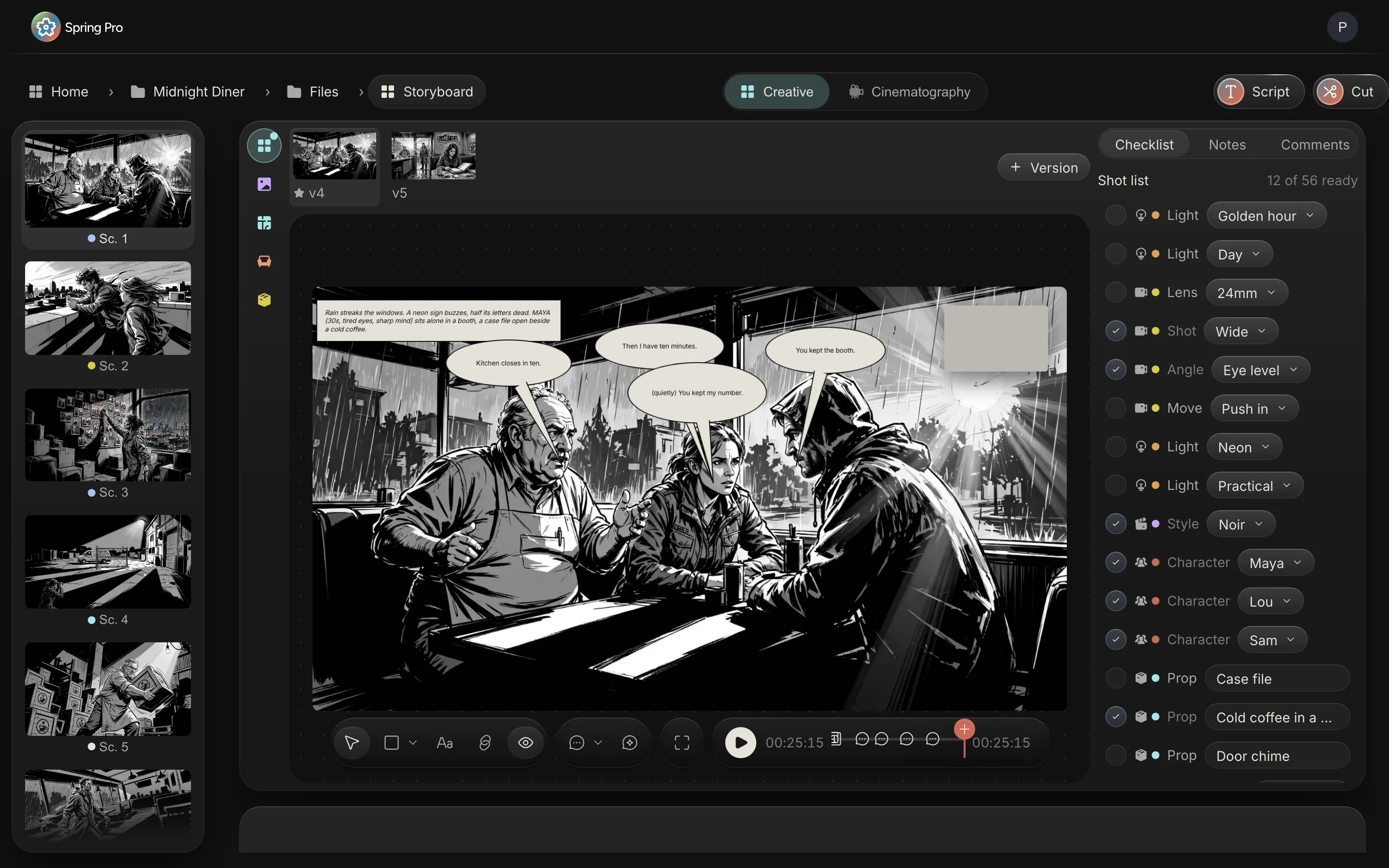
Real screen: Midnight Diner, our demo production, in Spring Pro.
The short answer. A shot list is the plan for how each scene is covered: the size of the shot, the angle, the lens, the camera move, the light and the style. A storyboard draws the same shots. Build both from the script, scene by scene, keep every try at each frame, star the one the film uses, and play the stars in order to check the timing before the shoot.
A shot list says how each scene will be covered. A storyboard shows it. In our view, kept in two files they drift apart: the list says wide and the drawing shows a close-up, and nobody notices until the day. This guide builds both from the script of a sample production, Midnight Diner, a demonstration project and not a real shoot: seven scenes, a set of picks for each, a frame for each, and the same frames played as an animatic. The numbers come from that project and the rules come from sources read and dated below.
In this guide 24 sections
- Quick answers
- Why the shot list and the board matter, and where they go wrong
- The film we are listing
- What a shot list holds
- What other shot lists carry, and what Spring Pro holds
- Step 1: Read each scene for what must be seen
- Step 2: Pick the size, the angle and the lens
- Step 3: Pick the move, the light and the style
- Step 4: A sample shot list, all seven scenes
- Step 5: Check the list against the rest of the project
- Step 6: Read it by shoot day
- Step 7: Draw the frame, and keep every try
- Step 8: Star the frame the film uses
- Step 9: Letter the dialogue, and time the scene
- Step 10: Play it as an animatic, then cut
- Step 11: Hand each department its own view
- Storyboarding a game: the same board, a different next step
- How people do it today, and what breaks when a scene changes
- From a short to a feature: what changes
- Doing it in Spring Pro
- The checklist
- How these numbers were made
- Questions people ask
- Sources
Quick answers
What is a shot list? A list of the shots a scene needs, each with its size, angle and movement and the kit behind it. Filmdaft calls it a detailed breakdown of every camera shot you plan to film in a scene or sequence. The shot list template holds the same picks as a spreadsheet.
What is a storyboard? A sequence of simple drawings or images, one for each shot or moment. Wikipedia describes it as a graphic organiser for pre-visualising a film, an animation, a motion graphic or an interactive media sequence.
What is the difference? The list is words and numbers, and the board is pictures. StudioBinder's guide, a competitor's page, describes the list as a detailed list of the shots to be filmed and the storyboard as a visual representation of the film or video project.
Who writes it, and in what order? The sources lean to the director and the cinematographer: StudioBinder adds the first assistant director, and Vimeo says the cinematographer usually writes it. On order, StudioBinder says shooting order, not story order, and Vimeo says you need not shoot in chronological order. Filmdaft says to work scene by scene from the script, and groups shots by setup. The day-by-day order belongs in the shooting schedule.
Do you need both? For a one-day video, a list may be enough. When the director, the camera team and art must see the same thing, the picture settles the argument before the day. That is our view, not a rule.
Does Spring Pro draw the frames? If you ask it to. Sketch AI draws a first frame from the scene, or you can draw, add your own picture or start blank. Its credits and pricing are not confirmed, so this page prints neither.
Why the shot list and the board matter, and where they go wrong
The list and the board are where the director's idea first becomes something other people can act on. Wikipedia says a film storyboard helps directors, cinematographers and television commercial clients visualise scenes and find problems before they occur, helps estimate production costs, and helps an editor assemble a rough cut. It adds that live-action scenes are rarely shot in script order, so a director can use the board on set to recall the intended look of each shot instead of rereading the script.
Everything after them reads from them. Filmdaft says the shooting schedule then uses the list to plan each day from setup time, location availability and crew needs.
In our view, the unit that costs is the hour. On the four shoot days of Midnight Diner, one extra hour of crew and cast labour costs between $2,639 and $2,993, depending on the day (the working is in film production scheduling). Here is who reads the list and the board, and what a vague one costs them.
| Reader | What they take from it | What goes wrong if it is vague or missing |
|---|---|---|
| Director | The frame and the picks, to agree the look | The shot is invented on the day, with the crew waiting |
| Camera team and grips | Size, angle, lens and move, and the dolly, crane or tower behind them | The wrong lenses are in the package, or the rig is not booked |
| Lighting | The light picks and the light plan | The rig is planned for the wrong time of day |
| Art and props | What the frame will show: set dressing and props | Something in the frame is not on the truck |
| 1st AD | The setups, to size the day | The day is planned from pages alone |
| Editor | The frames at their scene times | The pace is first seen in the cut |
The film we are listing
Midnight Diner is a short crime film. A burned-out investigator uses herself as bait to expose the night diner owner running contraband off the river, and pulls her old partner back in.
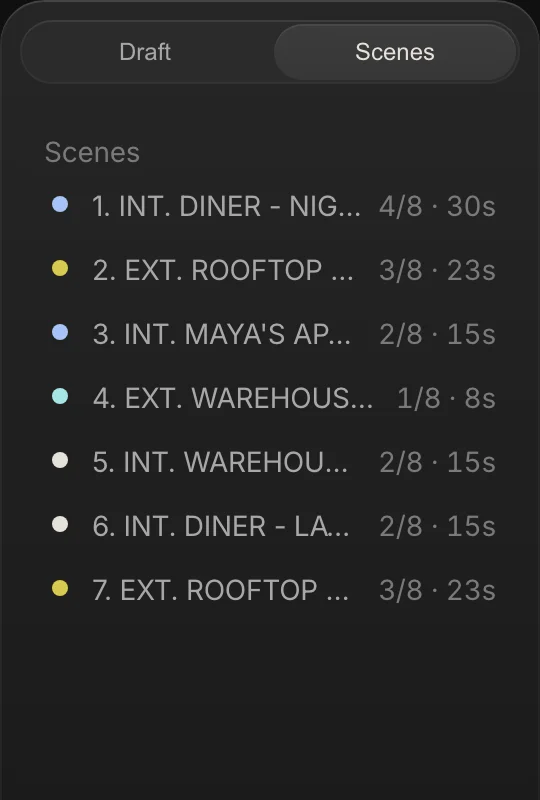
Seven scenes, 2 1/8 pages, four sets, three speaking characters. Here is every scene with the facts a shot list hangs on, and its planned length in seconds worked out two ways. Spring Pro keeps two clocks, and Step 9 says which one the animatic uses.
| Sc | Set | I/E | Time | Pages | By pages | By words | Cast |
|---|---|---|---|---|---|---|---|
| 1 | Diner | INT | Night | 4/8 | 30 s | 25.5 s | Maya, Lou, Sam |
| 2 | Rooftop | EXT | Day | 3/8 | 23 s | 19 s | Sam, Maya |
| 3 | Maya's apartment | INT | Night | 2/8 | 15 s | 9.5 s | Maya |
| 4 | Warehouse | EXT | Night | 1/8 | 8 s | 5.5 s | Maya |
| 5 | Warehouse | INT | Continuous | 2/8 | 15 s | 15 s | Lou, Maya |
| 6 | Diner | INT | Later | 2/8 | 15 s | 7.5 s | Sam |
| 7 | Rooftop | EXT | Dawn | 3/8 | 23 s | 12 s | Maya, Sam |
What a shot list holds
A shot list is a row per shot. The three guides read for this page share a core: a shot or scene number, a description of the shot or scene, and the camera's angle and movement. They differ at the edges.
StudioBinder's example adds shot type, equipment, framing, location and setup times, and sometimes audio or props. Vimeo's guide adds lighting, audio, durations and notes on props, costumes and locations. Filmdaft's list adds shot type, location, technical notes such as lens, depth of field, lighting and equipment, and an optional setup column that groups shots sharing a camera position and light.
Spring Pro's shot list holds six picks for each scene, each chosen from a short list so that two people mean the same thing by "wide": size (7 choices), angle (5 choices), lens (6 choices), move (8 choices), light (7 choices), style (5 choices). The first four belong to camera, light to lighting and style to direction. The checklist beside the frame calls the first pick Shot, and the Shot list tab calls it Size.
| Pick | Department | Choices |
|---|---|---|
| Size | Camera | Wide, Medium, Close, Extreme close, Over the shoulder, Two shot, Insert |
| Angle | Camera | Eye level, High, Low, Overhead, Dutch |
| Lens | Camera | 14mm, 24mm, 35mm, 50mm, 85mm, 135mm |
| Move | Camera | Static, Pan, Tilt, Push in, Pull out, Tracking, Handheld, Crane |
| Light | Lighting | Day, Night, Golden hour, Neon, Practical, Low key, High key |
| Style | Direction | Noir, Naturalistic, Documentary, Symmetric, Dreamy |
Size is how much of the subject is in the frame. Wikipedia's shot article draws the lines on the body: a medium shot stops just above or below the waist, a close-up shows the shoulder line, and an extreme close-up stops at the chin and forehead.
What other shot lists carry, and what Spring Pro holds
The table follows the fields in the three guides read for this page. Where Spring Pro does not hold a field, it says so.
| Field on other lists | Why it is there | In Spring Pro |
|---|---|---|
| Scene number | Match the shot to the script | Yes: every scene card carries its number |
| Shot number and setup letter (12A, 12B) | Tell shots apart, group by camera position | No, not in the picks: one set per scene, not per setup |
| Location, interior or exterior | Group the day by place | From the scene heading |
| Shot type, angle, movement, lens, lighting | The core of the list | Yes: the Size, Angle, Move, Lens and Light picks. The lens is a focal length, not a sensor size |
| Description of the action | What happens in the shot | The scene's script sits under the frame, and each row has a free Detail field |
| Equipment | What to bring | Yes: an Equipment row in the checklist, owned by Production |
| Framing, aspect ratio | Compose for the delivery | Not a row: Sketch AI draws frames at one wide size, close to 16 by 9, and the Timeline screen follows the film's own picture shape |
| Setup time or shot duration | Size the day | No: Spring Pro keeps no setup times, and a scene's planned length comes from its words |
| Props, wardrobe, audio | What is in the shot | Yes: rows for props, wardrobe, hair and makeup, sound and the rest, each owned by a department |
The honest gap is the second row. A conventional list has a row for every setup, so a scene can have a wide master, an over the shoulder and an insert, each with its own lens. In Spring Pro a scene holds one set of picks.
A scene can carry more than one row of a kind (scene 1 has four light rows), but nothing pairs a lens with the size it belongs to. Use the Detail field for that, and know what you give up.
Step 1: Read each scene for what must be seen
Read the scene as a camera would. What must the audience see, and in what order? Mark the moments the picture has to carry, because those are the shots. Vimeo's guide starts the same way: review the script, break the shoot into scenes if needed, then list the shots and camera setups.
Scene 1 of Midnight Diner opens: "Rain streaks the windows. A neon sign buzzes, half its letters dead." Everything in that line is something to see: rain on glass, a neon sign half dead. It tells the camera and the lights what the first frame is about before anyone picks a lens.
Step 2: Pick the size, the angle and the lens
Size first, because it decides how much of the place and the people the frame must carry: a wide shows where we are, a medium the people at a table, a close the face. Then the angle: level with the eyes, high, low, overhead or tilted (dutch). Pick each for what the shot needs to show, not for variety.
In the sample, scene 4 (a chain-link gate, a van, Maya watching) is picked wide, low and static. Scene 3 (Maya at her wall of photos) is over the shoulder and high.
A focal length only means something against a sensor size. Wikipedia's article on the normal lens says a normal lens has a focal length about equal to the diagonal of the film or sensor format, and that 50 mm is the most common normal lens on 35 mm full frame. Shorter is wide-angle and longer is long-focus. Spring Pro's Lens pick records the number only, so put the camera and sensor in the row's Detail field if it matters.
Step 3: Pick the move, the light and the style
Pick the move, then ask what carries it. Wikipedia says a dolly shot is traditionally done from a camera dolly, though a Steadicam or a gimbal can do the same. In the sample the tracking shot, the crane shot and the handheld shot each have an Equipment row for their gear: a dolly and track, a crane, a handheld rig with a follow focus.
The light pick says what the shot needs: day, night, golden hour, neon, practical, low key and high key. Lighting reads it, and so does Sketch AI when it draws the frame. The schedule does not: it reads the day or night in the scene heading.
Style is the director's one word: noir, naturalistic, documentary, symmetric and dreamy. Sketch AI does not read it either, because it takes its look from the film's style frame, so the pick is a note for people.
Step 4: A sample shot list, all seven scenes
Here is the shot list of Midnight Diner, computed from the project: every pick on every scene, in script order. Scene 1 shows four light picks because it holds four rows of that kind.
| Sc | Set | Size | Angle | Lens | Move | Light | Style |
|---|---|---|---|---|---|---|---|
| 1 | Diner | Wide | Eye level | 24mm | Push in | Golden hour; Day; Neon; Practical | Noir |
| 2 | Rooftop | Two shot | Low | 50mm | Static | Day | Naturalistic |
| 3 | Maya's apartment | Over the shoulder | High | 35mm | Handheld | Practical | Noir |
| 4 | Warehouse | Wide | Low | 85mm | Static | Night | Noir |
| 5 | Warehouse | Medium | Eye level | 24mm | Tracking | Low key | Noir |
| 6 | Diner | Wide | High | 35mm | Pull out | Low key | Noir |
| 7 | Rooftop | Two shot | Eye level | 50mm | Crane | Golden hour | Dreamy |
Read it for patterns, and for what is missing. Wide is the most used size, in scenes 1, 4 and 6, and Noir is the style of 5 of the 7 scenes. Only 4 of the 45 picks are ticked ready, all in scenes 1 and 2.
Close, Extreme close and Insert are never picked as a size. An unused choice is not an error. It is a question: did the director mean a film with no close-up?
A row added from the checklist starts on the first choice of its list, so a pick nobody changed reads like a decision. In the sample, Wide, Eye level, Static, Day and Noir are each the first choice of their list, and together they are 15 of the 45 picks, so check that each was chosen.
Step 5: Check the list against the rest of the project
A list is not done when every cell is filled. It is done when it agrees with the breakdown, the to-dos and the scene heading. Five checks on the sample found five questions, none of them a verdict: each is for the DP or the director. The sample is a demonstration project, so these are mismatches inside its own data, shown to teach the check and not findings from a real shoot.
| Where | The shot list says | The rest of the project says | The question |
|---|---|---|---|
| Scene 1, light | Golden hour, Day, Neon and Practical | The heading says night, and the schedule reads the heading | Which picks are for the night, and are Day and Golden hour wanted at all? |
| Scene 4, lens | 85mm | An Equipment row asks for a 135mm long lens, and two camera to-dos ask for 135mm. The checked lens package lists 24, 35, 50 and 85mm | Which lens is the plan, and is the 135mm in the package? |
| Scenes 1 and 6, move | Push in and Pull out | No Equipment row for either scene names a dolly, slider, track or crane | What does the move ride on? |
| Scene 3, size | Over the shoulder | A direction to-do asks for an insert list of eight photos, and no scene picks Insert | Where do the inserts live, when a scene has one size pick? |
| The whole list | 4 of 45 picks ticked ready | A priority 1 direction to-do, due the day before Day 1, says to lock the shot list with the DP, and it is still open | Who locks it, and when? |
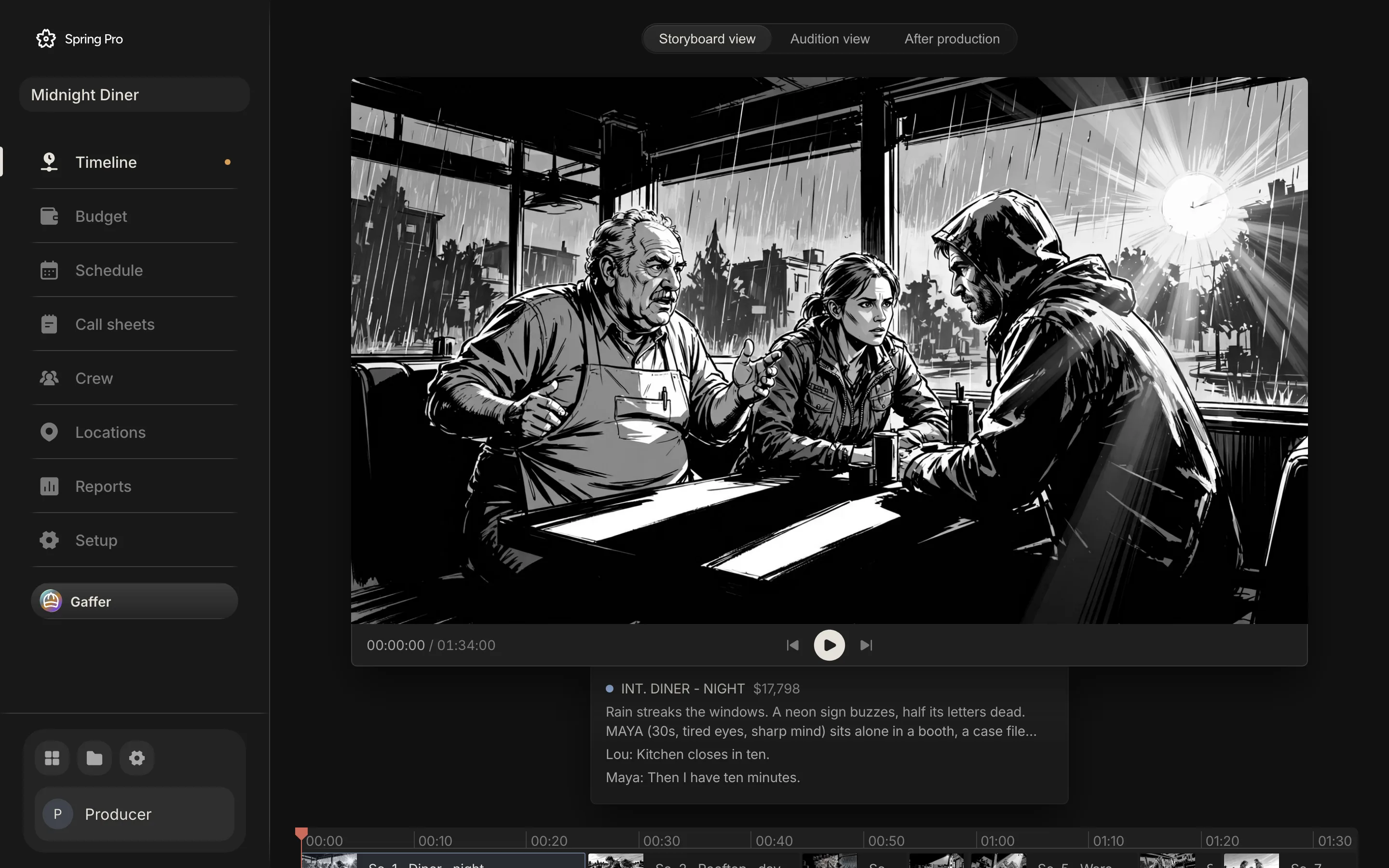
The first row shows on the board screen above. Scene 1's frame has a bright sunburst in its window while the heading says night, and its list starts with Golden hour and Day.
Sketch AI reads the light picks when it draws, and the text of the scene's to-dos too. The project does not record which picks or to-dos were set when that version was made, so treat the frame as a question and not as proof of a cause.
Step 6: Read it by shoot day
A shot list is written in script order and shot in schedule order. Reading it by day shows what the camera team has to carry and change. This is the same list grouped by the days of the shooting schedule, with the Equipment rows of the same scenes.
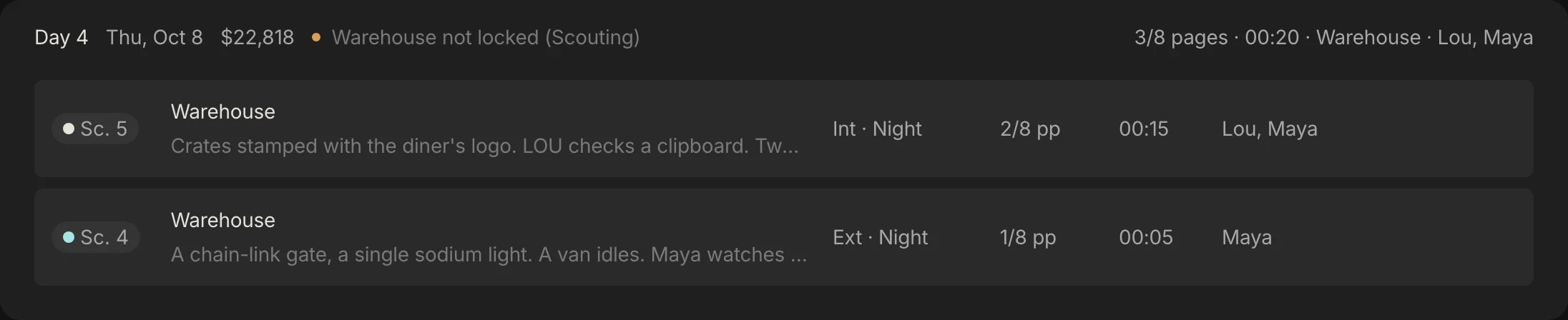
| Day | Scenes, in shooting order | Lenses | Moves | Light picks | Equipment named | One extra hour |
|---|---|---|---|---|---|---|
| 1 | 1, 6 | 24mm, 35mm | Push in, Pull out | Golden hour, Day, Neon, Practical, Low key | 100 kVA generator; Rain towers (2); Tower for the high wide | $2,993 |
| 2 | 2, 7 | 50mm | Static, Crane | Day, Golden hour | Kit lift to the roof; Crane for the dawn rise | $2,851 |
| 3 | 3 | 35mm | Handheld | Practical | Handheld rig with follow focus | $2,639 |
| 4 | 5, 4 | 24mm, 85mm | Tracking, Static | Low key, Night | Dolly and track for the tracking shot; 135mm long lens and heavy sticks; 100 kVA generator | $2,781 |
Day 2 asks for one lens, 50mm, for both scenes. Day 4 asks for two (24mm then 85mm), its Equipment row adds a 135mm, and it shoots scene 5 before scene 4, the reverse of the script.
An hour over on Day 4 costs $2,781 of crew and cast labour, from the budget engine at a planned 11-hour day with overtime after hour 10. Spring Pro keeps no setup times, so it cannot say how long a lens change or a dolly build takes. Ask your DP, and put the answer in the schedule.
Step 7: Draw the frame, and keep every try
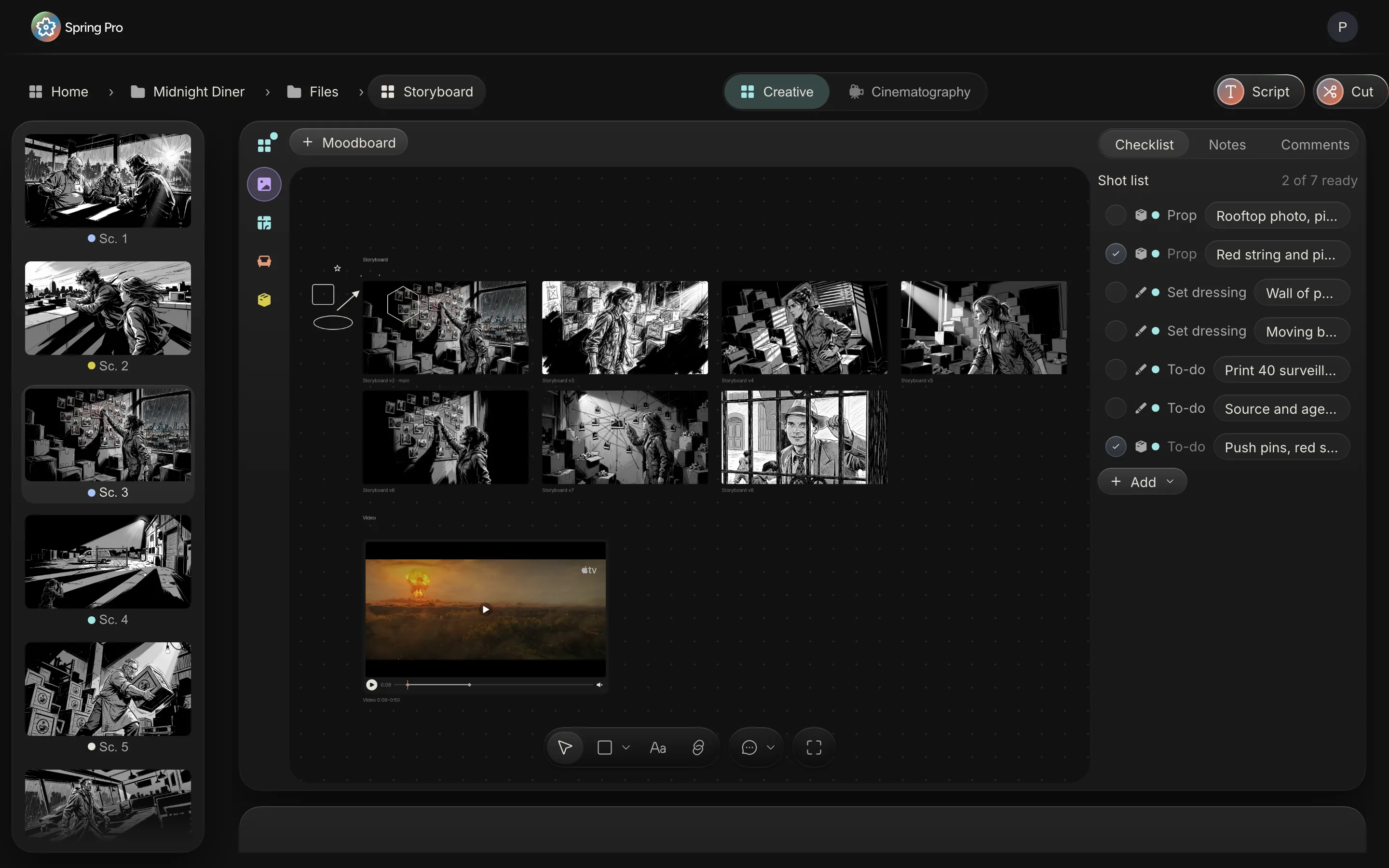
The frame is the shot in one picture. In Spring Pro, open a scene and its frame sits beside the picks, with the scene's script under it. Add a version from the Version menu: Sketch AI draws a first frame from the scene, Sketch from image redraws a picture you choose in the film's style, Blank gives an empty canvas, and you can add your own picture as it is (the menu lists that as Moodboard).
Sketch AI is given the scene's first two action lines, its cast, your picks for size, angle, lens and move, the light picks, the props, set dressing and VFX listed on the scene, and the text of the scene's to-dos. It also gets the film's style frame if you have set one, a character sheet for up to three people in the scene and, with no style frame set, an earlier frame, preferring one that shares a character. Frames come out black and white.
The first time you press it in a project with no film bible, it drafts the bible instead (the world, the look and the cast) for you to review on the title page. The next press draws.
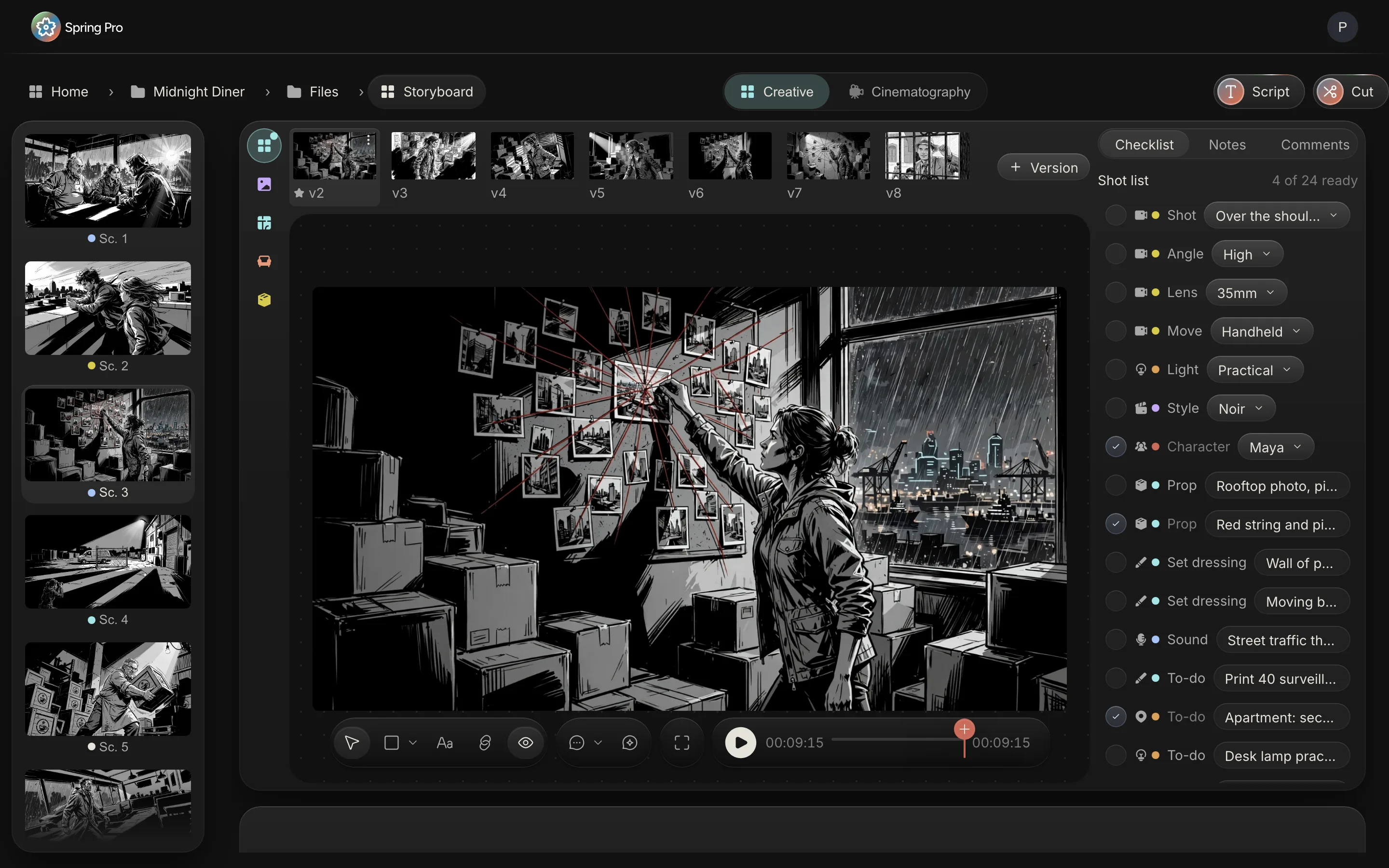
Every try is kept as a version, numbered one higher than the highest so far, in a row above the frame. The first frame drawn in a new scene is v2, because an empty v1 stands in until then. You can duplicate a version, copy it to another scene, replace its image or delete it.
Step 8: Star the frame the film uses
One version is the frame the film uses. The first frame you add is starred for you, and a later version takes the star when you choose Make primary from its menu. The star is what the rest of the project reads: the scene cards, the strip of scenes beside the frame, the animatic and the cut show the starred frame, and Reports shows whether each scene has a main frame picked.
Everyone on a project can star a frame, because there are no per-person approval rights yet. Agree who stars. Comments sit on the scene and can be pinned to a moment and a version.
The star is one link in a chain. Here is the whole chain, from a pick to the cut.
| You do | The app then | Where you see it |
|---|---|---|
| Pick size, angle, lens, move or light | Sketch AI reads the picks when it draws, and the camera and light views list them | The checklist beside the frame, Cinematography, the Shot list tab |
| Add a version | Keeps it beside the others, numbered, and stars it if it is the first | The row above the frame |
| Star a version | Makes it the scene's frame everywhere | The scene cards and the strip of scenes, the Storyboard view of the Timeline, the Cut button, Reports |
| Change a line of script | Works the scene's length out again and moves every later card | The time ranges on the cards, the length of the animatic |
| Letter the dialogue | Puts each line on the frame as a balloon with its own time | The frame canvas, and the cut plays a still for each balloon cue |
| Rewrite a scene after its frame was drawn | Keeps its frame and picks, and flags nothing as out of date | Nowhere: check the frame by eye |
| Press Cut | Lays each scene's starred frame on the edit timeline at its time | The edit |
Step 9: Letter the dialogue, and time the scene
Letter the dialogue is the spark button on the frame canvas. It puts the scene's first action line on the frame as a caption and each spoken line as a balloon, up to eight in all. A vision model looks at a small copy of the frame and is asked to put each balloon above its speaker's head and clear of faces, with a plain layout as the fallback.
The picture underneath is untouched. The balloons are ordinary items you can move, edit or delete, in four kinds: speech, off-screen, voice-over and caption. Each has a time, in seconds into the scene, which is its cue. The frame canvas can play the scene with the balloons coming in on their cues, and Cut turns them into stills.
A scene's planned length is worked out from its words, with dialogue at 150 words a minute plus half a second a line, action at three words a second, half a second for a parenthetical, never under four seconds, and the total rounded to the nearest half second. By that count Midnight Diner runs 1:34. The page-a-minute rule would put its 2 1/8 pages at about 2:08: Wikipedia calls that rule widely contested, and here it is 34 seconds off. Added scene by scene, the By pages column in the scene table near the top makes 129 seconds, because each scene is rounded to the second.
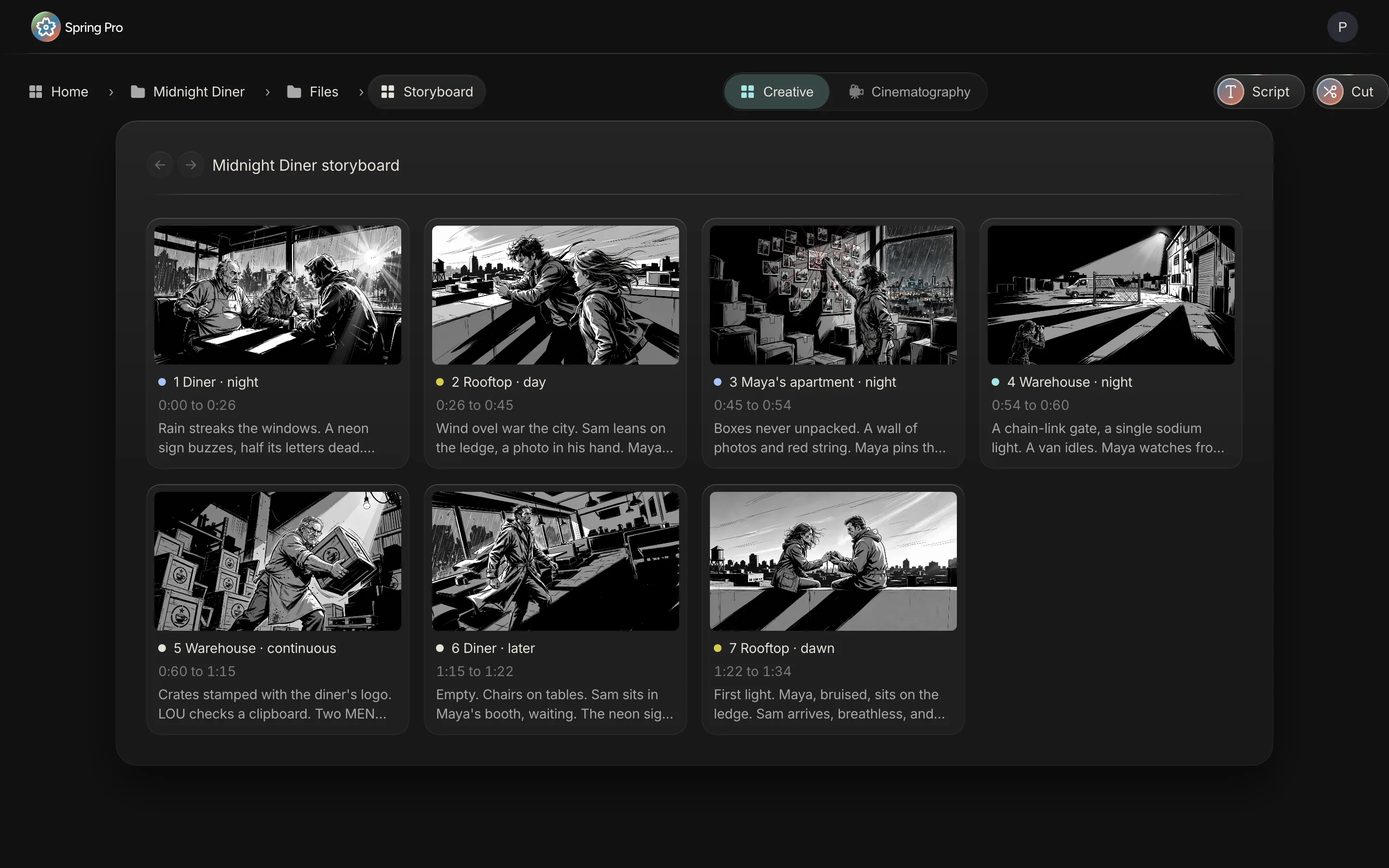
The Script page sizes the same scenes by pages, and the two clocks disagree: scene 1 is 30 seconds by pages and 25.5 by words. The storyboard, the schedule's day rows, the animatic and the cut use the words. Treat both as a plan until you have timed a read-through.
Step 10: Play it as an animatic, then cut
An animatic is the storyboard played in time. Wikipedia describes it as a sequence of still images, usually from a storyboard, shown in sync with rough dialogue or a rough soundtrack, used to test camera placement, shot lists and timing. Catch the dead scene here and nobody has paid to shoot it.
In Spring Pro it is the Storyboard view on the Timeline. It plays each scene's starred frame at its scene time, with the scene's heading and first lines under the frame and, once there is a budget, its planned cost: $17,798 for scene 1 in the sample. It shows the frames as pictures, without their balloons, and has no sound. Watch it once without stopping and write down where it drags.
Press Cut and the editor lays each scene's starred frame as an image clip at its scene time on one lane. A lettered frame plays as stills, with a new one wherever a balloon or caption comes or goes, back to back inside the scene's slot, so the balloons come in on their cues. The animatic and the cut run on the same scene times, so the edit starts from the timing you have already watched.
Step 11: Hand each department its own view
Every row belongs to a department, shown by the dot beside it, and each view of the board narrows to the departments it serves. The table counts, on Midnight Diner, what each department holds across the seven scenes, and where it sees it.
| Department | Its rows | Seen in (board views) | Rows in the project | To-dos in the project |
|---|---|---|---|---|
| Camera | Shot (the size), Angle, Lens, Move | Storyboard, Floor plan, Camera | 28 | 11 |
| Lighting | Light | Storyboard, Floor plan, Light | 10 | 10 |
| Direction | Style | Storyboard | 7 | 7 |
| Casting | Character, Extras | Storyboard, Floor plan | 16 | 4 |
| Art direction | Set dressing | Storyboard, Moodboard, Set, Dressing | 10 | 7 |
| Props | Prop | Storyboard, Moodboard, Dressing, Props | 14 | 3 |
| Costume | Wardrobe | Storyboard | 12 | 6 |
| Hair and makeup | Hair and makeup | Storyboard | 4 | 4 |
| Stunts | Stunt, Special effects | Storyboard | 8 | 6 |
| Sound | Sound | Storyboard | 7 | 7 |
| VFX | VFX | Storyboard | 2 | 4 |
| Production | Vehicle, Equipment | Storyboard | 11 | 12 |
| Locations | None of its own | Storyboard (its to-dos) | 0 | 9 |
A to-do for a department shows wherever that department's rows show, so the DP's Camera view carries the camera to-dos as well as the four picks. Style is the odd one out: it sits in no Cinematography view, so the director's one word shows on the board and on the Timeline's Shot list tab, not in the camera or light views.
Art and the camera team each get a board of their own on the same scene, with versions of their own. Under Creative, the Moodboard is an open canvas of references that also mirrors the scene's storyboard versions, and Set, Dressing and Props hold versions named s, d and p. Under Cinematography, Floor plan, Camera and Light hold the DP's versions, named f, c and l. Sketch AI can draw a first pass of each from the scene and its starred frame, and these are drafts to correct, like any frame.
The rows add up to 129 checklist rows and 90 to-dos, the same to-dos counted in how to do a script breakdown.
Storyboarding a game: the same board, a different next step
People who search for a game storyboard mean at least two jobs, in our reading. One is boarding a cutscene, which Wikipedia describes as a non-interactive sequence in a video game that interrupts the gameplay. The other is sketching how a game or an interface flows, and Wikipedia's storyboard article shows the word covers that too, from interactive media sequences to software interface design.
Spring Pro covers the first: a script, a frame, a shot list, versions, a starred frame and an animatic for each cutscene, as this page shows for a film. It is not a tool for mapping levels or interface screens. The game preproduction page has the cutscene side, and marks what is still coming.
How people do it today, and what breaks when a scene changes
There are four common ways. They differ in what you redo when a scene changes. This is our view, not a test of products.
| Way of working | Good for | When a scene changes you must |
|---|---|---|
| Pencil on printed boards, with a list on paper | One person, one afternoon | Redraw the panel, rewrite the line, reprint and re-pin |
| A spreadsheet for the list, drawings in another app or a folder | A short with a handful of setups | Edit the row, redraw the frame elsewhere, re-export, and keep the names matching |
| A vendor suite with a shot list and a storyboard tool (StudioBinder promotes both) | A team that already works in the suite | Check how that tool carries a scene change. We have read its guides, not tested its software |
| One project where the board sits on the scenes (Spring Pro) | A script that changes weekly, read by many people | Edit the scene. The frame and picks stay on it, and nothing says they are out of date, so check them by eye |
From a short to a feature: what changes
The job does not change with size. What grows is the number of setups, the people who read the list, and the cost of a wrong one. These sizes are rough labels, not industry definitions.
| Size | What the list and board are | What to add |
|---|---|---|
| Solo or YouTube video | A note of the shots, or the six picks on a card per scene | The order you shoot in, and the inserts you forget |
| Short film | One list, one board, the six picks per scene | Setups (A, B) when a scene has several, and the lens kit |
| Commercial | A board the client approves, in many versions | Numbered versions, comments pinned to a moment, and the one frame signed off |
| Indie feature | A numbered list in shooting order, per setup | Setup numbers and setup times. Spring Pro's picks hold neither: it keeps one set per scene |
| Series or episodes | Many scripts, boards for each | Not Spring Pro yet: one script and one unit per project |
Doing it in Spring Pro
The Storyboard page has a card for every scene, and Creative and Cinematography are its two views of a scene. The Timeline holds the whole-film views: the Shot list tab, the Storyboard view that plays the starred frames, and the To-dos and Breakdown tabs. The Cut button at the top right of the storyboard page hands the frames to the edit. Reports has a Shots page that counts, for each scene, the picks ticked ready, the frames and whether a main frame is picked.
You can ask Gaffer to set a scene's picks. It changes only the pick you name, and one undo reverts its run. Gaffer does not draw frames: those come from the Version menu. What it does not do yet:
- One set of picks per scene, not per setup. The picks carry no shot numbers or setup letters, and nothing pairs a lens with its size.
- No setup times or shot durations. A scene's planned length comes from its words.
- No flag when a scene is rewritten after its frame was drawn. Check the frame by eye.
- No per-person approval rights. Everyone on a project can star a frame.
- No sound in the animatic. It shows frames and text.
- No export or print sheet of the picks. Reports prints, and its Shots page shows counts. Start from the shot list template if you need a spreadsheet.
- Sketch AI credits and pricing are not confirmed. This page prints no price and no credit count. You never need Sketch AI: draw, add a picture or start blank.
This guide is the hub for storyboards and shot lists on this site. In Spring Pro the board is one view of the same scenes that the breakdown, the schedule and the call sheet read. For the board as a product see storyboard software. For what comes before it, see script breakdown software, and for what comes after, shooting schedule software and call sheet software.
The checklist
Copy this. Tick it before you hand the list and the board to anyone.
- One person owns the list, and the script is stable enough to draw from
- Every scene has its six picks, and each was chosen, not left on the first choice a new row starts with
- A scene that needs several setups has them written down, because the picks are per scene
- The lens picks are in the package you have checked, and the sensor size is written somewhere
- Every move has the gear behind it on an Equipment row
- The light picks agree with the scene heading, or the list says why not
- Every scene has a frame, and one version is starred
- You played the animatic once, end to end, and noted where it dragged
- The list is locked with the DP, and the date is written down
How these numbers were made
Every number about Midnight Diner on this page comes from the project itself, read with the app's own code. The picks and counts are computed, the planned lengths use the storyboard's pace formula (copied into this page and checked against the storyboard screen), and the hour costs come from the budget engine at a planned 11-hour day, labour only. The build stops if the project changes so that a claim no longer holds.
A few things are read off the screens and not computed, because the export leaves out pictures: the version rows, the starred versions and what the frame of scene 1 shows. Midnight Diner is a demonstration production, not a case study of a real shoot. Its picks are part of the demonstration data, so the five questions in Step 5 are mismatches inside that data, shown to teach the check. What other shot lists carry comes from the sources below, read on 2026-10-12, and they differ in which fields a list holds and who is named as its author.
Questions people ask
What is a shot list?
A list of the shots a scene needs, each with its size, angle, movement and the kit behind it. Filmdaft calls it a detailed breakdown of every camera shot you plan to film in a scene or sequence.
What goes in a shot list, and where is an example of a shot list?
The guides differ at the edges. StudioBinder and Filmdaft both list the scene and shot number, location, shot type, camera angle, camera movement and a note of the action. Filmdaft adds lens and lighting as technical notes, Vimeo lists lighting and durations, and StudioBinder lists equipment and setup times. A worked example for all seven scenes of Midnight Diner is in Step 4 above.
Is there a sample shot list or a film shot list template I can copy?
Yes. The shot list template is the list of Midnight Diner, the sample production, one row per scene, as a CSV. Vimeo also links templates in Sheets, Excel, Word and PDF.
What is the difference between a shot list and a storyboard?
The list is words and numbers and the board is pictures. StudioBinder's guide defines the list as a detailed list of the shots to be filmed and the storyboard as a visual representation of the project. Both are made in pre-production.
Do I need a storyboard if I already have a shot list?
Not always. For a one-day video the list may be enough. When the director, the camera team and art must agree on what a shot looks like, the picture does that faster than a paragraph.
What is an animatic?
The storyboard played in time. Wikipedia describes it as a sequence of stills, usually from a storyboard, shown with rough dialogue or a rough soundtrack. In Spring Pro the Storyboard view of the Timeline plays the starred frames at their scene times, with no sound.
Is there a free online storyboard maker?
Some tools say so: StudioBinder's guide promotes its own free storyboarding app (read on 2026-10-12, so check it), and pencil and paper cost nothing. Spring Pro's pricing is not confirmed, so this page makes no claim about what it costs and prints no price. Its Sketch AI credits are not confirmed either.
Is Spring Pro a StudioBinder storyboard alternative?
For the board and the shot list, it does the same core jobs: a frame for each scene, versions, a shot list with size, angle, lens, move, light and style, and an animatic. What it adds, per the StudioBinder comparison, is the budget and the edit in the same project. What it lacks here is setup numbers, setup times (which StudioBinder's guide lists) and per-person approval. We have read StudioBinder's guides for this page, not tested its software, so we do not claim a feature-for-feature match.
How do I make a game storyboard?
For a cutscene, the same way as a film: a frame for each scene, a shot list and an animatic. Wikipedia describes a cutscene as a non-interactive sequence in a game. The game preproduction page covers it. It is not a tool for mapping levels or interface screens.
Does Spring Pro draw storyboards with AI, and what does it cost?
On request: Sketch AI draws a first frame from the scene and your picks, in black and white, and you correct it. You can also draw, add a picture or start blank. Pricing and credits are not confirmed, so this page prints none.
Does the storyboard follow my script changes?
The board is keyed to the scenes of the script, so a new scene heading adds a scene card that waits for its frame, and a rewritten scene keeps its frame and picks. Spring Pro does not flag the frame as out of date, so check it by eye. A scene's planned length is worked out again from its words.
Sources
Every outside claim that names a source comes from one of these, read on the date shown. Standard conventions, such as the eighths rule and the usual specialist cases, are common practice. Figures from agreements and summaries change at each negotiation, so check the current text before you rely on a number.
- StudioBinder, shot list vs storyboard (a competitor's guide, which also promotes its own tools). Checked 2026-10-12.
- StudioBinder, what is a shot list, with an example (a competitor's guide). Checked 2026-10-12.
- Filmdaft, what is a shot list (a filmmaker's site that also promotes its own shot list maker and template). Checked 2026-10-12.
- Vimeo, how to make a shot list (a video platform's guide). Checked 2026-10-12.
- Wikipedia, storyboard. Checked 2026-10-12.
- Wikipedia, animatic (the animatics section of the storyboard article). Checked 2026-10-12.
- Wikipedia, shot (filmmaking). Checked 2026-10-12.
- Wikipedia, normal lens. Checked 2026-10-12.
- Wikipedia, cutscene. Checked 2026-10-12.
- Wikipedia, screenplay. Checked 2026-10-12.
More about storyboard and design
Directors, camera and art need to see the same scene before the day, and the plan has to survive the changes.