How to make a film call sheet, with a real filled-in example.
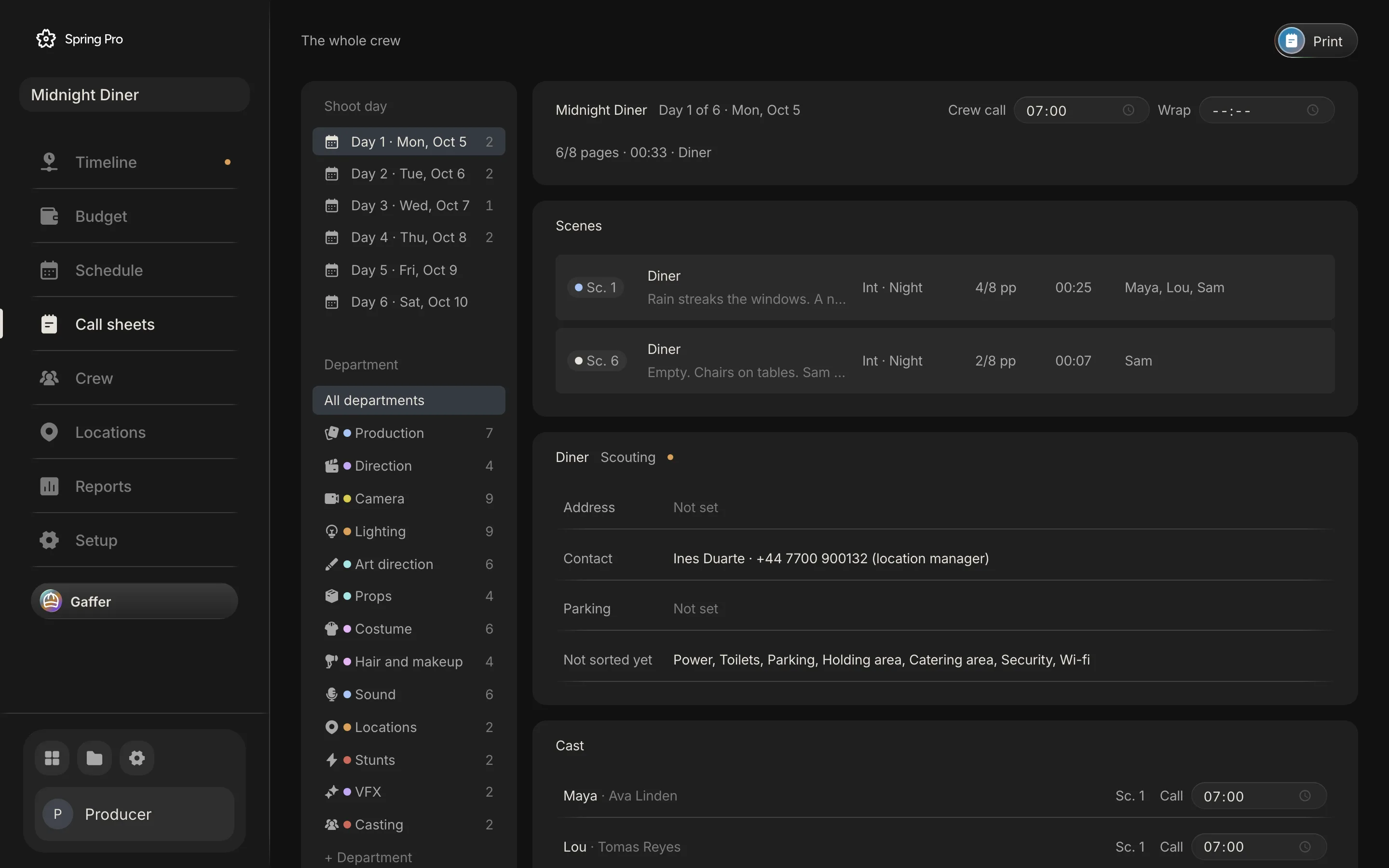
Real screen: Midnight Diner, our demo production, in Spring Pro.
The short answer. A call sheet tells every person on the shoot where to be and when, for one day. Build it from the schedule, not from last week's sheet: the day's scenes, the crew call and each actor's own call, the location with its address and parking, what is needed on set, and anything still open. Check it, approve it, and send one version.
Most call sheets are last week's call sheet with the date changed. That is how wrong call times happen. This guide builds one properly on a real production, Midnight Diner, from the schedule and the breakdown, and shows what the sheet carries on each of its 4 shoot days. The numbers come from the project and the rules come from sources read and dated below.
In this guide 20 sections
- Quick answers
- Why the call sheet is where mistakes become real
- What goes on a call sheet
- The film we are sheeting
- Step 1: Start from the schedule, not from last week
- Step 2: Set the crew call, then each actor's call
- Step 3: Check the rest between days
- Step 4: Say where, exactly
- Step 5: List what has to be on set
- Step 6: Show what is still open
- Step 7: Check it, approve it, send one version
- When the sheet changes after it goes out
- One sheet for each department
- How people make a call sheet today, and what breaks when the day changes
- From a short to a feature: what changes
- Doing it in Spring Pro
- The checklist
- How these numbers were made
- Questions people ask
- Sources
Quick answers
What is a call sheet? The document that tells cast and crew where to be and when, for one shoot day. The glossary entry has the short definition.
Who makes it? Generally the 2nd assistant director creates it, gathering department feedback, and the 1st AD gives final approval. Filmdaft adds that the 2nd AD usually builds it from the production schedule with the production coordinator, and on a small project the producer may do it.
When does it go out? The sources differ. StudioBinder says ideally 12 to 14 hours before the shoot day, Filmdaft says no later than 12 hours before the next work day starts, and Filmlocal says typically the evening before. Union agreements can set a deadline, so check yours.
One sheet or several? One sheet goes out per shoot day. Spring Pro can also show the same day filtered to one department.
Is it the same as the schedule? No. The schedule covers the whole shoot, and the call sheet covers one day with times and addresses filled in. See how to make a shooting schedule.
Why the call sheet is where mistakes become real
Everything upstream is a plan. The call sheet is the moment a plan becomes an instruction to the whole crew, and every error in the schedule, the breakdown or the locations arrives on it. A wrong call time is not a typo, it is a crew standing outside a locked door.
Each department plans its morning from the sheet. Filmlocal describes grip and electric using vehicle and generator positions to plan rigging, art and sound using scene order to plan gear, and crew working back from their call. Crews also keep sheets as records, which matter in a dispute about hours.
Hours are the cost. On Day 1 of Midnight Diner, one extra hour of crew and cast labour is $2,993 (the working is in film production scheduling).
| Reader | What they take from it | What goes wrong if it is wrong |
|---|---|---|
| Cast | Their own call, the scenes they are in | Waiting for hours, or missing the first setup |
| Crew | The crew call, the address, parking | The crew arrives late, or in the wrong place |
| Grip, electric | Where the vehicles and the generator go | The rig is planned for the wrong layout |
| Art, costume, props | The elements needed on set | A prop, a coat or a rig is not on the truck |
| Production office | The day as a record | No proof of what was called, if hours are disputed |
What goes on a call sheet
The sources agree on most of it. StudioBinder splits the sheet into a top section for nearly everyone (title, general call, location and address, producer and AD contacts, nearest hospital, sunrise and sunset, weather, parking, announcements) and a bottom section that is more individual (scenes, locations, scene schedules, individual call times, pick-ups).
Here is that list against what Spring Pro's call sheet actually carries, from its own code. Where a field is not a field, the table says so.
| Field | Why it is there | In Spring Pro |
|---|---|---|
| Production, day number, date | Which day this is | Yes: "Day 1 of 6" and the date, in the header |
| Crew call | When the crew is due | Yes, one time per day |
| Wrap | When the day ends, which the next call has to clear | Yes, a field you fill in |
| Scenes, pages, set, light | What will be shot | Yes, from the schedule |
| Location: address, contact, parking | Where to go | Yes, from Locations, with a flag when it is not locked |
| Facilities not sorted yet | What the day still lacks on site | Yes: power, toilets, parking, holding area, catering, security, wi-fi |
| Cast with their own call | When each actor is due | Yes: each actor, their scenes and their call |
| Elements needed on set | What has to be on the truck | Yes: nine categories from the breakdown |
| Open to-dos for the day | What is not done yet | Yes: a "Still open" list by department |
| Notes | Parking, safety, anything else | Yes, free text |
| Weather, sunrise and sunset, nearest hospital | Safety and planning | Not fields: write them in Notes |
| Calls per crew member or department | When each crew member is due | Not on the sheet: one crew call for the day (cast do get their own) |
| Advance schedule, pick-ups, N/C codes | The next day and special cases | Not on the sheet |
Abbreviations you will meet on other sheets, as Filmdaft defines them: SW start work, W work, WF work finish, SWF start work finish, H hold, N/C no call, PU pick-up, HMU hair and makeup, BG background, and the 1/8 page counts. The day out of days guide explains the first five.
The film we are sheeting
Midnight Diner has 4 shoot days. Each gets its own sheet. Here is what each one carries, computed from the project: the scenes and pages, who is called, how many elements are on set, and how many to-dos are still open.
| Day | Date | Scenes | Pages | Set | Cast called | On set | Still open | Priority 1 |
|---|---|---|---|---|---|---|---|---|
| 1 | 2026-10-05 | 1, 6 | 6/8 | Diner | 3 | 21 | 29 | 7 |
| 2 | 2026-10-06 | 2, 7 | 6/8 | Rooftop | 2 | 13 | 22 | 7 |
| 3 | 2026-10-07 | 3 | 2/8 | Maya's apartment | 1 | 7 | 7 | 0 |
| 4 | 2026-10-08 | 5, 4 | 3/8 | Warehouse | 2 | 21 | 22 | 7 |
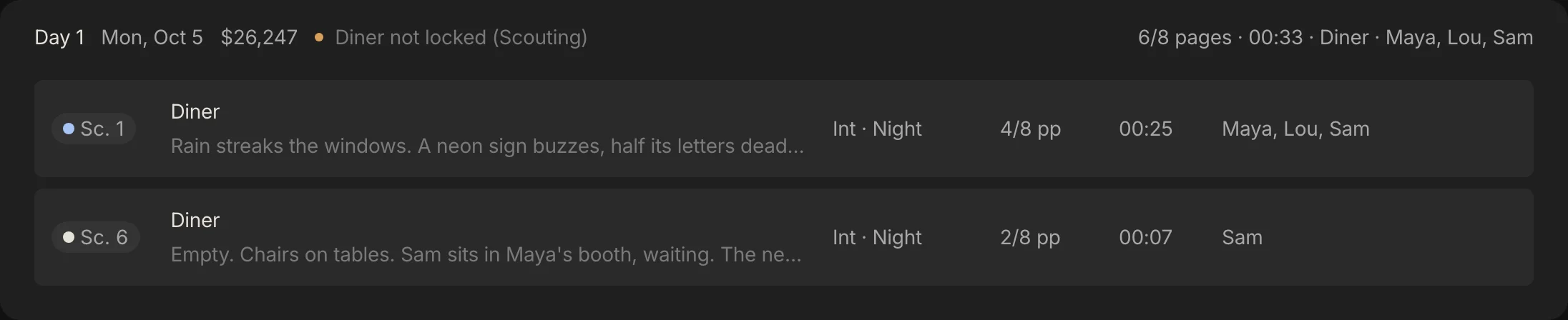
The rest of this guide builds Day 1: scenes 1 and 6 at the diner, 6/8 pages, with Maya, Lou and Sam.
Step 1: Start from the schedule, not from last week
The day's scenes, pages, sets and cast come from the schedule. Do not retype them. A 2nd AD builds the sheet from the production schedule, and a sheet copied from the last one carries the last one's mistakes.
In Spring Pro the sheet is built from the schedule as you look at it: pick the shoot day and its scenes, pages, set and cast are already there. Move a scene to another day and the sheet follows.
Step 2: Set the crew call, then each actor's call
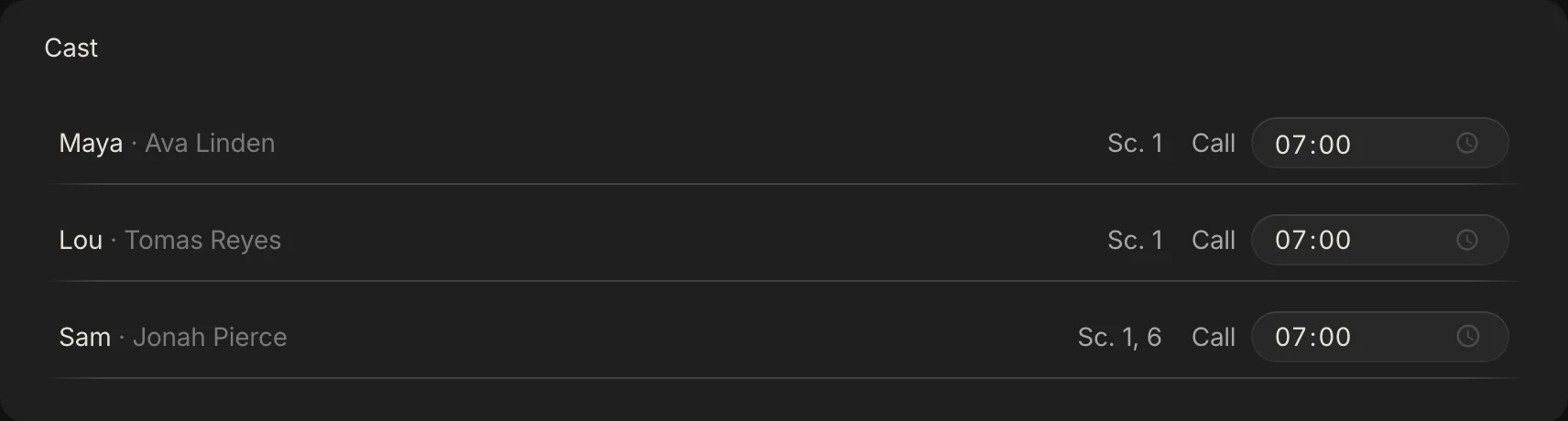
The crew call is the time the whole crew is due. Filmlocal defines the general call as when base camp opens, not an individual's call. Cast usually get later calls of their own, because each needs time in hair, makeup and wardrobe before the set: Filmlocal lists up to four times for an actor, for makeup, hair, costume and set.
Work backward. Start from the time the first scene needs the actor on set, subtract the time their hair, makeup and wardrobe take, and leave a buffer. Then check the crew can be ready for that first setup by the crew call.
One honest note about the sample. Midnight Diner's sheets use the default: every call is 07:00 and no actor has a call of their own. A real night day would call in the afternoon, which is why the turnaround check below matters.
Step 3: Check the rest between days
Every pair of days has a rest to clear. The wrap on one day plus the minimum rest is the earliest legal call on the next, and a night day followed by an early call is the classic trap.

Spring Pro keeps a wrap field on each sheet, and it does not check turnaround for you. Turnaround and meal breaks has the rules from two agreements (the IATSE 2021 summary and an Australian agreement summary, both summaries, so check your own contract) and a calculator for the earliest legal call.
Step 4: Say where, exactly
A sheet that sends the whole crew to the wrong place or the wrong door is worse than no sheet. Put the full address, the parking, and a contact who answers on the day. The top section in StudioBinder's layout adds the nearest hospital, the weather, sunrise and sunset.
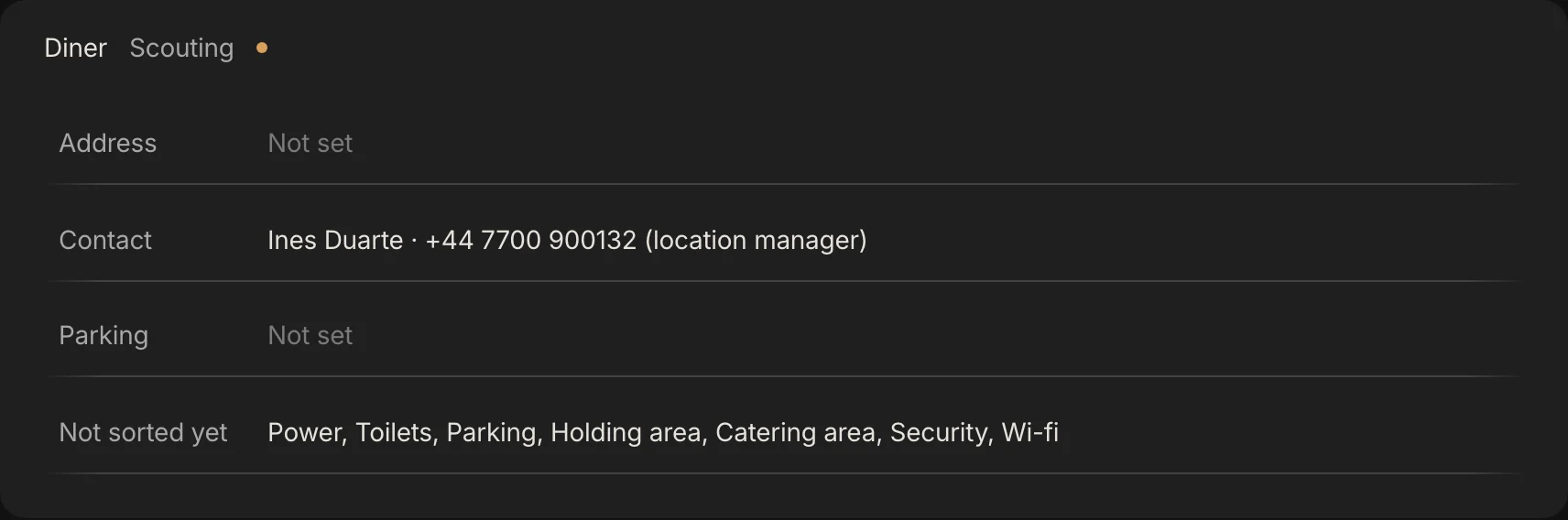
In Spring Pro the location block is read from Locations: address, contact, parking, and the facilities not sorted yet. It also shows the location's status and a flag when it is not locked. Day 1's block is honest about the sample: the address and the parking are not set, and the diner is still at Scouting. A sheet that shows its own gaps is doing its job.
Spring Pro has no weather, sunrise or hospital fields. Put them in the Notes box. StudioBinder advises checking the weather three days out, the day before and the morning of the shoot.
Step 5: List what has to be on set
The breakdown is what the sheet draws on here. Every prop, set dressing item, wardrobe look, vehicle, effect and piece of equipment for the day's scenes goes on the sheet, so the department that owns it knows what to bring. How to build those lists is in how to do a script breakdown.
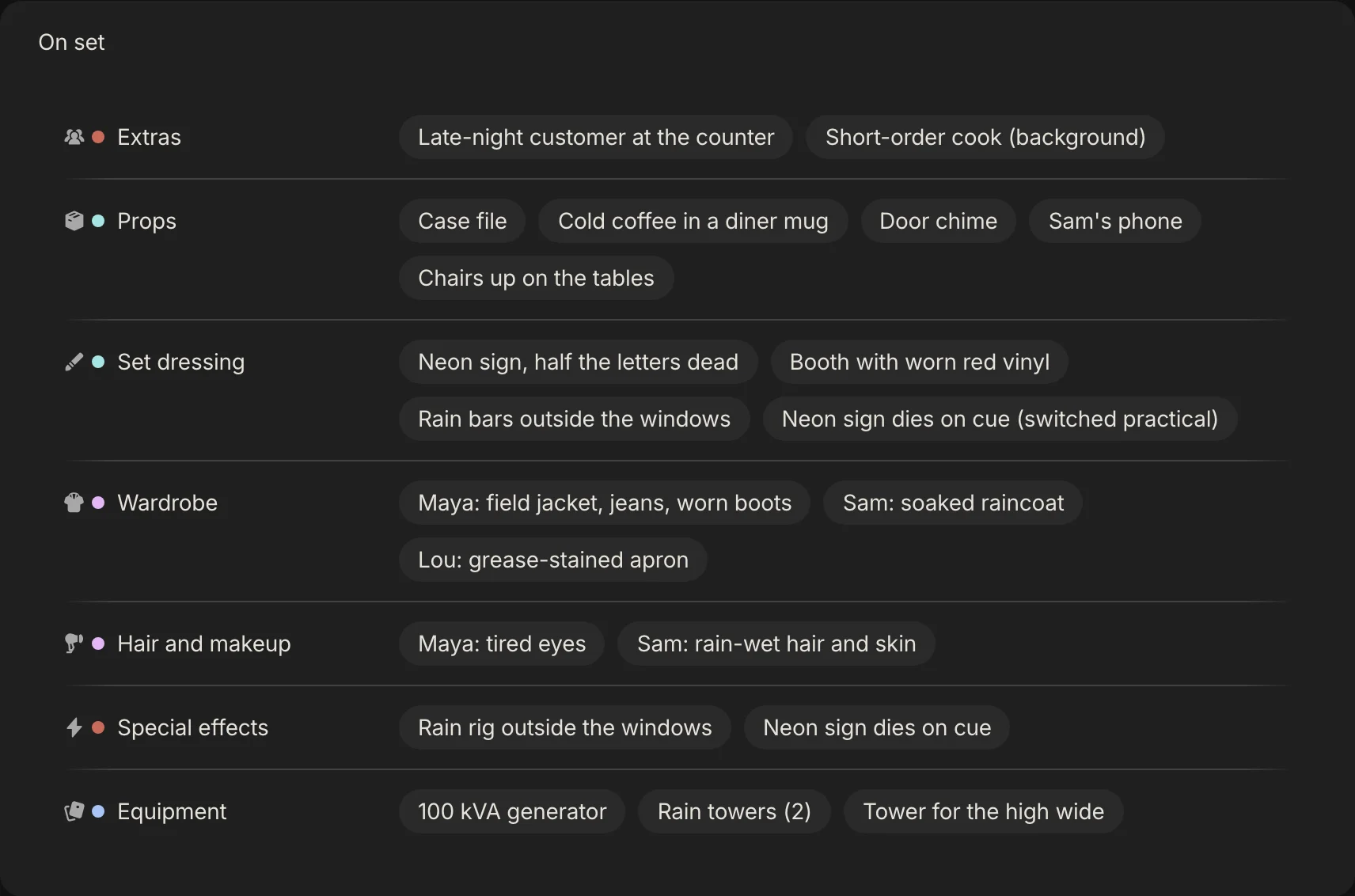
In Spring Pro the On set block carries nine categories from the breakdown for the day's scenes. Day 1 carries 21 distinct items, Day 3 only 7. Cast has its own block, and sound and VFX are not on the sheet.
Step 6: Show what is still open
A call sheet is a good place to show what is not finished, because the day is the deadline. In Spring Pro the Still open block lists the day's to-dos that are not done, by department and priority.
On Day 1 that is 29 to-dos across 11 departments, 7 of them priority 1. Day 3 has 7 and none at priority 1. Put the rest in Notes: parking, safety, weather, and anything the crew should know.
Step 7: Check it, approve it, send one version
The 2nd AD creates the sheet and the 1st AD checks it. Filmdaft says the 1st AD and the UPM check it before it goes out, and StudioBinder says the 1st AD is responsible for accuracy and gives final approval. Run it past the director if anything changed.
Send one sheet per day. StudioBinder warns that multiple versions confuse people, and describes an optional preliminary sheet watermarked "PRELIM", sent earlier. The production unit should confirm that people received it.
| Source | When it goes out |
|---|---|
| StudioBinder | Ideally 12 to 14 hours before the shoot day, though this can vary |
| Filmdaft | Usually no later than 12 hours before the next work day starts |
| Filmlocal | Typically the evening before, often between 8pm and midnight; union productions have a deadline under their agreement |
The sources do not agree on a number, so treat your agreement and your crew's habits as the rule. Spring Pro prints the sheet. It does not email it or track who has opened it.
When the sheet changes after it goes out
Changes happen. A revised sheet can change times, locations and scene order, and Filmlocal advises that each revision be read in full. StudioBinder describes a living online sheet that always shows the latest, but no general process for pushing a change to recipients.
A routine that works: change the schedule first, rebuild the sheet from it, mark the new sheet as a revision with a date and the reason, and tell people the same day. Our own advice: mark revised sheets the way a script's revision pages are marked, so people can tell they hold the latest.
Because Spring Pro builds the sheet from the schedule, the sheet is always current on screen. It does not keep a version history of sheets already sent, so keep the copy you sent.
One sheet for each department
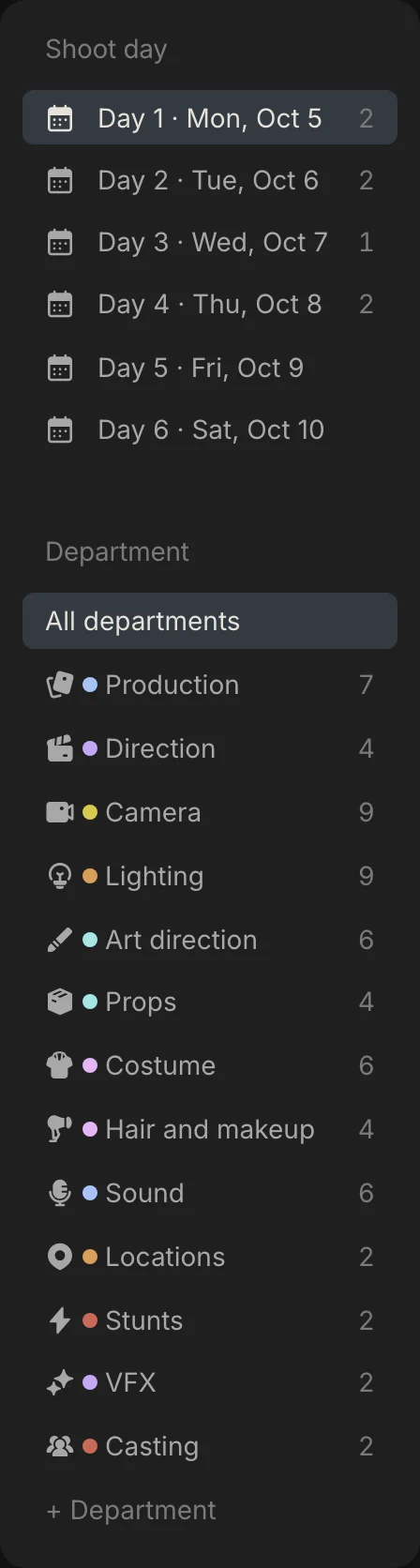
A props master does not need the whole sheet. In Spring Pro you pick the shoot day, then a department, and the sheet narrows to that department's elements and to-dos. The cast block shows for casting, costume, makeup, direction and production.
How people make a call sheet today, and what breaks when the day changes
Most sheets are a template in a document or a spreadsheet, or a tool that builds them from the schedule. They differ in what you redo when a day changes. This is our view, not a test of products.
| Way of working | Good for | When the day changes you must |
|---|---|---|
| A template in a document or spreadsheet | A short with one location, and it is free | Retype the scenes, the cast and the call times, and check the copy you send |
| Scheduling software that builds sheets from the schedule | A schedule that changes often | Check the sheet against the budget and the cast report if those live in other files |
| One project where the sheet reads the schedule, locations and breakdown (Spring Pro) | A day that changes weekly, read by many people | Look at the new sheet. It prints but does not email, and it keeps no history of sent versions |
From a short to a feature: what changes
The sheet's job does not change with size. What grows is the number of people on it and the cost of a wrong call. These sizes are rough labels, not industry definitions.
| Size | What the sheet is | What to add |
|---|---|---|
| Solo or YouTube video | A message with the time and the place | Nothing more |
| Short film | One page for the day | Each actor's own call, parking, the nearest hospital |
| Commercial | One page, many people, a client on set | The client's name and contact (Filmdaft mentions this for branded shoots) |
| Indie feature | A full sheet, sent every evening | Calls by department, an advance schedule, pick-ups, rest checks against the agreement |
| Series or episodes | Many sheets across units | Not Spring Pro yet: one unit and one script per project |
Doing it in Spring Pro
In Spring Pro the Call sheets page has a shoot day picker and a department filter on the left, and the sheet itself on the right: the header with crew call and wrap, the scenes, the location block, the cast with their calls, On set, Still open and Notes. Nothing is retyped: the day comes from the schedule, the places from Locations and the elements from the breakdown.
What it does not do yet: it does not email the sheet or track who read it, it has no weather, sunrise or hospital fields (use Notes), no calls per crew member or department (cast do get their own), no advance schedule, and no turnaround check. Day 5 and Day 6 of the sample have no scenes, so they have no sheet content. See call sheet software for the tool and the free call sheet template to start in a spreadsheet.
The checklist
Copy this. Tick it before you send the sheet.
- The day's scenes, pages and cast come from the schedule, not from memory
- The crew call is set, and each actor has a call of their own
- Wrap and the next call clear the rest your agreement asks for
- The address, parking and a contact are on the sheet
- Weather, sunrise and sunset, and the nearest hospital are on the sheet or in the notes
- Every element for the day's scenes is listed under On set
- What is still open is listed, with its owner
- The 1st AD has checked it, and one version goes out
- You kept the copy you sent
How these numbers were made
Every number about Midnight Diner comes from the project itself, read from the app's own data. The day table is computed, and the build stops if the project changes so that the story no longer holds. The hour cost uses Spring Pro's own cost engine with a planned 11-hour day, and it covers crew and cast labour only.
Midnight Diner is a demonstration production, not a case study of a real shoot. The descriptions of what a sheet holds and when it goes out come from the sources below, read on 2026-10-12, and they disagree in places. Agreement figures come from summaries.
Questions people ask
What is a call sheet?
The document that tells cast and crew where to be and when, for one shoot day. See the glossary entry.
What goes on a call sheet?
The day and date, the crew call, the scenes, the location with its address and parking, each actor's call, what is needed on set, and notes such as weather and the nearest hospital. StudioBinder lists the fields, and the free template has them as a spreadsheet.
Who makes the call sheet?
Generally the 2nd assistant director, with the 1st AD approving it. On a small project the producer may do it.
What is the difference between a crew call and a general call?
Filmlocal defines the general call as when base camp opens, not an individual's call. Cast and some departments get calls of their own.
When should a call sheet be sent?
The sources differ: 12 to 14 hours before the shoot day, no later than 12 hours before, or the evening before. Union agreements can set a deadline, so check yours.
Do you send one call sheet or many?
One per shoot day. Multiple versions confuse people, and a revision should be marked and read in full.
What do SW, WF and PU mean on a call sheet?
Start work, work finish and pick-up, as Filmdaft defines them. See the day out of days guide for the codes.
Can I make a call sheet in Excel or Google Sheets?
Yes, for a short. You retype the scenes and cast from the schedule, so the risk is a stale sheet. The call sheet template is a filled-in start.
Does Spring Pro email call sheets?
No. It prints them. It also has no weather or hospital fields, and no turnaround check. See call sheet software.
Sources
Every outside claim that names a source comes from one of these, read on the date shown. Standard conventions, such as the eighths rule and the usual specialist cases, are common practice. Figures from agreements and summaries change at each negotiation, so check the current text before you rely on a number.
- StudioBinder, the production call sheet (a competitor's guide). Checked 2026-10-12.
- Filmdaft, what is a call sheet. Checked 2026-10-12.
- Filmlocal, what a call sheet in film is and how every department depends on it. Checked 2026-10-12.
- IATSE Basic Agreement, 2021 negotiations summary (Editors Guild, a union summary). Checked 2026-10-12.
- Motion Picture Production Certified Agreement, summary (MEAA, Australia). Checked 2026-10-12.
More about call sheets, crew and locations
The right people at the right address at the right time, from the same plan.