From the plan to the cut: how a storyboard becomes an edit without leaving the project.
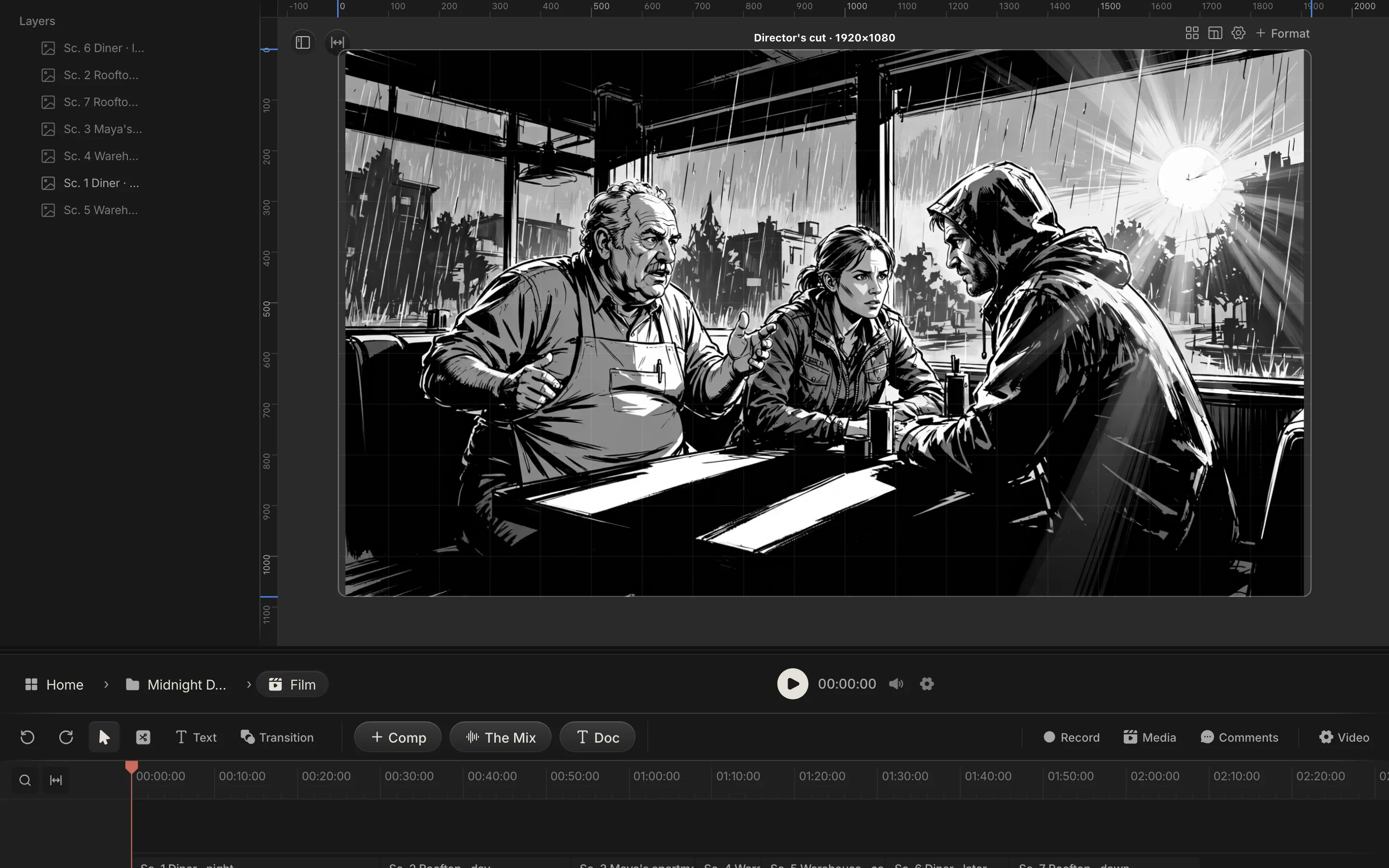
Real screen: Midnight Diner, our demo production, in Spring Pro.
The short answer. In Spring Pro the first cut is made from the plan. Star one frame per scene on the storyboard, then press Cut: each starred frame is placed on a new lane of the director's cut, at the scene's planned start, for its planned length. Edit it, export MP4, WebM or PNG, share one link, and pin comments to a timecode.
When the storyboard lives in one tool and the edit in another, a change to a frame means exporting it, importing it again and checking its timing. This guide follows one production, Midnight Diner, from its starred frames to a shared link, inside the same project as its script, schedule and budget. It says at each step what the app does, what moves when the plan changes, and what is not live. The numbers come from the project and the app's own rules, and the outside facts come from sources read and dated below.
In this guide 26 sections
- Quick answers
- Why the cut belongs next to the plan, and where it breaks
- What it costs when the gap shows up late
- How people make an animatic and a first cut today, and what breaks when a scene changes
- The film we are cutting
- Before you start
- Step 1: Give every scene a frame, and star one
- Step 2: Letter the frame, if you want balloons in the cut
- Step 3: Read the clock before you trust the length
- Step 4: Watch the animatic
- Step 5: Press Cut
- When the plan changes after you press Cut
- Step 6: Edit the cut on the timeline
- Step 7: Captions and text
- What the shoot adds: story order against shoot order
- Step 8: Export the cut
- What export does not do
- Step 9: Share the cut
- Step 10: Comment on a timecode
- What is not live, said plainly
- From a short to a feature: what changes
- Doing it in Spring Pro: where each part lives
- The checklist
- How these numbers were made
- Questions people ask
- Sources
Quick answers
What does going from the plan to the cut mean? The edit lives in the same project as the script, the storyboard, the schedule and the budget, so the first cut is made from the plan and not rebuilt from exported files. In Spring Pro that first cut is a run of still frames at planned times, which makes it an animatic more than a rough cut. Footage goes on the same timeline when you have it.
How does a storyboard frame reach the timeline? You press Cut on the script page or the storyboard page. Each scene's primary frame, the one marked with a star, is placed on a new lane of the director's cut as an image clip, or as a run of stills if the frame is lettered with balloons. It starts where the scene starts on the planned clock and runs for the scene's planned length.
What is an animatic? Wikipedia's storyboard article describes it as a simplified mock-up that can follow the storyboarding stage, to show how a scene will look and feel with motion and timing. At its simplest, it says, an animatic is a sequence of still images, usually from the storyboard, shown in sync with rough dialogue or a rough soundtrack. Spring Pro's animatic plays your primary frames at their scene times. It has no sound.
How long does Spring Pro make a scene? It reads the scene: spoken lines at 150 words a minute with a half-second beat each, action at about three words a second, never under four seconds. On Midnight Diner that gives 1:34, where the one-page-a-minute rule would give 2:07.5.
What can I export? MP4 (H.264 video with AAC sound), WebM (VP9 with Opus sound) or one PNG frame, made in your browser. You pick the range, full, half or quarter size, and a quality level. Export acts on the composition you have open, so open it from the director's cut.
How do I get notes on it? Open Video from the director's cut and it gives one permanent link for that Film that plays the latest cut, with no sign-in. Comments pinned to a timecode live in the editor, for people on the project. A reviewer who only has the link cannot comment on the page.
What is not live? Multicam recording (coming, in a desktop app), OTIO and FCPXML files, comments from reviewers on the public link, a link expiry or stop switch, and captions made automatically from a recording. The table near the end says what to do instead.
Why the cut belongs next to the plan, and where it breaks
Every cut starts as a plan. Someone decides how long each scene runs, which frame stands for it, and what the viewer hears while they look. When the board lives in one tool and the edit in another, that decision is made twice, and the two copies drift as soon as the script moves.
One route is the one StudioBinder describes: draw the storyboard, import the images into an editing program, name and number the files with care, then add dialogue, music and sound effects. Boords, a storyboard tool, turns frames into a timeline with an Animatic button, and has you time each frame by dragging its marker against the audio. Neither page says what happens to the timing when the script changes.
Three things move after you start, and each is a ripple point. The script changes, and every scene after the change shifts in time. A frame is swapped, and the picture in the cut is stale. The shoot comes in out of story order, so the cut fills in from the middle.
| Reader | What they take from it | What goes wrong if it is off |
|---|---|---|
| Director | The pace and order of the scenes, before anyone shoots | A slow or crowded scene is found after the day it was shot |
| Producer | The planned runtime, set against the schedule and the budget | The runtime and the plan disagree and nobody notices |
| Cinematographer and 1st AD | What each scene needs on screen, and for how long | Coverage is planned from the wrong length of scene |
| Editor | The scenes in order, with times and frames | Frames and times are rebuilt by hand from exports |
| Client or reviewer | A link that plays the current cut | Notes arrive about a version that is already out of date |
The rest of this guide takes Midnight Diner, 7 scenes and 2 1/8 pages, from board to shared link, and says at each step what moves when something upstream changes.
What it costs when the gap shows up late
The plan is cheap to change and the shoot is not. On Midnight Diner, one overtime hour on Day 1 is $2,993, and one more shoot day costs about $23,540 before contingency, the average of its four planned days (the working is in film production scheduling). A gap in coverage that only shows once footage is in the cut can turn into that day. The animatic shows the same gap for the price of pressing play.
We found no survey of how often an edit sends a production back to shoot, so we quote none. What we can compute is what a shoot day costs on this plan and what it buys. The table divides each day's planned cost by the seconds of cut its scenes make.
| Day | Scenes shot, in order | Seconds of cut | Cut so far | Planned day cost | Cost per second |
|---|---|---|---|---|---|
| 1 | 1 and 6 | 33 s | 33 s (35%) | $26,247 | $795 |
| 2 | 2 and 7 | 31 s | 64 s (68%) | $23,361 | $754 |
| 3 | 3 | 9.5 s | 73.5 s (78%) | $21,733 | $2,288 |
| 4 | 5 and 4 | 20.5 s | 94 s (100%) | $22,818 | $1,113 |
| All four | 94 s | $94,159 | $1,002 |
The four days cost between $21,733 and $26,247 whether they yield 9.5 s of film or 33 s. People paid by the day are paid for the whole day whatever it yields, so the seconds it yields are the thing to watch. The seconds are the app's reading-pace estimate and the day costs are the schedule's planned costs, and nothing in Spring Pro shows cost per second: we divided them for this page.
How people make an animatic and a first cut today, and what breaks when a scene changes
Here are three ways of working, and then Spring Pro's. They differ in what you redo when the script or a frame changes. This is our reading of the pages named below, not a test of the products.
| Way of working | What the page we read describes | When a scene or a frame changes you must |
|---|---|---|
| Boards exported as images, timed in a general editing program | StudioBinder lists drawing the boards, importing the images, naming and numbering the files, then adding dialogue, music and sound effects | Export the board again and import it again, then check the timing of every frame (the page does not say how timing carries over) |
| A storyboard tool with an animatic mode | Boords turns frames into a timeline, lets you drag each frame marker to time it against audio, then share a link or export an MP4 | Change the frame and its timing in the tool. The page does not mention importing a script |
| A review tool for the finished cut | Frame.io lets reviewers comment at a timecode, asks for a name and email from a reviewer who is not signed in, and can put a passphrase on a link | Export and upload the new version, then ask for notes again |
| One project where the cut reads the plan (Spring Pro) | Cut places the primary frames at planned times, and the animatic reads the script as it draws | Press Cut again to add new scenes only. Re-time or replace placed clips by hand (see below) |
The stage matters because of what comes after it. Frame.io's guide to editing stages describes an assembly that is rough and often longer than the final film, a rough cut that producers and clients see, and a picture lock after which editorial changes stop and finishing begins. The cut in this guide sits before all of that: it is the plan played back, and the place where timing is cheapest to change.
The film we are cutting
Midnight Diner is a short crime film. A burned-out investigator uses herself as bait to expose the night diner owner running contraband off the river, and pulls her old partner back in.
It has 7 scenes and 2 1/8 pages across four sets, planned over 4 shoot days, and its storyboard holds a frame for every scene. Here are the scenes the cut is built from.
| Sc | Set | Time of day | Pages | Cast |
|---|---|---|---|---|
| 1 | Diner | Night | 4/8 | Maya, Lou, Sam |
| 2 | Rooftop | Day | 3/8 | Sam, Maya |
| 3 | Maya's apartment | Night | 2/8 | Maya |
| 4 | Warehouse | Night | 1/8 | Maya |
| 5 | Warehouse | Continuous | 2/8 | Lou, Maya |
| 6 | Diner | Later | 2/8 | Sam |
| 7 | Rooftop | Dawn | 3/8 | Maya, Sam |
Before you start
Cut hands over what the plan already knows. If you cannot tick the list below, the cut will have holes.
- A script with scenes. The clock reads the script, so a scene needs lines in it. A scene with no lines still gets four seconds.
- A picture for each scene you want in the cut. A scene whose primary version has no picture is left out, not filled with a blank.
- One primary frame per scene. Cut places each scene's primary version. A scene with no star falls back to its first version, so star the one you mean.
- A Film in the project. Cut is the hand-off to the project's Film, where the director's cut lives.
- A rough idea of each scene's length. The clock is an estimate, and Step 3 shows how it is made.
Step 1: Give every scene a frame, and star one
Open the storyboard from the script. Each scene keeps its frames as versions, v1, v2 and so on, and the Version menu adds another: a Sketch AI first pass, a sketch from an image, a blank, or a moodboard picture. Sketch AI needs the film set up first, and the menu says so. However a frame is made, the crew decides which one is in.
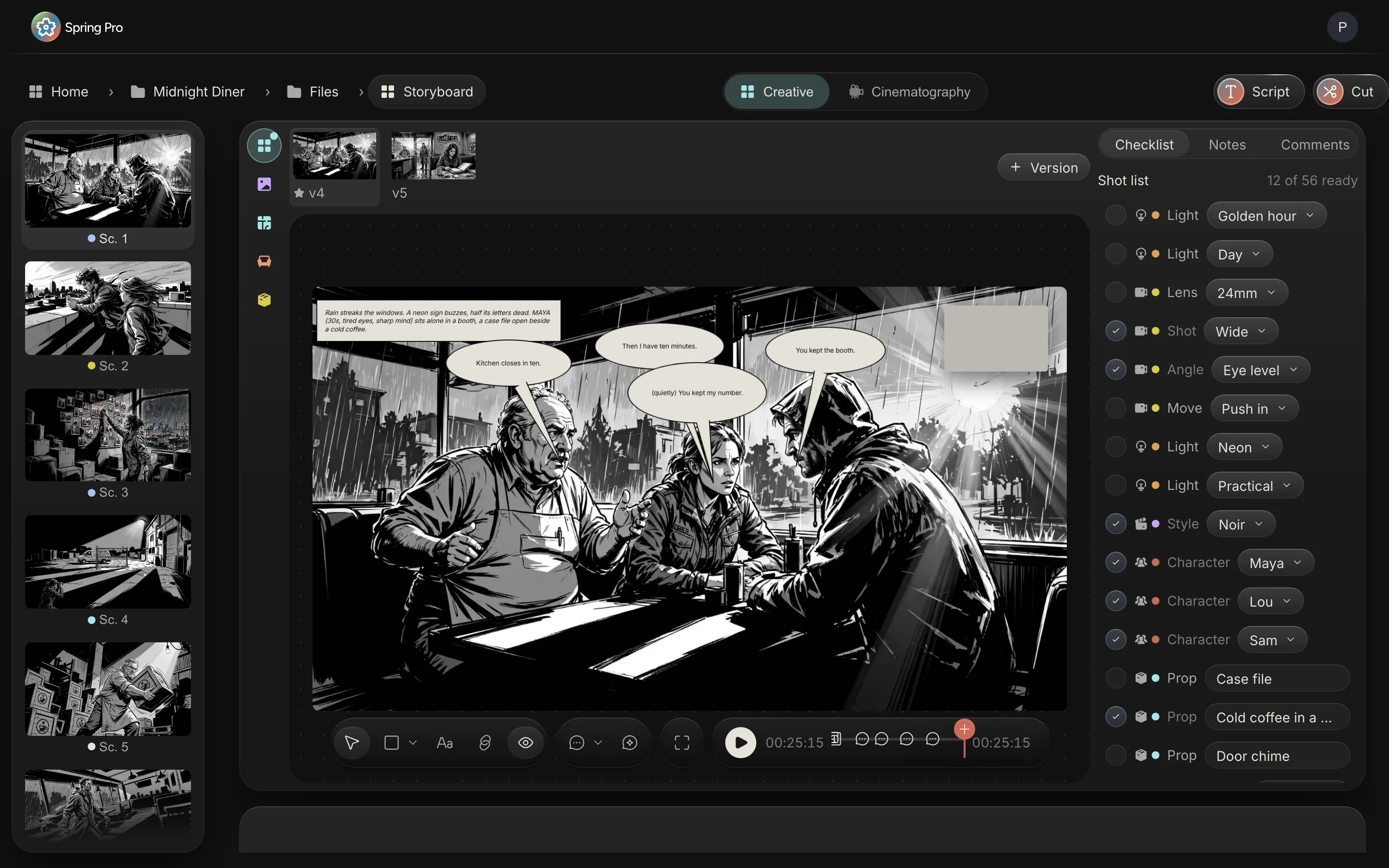
One version is the primary, marked with a star on its tile. Right-click a version, or open its menu, and choose Make primary. Cut places the primary version. If no version is starred, the first one counts as primary, so star the one you mean.
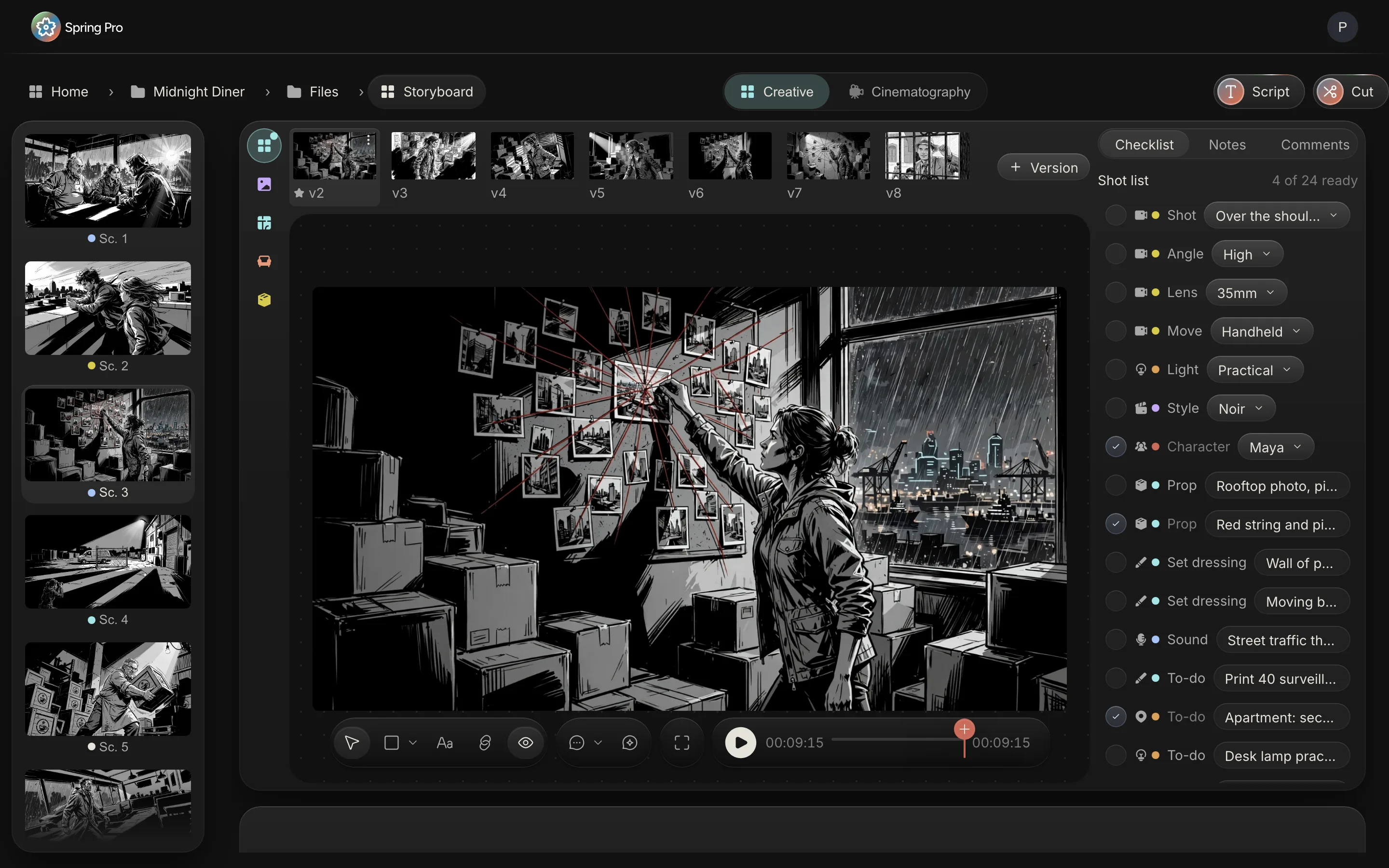
A scene whose primary version has no picture is skipped by Cut. The animatic is more forgiving: it falls back to the first version that does have a picture, so it can show a frame for a scene that Cut will leave out. The storyboard software page covers versions and the shot list in depth.
Step 2: Letter the frame, if you want balloons in the cut
Lettering is optional. Right-click a version and choose Letter the dialogue, and Spring Pro places a balloon for each spoken line and a caption box for the scene's first action line, eight at most. They are ordinary items on the frame: move them, retime them or change the words.
When you press Cut, a lettered frame is drawn again with its balloons appearing in speaking order, one still for each change, and those stills play back to back inside the scene's slot. The stills are stored in the storyboard's media library. A frame that fails to render plays plain.
Step 3: Read the clock before you trust the length
Cut places clips on a clock, so read the clock first. Spring Pro shows two estimates of how long a scene runs, and they disagree.
The script page's scene list uses the page rule: one page to a minute, so a scene of 4/8 reads 30 seconds. No Film School gives the same rule, one page to about a minute, and the glossary entry on eighths has the convention.
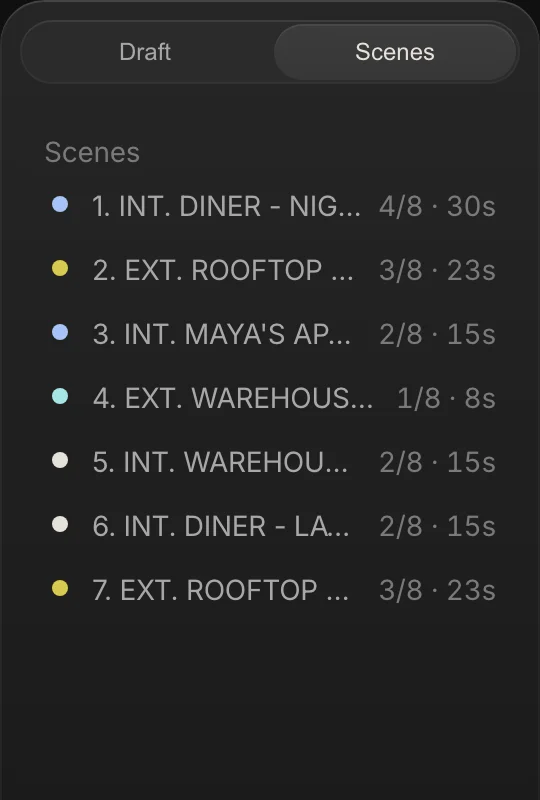
The storyboard, the animatic and Cut use a reading pace. Spoken lines count at 150 words a minute with a half-second beat each, a parenthetical counts a half second, and action counts about three words a second. A scene never runs under four seconds, and lengths round to the half second.
| Sc | Pages | Script page (page rule) | Storyboard, animatic and Cut | Starts at | Words spoken | Words of action |
|---|---|---|---|---|---|---|
| 1 | 4/8 | 30 s | 25.5 s | 0:00.0 | 17 | 48 |
| 2 | 3/8 | 23 s | 19 s | 0:25.5 | 26 | 20 |
| 3 | 2/8 | 15 s | 9.5 s | 0:44.5 | 7 | 18 |
| 4 | 1/8 | 8 s | 5.5 s | 0:54.0 | 0 | 17 |
| 5 | 2/8 | 15 s | 15 s | 0:59.5 | 10 | 31 |
| 6 | 2/8 | 15 s | 7.5 s | 1:14.5 | 5 | 15 |
| 7 | 3/8 | 23 s | 12 s | 1:22.0 | 10 | 20 |
| All | 2 1/8 | 129 s (127.5 s unrounded) | 1:34 (94 s) | 75 | 169 |
Added up, the page rule gives 2:07.5 and the reading pace gives 1:34, about 26 per cent shorter. Neither is a measurement: both are estimates until there is footage. Pages predict length poorly scene by scene, since scenes 3, 5 and 6 are all 2/8 of a page and read 9.5 s, 15 s and 7.5 s.
Cut uses the reading pace, as do the storyboard cards and the animatic. The same clock is written two ways in the app. The cards round to the whole second, so 25.5 reads 0:26 and 59.5 reads 0:60. The Schedule page cuts the seconds off instead, so scene 1 reads 00:25 there, scene 6 reads 00:07, and Day 1, which holds both, reads 00:33.
Step 4: Watch the animatic
Open Timeline from the sidebar and stay on Storyboard view. It shows each scene's primary frame at its planned time, with the scene heading and its first lines under the picture (and the scene's planned cost, when the project has a budget), and a strip of scenes with a ruler. Space plays and pauses, the previous and next buttons jump a scene, and you can drag the ruler to scrub.
The animatic reads the script and the primary frames every time it draws, so it always shows the current scene lengths and the current pictures. Its total, 1:34 for Midnight Diner, is the sum of the scene clocks. It has no sound.
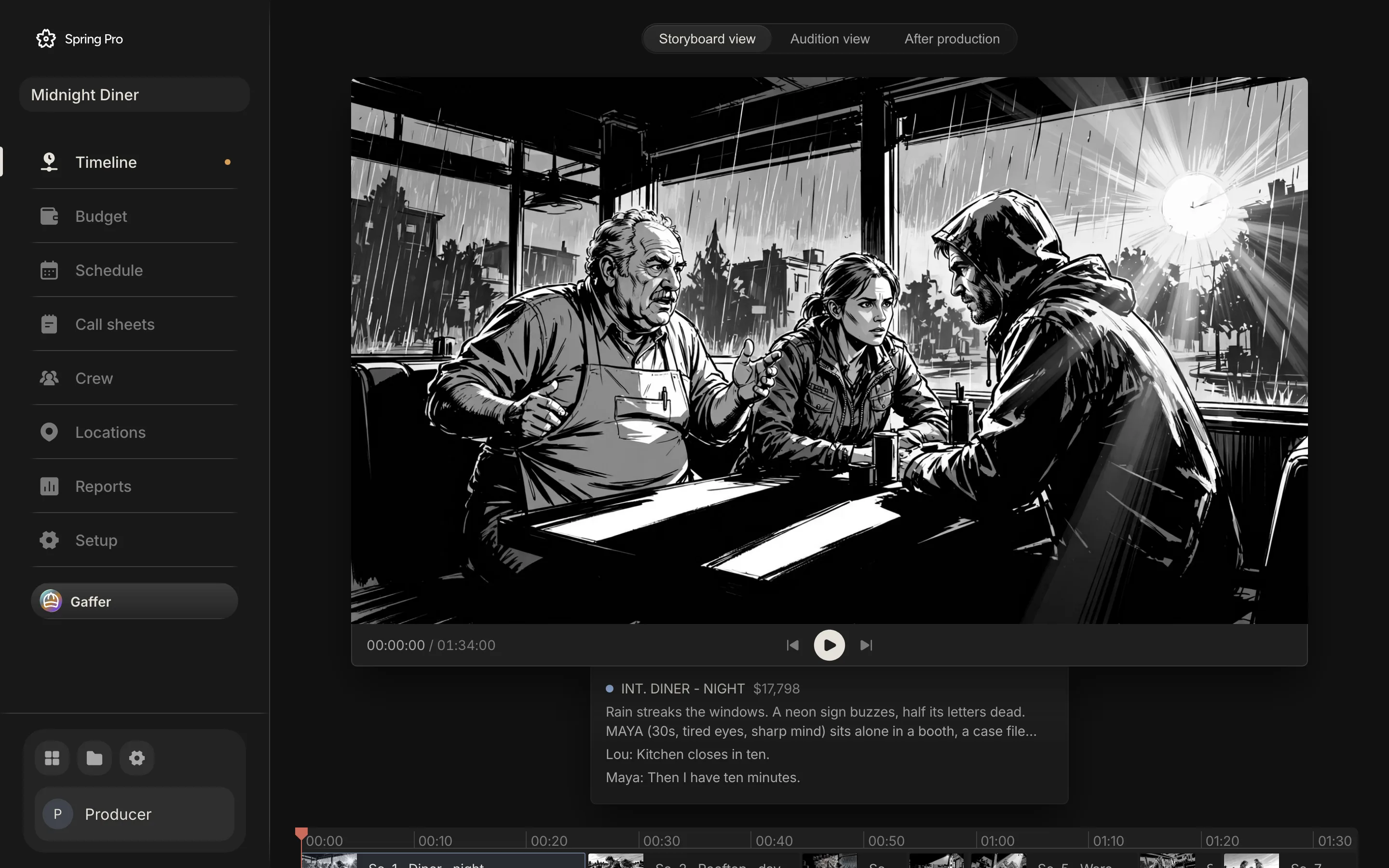
Two other views sit beside it, and both are placeholders. Audition view says the chosen audition takes will play there once casting is in, and After production says the cut will play there once footage is in. Treat both as not live.
Step 5: Press Cut
Cut sits at the top right of the script page and of the storyboard page, beside the button that switches between them. It appears when the project has a Film to hand the scenes to.
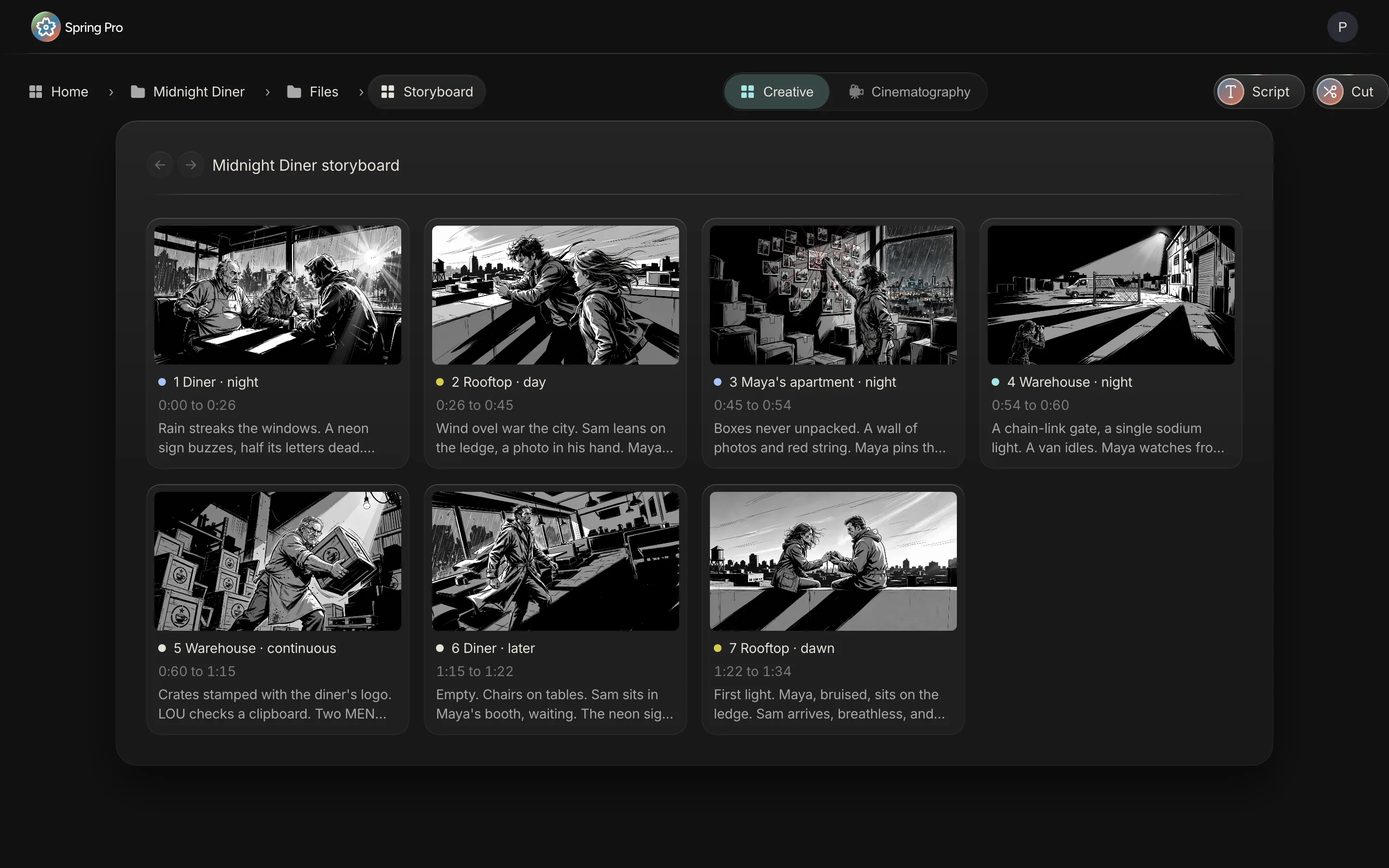
Press it and the app does this, in order.
- It reads each scene's planned start and length from the script, on the same clock as the animatic.
- It takes each scene's primary version. A scene whose primary version has no picture is left out.
- If a frame is lettered, it draws the balloons in speaking order and makes one still for each change.
- It opens the Film, adds one new video lane to the director's cut, and puts an image clip for each scene on it, named with the scene number and set, such as "Sc. 1 Diner · night". A lettered frame gets one clip for each still: the first keeps the scene's name and the others are numbered after it (2, 3 and so on).
- A plain frame's clip starts at the scene's start and runs for the scene's length, and the stills of a lettered frame follow one another inside that same slot. The picture is the same stored file the storyboard uses, not a copy of its bytes.
- Any scene whose clip name is already on the cut is left alone, so a second press adds only what is missing.
Scene 1 is a case in point. Its starred frame in the app's own copy of Midnight Diner is lettered (the screen in step 1 shows balloons and a caption box on it), so Cut would place scene 1 as stills, one for each change of balloon, and not as a single clip.
When the plan changes after you press Cut
The animatic follows the script. The placed cut does not. Say you add a ten-word line of dialogue to scene 3. Scene 3 grows from 9.5 s to 14 s, every scene after it starts 4.5 seconds later, and the film runs 98.5 s instead of 94 s.
| Sc | Animatic start now | Animatic start after the line | Start of the clip Cut placed |
|---|---|---|---|
| 1 | 0:00.0 | 0:00.0 | 0:00.0 |
| 2 | 0:25.5 | 0:25.5 | 0:25.5 |
| 3 | 0:44.5 | 0:44.5 | 0:44.5 |
| 4 | 0:54.0 | 0:58.5 | 0:54.0 |
| 5 | 0:59.5 | 1:04.0 | 0:59.5 |
| 6 | 1:14.5 | 1:19.0 | 1:14.5 |
| 7 | 1:22.0 | 1:26.5 | 1:22.0 |
Press Cut again and nothing moves, because every scene already has a clip with its name. Cut adds only the scenes that are missing, and it does not re-time or re-picture a clip it placed. The same goes for a swapped primary frame: the animatic shows the new picture and the placed clip keeps the old one.
To re-lay the cut after a revision you have two options. Move the clips by hand with trim and slide, or delete the clips and press Cut again. If a scene is renumbered or renamed, its old clip keeps the old name and Cut adds a second clip beside it.
The schedule has the same shape: change one scene and the cost of every day that holds it moves, as how to make a shooting schedule shows. Here the ripple is time.
Step 6: Edit the cut on the timeline
The Film opens as an ordinary timeline editor. The arrow selects and moves, the scissors tool or the S key arms the blade, and dragging a clip edge trims it, with the lane's neighbours rippling along. Hold Alt and drag to slip the footage inside a video clip (on a still it shifts nothing you can see), and hold Shift and drag to slide the clip among its neighbours.
The toolbar adds text, a transition at the nearest clip edge, a composition for motion design and 3D inside the cut, The Mix for sound, and the Doc for the film's script. The transitions are dissolve, dip to black, dip to white, dip to colour, wipe and slide. Footage comes in from the Media panel or by dropping files onto a lane, and an audio clip has fade handles.
Lanes can be muted, locked or hidden, tracks reorder by dragging, and undo and redo sit at the left of the toolbar. The ruler counts minutes, seconds and frames at the project's frame rate. Timecode in that form names a single frame, which is what lets a note point at one.
Step 7: Captions and text
Two things in the cut can put words on screen. The balloons and caption boxes you lettered on a frame are drawn into the cut by Cut, though they are lettering on the picture and not subtitles. And the Text button adds a text clip that you type, place and time yourself.
What is not live is a caption lane made for you from a recording. The code can turn a voice recording into word-timed captions, but in the code we read, the route that does the transcribing is set up only for our development server, so we do not count it as live. If the cut needs subtitles today, write them as text clips.
What the shoot adds: story order against shoot order
Scenes are not shot in story order, so the cut is assembled in a different order from the one the footage arrives in. Wikipedia says scenes are usually not shot in script order and the editor arranges them in the correct sequence. Frame.io's guide adds that an assembly is built gradually from each day's footage while shooting continues.
On Midnight Diner the schedule shoots the scenes in the order 1, 6, 2, 7, 3, 5, 4. The table shows how much of the planned 94 s each day makes possible.
| After day | Scenes shot so far | Seconds of the cut covered | Share of the planned cut | Scenes still to come |
|---|---|---|---|---|
| 1 | 1, 6 | 33 s | 35% | 2, 3, 4, 5, 7 |
| 2 | 1, 2, 6, 7 | 64 s | 68% | 3, 4, 5 |
| 3 | 1, 2, 3, 6, 7 | 73.5 s | 78% | 4, 5 |
| 4 | 1, 2, 3, 4, 5, 6, 7 | 94 s | 100% | None |
Spring Pro does not match footage to scenes or swap a frame for its footage. You place the clips yourself, on the same timeline as the frames. How the days are ordered is a scheduling question: see how to make a shooting schedule and day out of days explained.
Step 8: Export the cut
Open the director's cut, then Video in the editor toolbar, then Export in the left rail. In the code we read, Export works on the composition you have open, so from inside a composition the whole timeline means that composition and not the film. The panel offers three formats and no more: MP4, WebM and PNG. The defaults are MP4, the whole timeline, full size and 80 per cent quality.
| Setting | Choices | What it does |
|---|---|---|
| Format | MP4, WebM, PNG | MP4 is H.264 video with AAC sound. WebM is VP9 video with Opus sound. PNG is one frame |
| Range | Whole timeline, Selection | Selection runs from the start to the end of the selected clip, and is greyed out until a clip is selected |
| Resolution | Full, Half, Quarter | Full is the project size. The others scale it down |
| Quality | 20 to 100 per cent | Sets the bitrate target for video. PNG has no quality setting |
| Frame (PNG only) | Current frame, Selection | Saves one frame. See the limits below |
The file is made in your browser, from the same drawing code as the preview, with the audio mixed from the same clips and rules as playback. A track that is muted in the editor is silent in the file. YouTube's help page lists MP4, H.264 and AAC-LC among its recommended upload settings, which is the pairing the MP4 option writes.
What export does not do
Five limits, from the export code as we read it.
- PNG saves the first frame of the range. The option is labelled Current frame, but in the code we read it saves the frame at the start of the range: the start of the cut, or the start of the selected clip, not the frame under the playhead.
- MP4 can become WebM. If the browser has no H.264 encoder, the MP4 choice is written as a WebM file.
- Without WebCodecs it records in real time. A browser with no WebCodecs falls back to recording the picture as it plays, so a minute of film takes a minute.
- Size only goes down. Export scales the project size by full, half or quarter, never up. The output is 8-bit; there is no H.265 or 10-bit output, no EXR and no loudness target.
- No export speed is published. It depends on your machine and your footage, and we have not timed it. The file name is set for you, so rename it before it goes out.
Step 9: Share the cut
On the same Video page, Share for review gives one link for each Film. In the code we read, it plays whichever composition is open when it is made, so open Share for review from the director's cut.
The link is permanent, the same every time you open the panel, and it plays the latest cut: once the link exists, the editor republishes the cut a few seconds after you stop editing. Nothing is rendered or uploaded as a video file. The page holds the cut as a small document and plays it with the same drawing code as the preview, in the viewer's browser.
The viewer gets a player with play and pause, mute, a scrub bar, the time, the title and full screen. No sign-in is asked. If the link cannot be loaded, the page says "This link is not available. Ask the sender for a new one."
The panel has two tabs. People holds the link, Copy link and Copy for AI, which copies the link with a short prompt, the video's title, length and size, the scene list and the script as plain text, ready to paste into an assistant. Developers holds embed code in three forms (HTML, responsive and React), each an iframe of the same page, plus the share id.
- Anyone with the address can watch. In the code we read, the link has no password, sign-in or expiry. The Video page describes it as a private link. Treat it as unlisted, not locked.
- There is no stop switch. The panel has no way to turn the link off.
- Reviewers cannot comment on the page. The left rail's own blurb says to send the link and collect comments, but the page is a player with no comment box. Notes from people who are not on the project have to come back another way.
- It plays the edit, not a file. The viewer's browser streams the media and draws the cut, so playback depends on their connection and device. The page has no download button.
For comparison, Frame.io's help page on share links describes reviewers who comment after giving a name and email, an optional passphrase and optional downloads. Spring Pro's link has none of those today.
Step 10: Comment on a timecode
Comments live in the editor, behind the Comments button, which shows how many are still open. Type in the box that says it leaves a comment at the playhead, press Enter or Send, and the note is pinned to the playhead's time. Each card shows the time, who wrote it and how long ago, and the time button jumps the playhead there.
Anyone on the project can reply and mark a comment resolved, and the list can be filtered to open ones. A dot on the timeline ruler marks each comment, dimmed once resolved, and clicking it moves the playhead. Only the author sees the delete button. Notes arrive live, with no refresh.
On a person's note, Have Gaffer do it asks Gaffer to carry out the note through the same operations as any edit and to reply in the thread with what it changed. It acts only when you press it. In the code we read, it needs a Gaffer API key (added in the Gaffer panel, or set for the build) and says so if there is none. We have not tried this button in the running web app, so check it before you promise a reviewer an answer.
Two limits. Comments are for people on the project, and the public link does not carry them. And the frame count in a comment's label is worked out at 30 frames a second whatever the project's frame rate, although the comment is stored in seconds, so a jump lands on the right moment.
Frame.io's help describes the same idea, a comment pinned to a timecode, and adds range comments across two timecodes. Spring Pro pins a single time.
What is not live, said plainly
These are the gaps a reader would otherwise find out about late. Each row says what to do today.
| Thing | Status | What to do today |
|---|---|---|
| Multicam recording on set | Coming, in a desktop app. Not built | Record cameras elsewhere and add the clips to the timeline |
| OTIO and FCPXML files | Not built | Export an MP4 and hand that over |
| Comments from reviewers on the public link | Not live | Have reviewers reply another way, or work inside the project |
| Link expiry, a password, a stop switch, download control | Not live | Treat the link as public once it is sent |
| Captions made from a recording | Not live in the web app | Letter the frames or type text clips |
| Audition view and After production on the Timeline page | Placeholders that say so on screen | Use the Film editor for the cut |
| Re-timing a placed cut from the script | Not built. Cut only adds missing scenes | Move the clips by hand, or delete them and press Cut again |
| Sound in the animatic | None | Add audio to the Film timeline. The Timeline page animatic stays silent |
| H.265, 10-bit, EXR, loudness targets | Not live. Export is 8-bit H.264 or VP9 | Export MP4 or WebM |
| Several episodes or units in one project | Not built | One project for each film |
From a short to a feature: what changes
The steps do not change with size. What grows is the number of people who need to see the cut and the cost of getting it wrong. These sizes are rough labels, not industry definitions.
| Size | Who cuts | What the flow gives | What to watch |
|---|---|---|---|
| Solo or YouTube video | You | Frames at planned times as a timing check | Skip the lettering. Do not trust the length until you have read a scene aloud |
| Short film | The director or an editor | An animatic before the shoot, and a link for the camera and AD departments | Replace frames with footage as each day delivers it |
| Commercial | An editor, with a client reviewing versions | Quick cuts of the same scenes and one link that stays current | Reviewers cannot comment on the link, so collect notes elsewhere |
| Indie feature | A separate editorial team | The animatic and the first assembly plan in the same project | No interchange file leaves the project today: hand over an MP4 |
| Series or episodes | Several editors | Not Spring Pro yet: one script and one unit per project | Shared elements and cross-boarding across scripts |
Doing it in Spring Pro: where each part lives
The script and storyboard pages hold the frames, the star, the lettering and the Cut button. Timeline, in the sidebar, plays the animatic. The Film is the editor: the director's cut, the tools, Comments, and Video for settings, sharing and export.
Because the cut sits in the same project, the plan stays one click away: the schedule that orders the footage, the call sheets that bring it in, and the budget that prices each day. How to break down a script and how to budget a short film cover the lists the cut sits on.
If you are coming from StudioBinder, the comparison covers what each does. In short, Spring Pro gives you a first cut you can share and a timeline to refine it on, and it has no hand-off file for another editing system.
The checklist
Copy this. Tick it before you send the cut to anyone.
- Every scene has a version with a picture
- The version you mean is starred as primary in every scene (an unstarred scene uses its first version)
- Frames that need balloons are lettered, and the balloons are read
- The animatic's scene lengths feel right on playback, and you know it has no sound
- You pressed Cut once, and the clips match the scene list
- After a script change, you re-timed the clips or deleted them and pressed Cut again
- Footage clips are placed as each shoot day delivers them
- The export format matches where it is going, and the file is renamed
- The link goes only to people you are happy to have watch, knowing it has no password or expiry
- Notes from outside the project are logged as timecode comments by someone on it
How these numbers were made
Every number about Midnight Diner comes from the project: its script lines, its schedule and the budget engine, through the same functions the app uses. The scene clock is the app's reading-pace rule, reproduced here because the app file that holds it opens a database connection and cannot be loaded by this site. The build stops if the rule's constants change in the app's source, or if the clock no longer matches the labels on the storyboard screen: 0:00 to 0:26, 0:26 to 0:45, 0:45 to 0:54, 0:54 to 0:60, 0:60 to 1:15, 1:15 to 1:22, 1:22 to 1:34.
How Cut, export, share and comments behave was read in the app's code on 2026-10-12, and the build checks the key lines of that code and stops if they change. We have not timed an export. Midnight Diner is a demonstration production, not a case study, and the ten-word line in the change table is a made-up example. Outside facts come from the sources below, read on 2026-10-12.
Questions people ask
What is an animatic?
A simplified mock-up that can follow the storyboarding stage, to show how a scene will look and feel with motion and timing. At its simplest it is a sequence of still images, usually from the storyboard, shown in sync with rough dialogue or a rough soundtrack. Wikipedia's storyboard article has it in its animatics section. Spring Pro's animatic plays the primary frames at their scene times, without sound.
How do you make an animatic from a storyboard?
Put the frames in story order on a timeline, time each against the dialogue, add sound and review it. StudioBinder and Boords each describe a way. In Spring Pro you star one frame per scene, watch Timeline, then press Cut to place the frames in the Film.
What does the Cut button do in Spring Pro?
It hands the storyboard to the editor. Each scene's primary frame is placed on a new lane of the director's cut as an image clip (a lettered frame becomes a run of stills), starting at the scene's planned start and running for its planned length. A second press adds only the scenes that are missing.
Which frame does Cut use for a scene?
The scene's primary version, the one marked with a star. If none is starred, the first version counts. A scene whose chosen version has no picture is left out. See the storyboard software page for versions.
How long does Spring Pro make each scene in the animatic?
It reads the scene: spoken lines at 150 words a minute with a half-second beat, action at about three words a second, and never under four seconds. Midnight Diner comes to 1:34. The script page's scene list uses a separate page rule of one page a minute.
What happens if I change the script after pressing Cut?
The animatic updates, but the clips Cut placed keep their old times and pictures. Move them by hand, or delete them and press Cut again. If scenes are renumbered, Cut adds a second set beside the old clips.
What can I export from the cut?
MP4 with H.264 and AAC, WebM with VP9 and Opus, or a single PNG frame, at full, half or quarter size. It is made in your browser. There is no H.265, 10-bit, EXR, OTIO or FCPXML output.
How do I share a cut for review?
Open the director's cut, then Video, then Share for review, and copy the link. It is one permanent link for that Film that plays the latest cut, with no sign-in. Anyone with the address can watch, and there is no expiry or stop switch.
Can reviewers comment on the share link?
No. The public page is a player with no comment box. Comments pinned to a timecode live in the editor, for people on the project. Frame.io is an example of a tool where reviewers comment after giving a name and email.
Can I comment on a specific timecode?
Yes, in the editor. Open Comments, type in the box that leaves a comment at the playhead, and the note is pinned to that time. Anyone on the project can reply or mark it resolved, and a dot marks it on the timeline ruler.
Does Spring Pro export OTIO or FCPXML?
No. Neither is built, so there is no file that carries the timeline to another editing system. To hand a cut to another editor today, export an MP4.
Does Spring Pro support multicam editing?
Not as a multicam edit. Spring Pro does not sync several cameras or switch between them, and recording every camera on set in a desktop app is coming, not built. The editor does have a Record button that captures your screen, your camera or both, and you can add clips from several cameras to the timeline yourself.
Sources
Every outside claim that names a source comes from one of these, read on the date shown. Standard conventions, such as the eighths rule and the usual specialist cases, are common practice. Figures from agreements and summaries change at each negotiation, so check the current text before you rely on a number.
- Wikipedia, storyboard (the animatics section). Checked 2026-10-12.
- StudioBinder, how to make an animatic (a competitor's guide). Checked 2026-10-12.
- Boords, how to make an animatic (a storyboard software vendor). Checked 2026-10-12.
- Frame.io, editing stages in the video post-production workflow guide (a review software vendor). Checked 2026-10-12.
- Frame.io help, commenting on your media (vendor documentation). Checked 2026-10-12.
- Frame.io help, share links explained for clients (vendor documentation). Checked 2026-10-12.
- Wikipedia, SMPTE timecode. Checked 2026-10-12.
- Wikipedia, film editing. Checked 2026-10-12.
- No Film School, how to create a script breakdown (a video page that describes the StudioBinder method). Checked 2026-10-12.
- YouTube Help, recommended upload encoding settings (Google). Checked 2026-10-12.