An AI production assistant for film: what it answers, what it changes, and what it never does.
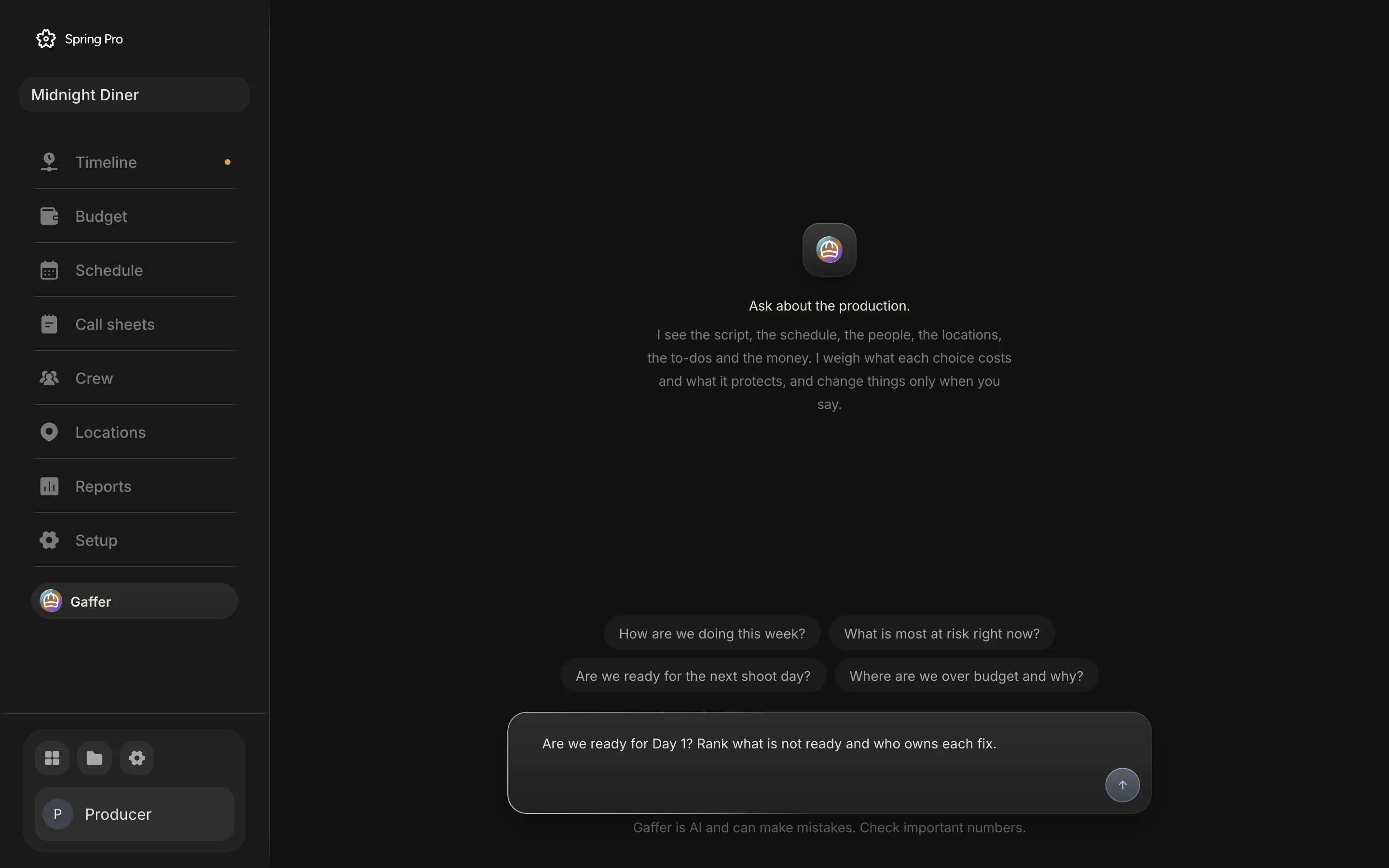
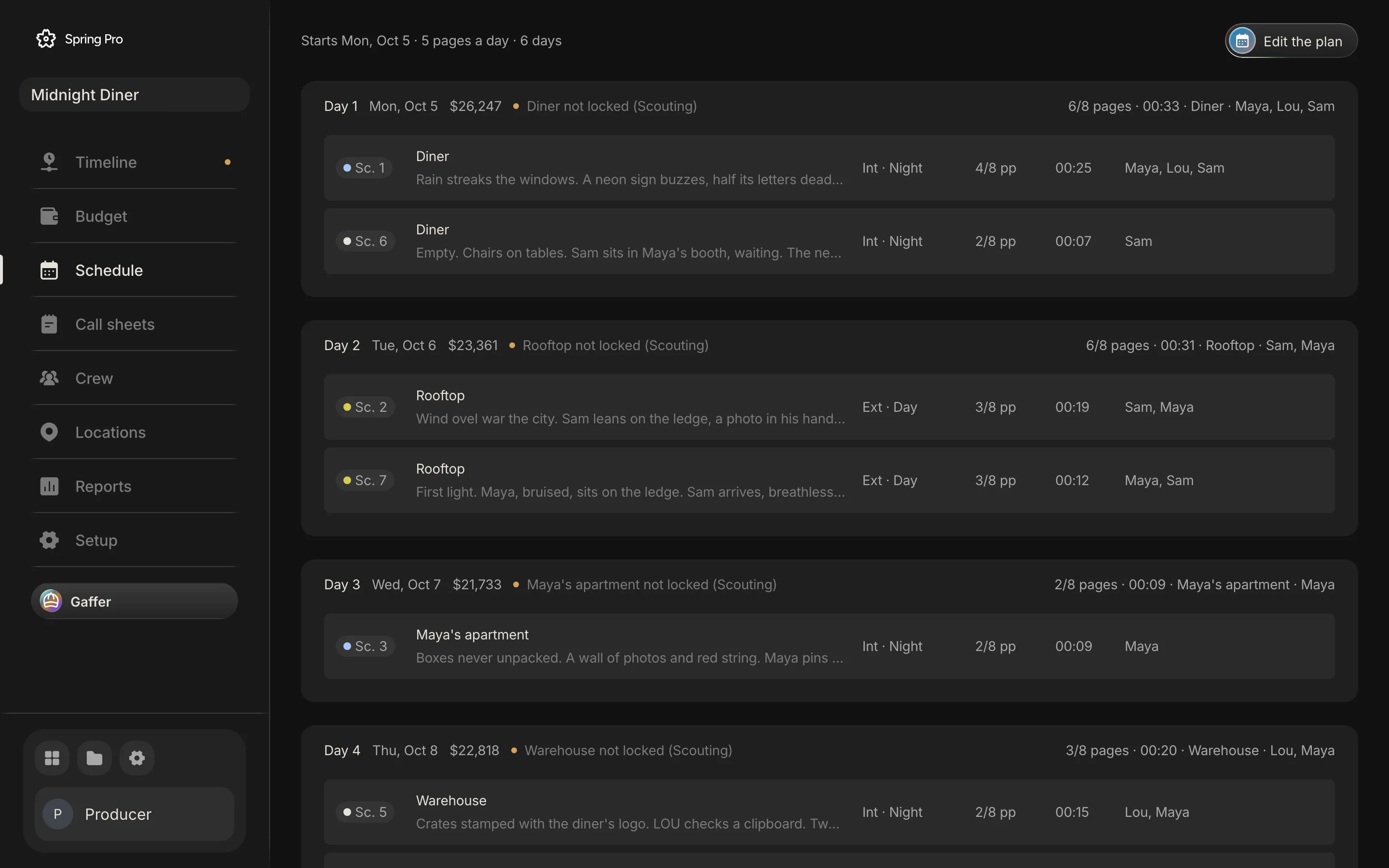
Real screen: Midnight Diner, our demo production, in Spring Pro.
The short answer. An AI production assistant for film reads the schedule, cast, locations, to-dos and budget together, so it can answer what no single tool can: are we ready for Day 1, what moves if a scene moves, what a day costs, what is not priced. Spring Pro's Gaffer is told to change things only when asked, gives one undo per run, and can be wrong.
Most film software answers one question about one document. A production runs on questions that cross all of them. This guide shows what one assistant that reads the whole production can answer, using Spring Pro's Gaffer on a real sample, Midnight Diner, and where it stops. The lists come from the app's own code, the numbers come from running its tools on the sample, and one real answer is checked against the project. It is about the Gaffer on the production desk. The editor has a separate Gaffer with its own tools, and nothing here is a claim about that one.
In this guide 22 sections
- Quick answers
- Why the useful questions cross every page
- The film we asked about
- What it reads: 15 tools, none of which change anything
- How a question runs, from the brief it works to
- Question 1: are we ready for Day 1?
- One real answer, checked against the project
- Question 2: what moves if a scene moves?
- Question 3: what does a day cost?
- Question 4: what is not priced yet?
- What it can change, when you ask
- The one undo per run
- What it never does, and how each rule is held
- Where it goes wrong
- AI, the crew and the agreements
- How people get these answers today, and what other AI helpers say about themselves
- From a short to a feature: what changes
- Doing it in Spring Pro
- The checklist
- How these numbers were made
- Questions people ask
- Sources
Quick answers
What is an AI production assistant for film? Software that reads the schedule, the cast and crew, the locations, the to-dos and the budget together, and answers in plain language. In Spring Pro it is Gaffer, a page on the production desk. It is not a PA, the entry-level crew job that shares the name, and its own name is the crew job of chief lighting technician.
What can it answer that one tool cannot? Questions that cross every page: are we ready for Day 1, what moves if a scene moves, what a day costs, and what is not priced yet. Each needs the schedule, the people, the places and the money at once. The sections below show each one on a real sample.
Can it change things? Yes, and its brief tells it to act only when you ask. That is an instruction to the model, not a lock. It has 15 tools that read and 23 that change the production, plus an undo, and each change is saved the way an edit on the page is saved. One "undo that" reverts everything it did in its last run.
What does it never do? It does not send messages, pay or move money, or change the words of your script, and on the production desk no tool for those exists. It drafts a call sheet or a message as text for a person to send. It is also told never to guess a number, a date, a name or an id, but that is a rule for the model, not a lock, and the checked answer below shows where it slipped on owners.
Can it be wrong? Yes. NIST calls confident, wrong output confabulation, and says it is a natural result of how these models are built. On the one real answer we checked, every date, count and amount matched the project. The owners it named were not recorded in the project: no to-do has one, so it named people from the crew list. Check numbers and names before you act on them.
Does it replace the 1st AD, the UPM or the line producer? No, and this guide is written on that footing. It does the reading and the drafting, and a person decides and sends. Guild agreements now speak to this, and the section on agreements below says what we read.
Why the useful questions cross every page
A production office does not ask one-document questions. "Are we ready for Day 1?" needs the schedule for the date and the warnings, the call sheet for the times, Locations for the status and the address, the crew list for the contacts, the to-dos for what is late, and the budget for what it costs. In most tools those live in different files or different products.
Someone in the production office has to hold all of it at once, whether that is a line producer, a UPM or a production coordinator. A recap by a Film Independent writer of a 2017 talk by line producer Angela Sostre says that once a script is ready a line producer is usually called on to create a realistic schedule and a rough line-by-line budget. The writer's own example is money saved on travel offsetting the cost of an extra half-day of shooting. The recap also says Sostre notes that actor availability can be an issue.
That is the work an assistant can take the reading off. The table shows where each fact behind the Day 1 question is kept in Spring Pro.
| Fact | Where it is kept | What a miss does |
|---|---|---|
| The date and the day's warnings (two sets, day and night mixed, too many pages) | Schedule | A day that cannot be shot as planned |
| The crew call and each actor's call | Call sheets | People arrive at the wrong time |
| A location's status, address and facilities | Locations | The crew goes where nobody has agreed |
| An actor's phone and email | Crew | Nobody can reach the cast |
| Open and late to-dos by priority | The to-dos on each scene, and Reports | The prop, the permit or the generator is not there |
| What the day costs | Schedule and Budget | An overrun nobody priced |
Gaffer's tools read all of these in one run. The Reports page and Gaffer also count risks with the same function in the app, so they share one definition of a risk.
The film we asked about
Midnight Diner is a short crime film of 7 scenes and 2 1/8 pages. Its schedule has four shoot days that carry scenes and two empty days after them. It has 44 people on its lists: 5 cast, 32 crew and 7 vendors. Its budget was locked on 4 October 2026.
One thing to know before the numbers. The schedule starts on Monday 5 October 2026, and the numbers and screens on this page were made on Monday 12 October 2026. Every day is already in the past, so a to-do due before 12 October counts as late. That is why the sample looks so far behind.
| Day | Date | Scenes | Pages | Planned cost | Open to-dos | Past due | Not-ready lines |
|---|---|---|---|---|---|---|---|
| 1 | Mon 5 Oct | 1, 6 | 6/8 | $26,247 | 29 | 27 | 8 |
| 2 | Tue 6 Oct | 2, 7 | 6/8 | $23,361 | 22 | 18 | 7 |
| 3 | Wed 7 Oct | 3 | 2/8 | $21,733 | 7 | 5 | 5 |
| 4 | Thu 8 Oct | 5, 4 | 3/8 | $22,818 | 22 | 20 | 7 |
Every day lacks a crew call and every location is still at Scouting. The to-dos are not assigned to anyone: none of the 90 to-dos has an owner set. Keep that in mind for the checked answer below.
What it reads: 15 tools, none of which change anything
Gaffer works through tools, small functions that read or change the production. Fifteen of them only read. The table groups them by what they reach, from the tool descriptions in the code.
| Area | What comes back | Tools |
|---|---|---|
| The whole production | The script's size, every day with its scenes, pages, times, warnings and planned cost, what is not scheduled, who is not cast, to-dos open and late, locations, the risks the Reports page lists, and the money | get_production |
| The script and its scenes | Scene numbers, headings, pages, cast, cost, shoot day, the director's brief and notes, and a scene's words as written | get_scenes, get_scene, get_script |
| The schedule | Each day's date, call, first shot, lunch, wrap, who is called, what was shot, delays, warnings and planned cost; and one day as its call sheet with a list of what is not ready | get_schedule, get_day |
| People | Each actor's working days and holds (the day out of days), and everyone's deal, hours, contact details and planned cost | get_cast_days, get_people |
| Places | Each location's status, address, contact, parking, permit, facilities not sorted, its scenes and its days | get_locations |
| To-dos and the breakdown | To-dos by department, priority, due date and owner, and the breakdown as a pull list for a scene, a day or the whole film | get_todos, get_elements |
| Money | Totals and accounts, every budget line, the change log and what is not priced yet, expenses and their status, and what-ifs that change nothing | get_budget, get_budget_lines, get_expenses, what_if |
It does not see the storyboard pictures, only how many frames a scene has and whether one is picked. It does not see receipts, only whether one is attached. Weather, sunrise and turnaround are not among its tools, and the limits section says what it does about turnaround instead.
How a question runs, from the brief it works to
Gaffer follows a written brief in five steps. It reads first and is told never to guess a number, a date, a name or an id. It traces the ripple of the question through the story, the schedule, the people, the money and the risk. It acts only when asked, then reads back what changed and names any new problem the change made, such as a day over its pages or an actor on a new hold.
It leads with the answer, in one or two sentences, then the detail. For a decision it gives two or three options, each with what it costs and what it protects, then its pick. You choose, and it makes exactly that change.
Story comes into its reasoning. It can read each scene's brief and words, so a cheaper option can be weighed against what the scene must do. The production desk's Gaffer has no tool that writes the script or draws a frame, and the creative calls stay with the people who make the film.
A run is one question and everything Gaffer does to answer it, up to 60 rounds with the model. A round can call more than one tool, so this is not a count of what the Steps card shows. Near the end it is told to wrap up and say what is left. A busy or failed model call is tried again twice before it says so, and the Stop button ends the run.
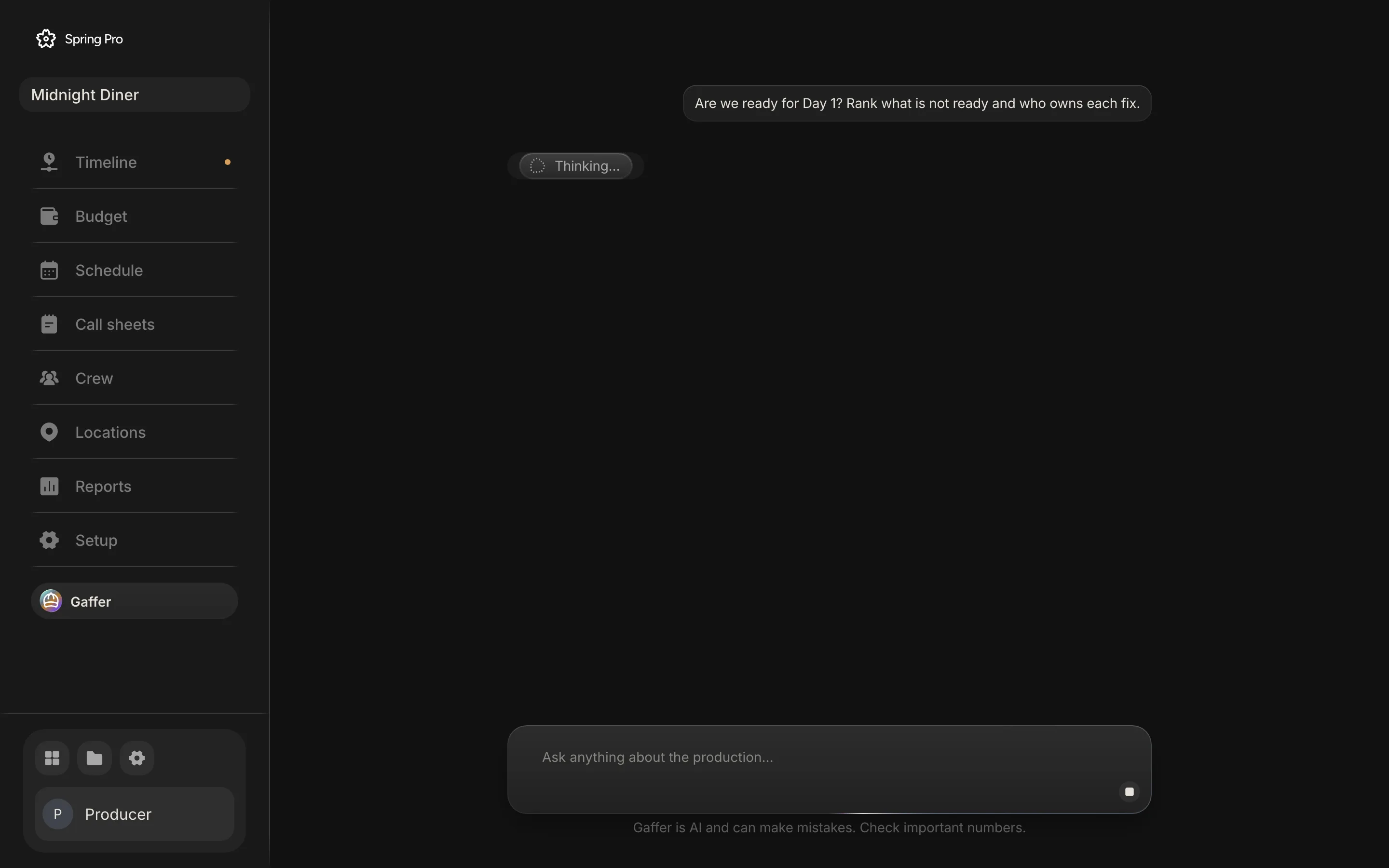
The conversation is saved with the project, so it is there on your next visit. As a chat grows, old tool readings are shortened and Gaffer reads again when it needs them, so treat a number in an old message as old.
Question 1: are we ready for Day 1?
This is the question typed into the first screen on this page, and one of the four suggestions asks it about the next shoot day. For this question the brief says to read get_production for the risks and get_day for the list of what is not ready. get_production returns the film-level risks and counts, and get_day returns one shoot day as its call sheet.
The table is every check the day read makes, in the order the code runs them, with what it returned for Day 1 of Midnight Diner. The warnings in the last row are the schedule's own: more than one set, day and night mixed, or a day over its pages target.
| Check | Looks at | Day 1 returned |
|---|---|---|
| The day has scenes | The schedule | Nothing flagged |
| The day has a date | The schedule's start date | Nothing flagged |
| A crew call is set | The day's call time | No crew call. |
| Each location is locked | Location status | Diner is scouting, not locked. |
| Each location has an address | Locations | Diner has no address. |
| Each character is cast | Cast and crew | Nothing flagged |
| Each actor has a phone or an email | Cast and crew | Ava Linden (Maya) has no phone or email. Tomas Reyes (Lou) has no phone or email. Jonah Pierce (Sam) has no phone or email. |
| No priority 1 to-do is open | The to-dos on the day's scenes | 7 P1 to-dos open on these scenes. |
| Nothing is past due | The to-dos on the day's scenes | 27 to-dos are past due. |
| No schedule warnings | The schedule's own checks | Nothing flagged |
The check does not list facilities (power, toilets, parking and the rest) as not ready, though the day read carries them for each location. It does not check turnaround, weather or permits unless a permit is a to-do.
The film-level risk list flags a location as needed this week only for days in the next 7 days. On 12 October, with every day already past, it lists one risk, "20 P1 to-dos are past due", owned by department heads. The day read does not depend on that window, which is why it still finds the unlocked Diner.


One real answer, checked against the project
We asked Gaffer that question on the real Midnight Diner project and saved the answer: "Are we ready for Day 1? Rank what is not ready and who owns each fix." It answered with nine ranked items. The table checks the main claims in the part of the answer the screen shows, against the project data. It is not every phrase.
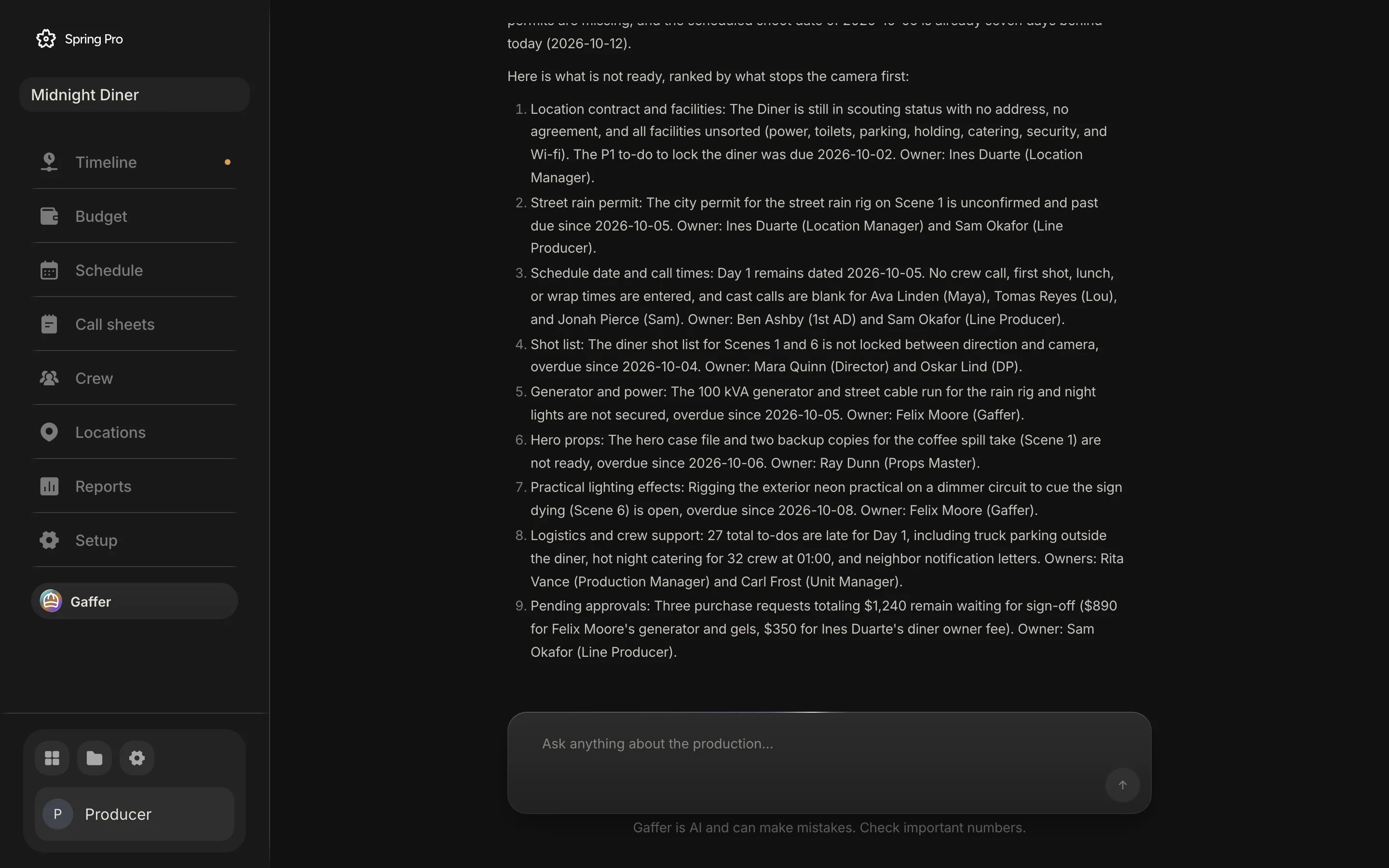
The top of the answer is scrolled out of the capture, so we checked only what is visible. We captured it from a development copy of the app and did not record which model route produced it, so the live server may answer differently. Another run would word it differently.
| The screen says | The project holds | Result |
|---|---|---|
| Day 1 is dated 2026-10-05, seven days behind today (2026-10-12) | Day 1 is Monday 5 October 2026, and the capture was made on 12 October | Matches |
| The Diner is in scouting, with no address and all seven facilities unsorted | Status Scouting, no address, none of the 7 facilities sorted | Matches |
| No crew call, first shot, lunch or wrap, and blank cast calls for Ava Linden, Tomas Reyes and Jonah Pierce | None of those times is set, and those three play Maya, Lou and Sam | Matches |
| Six items overdue since a date from 2 to 8 October: lock the diner (called a P1 to-do), the shot list, the street rain permit, the generator, the hero props and the neon dimmer | Six priority 1 to-dos on scenes 1 and 6, due 2, 4, 5, 5, 6 and 8 October. The permit to-do says night shoot permit for the street rain rig, and the screen adds the word city | Matches the dates |
| 27 to-dos are late for Day 1, including truck parking, hot night catering for 32 crew at 01:00 and neighbour letters | 27 of 29 open to-dos on scenes 1 and 6 are past due, including those three, due 4, 6 and 9 October | Matches |
| Three requests totalling $1,240 wait for sign-off, $890 and $350 | Three requested expenses: $650, $240 and $350, $1,240 in all | Matches the amounts |
| Each fix has a named owner, for example Ines Duarte, location manager | No to-do in the project has an owner set, 0 of 90. All nine names on the screen are on the crew list, with jobs that fit the work | Names are real, assignments are not recorded |
| The $890 is Felix Moore's generator and gels, and the $350 is Ines Duarte's diner owner fee | Each request has a vendor name (Spark Lighting for the generator, Ray Dunn, a props master on the crew list, for tape and gels, and "Diner owner") and no requester | Requesters are not recorded |
Every date, count and amount matched. The assignments did not come from the project. The brief tells Gaffer to name the owner of each fix, and also to say a fact is not set when the desk does not hold it. With no owners recorded, it named people from the crew list instead of saying none were set.
It also ranked and grouped. Six of the seven priority 1 to-dos on those scenes are named in the list, and the seventh (call sheet for day 2 out by 18:00 the day before, due 9 October) does not appear in the nine items and sits only inside the count of 27. That is a reasonable summary, and it is also why you read the count against the page.
The fix is in your hands. Set an owner on each to-do, which the day read and the scene read both carry, and ask who owns a fix after that. Until then, read every name in an answer as a suggestion.
Question 2: what moves if a scene moves?
Lou works on Day 1 and Day 4 and waits through Days 2 and 3, two hold days. Whether a hold is paid depends on his deal, and the app's planned cost has no hold pay in it. His second scene is scene 5, the warehouse. The brief tells Gaffer to read the schedule and the day out of days, lay out options with their cost in days, holds, pages and money, and make a move only on your pick.
We ran that move through its tools on the sample, the same change as the right-click menu below makes. We did not capture Gaffer's written answer to it, so the table is what the tools return, not its wording.
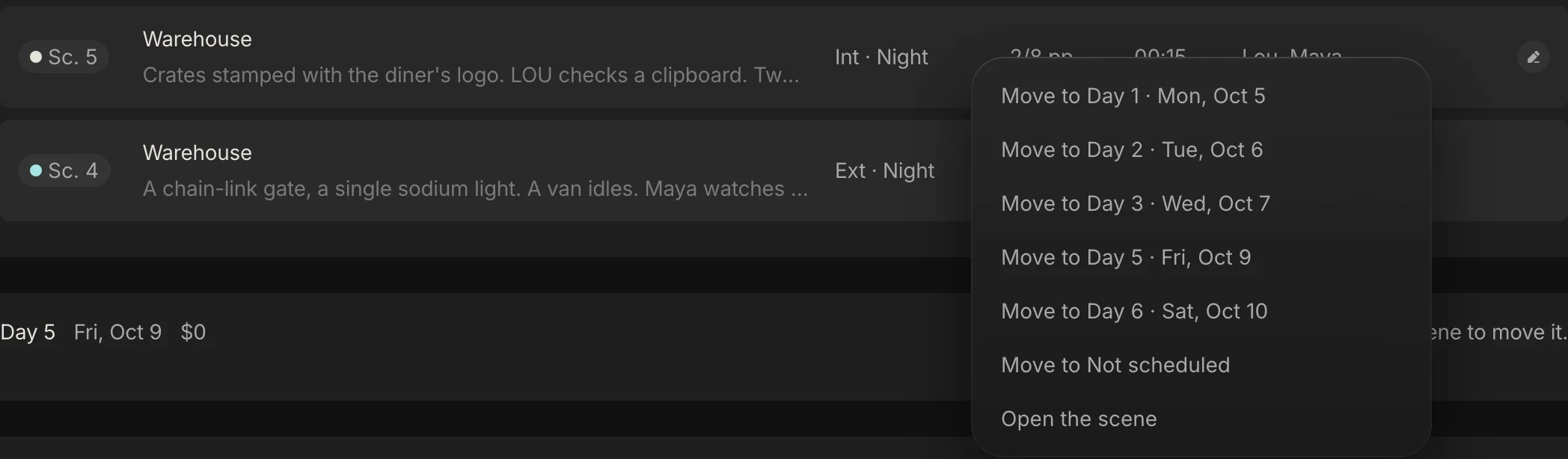
| What | Before | After |
|---|---|---|
| Lou's hold days | 2 | 0 |
| Day 2: scenes | 2, 7 | 2, 7, 5 |
| Day 2: pages | 6/8 of a page | 1 page |
| Day 2: warnings | None | More than one set; Day and night mixed |
| Day 2: planned cost | $23,361 | $24,447 |
| Day 4: scenes | 5, 4 | 4 |
| Day 4: planned cost | $22,818 | $21,733 |
| The four shoot days together | $94,159 | $94,159 |
The planned cost of the four days does not change, because the app's planned cost does not include hold pay. About $1,086 of cost moves from Day 4 to Day 2, and Lou's two holds go away, which saves whatever his deal pays for a hold. The price is a day with two sets and both day and night. That is a company move and a change of light, and the real decision is which problem you would rather pay for.
The same trade is worked in full in the day out of days guide and in how to make a shooting schedule. After a move, the tool returns day lines for the days it touched, with pages and warnings, and the brief tells Gaffer to read back the costs and the holds too.
Question 3: what does a day cost?
Every shoot day carries a planned cost, worked out by the app from the people on it and the items on its scenes. Gaffer reads it from the schedule and from the day read. On Midnight Diner, Day 1 is $26,247, the dearest, and the four shoot days together are $94,159.
The what_if tool prices a change without making it. Two examples on the sample, with the contingency of 10% the budget already carries:
| The question | Added cost | How the tool gets there |
|---|---|---|
| What does one more shoot day cost? | $25,894 | An average planned shoot day, $23,540, plus 10% contingency |
| What if the planned day is 12 hours, not 11? | $23,288 | The extra hour is paid at overtime after hour 10: $11,264 across the shoot days and $9,907 across paid prep and wrap days, plus 10% contingency |
The extra day is an average day, not the next one on the schedule, so it is a first estimate and not the price of a particular night. Both numbers come from the app's engine and not from the model's arithmetic, as long as Gaffer calls the tool, which its brief tells it to do before a big change.
For the arithmetic of a single overtime hour on one day, see film production scheduling. The budget side of the same questions is in how to budget a short film.
Question 4: what is not priced yet?
A budget is only as good as what is priced in it. In Spring Pro, breakdown items in the budget's categories and location fees that have no budget line are not priced. The get_budget_lines tool returns them as a to-price list, and save_budget_line prices one from it.
On Midnight Diner that is 66 items in 9 accounts. The tool returns only the first 60, so Gaffer sees 60 of the 66, and the 3 location fees are among the 6 it does not see.
| Account | Not priced | In the list Gaffer sees |
|---|---|---|
| Props | 14 | 14 |
| Art department | 10 | 10 |
| Extras | 4 | 4 |
| Wardrobe | 12 | 11 |
| Hair and makeup | 4 | 3 |
| Stunts and SFX | 8 | 8 |
| Lighting and grip | 9 | 8 |
| Transport | 2 | 2 |
| Locations | 3 | 0 |
| All accounts | 66 | 60 |
None of the 66 was added to the script after the lock on 4 October, by the same test the Budget page uses to flag new script items. They are work not done yet, not scope that crept in. The change log is empty too, so no budget line or deal has been changed since the lock.
None of the 60 Gaffer sees comes with a suggested rate, because no budget line with the same description has been priced before.
The tool takes an account filter, so a question about one account at a time sees all of it, location fees included. A question about the whole budget sees the first 60.
What it can change, when you ask
Twenty-three tools change the production. Each makes the same write as the page it belongs to: Schedule, Call sheets, Crew, Locations, the to-dos on a scene and the Budget. A change from Gaffer is a normal edit saved the normal way, not a separate copy.
After the lock, a change to a budget line or to a person's deal is logged with who, what and how much. Changes to the budget's rules, funding and expenses are not in that log. Gaffer's brief tells it to act only when asked. That is an instruction to the model, and the rules table below says which rules the tools hold and which only the brief does.
| Area | What it can do | Tools |
|---|---|---|
| The schedule | Move scenes to a day or off the schedule, swap two days, add or remove a day, set the crew call, first shot, lunch, wrap, each actor's call, notes and delays, mark scenes shot, set the start date, pages a day and weekends, or plan the whole shoot | move_scenes, swap_days, add_day, remove_day, set_day, mark_shot, set_schedule, plan_shoot |
| People | Add or change a person (deal, hours, contact, the character an actor plays), or remove one | save_person, remove_person |
| Places | Change a location's status, address, contact, parking, permit, notes and which facilities are sorted | update_location |
| To-dos, the breakdown and notes | Add a to-do with its department, priority, due date and owner, add a breakdown element or a shot pick, change or remove an item, write a scene's production notes | add_todo, add_element, update_item, remove_item, set_scene_notes |
| Money | Add, change or remove a budget line, log an expense, approve, reject or mark one paid, add funding, set the budget's rules, lock the budget | save_budget_line, remove_budget_line, add_expense, update_expense, save_funding, set_budget_rules, lock_budget |
One more tool, remember, saves a standing preference for the project, such as "always call cast an hour before crew". It is added to every question afterwards, and the step shows in the chat, so nothing is learned silently.
What it cannot change is as important as what it can. There is no tool that writes the script's lines, sends anything, or pays anyone, and the next sections show how each rule is held.
The one undo per run
If a run changed anything, the app keeps the project as it was before the run's first change. Say "undo that" and Gaffer calls undo_last_changes, which puts back what it changed. The brief tells Gaffer to end every change with that offer.
We ran it on the sample with the real tools: move scene 5 to Day 2, then ask for the undo. This is what we saw.
- The schedule came back exactly. Day 2 held scenes 2 and 7 again and Day 4 held 5 and 4.
- Another person's edit stayed. We typed an address for the Diner between the move and the undo, and the undo left it alone.
- An edit to the same field did not. When Gaffer set a call time and someone then changed that same call, the undo put the field back to what it was before the run, and their edit was lost. Look at the day before you undo.
- A read-only question did not use the undo up. A change, then a question that only read, then "undo that" still reverted the change.
- Only one run goes back. After an undo there is nothing left to undo, and the tool answers "Nothing of mine to undo."
- The lock can be undone. Locking the budget replaces the lock and clears the change log, and "undo that" restores the earlier lock.
Two limits from the code. The undo is held in the open production desk, not saved with the project, so a reload, a closed tab or leaving the desk to open a scene or the script loses it, although the chat itself is saved. We read that in the code and did not test it in the running app. And a stopped run still counts as a run, so what it had changed before you pressed Stop can be undone.
What it never does, and how each rule is held
Some rules are built into what the tools can do. Others are instructions to the model, and an instruction can be broken. The table says which is which. The tool rules were checked by running the app's own tool code on the sample.
| The rule | How it is held | Held by |
|---|---|---|
| It sends no message, email or call sheet | No tool sends anything. It drafts the text for a person to send | The tools |
| It pays and moves no money | No payment tool exists. Add expense logs a request and never pays. Approve and mark paid change the record only, and an approval is recorded with the signed-in user's email address, or left blank if it has not loaded. An expense under 100 in the budget's currency approves itself by default, with or without Gaffer | The tools |
| It does not change the script's words | Only get_script reads the script's text, and no tool writes script lines. A scene note is a production note, not a script line | The tools |
| It does not replan over scheduled days without your yes | plan_shoot refuses while days hold scenes unless it is called with replace set | The tools |
| It refuses bad input | A time must be written HH:MM, a scene, day, person, place, department and account must exist, and a character can be cast once | The tools |
| It removes, locks and replans only on an exact ask | The brief says remove_day, remove_person, remove_item, remove_budget_line and lock_budget only when you asked for exactly that | The brief, an instruction to the model |
| It acts only when asked, and waits for your pick after options | The brief says to act only when asked and to make exactly the option you pick | The brief, an instruction to the model |
| It does not guess a number, date, name or id | The brief says to read first and say a fact is not set | The brief, and it can fail (see the checked answer, where it named owners nobody had recorded) |
Say lock only when you mean it. Locking an already locked budget replaces the lock and clears the change log, and nothing but the brief stops Gaffer from calling it.
Where it goes wrong
NIST's generative AI profile names one of its risks confabulation: confidently stated content that is wrong, which it says is a natural result of how these models are built. It also warns that people may lean on such systems too much, which it calls automation bias. Spring Pro's own screen carries the same warning: "Gaffer is AI and can make mistakes. Check important numbers."
Here is what we found in the code and on the sample, besides the owners with no record behind them.
- A capped list. get_budget_lines returns 60 unpriced items, and the sample has 66.
- An average day. what_if prices an extra day at the average planned day, not at the day you have in mind.
- Shot by date. The overview counts a day as shot once its date has passed, even when no scene is marked shot. On 12 October it reads all four days that hold scenes as shot and finds no next day. Keep the start date true when a shoot slips.
- Turnaround and meals from a rule of thumb. Its brief gives about 12 hours from wrap to the next call, never under 10, and a meal within 6 hours of call. That is not your agreement, and the app does not check turnaround. See turnaround and meal breaks.
- Old readings shorten in long chats. As a chat grows, older tool results are shortened and only the newest turns are kept, so Gaffer reads again when it needs a number. A run stops after 60 rounds with the model and keeps what it had changed so far.
- Everyone on the project can ask. Spring Pro has no per-person permissions yet, so treat Gaffer as able to read what anyone on the project can read, including deals, rates and contact details.
- Your data goes to a model. Each step sends the conversation and what the tools read, which can include names, deals, phone numbers, the script's text, to-dos and the budget, to an AI model through Spring Pro's server. The server function takes signed-in people only and keeps the model key off your browser. A development copy of the app can reach a model by another route. Read the provider's data terms and your own agreements before you use it on a confidential script.
AI, the crew and the agreements
Guild agreements have started to say who must do the work. The Directors Guild's June 2026 release on its new four-year agreement lists its 2023 AI safeguards as renewed, including that its members' work "must continue to be performed by a person". Members ratified it later that month.
The guild's December 2023 release on a tentative agreement for commercials is more specific. It says all duties of directors, assistant directors and unit production managers must be done by a person, and that generative AI does not count as one. It calls these the same protections the guild secured in its Basic Agreement earlier that year.
That agreement is for commercials. It still needed a members' vote when released, and we did not confirm the vote. It gives the term as ending on 30 November 2026, so look for what replaces it.
IATSE's memorandum of 3 July 2024 adds an article on artificial intelligence. A producer may require employees to use AI systems, and those employees stay covered by the agreement while they do. The producer will not require an employee's prompts in a way that displaces a covered employee, may require consent before an employee uses AI, and may reject its output. We read the memorandum, not the ratified text, so check the final agreement.
None of this is a ruling on a tool like Gaffer, and we are not lawyers. It shows where the line sits: the assistant reads and drafts, and a named person decides and sends. If your production is under an agreement, read it and any policy your producer has issued on AI use, including privacy and security, before you use any AI tool on crew data.
How people get these answers today, and what other AI helpers say about themselves
Here are four ways people get these answers, plus Spring Pro's. This is our view. The two vendor rows come from the vendors' own pages, read on 12 October 2026, and we did not test either product.
| Way of working | Good for | What to check |
|---|---|---|
| A person who reads the documents (1st AD, UPM, production coordinator, line producer) | Judgement calls, and the people you have to ring | The answer is only as fresh as their last read of each file |
| A general chatbot with files pasted in | A quick draft or a summary | It knows only what you pasted, so a later schedule change is not in it |
| An AI agent inside a breakdown and scheduling tool (Filmustage describes one) | Moving scenes and finding conflicts in the schedule | Its page describes a preview and an approval for structural changes, a backup before each action with seven days of rollback, and the ability to rewrite dialogue, action lines and scene headings. It does not say whether a rewrite is previewed first, so check what it can change in your script |
| A scheduling agent you talk to (FinalBit describes one) | Building and reworking a schedule by asking | Its post, first published in August 2025, gives examples of what a user could ask, such as moving scenes, and does not mention an approval step or an undo |
| Spring Pro's Gaffer | Questions across the schedule, people, places, to-dos and money, and changes you ask for | It applies a change when asked, with no preview step, then reads back and offers one undo. It does not edit the script, and it can be wrong |
A preview and approval step is slower and safer on a large change. Act then undo is faster and shows its work afterwards. Which suits you depends on what a wrong change costs and on whether anyone else edits the same fields while you work.
The Filmustage page and the FinalBit post are marketing, so treat their claims as claims. For a comparison of one scheduling suite with Spring Pro, see the StudioBinder alternative.
From a short to a feature: what changes
The questions do not change with size. What grows is how many people ask them and what a wrong answer costs. These sizes are rough labels, not industry definitions.
| Size | Does it earn its place | What to watch |
|---|---|---|
| Solo or YouTube video | Probably not: a shot list and a calendar answer the questions | Setting up a tool may cost more time than the questions are worth |
| Short film | Yes for the readiness and cost questions, when one person is producer, AD and coordinator | One person owns every fix, so set owners to yourself |
| Commercial | Yes for what-ifs and undo when the client changes the days | A late change: price the move before you accept it |
| Indie feature | Yes for the line producer's questions across a longer schedule and a bigger budget | Check numbers against the pages, read your agreement on AI, and expect old readings to shorten in long chats |
| Series or episodes | Not yet: one unit and one script per project | Several units or episodes in one schedule are not built |
Doing it in Spring Pro
Gaffer is a button in the production desk's sidebar, just below Setup. Open it, pick one of the four suggestions or type your own question, and press Enter. While it works you see a label that reads Thinking or names the tool it is running, and a Steps card that counts the tools as they run. The reply streams in as it is written.
The four suggestions are "How are we doing this week?", "What is most at risk right now?", "Are we ready for the next shoot day?" and "Where are we over budget and why?". There is one conversation per project, saved, so it is there next time. The pages it reads are described in shooting schedule software, call sheet software, production budget software and script breakdown software.
What it does not do yet: it cannot send, pay or edit your script, it has no turnaround, weather or permit checks of its own, it reads one unit and one script per project, it does not see storyboard pictures or receipts, and it has no preview step before a change. The undo lasts only while the production desk stays open.
The checklist
Copy this. Tick it before you rely on an answer or let it change the plan.
- Ask in one sentence, and name the day or the scene by number
- Set an owner on every to-do before you ask who owns a fix
- Keep the schedule's start date true, because a day counts as shot once its date passes
- Ask for options before a large change, then pick one
- Check each number it quotes against the page it came from: Schedule, Call sheets, Budget
- Check any turnaround, meal or overtime rule against your own agreement
- After a change, read the days it touched, and say "undo that" before you reload or leave the desk if it is wrong
- Read anything it drafts before you send it, and keep a copy of what you sent
- Read the provider's data terms and your agreement's AI terms before you use it on crew data
How these numbers were made
Every number about Midnight Diner was computed, not typed: from the sample project's own data and the app's cost engine, and by running Gaffer's own tools on the sample for the readings, the move and the undo, on copies held in memory. The desk those tools read is rebuilt in the page the way the production desk builds it. It leaves out storyboard frames, scene running times and the money tracker, and no number here uses them. The build stops if the code or the sample changes so that a sentence here is no longer true.
Midnight Diner is a demonstration production, not a real shoot. We captured one real Gaffer answer on 12 October 2026 from a development copy of the app and checked it by hand, and another run would word it differently. The descriptions of agreements and of other tools come from the sources below, read on 12 October 2026. The IATSE memorandum was read as text, the guild items are union releases and not the agreements themselves, and agreements change, so check yours.
Questions people ask
What is an AI production assistant for film?
Software that reads a production's schedule, cast and crew, locations, to-dos and budget together and answers questions about them. In Spring Pro it is Gaffer. It assists the people who run the production and does not replace them.
Is an AI production assistant the same as a production assistant (PA)?
No. A PA is an entry-level crew job. An AI production assistant is software that answers questions and drafts work for the production office. Gaffer is also the name of the chief lighting technician on a crew, and the sample crew list has a person with that job.
What can it answer that my schedule software cannot?
Questions that cross the schedule, the call sheets, the locations, the crew list, the to-dos and the budget, such as whether Day 1 is ready, what a scene move changes, what a day costs and what is not priced. See film production scheduling for the schedule side.
Can Gaffer change my schedule, budget or script?
It can change the schedule, people, locations, to-dos, breakdown and budget, with 23 tools, and its brief tells it to act only when you ask. On the production desk it cannot change the script's words, because no tool writes them.
Can Gaffer send call sheets or messages, or pay people?
No. No tool sends anything or pays anyone. It drafts a call sheet or a message as text for you to send. See how to make a call sheet for the sheet itself.
Can I undo what Gaffer did?
Yes, one run back. Say "undo that" and it reverts what it changed in its last run. The undo lives in the open production desk, so a reload, a closed tab or leaving the desk loses it, and an edit someone else made to the same field after Gaffer's is lost too.
How accurate is it, and can it be wrong?
It can be wrong. NIST describes confident but false output as a natural result of how these models are built. On our checked answer the dates, counts and amounts matched, and the owners it named were not recorded in the project. Check numbers and names against the pages.
Does it replace the 1st AD, the UPM or the line producer?
No. It does reading and drafting, and a person decides and sends. Guild agreements now speak to this: a Directors Guild release on a tentative commercials agreement says certain duties must be done by a person.
Where does my production data go when I ask Gaffer?
Each step sends the conversation and what the tools read to an AI model through Spring Pro's server, for signed-in people only. That can include names, deals, contact details, script text and the budget. Read the provider's data terms and your agreements first.
Does Gaffer know my turnaround and meal rules?
Not yours. Its brief gives a rule of thumb of about 12 hours from wrap to the next call and a meal within 6 hours, and the app does not check turnaround. Use the turnaround guide and your agreement.
Does it work for a series?
Not yet. Spring Pro handles one unit and one script per project, so Gaffer cannot answer across several episodes or units in one schedule.
Sources
Every outside claim that names a source comes from one of these, read on the date shown. Standard conventions, such as the eighths rule and the usual specialist cases, are common practice. Figures from agreements and summaries change at each negotiation, so check the current text before you rely on a number.
- NIST AI 600-1, Artificial Intelligence Risk Management Framework: Generative AI Profile (July 2024, a US government standards body). Checked 2026-10-12.
- Directors Guild of America, board approves the tentative new agreement (12 June 2026, a union release). Checked 2026-10-12.
- Directors Guild of America, membership ratifies the new contract (26 June 2026, a union release). Checked 2026-10-12.
- Directors Guild of America, tentative agreement on a new commercials contract with the AICP, sent to members for ratification (8 December 2023, a union release). Checked 2026-10-12.
- IATSE Basic Agreement, memorandum of agreement of 3 July 2024 (a copy held by the Berkeley Labor Center). Checked 2026-10-12.
- Filmustage, AI Agent for Film and TV Pre-Production (a vendor page). Checked 2026-10-12.
- FinalBit, AI and Agentic Scheduling: The Future of Feature Film Production (a vendor blog post, first published 26 August 2025 and marked updated 6 July 2026). Checked 2026-10-12.
- Film Independent, a recap by a staff writer of a talk by line producer Angela Sostre on building a better budget (16 August 2017). Checked 2026-10-12.