Film production scheduling: the whole picture.
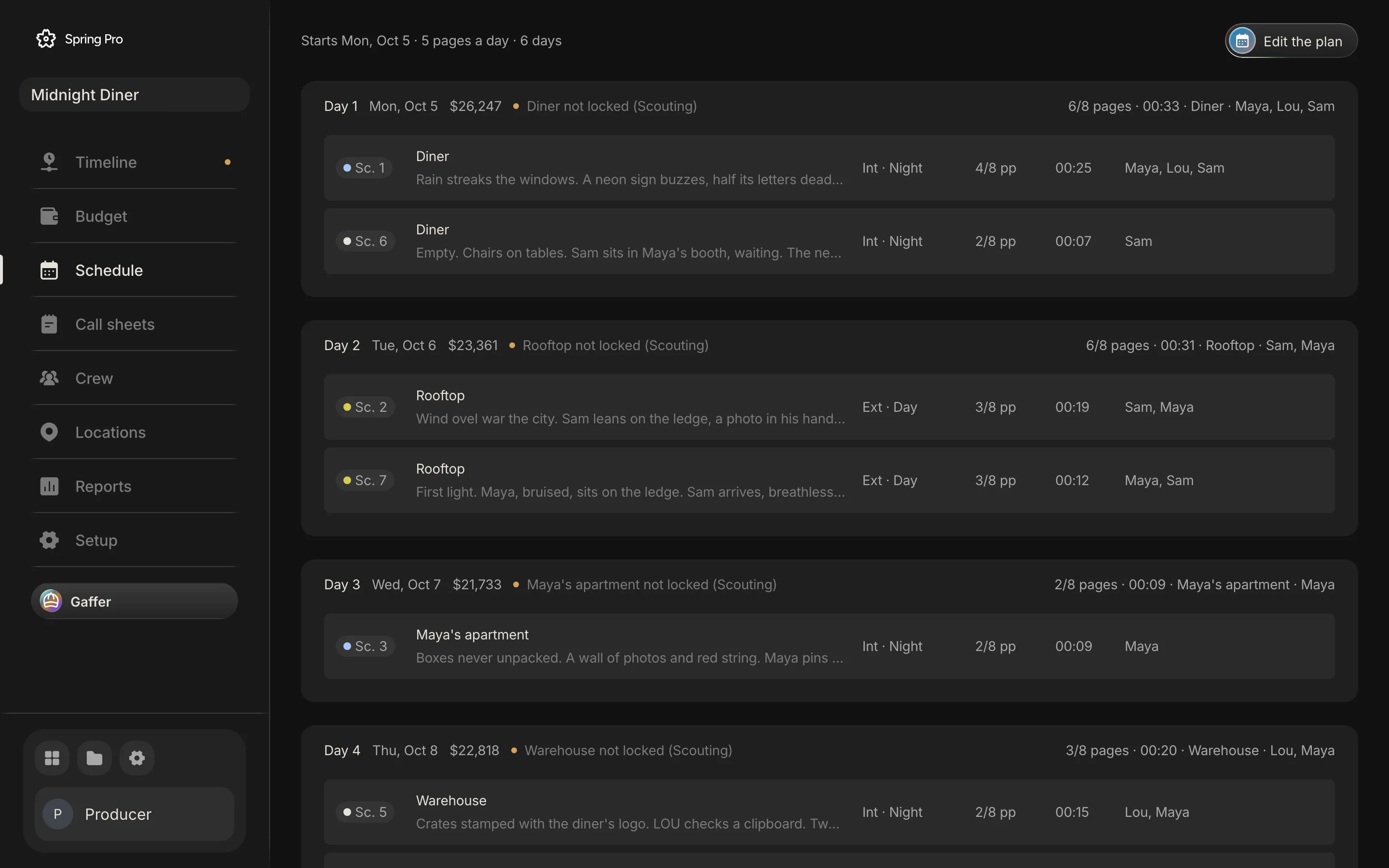
Real screen: Midnight Diner, our demo production, in Spring Pro.
The short answer. A film production schedule turns a script into dated shoot days, and the cast report, call sheets, locations and the cost of each day all read from it. It breaks when one scene moves and those documents are retyped. Keep them tied to one schedule, check the rest rules, and price every day.
This is the long version. It covers the pain at every size of production, the seven places a schedule goes stale, what hours cost on a real day, the rules that make them expensive, how people schedule today, and how it all connects in one project. The numbers come from Midnight Diner, a real demonstration production: 7 scenes, 4 shoot days, 44 people, computed by the app's own engines. For the step-by-step method, read how to make a shooting schedule.
In this guide 18 sections
- Quick answers
- Production schedule, shooting schedule, call sheet: which is which
- The production schedule around the shoot
- The pain, by size of production
- Where a schedule breaks: the seven handoffs
- What it costs: hours are the bill
- The rules that make hours expensive
- How people schedule today, and where it breaks
- The method, in one page
- When the script changes: a revision routine
- From a short to a feature: what changes
- In Spring Pro: one move, the whole chain
- Where the move shows up
- Where the money and the reports show it
- Which setup fits you?
- How these numbers were made
- Questions people ask
- Sources
Quick answers
What is a film production schedule? The plan that puts every scene on a dated shoot day, at a location, with a cast. Everything else reads from it: the call sheets, the cast report, the location bookings and the cost of each day.
Who makes it? The 1st assistant director builds the shooting schedule, and the production manager and producer check it. The line producer ties it to the budget: in a Film Independent interview, once the script is ready, a line producer builds a realistic schedule and a rough line-by-line budget to start raising funds.
What goes wrong? A change. The script is revised, an actor loses a day or a location says no, and everything built from the schedule is now stale. The method is covered in how to make a shooting schedule.
What does a day cost? On Midnight Diner, a shoot day costs $21,733 to $26,247 to plan, and one overtime hour on the costliest day adds $2,993. These are worked examples, not benchmarks.
Do you need software? Not for a short with a few locations. A schedule that changes weekly, read by many people, is where one connected project starts to pay for itself, which is covered in shooting schedule software.
Production schedule, shooting schedule, call sheet: which is which
People use these words loosely, and a page that mixes them up costs a reader time. Here we use "production schedule" for the whole timeline from prep to delivery, and "shooting schedule" for the dated shoot days inside it.
| Document | What it answers | Who reads it | Covers |
|---|---|---|---|
| Production schedule | What happens, in order, from prep to delivery | Producers and department heads | Weeks to months |
| Shooting schedule | Which scenes on which day, where, with whom | The 1st AD, the production manager, every department | The shoot |
| One-line schedule | The shooting schedule, one line a scene | Everyone, at a glance | The shoot |
| Stripboard | The schedule as movable strips, coloured by light | The 1st AD | The shoot |
| Day out of days | Which cast work which days, and who is waiting | Casting, producers, actors | The shoot |
| Call sheet | One day, with times and addresses | Cast and crew | One day |
| Daily production report | What actually happened that day | Producers and financiers | One day |
Each has its own page: the stripboard, the day out of days, the call sheet and the daily production report. Two terms decide most of a schedule's cost: the company move and turnaround.
The production schedule around the shoot
The shooting schedule is the part everyone argues about, but it sits inside a longer timeline. That timeline has the same job at every stage: hold the dates other people are waiting on.
| Phase | What the schedule holds | What it depends on |
|---|---|---|
| Development | A script stable enough to break down, and a first budget | A draft that has stopped changing daily |
| Prep | Breakdown, locations, casting, crew hires, tests, the tech scout | Money and availability |
| Shoot | Dated shoot days, call sheets, daily reports | Cast and location bookings |
| Wrap | Returning gear, striking sets, closing accounts | The last shoot day |
| Post | Edit, sound, grade, effects | The footage and the approvals |
| Delivery | Masters and the dates a festival or platform needs | The finished edit |
The shooting schedule is the part Spring Pro builds today, and the edit lives in the same project. A production calendar for the other phases, with milestones, is not built yet.
The pain, by size of production
The same schedule looks different at every size, and the reader needs to find their own. These sizes are rough labels, not industry definitions.
On a short, the pain is availability: one actor's window or one location can decide the shape of the shoot, and losing a day breaks it. On a feature, the pain is money and change: overtime, revisions and extra days. A line producer's interview names the small versions of the same pain: an untrained dog can put a shoot behind by hours, leading to overtime or an extra shooting day, and child performers work fewer hours and need a studio teacher.
| Size | Typical shape | What hurts most | What the schedule must do |
|---|---|---|---|
| Solo or YouTube video | One person, a day or two | No plan, forgotten shots, re-shoots | Hold a shot list and one day plan |
| Short film | 2 to 10 days, a small crew | One actor's window, one lost location | Group by set, read the day out of days, plan a cover day |
| Commercial | 1 to 3 days, many versions | A tight day, many cutdowns, approvals | One set a day, a strict order, slack for approvals |
| Indie feature | 15 to 40 days, a line producer | Overtime, revisions, extra days, cash | Price every day, check rest, run a revision routine |
| Series or episodes | Many scripts, blocks and units | Cross-boarding, several units, turnaround | Plan blocks. Not covered by Spring Pro yet. |
| Game cutscenes | Capture days, voice, localisation | An orphaned scene when a level is cut | Treat capture days as shoot days |
Notice that most of the pain is about change, not about the first draft of the schedule. That is why the next section is about where a change goes.
Where a schedule breaks: the seven handoffs
A production is one story that keeps changing. Each document is a view of the same scenes, and the pain is not inside any one of them. It is between them, at the seven handoffs below, in the order a change travels.
- 1. Script revision to breakdown. The words change and the breakdown still lists the old scene. Revision colours exist so everyone can see that material has changed, and the same scheme is applied to call sheets and schedules so departments stay in sync.
- 2. Breakdown to schedule. A breakdown groups scenes by location, cast availability and technical needs, and its per-scene estimates feed the schedule. If the strips were built from sheets that have since changed, the schedule is built on an old script. The method is in how to do a script breakdown.
- 3. Schedule to cast. The day out of days says who works and who waits. Move one scene and a hold appears or disappears, and the report is wrong until someone rebuilds it.
- 4. Schedule to locations. A location is needed on a day nobody booked it for, or a day's set has not been secured. The status belongs on the day it blocks, not in an email thread.
- 5. Schedule to call sheet. The sheet lists the scenes and the cast for one day. If it was copied from last week's and edited, one forgotten line puts the wrong actor on the wrong call.
- 6. Schedule to budget. The cost of a day follows its scenes, so a move shifts money between days. The budget goes stale when the cost of a day lives in another file, and the line producer ties the schedule directly to cost.
- 7. Shoot day to actuals. What really happened, the first shot, the wrap and the scenes completed, has to reach the plan. When the report is typed in the evening and reaches the budget a week later, the next decision is made on old numbers.
If these seven were one file, each handoff would be free. Where they are separate files, each is a retyping job, and each retyping job is a chance to be wrong.
What it costs: hours are the bill
A schedule is a labour bill. On Midnight Diner, people are 88% to 94% of every shoot day, so the cost of a scheduling error is paid in hours. The production plans an 11-hour day, with overtime after hour 10 at 1.5 times the rate and 18% fringes.
Here is every shoot day, computed by the app's own cost engine. The last two columns are the cost of an overrun on that day.
| Day | Set | Planned cost | People | One extra hour | A 14-hour day |
|---|---|---|---|---|---|
| 1 | Diner | $26,247 | 88% | +$2,993 | +$8,979 |
| 2 | Rooftop | $23,361 | 94% | +$2,851 | +$8,554 |
| 3 | Maya's apartment | $21,733 | 94% | +$2,639 | +$7,917 |
| 4 | Warehouse | $22,818 | 94% | +$2,781 | +$8,342 |
The calculator opens on the real Day 1 and runs the same formula as the app, checked at build against the engine. Put in your own crew and rules.
Two more costs sit outside the table. One more shoot day costs about $23,540, the average of these four days before contingency. And an actor on hold costs the day rate when holds are paid: $800 a day for Lou, so $1,600 for his two holds.
We found no reliable industry average for the cost of a shoot day at a given budget, so we do not quote one. Your numbers beat a borrowed average.
The rules that make hours expensive
Hours are expensive because agreements set rest and meals, and breaking them is paid per person. Three figures matter most. These come from union and industry summaries, so check your own agreement before you rely on any of them.
| Rule | IATSE Basic Agreement (2021 summary, 2024 memorandum) | Australian agreement (summary) |
|---|---|---|
| Rest between days | 10 hours minimum for productions with established terms | 10 hours between consecutive days |
| After a day off or a weekend | 54 hours of weekend rest after a five-day week | 34 hours after one day off |
| If rest is broken | Additional double time for all invaded time (2024), up from additional straight time | Double time until the rest is provided |
| If a meal is late | $25 for the fifth and each later half hour of delay in a day | Double time from when the meal falls due |
The full table, with overtime, penalties and a calculator for the earliest legal call, is in turnaround and meal breaks on a film shoot. The sources are the IATSE 2021 summary, the IATSE 2024 memorandum, the Australian summary and a payroll vendor's guide to meal penalties.
The lesson for the schedule is simple. Every pair of days has a rest to clear, and every long day has a meal to place, so a schedule that ignores them is not finished.
How people schedule today, and where it breaks
People build a schedule on paper strips, in a spreadsheet, or in scheduling software, and each handles a change differently. The question that tells them apart is what you must redo when a scene moves.
| Handoff | Paper or spreadsheet | Tools kept separate | Spring Pro |
|---|---|---|---|
| 1. Script revision to breakdown | Retype scene by scene | Retype or re-import | Update scenes proposes keep, update, new or remove for each scene, and scene ids survive, so boards stay attached |
| 2. Breakdown to schedule | Build the strips by hand | Build or import the strips | Plan the shoot builds a first schedule by set and light from the same scenes |
| 3. Schedule to cast | Rebuild the day out of days | Run a report, if it reads the same file | The day out of days is built from the schedule, with holds counted |
| 4. Schedule to locations | A thread or a sheet beside the schedule | A field you keep up | Each set shows its status on every day it is needed |
| 5. Schedule to call sheet | Copy the last sheet and edit it | Generate it, if the tool does | Call sheets fill from the schedule; they print but do not email |
| 6. Schedule to budget | Retype the cost of the day | Enter it again in the budget file | The cost of a day reads the same schedule |
| 7. Shoot day to actuals | Type the report, then the budget | The same, if the files are separate | A wrapped day moves from planned to actual in the budget |
We have not tested other products for this page, so the middle column describes a setup, not a named tool. Where a product covers a handoff, it earns the tick.
Our view: the gap between a good spreadsheet and any tool is smaller than vendors say. It opens when the schedule starts changing every week.
The method, in one page
The method itself is short, and the how-to walks it on a real film. In order:
- Size every scene in eighths of a page. Rounding to whole pages hides the real size of the film.
- Count the days you can afford from money, not from pages. Pages set one floor and the number of sets sets another.
- Group scenes by location, then split by light. Script order stops mattering, and a day with two sets is a company move you decide on purpose.
- Fill the days and set the order inside each. Light windows first, and whoever must leave early.
- Check the cast, the rest and the weather. Read the day out of days, run the rest check on each pair of days, and give every exterior a cover day.
- Price every day, then publish it and keep it alive. Every change has a version, a date and a reason.
Each step, with the real sample, the calculator and a screen beside it, is in how to make a shooting schedule. The free schedule template has the same rows as a spreadsheet.
When the script changes: a revision routine
Most schedules are revised more often than they are made. The industry answer is the coloured revision page: each new set of pages gets a colour so everyone can tell they hold the latest. The standard order runs white, blue, pink, yellow, green, goldenrod, then buff, salmon, cherry and tan, and the same scheme is applied to call sheets and schedules. UK productions often swap the first two.
The colours solve who holds what. They do not solve the work behind each revision, which is the same every time:
- List only the changed scenes. A revision is a short list, not a new script.
- Re-size them in eighths. A scene that grew or shrank moves its day's page count.
- Update the breakdown for those scenes. New cast, props or a new set change the schedule.
- Re-run the schedule checks on the affected days only. Pages, sets, light, cast and rest.
- Reissue the call sheets for those days. Mark them with the revision colour.
- Log it. A version, a date and a reason, and tell people the same day.
In Spring Pro, you edit the draft and press Update scenes. It proposes keep, update, new or remove for each scene, you tick what you accept, and scene ids survive, so the boards stay attached. Coloured revision pages are not built yet, and neither is a stale flag on the schedule when a scene's words change, so the re-checks above are still yours to run.
From a short to a feature: what changes
The method holds at every size. What grows is the number of things that can go wrong between two days, and the number of people who read the schedule.
| Size | What changes in the schedule | What to add | Where Spring Pro stops |
|---|---|---|---|
| Short film | Few days, one unit, one location often | A day out of days and a cover day | Nothing yet |
| Commercial | Many versions, one tight day | A strict order inside the day and slack for approvals | No client sign-off on the share link |
| Indie feature | Many days, revisions, overtime, cash | A price on every day, rest checks, a weekly review, cash flow | No payroll or timecards; no rest checks |
| Series or episodes | Blocks, several units, cross-boarding | A schedule per block | One script and one unit per project |
| Game cutscenes | Capture days, voice, orphaned scenes | Capture days as shoot days | Capture planning is not built yet |
Series and multi-episode scheduling are the biggest limit. We say so plainly: if you run several units or episodes at once, the method holds but this tool does not yet.
In Spring Pro: one move, the whole chain
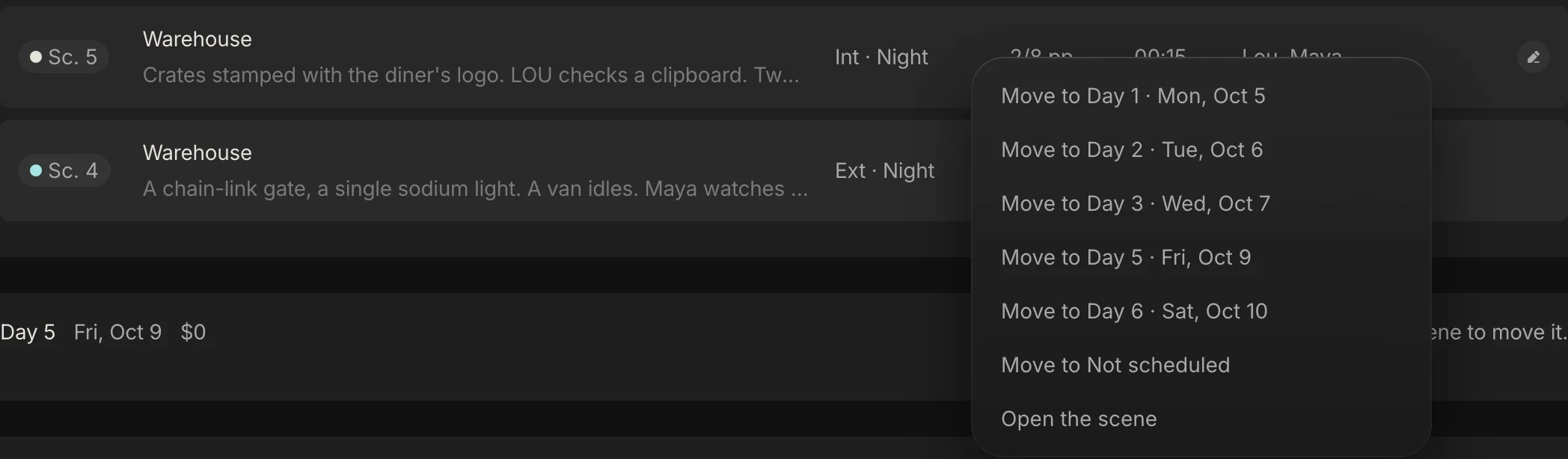
Everything above is a handoff, and in Spring Pro the handoffs are views of the same scenes. The clearest way to see it is to move one scene. Take Lou's last scene, scene 5, from Day 4 to Day 2, so that both of Lou's holds disappear.
Right-click the scene and pick the day. The move costs nothing in total, but about $1,086 shifts from Day 4 to Day 2 because costs follow the scenes, and Day 2 now has two sets. Here is each place it shows, as it stands in the sample.
Where the move shows up
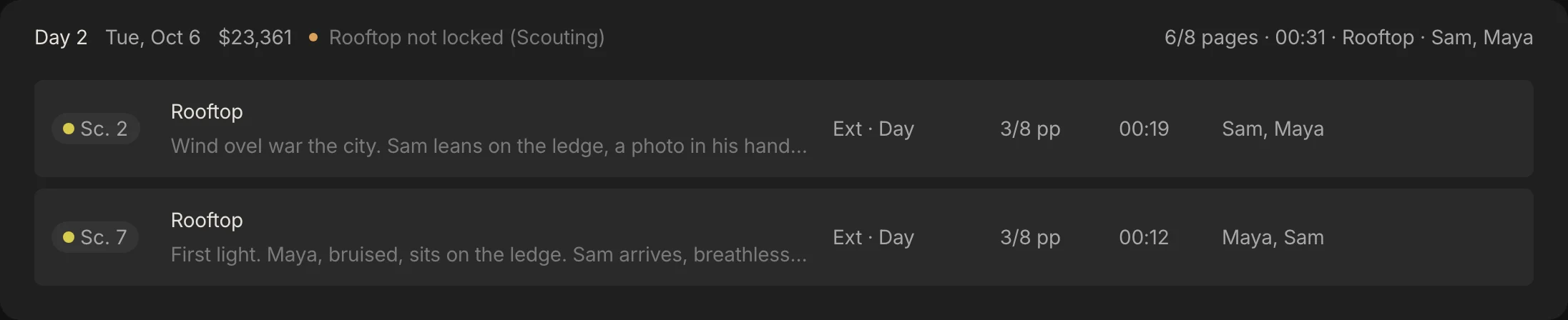
The schedule. Each day's header carries its pages, sets, cast, warnings and planned cost. After the move Day 2 shows a second set and two warnings, more than one set and day and night mixed, and the costs of Day 2 and Day 4 shift.
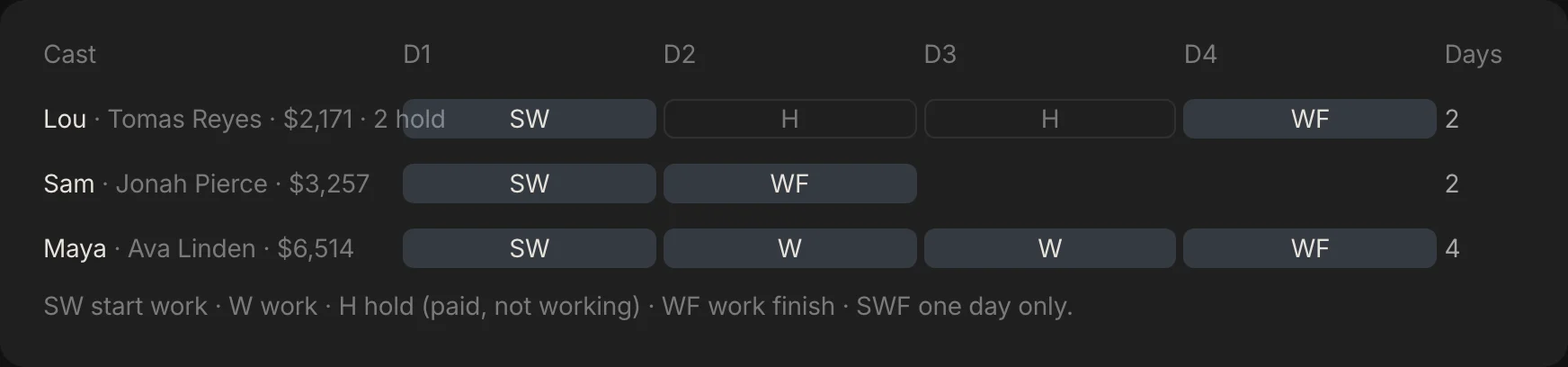
The cast report. The day out of days is built from the same schedule, so Lou's two hold boxes disappear and his last day moves up to Day 2.
The call sheet. Each day's call sheet fills its scenes and its cast from the schedule, so the moved scene and the actor on it appear on Day 2's sheet and leave Day 4's.
The locations. Each set carries a status from scouting to wrapped, and the schedule shows that status on every day the set is needed, so a day that now needs a second location flags it.
Where the money and the reports show it
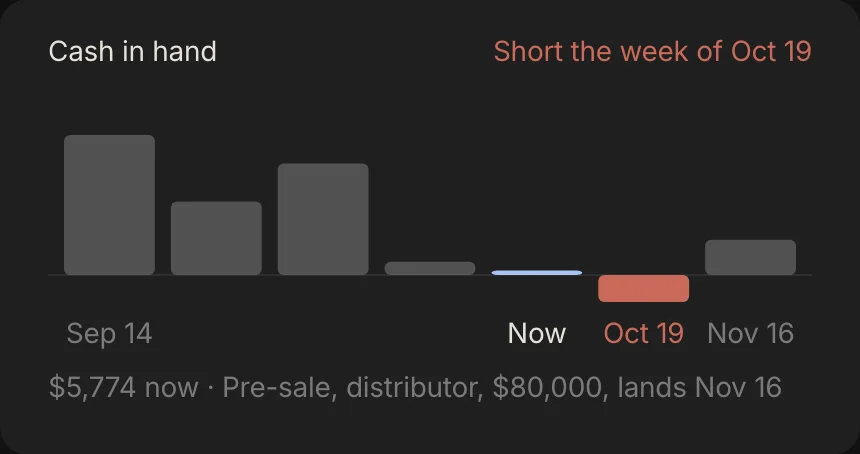
The budget. The cost of a day reads the same schedule, so the budget and the cash picture follow it. The cash view groups money out by week against the funding coming in, and flags the week cash runs short.
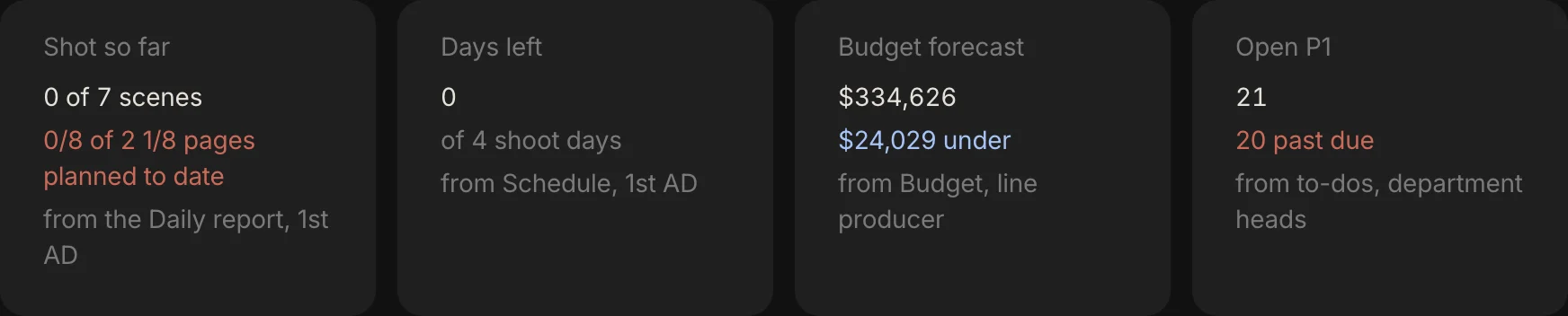
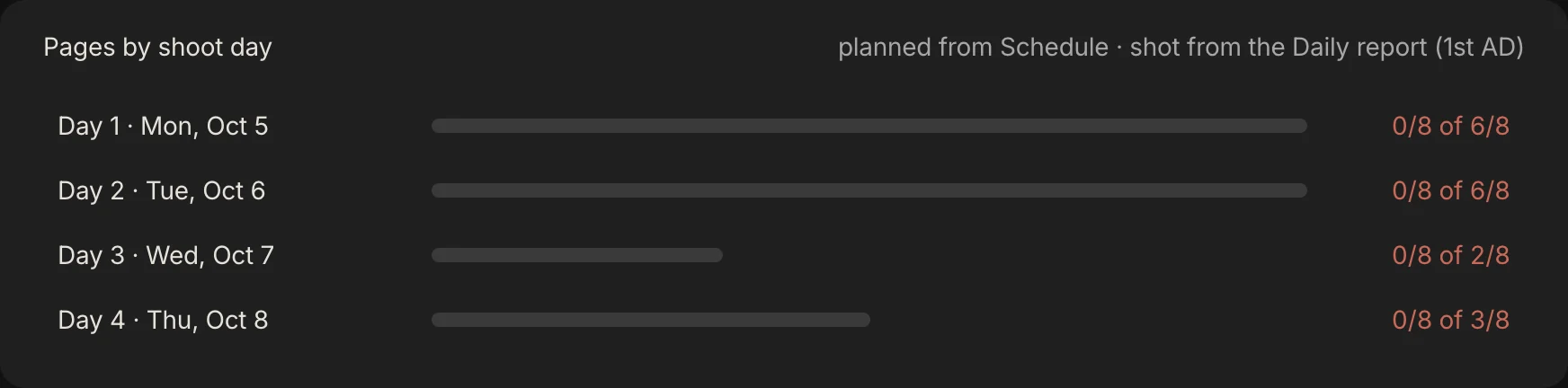
The reports. Reports opens on what is shot, how many days are left, the forecast and the open priority-one to-dos, and its pages-by-shoot-day panel sets what the schedule planned against what the daily report says was shot.
Gaffer. The assistant reads the schedule, the people, the locations and the money together, so a question such as "are we ready for Day 1?" is answered from all of them. It changes things only when you say, and one "undo that" reverts a run.
What the app does not do yet: call sheets print but do not email, it does not check turnaround or meal breaks, and it handles one unit and one script. See shooting schedule software for the tool, and call sheet software for the day-level view.
Which setup fits you?
There is no single right way. The real question is what you need.
- A short with one or two locations. A spreadsheet and a checklist. Use the free schedule template.
- A feature, with a schedule that changes weekly. Scheduling software, and keep the budget and the call sheets in the same place if you can. The cost of keeping them apart is the retyping above.
- A production where one change must reach the cast report, the call sheets and the cost at once. That is what Spring Pro is for.
- Several units or several episodes. Not Spring Pro yet.
How these numbers were made
Every number about Midnight Diner comes from the project itself, computed with Spring Pro's own scheduling and budget engines and matched to the screens on this page. The calculator uses the same formula, and the build refuses to publish if it disagrees with the engine on Day 1. Midnight Diner is a demonstration production, not a case study of a real shoot.
Figures about agreements and meal penalties come from summaries dated in the sources, and the contract text controls. We could not verify an average cost per shoot day by budget level, or the share of productions that still schedule in spreadsheets, and we found no reliable survey for either, so we state neither.
Questions people ask
What is a film production schedule?
The plan that puts every scene on a dated shoot day, at a location, with a cast. The call sheets, the cast report, the location bookings and the cost of each day all read from it.
What is the difference between a production schedule and a shooting schedule?
People use the words loosely. Here a production schedule is the whole timeline from prep to delivery, and the shooting schedule is the dated shoot days inside it. See the stripboard for the working form.
Who is responsible for the production schedule?
The 1st assistant director builds the shooting schedule, and the production manager and the producer check it. The line producer ties it to the budget.
How do I schedule around an actor who is only free some days?
Group their scenes into the days they have, then read the day out of days. It shows the holds, the days between their first and last when they wait, and a hold is usually still paid.
How many shoot days does a film need?
Pages set one floor and the number of sets sets another, so use whichever is larger. Midnight Diner is only a few pages and still needs 4 days, because it has 4 sets.
What does it cost to add a shoot day?
About one average planned day, before contingency. On Midnight Diner that is $23,540, and the calculator in this guide runs your own crew and rules.
What happens to the schedule when the script changes?
Everything built from it can go stale: the breakdown, the cast report, the call sheets and the cost. Revision colours exist to flag that change, and a connected project makes each handoff a view of the same scenes. See how to break down a script.
Do I need scheduling software?
Not for a short with a few locations. It starts to earn its place when the schedule changes every week and the budget, the call sheets and the cast report all depend on it.
Sources
Every outside claim that names a source comes from one of these, read on the date shown. Standard conventions, such as the eighths rule and the usual specialist cases, are common practice. Figures from agreements and summaries change at each negotiation, so check the current text before you rely on a number.
- Film Independent, a line producer on building a better budget. Checked 2026-10-12.
- Filmustage, the role of script breakdown in scheduling (a vendor). Checked 2026-10-12.
- Scriptation, script revision colors (an app vendor). Checked 2026-10-12.
- IATSE Basic Agreement, 2021 negotiations summary (Editors Guild, a union summary). Checked 2026-10-12.
- IATSE Basic Agreement, 2024 memorandum of agreement (a copy held by the Berkeley Labor Center). Checked 2026-10-12.
- Motion Picture Production Certified Agreement, summary (MEAA, Australia). Checked 2026-10-12.
- Wrapbook, meal penalties: a producer's guide (a payroll vendor). Checked 2026-10-12.
More about shooting schedule
A schedule is a labour bill. The cost of an error is paid in hours.
- Scenes become strips. Strips become shoot days. The tool
- A film shooting schedule template, laid out as a stripboard.
- How to make a shooting schedule for a film, with a real sample.
- Turnaround and meal breaks on a film shoot: the rules and a calculator.
- What a day out of days report is, and how to read one.
- One line schedule vs stripboard: the same four days, three ways.
- How to schedule a night shoot for film: the calls, the meals, the rest and the loadings.
- Film weather cover day: how to swap a rain day, with worked costs.
- Scheduling through script revisions: the colours, the routine and what each change costs.
- What is a stripboard?
- What is a day out of days?
- What is turnaround on a film set?