Location scouting for film: how to scout, lock and wrap a location, with a worked sample.
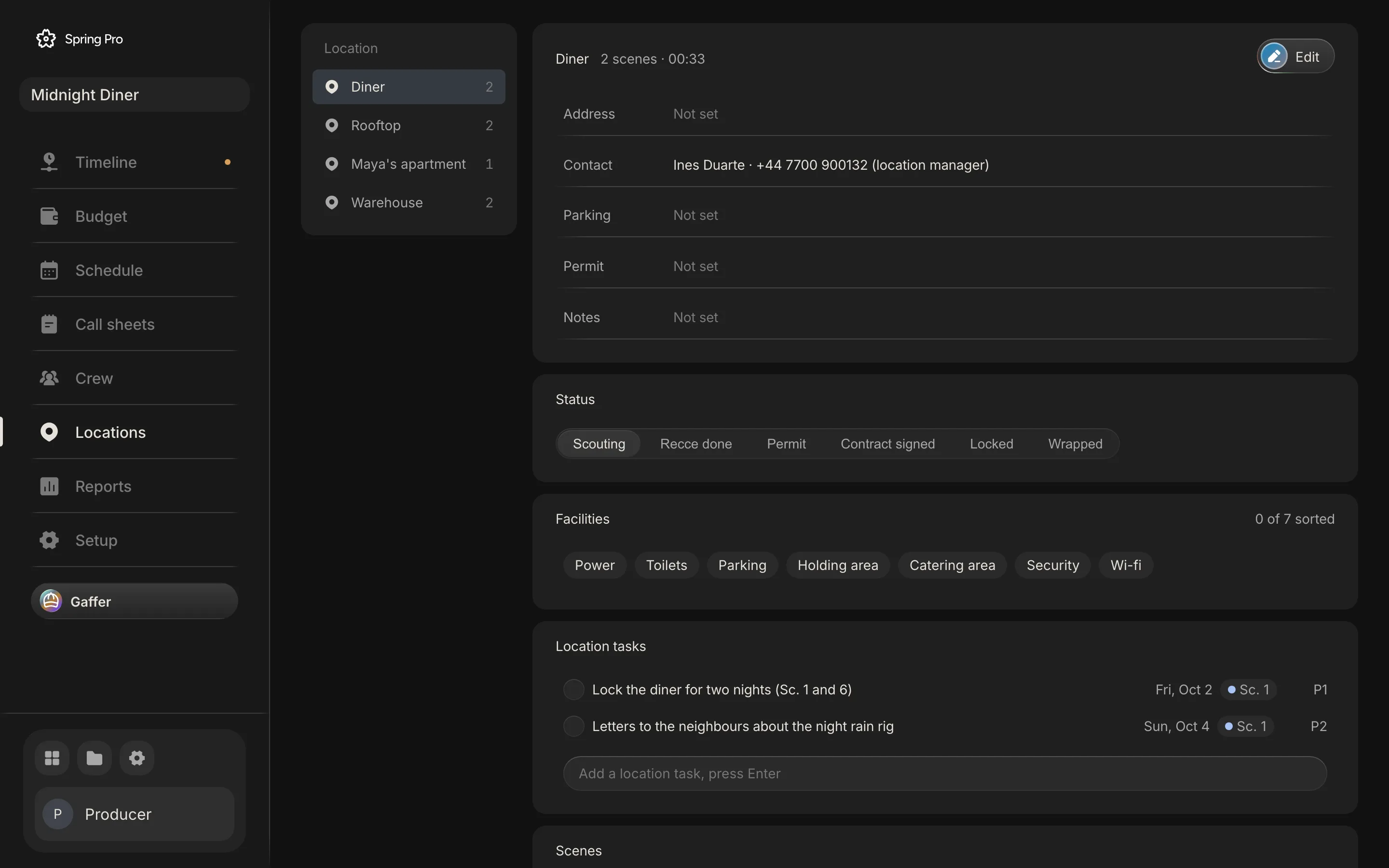
Real screen: Midnight Diner, our demo production, in Spring Pro.
The short answer. Scouting a location means visiting it, checking what the crew needs there, and recording the answers before you commit. Move each place through six steps (scouting, recce done, permit, contract signed, locked, wrapped) and check power, toilets, parking, holding, catering, security and wi-fi. The location manager owns the path. Until a place is locked, every day that needs it is at risk.
A location can fail on plain things: no toilets, no room for the generator, a street that needed a permit nobody asked about. This guide takes a place through the six steps from first visit to wrap, and uses a sample production, Midnight Diner, to show what the app does with them: seven scenes at four sets, every one still at its first step, so you can see what an unlocked location looks like to everyone who depends on it. The numbers come from the project. The checklist comes from scouting guides and a film school's checklist, read and dated below.
In this guide 22 sections
- Quick answers
- Why a location is where a plan breaks first
- The film we are scouting
- Before you start
- The six steps of a location, in the order the app keeps them
- Step 1: Scouting, and finding more than one option
- Step 2: Recce, with a location scout checklist
- Step 3: Permit, and why this page gives no rules
- Step 4: Contract signed, get it in writing
- Step 5: Lock it, and know what lock means
- Step 6: Wrapped, hand it back
- What it takes to lock a set: the sample's nine location tasks
- Who owns a location: the location manager and the film line producer
- What a location that is not locked puts at stake
- Why an unlocked location is a flag on every day it blocks
- How people track locations today, and what breaks when a day moves
- From a short to a feature: what changes
- Doing it in Spring Pro
- The location scouting checklist
- How these numbers were made
- Questions people ask
- Sources
Quick answers
What is location scouting for film? Finding places that could work for a scene, visiting them and recording what each one offers. Wrapbook calls it a critical pre-production process, says the screenplay and an initial script breakdown give the first clues to what you need, and says the budget and the shooting schedule limit which places are feasible.
Who does it? The location manager runs it, and Wikipedia says that person is usually supervising several scouts and assistant managers over a show. On a small shoot the producer or the line producer may cover it, since Wikipedia says the line producer facilitates location scouting.
What is a tech scout? A later visit, after the places are chosen. Wrapbook describes it as a secondary scout after selection, attended by many more crew than the initial scout, which it limits to creative keys such as the director, 1st AD, production designer and director of photography.
When is a location locked? When its permit and contract are settled and its dates match the schedule (our definition, not an industry rule). In Spring Pro only the last two steps, Locked and Wrapped, count as locked.
Do I need a permit? It depends on the place, who owns the land and what you will do there. Local offices publish their own rules, so ask the film office or council for that site. This page gives no permit rules for any place.
Why a location is where a plan breaks first
Every other plan sits on a place. The schedule groups scenes by set, so a set that falls through takes its day with it. The call sheet sends the crew to an address, and the budget prices the fee, the permit and the guard.
The problems that hurt are plain ones. Wrapbook gives three examples of infrastructure that changes the budget: an inadequate power supply can force you to rent an extra generator, a place with no toilets means portable toilets or a honey wagon, and too little space for parking or crew lunches might force you to rent a secondary location. The line producer interviewed by Film Independent makes the same point from the budget side: choosing where to shoot is not only about what looks good, because permits and parking move the cost.
People are the cost that rides on a day. On Day 1 of Midnight Diner the crew and cast cost (wages with fringes, and kit) at the planned 11-hour day is $23,097, and one extra hour adds $2,993 (the working is in film production scheduling). Here is who reads the location record and what a gap does to each of them.
| Reader | What they take from it | What goes wrong if it is missing or stale |
|---|---|---|
| Director and DP | Whether the place fits the scene and the light | The place is chosen on looks and fails on logistics |
| 1st AD and the schedule | Which day each set is needed, and for how long | A day is built on a place that falls through, and scenes have to move |
| The call sheet | Address, parking, contact, facilities | The crew arrives at the wrong door, or without toilets or parking |
| Line producer and budget | Fees, permits, security, power | The cost turns up late as a generator, a guard or a truck permit |
| Department heads | Power, access, room to stage equipment | Grip and electric plan for a layout that is not there |
| The producer | Which sets are locked and which are not | Nobody sees how exposed the plan is until the week of the shoot |
This guide is the location half of getting the right people to the right address. The call sheet half is how to make a call sheet, and the day plan is how to make a shooting schedule.
The film we are scouting
Midnight Diner has four sets in seven scenes, and each set is shot on a single day. Here is each one as the app holds it: its scenes, its pages, the day it is needed, its status, how many of the seven facilities are ticked, and the planned cost of that day.
| Set | Scenes | Pages | Shoots on | Status | Facilities ticked | Planned cost of that day |
|---|---|---|---|---|---|---|
| Diner | 1, 6 | 6/8 | 5 Oct (Day 1) | Scouting | 0 of 7 | $26,247 |
| Rooftop | 2, 7 | 6/8 | 6 Oct (Day 2) | Scouting | 0 of 7 | $23,361 |
| Maya's apartment | 3 | 2/8 | 7 Oct (Day 3) | Scouting | 0 of 7 | $21,733 |
| Warehouse | 4, 5 | 3/8 | 8 Oct (Day 4) | Scouting | 0 of 7 | $22,818 |
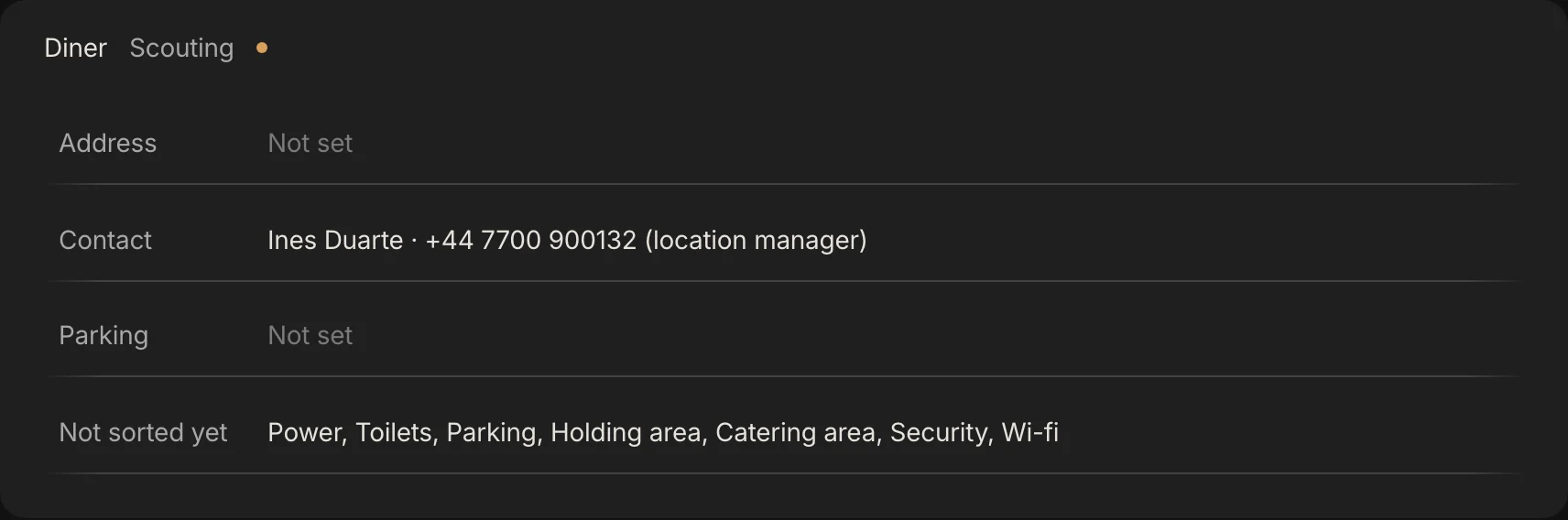
All four sets are at Scouting, the first step. Only the Diner has a saved record, and that holds nothing but the status. The other three have none, so they show the default. No set has an address, a parking note, a permit or notes, and no facility is ticked on any of them.
A production in early prep can look like this, and nothing here was filled in to look good. The rest of this guide shows what the app does with a record this empty, and how it fills.
Before you start
A scout is only as useful as what you take to it. Tick these first, or you will scout for the wrong things.
- A broken-down script. The sets and what each scene needs come from the breakdown: night or day, interior or exterior, rain, vehicles, crowds.
- A rough schedule. You need to know which day each set is needed and for how many days. A set you need for two nights is a different deal from one you need for an afternoon.
- One owner. One person keeps the location record. Everyone else adds to it, and nobody keeps a private copy.
- A list of what you will check. Use the one in Step 2 and add what your film needs.
- A rough budget line. Fees, permits, security and power sit in the budget's Locations account (see how to budget a short film).
The six steps of a location, in the order the app keeps them
Spring Pro runs every location along one path: Scouting, Recce done, Permit, Contract signed, Locked, Wrapped. The table says what each step means, what you record at it, and whether the app then counts the place as locked. The meanings are our reading, built from the sources below; the app does not define them.
| Step | What it means | What you record in Spring Pro | Counts as locked |
|---|---|---|---|
| Scouting | You are finding places and visiting them | Nothing required yet. A set exists because a scene names it, and you can note the options in its Notes | No |
| Recce done | The visits are done, with photographs and checks | Address, parking, contact, the facilities you ticked, notes | No |
| Permit | Permission is applied for, or granted, where the place needs it | The Permit field, and a location task for each application | No |
| Contract signed | The owner has agreed in writing: hours, crew size, fee, insurance | The status only. The location record has no place for the agreement | No |
| Locked | Dates, terms and permit are settled and the schedule matches. You stop looking | The status. The flag clears | Yes |
| Wrapped | The place is handed back as you found it | The status, and any wrap tasks | Yes |

Step 1: Scouting, and finding more than one option
Start from what the script needs, not from what is nearby. For each set, write down what its scenes ask of the place. In Midnight Diner the Diner's first scene is a night interior with a rain rig: Rain Makers Ltd is on the vendor list for the rain rig in scene 1, and one location task reads "Letters to the neighbours about the night rain rig".
Wrapbook advises at least three legitimate options for any scripted location before you schedule physical scouts, and Peerspace suggests starting with your own network. Our reading of the three: the first place that says no, or asks too much, should not stop the film.
In Spring Pro a location is a set: the place named in the scene heading. Scenes 1 and 6 both take place in the diner, so they share the set "Diner". Every set appears on the Locations page with its scene count. A place you are considering but have not chosen has no page of its own, so write the options in the set's Notes or as a location task.
Step 2: Recce, with a location scout checklist
Visit at the time of day you will shoot. Peerspace and the Rocketjump checklist both say so, and light and noise do change over a day. Take photographs, a tape measure and your shot list or storyboards, and bring the people who will have to work there. PremiumBeat calls power the one thing every shoot needs, and says to note the total amps and where the breaker box is.
Rocketjump lists, ideally, the director, cinematographer, location manager, assistant director, producer, production designer, gaffer, key grip and sound. You will not get all of them to a first visit. Rocketjump also has separate checklists for camera, grip and electric together, for sound, and for production design. Our reading is that a later tech scout is where each head checks their own.
Spring Pro tracks seven facilities for every set. The table sets each one against what the sources ask on site.
| Facility | What to ask on site | Sources that list it |
|---|---|---|
| Power | May you use the place's electricity, and is it enough for lights plus production? Where is the breaker box, and how many circuits? If not, may you run a generator, and where can it sit unheard? | Rocketjump, PremiumBeat, Wrapbook |
| Toilets | Is there a toilet for cast and crew, and enough of them? If not, budget portable toilets or a honey wagon | Rocketjump, Wrapbook, PremiumBeat |
| Parking | How many spaces, what do they cost, when does the car park close, how far is it from set, and can the trucks and equipment get in? | Rocketjump, PremiumBeat, Wrapbook |
| Holding area | A space for actors to wait, and a space to change costume | Rocketjump |
| Catering area | Where tables and chairs go for meals, where snacks, water and rubbish go, and what shops are near | Rocketjump, Wrapbook (shops nearby: Peerspace) |
| Security | Which hours you may shoot, who holds the keys, whether equipment can be left safely, whether the owner must be present. Outdoors, whether you need traffic control or a security officer | Rocketjump, Peerspace |
| Wi-fi | Is there internet, and does the phone signal work? | Rocketjump |
The sources add things the app has no field for: noise (several of the sources raise it), the sun and the light, what you may change in the room, measurements, and how far the nearest hospital is, which Rocketjump asks. Put them in the set's Notes, whose own prompt reads "Power, toilets, neighbours, access times." Photographs have no field in the location record either, so keep them in the production's folder and note where, or add a still to the scene's Moodboard as a reference image.

Step 3: Permit, and why this page gives no rules
Permit rules depend on the place, who owns the land and what you do there, so we give none. Three offices that publish their own pages differ even on who you ask and what they want.
Hillingdon Council runs a film office for its land. Denbighshire County Council says it can only speak for land it owns and leaves private land to you and the owner. The St. Pete-Clearwater Film Commission handles permits for the municipalities of Pinellas County through an online portal and asks for a certificate of insurance.
So ask four things of the local office for your site: who owns the land, whether what you plan needs a permit (a generator, a crane, night work, a rain rig), what insurance they want, and how much notice they need. Ask before you pay or file, because Wrapbook puts reviewing your options ahead of filing permits or paying owners.
Tell the neighbours early. The location manager also deals with affected neighbours, and the sample has an open priority 2 task for it, due before the Diner shoots, because the rain rig runs at night.
In Spring Pro the Permit field takes a status or a number, and each application is best kept as its own location task with a due date. Move the status to Permit when the application is in. Keep the permit itself in the production's files, because the Permit field holds a note and not the document.
Step 4: Contract signed, get it in writing
A visit is not a booking. Peerspace advises a formal agreement with the owner that covers the hours and the size of the cast and crew. StudioBinder describes the location manager negotiating terms of use, payment and insurance, aiming for terms that protect the production and are fair to the owner.
The legal terms of a release or location agreement depend on where you are and what you are agreeing to, so have your producer or a lawyer read yours.
Spring Pro has the step, Contract signed, and nothing more. The location record has no place for the agreement, and the app checks nothing about it. Keep the signed copy with the production's legal documents, and put the date and the fee in the set's Notes.
Step 5: Lock it, and know what lock means
Locking is a decision to stop looking. Our test, which is advice and not a rule: the permit is settled or not needed, the contract is signed, the dates match the schedule, the address and a contact are on the sheet, and each facility is answered or someone is booked to supply it.
The app is stricter in one way and looser in another. It counts only Locked and Wrapped as locked, so a place at Contract signed still shows its flag until you move it on. But it checks nothing: you can click Locked on a place with no address, no permit and no facility ticked, and the flag clears.
Decide your backup before you lock. No Film School lists a backup plan for a place that turns out to be unavailable or unsuitable among its ten tips.
Step 6: Wrapped, hand it back
A location is not finished when the camera stops. The location manager sees to the strike and wrap, and StudioBinder says the place should be left as it was found, with any damage from filming dealt with.
In the sample the location manager is budgeted 8 prep days and 2 wrap days around 4 shoot days. That is more days before and after the camera than during it.
Set the status to Wrapped when the place is handed back. The app still counts it as locked, so no flag returns.
What it takes to lock a set: the sample's nine location tasks
Location work shows up as to-dos. The sample has nine location tasks across the four sets, and they map onto the steps: finding, recces, permits, neighbours, security, booking. The Locations page lists them under each set, with the day that set shoots beside them here.
| Task | Set | Priority | Due | Set shoots | Done |
|---|---|---|---|---|---|
| Lock the diner for two nights (Sc. 1 and 6) | Diner | P1 | 2 Oct | 5 Oct (Day 1) | No |
| Letters to the neighbours about the night rain rig | Diner | P2 | 4 Oct | 5 Oct (Day 1) | No |
| Rooftop access and insurance | Rooftop | P1 | 3 Oct | 6 Oct (Day 2) | No |
| Rooftop day two booked | Rooftop | P2 | 2 Oct | 6 Oct (Day 2) | Yes |
| Apartment: second-unit flat on Elm St | Maya's apartment | P2 | 1 Oct | 7 Oct (Day 3) | Yes |
| Parking permit for Elm St, one night | Maya's apartment | P2 | 6 Oct | 7 Oct (Day 3) | No |
| Warehouse yard permit, two nights | Warehouse | P1 | 2 Oct | 8 Oct (Day 4) | No |
| Security guard for the yard, both nights | Warehouse | P1 | 7 Oct | 8 Oct (Day 4) | No |
| Recce photos of the yard at night shared with the team | Warehouse | P2 | 2 Oct | 8 Oct (Day 4) | Yes |
6 of the 9 are still open, 4 of them priority 1, and every open task falls due before the day its set shoots. None of the four sets has moved past Scouting.
The sample also disagrees with itself, which is what this record is for. The Diner task asks for "two nights" and its budget line prices 2 days at $900, but the schedule has the Diner on one day.
The Warehouse permit and guard tasks say "two nights" and "both nights", and the security vendor is listed for two nights, yet the Warehouse is on one day. We have left it as it is. Someone has to decide which is right before either place is locked.
Who owns a location: the location manager and the film line producer
The location manager owns the path. Wikipedia lists finding and securing locations, applying for permits, negotiating fees, arranging parking, temporary facilities and security, and the final strike and wrap. StudioBinder adds contracts and insurance, and tracking location costs against the budget.
The film line producer is the other name you will meet on locations. Wikipedia describes primary responsibility for the logistics of the production, with department heads reporting to the line producer, who also facilitates location scouting. Where a location manager sits in that line is not something the article says.
A Filmustage guide (a vendor) lists managing scouting and obtaining permits among a line producer's duties. The sources give the same work to different people, so say who owns each step before you start.
The line producer's side is the money and the day. The line producer Film Independent interviewed compares the job to event planning for a film, and says permits and parking can change what a place really costs.
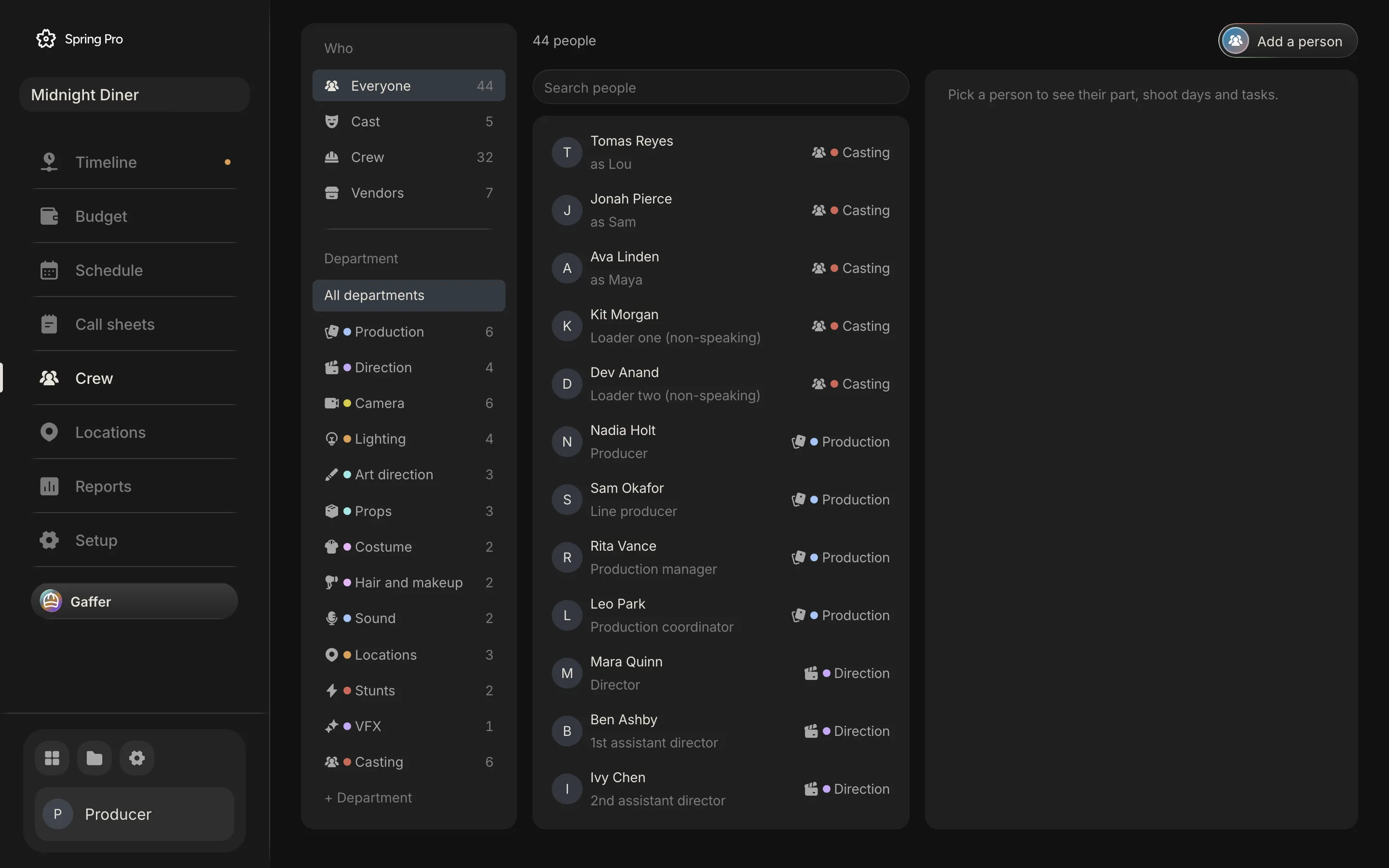
In Midnight Diner the crew list has Ines Duarte as location manager and Carl Frost as unit manager in the locations department, and Sam Okafor as line producer in production. In Spring Pro the risk on an unlocked place names its owner as "Location manager", a role and not a person you assign. A call sheet's contact falls back to the location manager's name and phone when the set has no contact of its own.
What a location that is not locked puts at stake
The four shoot days carry $94,159 of planned cost between them, and each day sits on one set. The people part (crew and cast wages with fringes, and kit), at the planned 11-hour day, is $86,959. If one place falls through, its day is what you re-plan, between $21,733 and $26,247 here. What you owe for a cancelled day depends on your contracts and the notice you give, which this page does not model.
The location itself is a small line. The sample's Locations account is $14,555, about 4 per cent of the $358,654 budget, and most of it is people: Ines Duarte and Carl Frost come to $11,155 (77 per cent), and Northside Security, the security company, to $1,600. The only place fee is the Diner, 2 days at $900, which is $1,800 against $26,247 for the day it sits on.
Three sets have no fee line: Rooftop, Maya's apartment, Warehouse. The budget turns a set with no fee line into a line to price, with the days taken from the schedule, but only until the budget is locked, and after that it flags just what was added since. This one was locked on 4 October with all four sets in it, so those three are not flagged. They are simply unpriced.
So the cost of a location is rarely its fee. It is the day built on it.
Why an unlocked location is a flag on every day it blocks
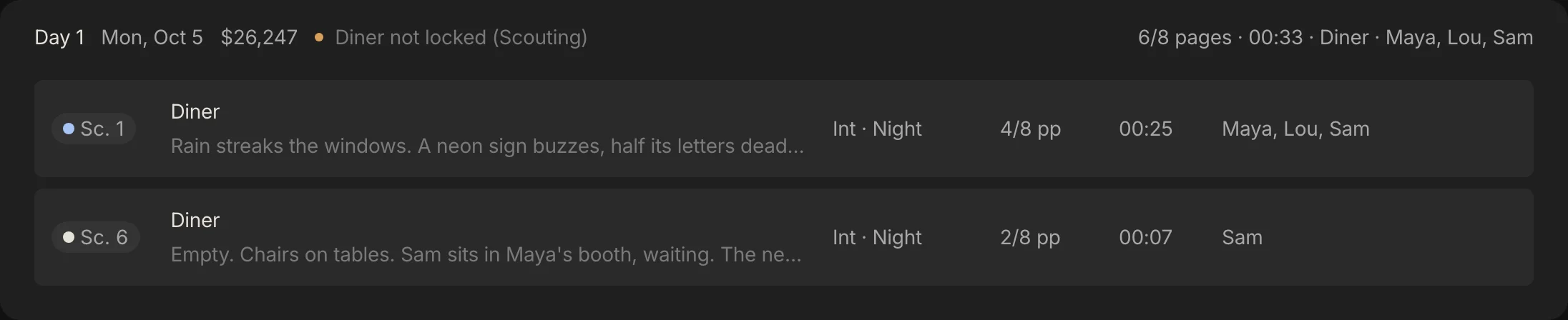
A location that is not locked should not be a note on a Locations page. The app puts the status where the people who depend on it look. On the schedule, each day shows a flag with the set and its status. On the call sheet, the set's block shows its status with a flag, the address, the contact, the parking and a "Not sorted yet" list of the facilities nobody has ticked.
In Midnight Diner that is four flags on four shoot days, one for each set, because every set is at Scouting. Move a scene to another day and its flag moves with it.
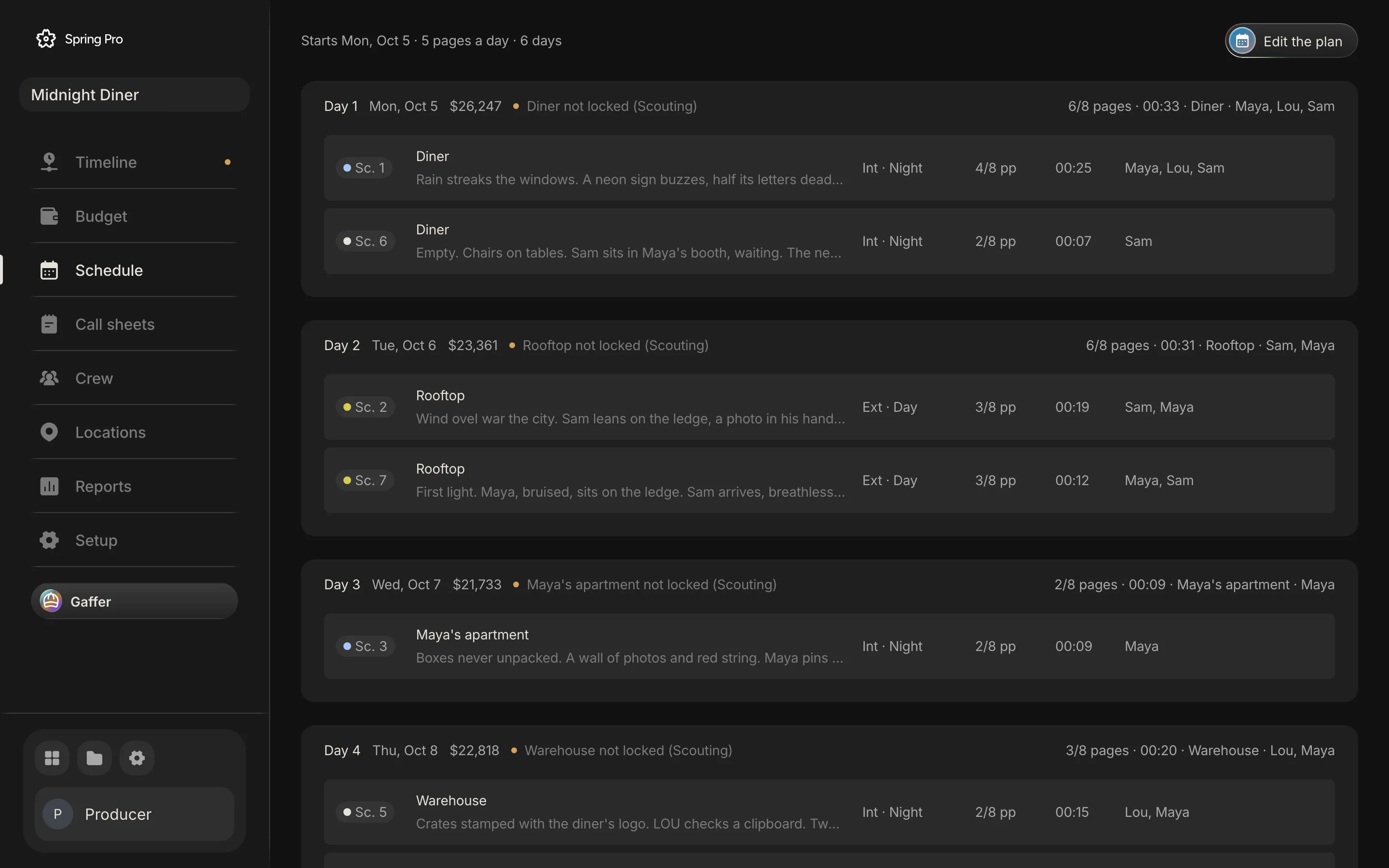
The Overview in Reports adds a time rule. It names a place as a risk, "is needed this week and not locked", owned by the Location manager, from seven days before a day that needs it, until you lock the place or the day has passed. Gaffer reads the same rule. The risk row carries a status picker and an Open button, so you can fix it where you see it.
| Set | Needed on | The Overview names it from |
|---|---|---|
| Diner | 5 October (Day 1) | 28 September |
| Rooftop | 6 October (Day 2) | 29 September |
| Maya's apartment | 7 October (Day 3) | 30 September |
| Warehouse | 8 October (Day 4) | 1 October |
The sample's dates, 5 to 8 October 2026, are fixed. Once they have passed, a fresh Overview of it does not show these risks, and the screens on this page do not either. The table is the rule applied to those dates.
How people track locations today, and what breaks when a day moves
Most productions track locations in a file and an inbox. They differ in what you redo when a day moves. This is our view from our own work, not a test of products.
| Way of working | Good for | When a day moves you must |
|---|---|---|
| A scout checklist in a document or spreadsheet | A short with one or two sets, and one person keeping it | Retype the set into the schedule, the call sheet and the budget. Nothing flags a place that is not locked |
| Email threads with the owner and the film office | The record of what was agreed and when | Find the thread, work out which dates it covers, and tell the crew |
| A marketplace or library of places | Finding and booking a place | Recheck the booking dates against your schedule by hand, since the booking sits apart from your schedule and call sheets |
| One project where the status sits on the schedule day (Spring Pro) | A plan that moves weekly and is read by many people | Move the scene and the flag moves with it. You still set the status by hand, and nothing checks the permit or the contract |
From a short to a feature: what changes
The path does not change with size. What grows is the number of people who scout, the paperwork per place, and the cost of a place that falls through. These sizes are rough labels, not industry definitions.
| Size | Who scouts and locks | How deep | What to watch |
|---|---|---|---|
| Solo or YouTube video | You | A message to the owner and a note of the address | A place that says no on the day |
| Short film | The producer or director, sometimes a line producer | One visit at the right time of day, a written yes, the seven facilities | Toilets, power and parking, and a backup |
| Commercial | A producer with a location manager | Releases, client approval, many sets in few days | Company moves between sets, and approvals that change a set late |
| Indie feature | A location manager with scouts and assistants | Tech scouts, permits, neighbours, a backup for each key set | A permit or a neighbour that moves a day |
| Series or episodes | A department across several units | Not Spring Pro yet: one script and one unit per project | Shared sets across episodes |
For a short, the pain is one place. For a feature it is many places each waiting on a different permit, which is why the status has to sit on the day each one blocks. A day with two sets in it is also a company move, and the schedule flags it with "More than one set".
Doing it in Spring Pro
Spring Pro's Locations page lists every set in the script with its scenes. Each set holds an address, contact, parking, permit and notes, the six-step status, the seven facilities and its location tasks, and shows the scenes and shoot days that need it. The schedule, the call sheets and Reports read that record, and the budget offers a fee line to price for each set, with the days taken from the schedule and the rate typed by you. The shooting schedule is where the flag lands.
You can ask Gaffer which locations are not locked, which days they block and what is not sorted. If you ask, it can change a location's status or fields, and one undo reverts the run.
What it does not do yet: the location record has no place for permits, contracts, releases or photographs (a scene's Moodboard takes reference images), it has no map, and floor plans live on a scene's cinematography board and not on the location. It checks nothing about a status, a backup place has no page of its own, and the record is kept under the set's name, so renaming a set in the script starts a blank record for the new name. A saved budget fee line keeps its own number of days and does not follow the schedule.
There are also no per-person permissions, so anyone on the project can change a status, and the Overview names a place only inside its seven-day window. It handles one script and one unit per project.
The location scouting checklist
Copy this. Tick it before you lock a place.
- Every set in the script has a record, and one person owns it
- Each set has more than one option, or a chosen place and a backup
- You scouted at the time of day you will shoot, with photographs and measurements
- Power, toilets, parking, holding, catering, security and wi-fi are each answered, even if the answer is none
- Noise, light and what you may change are in the notes
- You asked the local film office or council what the place needs, and noted the insurance, the notice and who must be told
- The neighbours know
- The agreement is signed and covers the hours and the size of the crew
- The dates in the agreement match the days on the schedule
- The status says what is true, so a flag means someone has work to do
- After wrap, the place is handed back and the status says so
How these numbers were made
Every number about Midnight Diner comes from the project: its sets, days, tasks, crew and budget lines are read from its data, and the day costs come from Spring Pro's cost engine at a planned 11-hour day. The dates in the Overview table come from running the app's own risk function on each day. The build stops if the project changes so that this story no longer holds, or if the app's step list, facility list or lock rule change.
Midnight Diner is a demonstration production, not a case study of a real shoot, and its "two nights" are a real inconsistency in the sample. The scouting checklist comes from the sources below, read on 2026-10-12. Several are vendors or older posts from 2015 to 2019, so adapt the list to your film. Permit rules are not stated for any place, because they differ.
Questions people ask
What is location scouting for film?
Finding places that could work for a scene, visiting them and recording what each one offers. Wrapbook calls it a critical pre-production process, says the screenplay and an initial script breakdown give the first clues, and says the budget and the shooting schedule limit which places are feasible.
What should I check on a location scout?
Power, toilets, parking, a holding area, a catering area, security and wi-fi, plus noise, light and what you may change. The table in Step 2 sets each against the Rocketjump checklist and three other guides.
What is the difference between a location scout and a tech scout?
A tech scout is a later visit, after the places are chosen. Wrapbook describes it as a secondary scout after selection, attended by many more crew than the initial scout, which it limits to creative keys such as the director, 1st AD, production designer and director of photography.
What does a location manager do?
Finds and secures the places, gets permits, negotiates fees and terms, arranges parking, facilities and security, and sees the place handed back. See Wikipedia and StudioBinder.
What does a film line producer do about locations?
Wikipedia says the line producer facilitates location scouting and has primary responsibility for the logistics of the production, and Filmustage lists managing scouting and obtaining permits among the duties. On a small shoot the line producer may do what a location manager does on a large one.
When is a location locked?
When the permit and contract are settled and the dates match the schedule, by our definition. In Spring Pro only Locked and Wrapped count as locked, and the app does not check that the permit or contract exists.
Do I need a permit to film at a location?
It depends on the place, who owns the land and what you do there, so ask the local film office or council for that site. Offices publish their own rules, as the pages from Hillingdon, Denbighshire and St. Pete-Clearwater show. This page gives no permit rules for any place.
Do I need a location agreement or release?
Peerspace advises a formal agreement with the owner covering the hours and the size of the cast and crew. The legal terms depend on where you are, so have your producer or a lawyer read yours.
How many locations should I scout for each set?
Wrapbook advises at least three legitimate options before you schedule physical scouts, and No Film School adds a backup plan. Spring Pro has no page for a backup, so note it in the set's Notes.
Does Spring Pro store permits and contracts?
Not in the location record. It holds a status, a permit field for a status or number, and notes, with no place for the documents, so keep them in your production's files. See call sheet software for how the record reaches the sheet.
What happens if a location falls through?
Set the status back to the step it has really reached and the flag returns on every day that needs it. Then move the scenes or find another place, as in how to make a shooting schedule. What you owe for a cancelled day depends on your contracts, and Spring Pro does not model it.
Sources
Every outside claim that names a source comes from one of these, read on the date shown. Standard conventions, such as the eighths rule and the usual specialist cases, are common practice. Figures from agreements and summaries change at each negotiation, so check the current text before you rely on a number.
- Wrapbook, location scouting 101 (a payroll vendor, 2022). Checked 2026-10-12.
- Rocketjump Film School, location scout checklist (a film school PDF dated 2015, copy hosted on a SUNY New Paltz site). Checked 2026-10-12.
- PremiumBeat, location scouting tips: the whys and hows of where (a stock media vendor, 2016). Checked 2026-10-12.
- Peerspace, everything you need to know about location scouting (a vendor that rents production spaces, 2019). Checked 2026-10-12.
- No Film School, ten tips for location scouts (2023). Checked 2026-10-12.
- StudioBinder, what is a location manager in film (a competitor's guide, 2023). Checked 2026-10-12.
- Wikipedia, location manager (last edited 10 August 2026, with a notice asking for more citations). Checked 2026-10-12.
- Wikipedia, line producer (last edited 1 September 2026, with a notice that some sources may be unreliable). Checked 2026-10-12.
- Filmustage, navigating the world of line producers (a vendor, 2023). Checked 2026-10-12.
- Film Independent, a line producer on building a better budget (2017). Checked 2026-10-12.
- Hillingdon Council, film office (a UK council page, one local office). Checked 2026-10-12.
- Denbighshire County Council, filming (a UK council page, one local office). Checked 2026-10-12.
- St. Pete-Clearwater Film Commission, permits (a US film commission page covering the municipalities of Pinellas County, Florida). Checked 2026-10-12.
More about call sheets, crew and locations
The right people at the right address at the right time, from the same plan.