How to make a shooting schedule for a film, with a real sample.
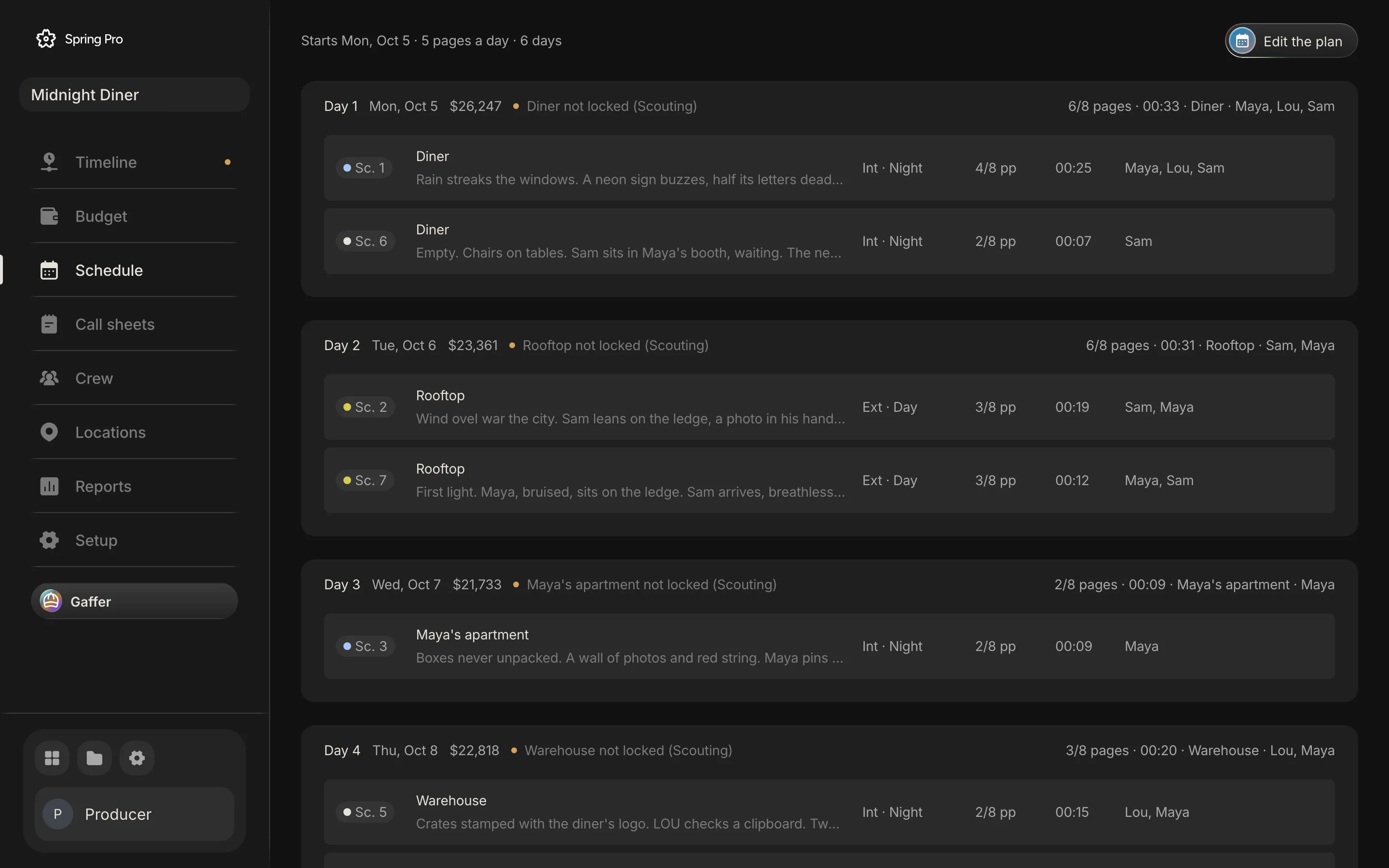
Real screen: Midnight Diner, our demo production, in Spring Pro.
The short answer. To make a shooting schedule, break the script into scenes and size each in eighths of a page. Group scenes by location, then by day or night. Fill each shoot day to a page target you can reach, put dates on the days, then check every day for too many pages, two sets, mixed light, rest between days and cost.
Most first schedules are the script in order, cut into days. It looks tidy. It also drags the whole crew between locations for every scene, which is the most expensive way to shoot a film. This guide builds a real schedule from start to finish on a real production: Midnight Diner, 7 scenes, 2 1/8 pages, 44 people. Every number comes from the project itself, and the sections on rest, meals and cost cite where their rules come from.
In this guide 28 sections
- Quick answers
- Why schedules break, and where
- The film we are scheduling
- Before you start
- Step 1: Size every scene in eighths
- Step 2: Decide how many days you can afford
- Step 3: Group scenes by location
- Step 4: Split each location by light
- Step 5: Fill the days
- Step 6: Set the order inside each day
- Step 7: Check the cast across the days
- Step 8: Fix the holds, and see what it breaks
- Step 9: Check turnaround, meals and hours
- Step 10: Plan for the weather
- Step 11: Add the days nobody schedules
- Step 12: Put a price on every day
- What a mistake costs, on a real day
- Step 13: Publish it, then keep it alive
- From a short to a feature: what changes
- Paper, spreadsheet or software: what breaks when a scene moves
- Eight mistakes that cost real money
- The checklist
- Doing it in Spring Pro
- So what should you actually do?
- How these numbers were made
- Your turn
- Questions people ask
- Sources
Quick answers
What is a shooting schedule? A day-by-day plan of the shoot: which scenes you film on which date, at which location, with which cast. The script says what happens. The schedule says when you shoot it.
Who makes it? The 1st assistant director builds it, and the production manager and the producer check it. On a small film that is often one person doing all three jobs.
How many pages can you shoot in a day? It depends on the work. Dialogue moves fast, while stunts, effects, crowds and night work move slowly. Spring Pro flags a day over five pages by default, and you should change that number to suit your film.
Do you shoot in script order? Almost never. You shoot by location, by light and by who is available, and you fix the story in the edit.
Do you need software? No. A spreadsheet is enough for a short with a few locations. Software starts to earn its place when the schedule changes every week and the budget, the call sheets and the cast report all depend on it.
What is the difference between a schedule and a call sheet? The schedule covers the whole shoot. A call sheet covers one day, with the times and the address filled in. For the wider picture, see film production scheduling: the whole picture.
Why schedules break, and where
A schedule rarely fails on the day it is made. It fails the week after, when the script changes, an actor loses a day or a location says no. One scene moves, and everything built from the schedule is now wrong.
That is the real problem under every step below. The schedule feeds the cast report, the call sheets, the location bookings and the cost of each day, and when those live in separate files, someone retypes each one. Revision colours exist so everyone can see that material has changed, and the colour scheme is applied to call sheets and schedules too, so departments stay in sync.
The breakdown comes first in the chain. A breakdown groups scenes by location, cast availability and technical needs, and its per-scene estimates feed both the schedule and the budget. Time is the part that moves the money: a line producer interviewed by Film Independent ties the schedule directly to cost, down to an extra half day of shooting being paid for by savings elsewhere.
Here are the seven handoffs where a schedule goes stale. Each one is a place where a change has to travel by hand if the documents are separate.
| Handoff | What goes stale when a scene moves | Where this guide covers it |
|---|---|---|
| 1. Script revision to breakdown | The breakdown still lists the old scene | Before you start |
| 2. Breakdown to schedule | Strips were built from sheets that have changed | Steps 1 to 5 |
| 3. Schedule to cast | The day out of days no longer matches the days | Steps 7 and 8 |
| 4. Schedule to locations | A location is needed on a day nobody booked it for | Steps 3 and 10 |
| 5. Schedule to call sheet | The sheet lists the wrong scenes and the wrong cast | Step 13 |
| 6. Schedule to budget | The cost of the day is the old cost | Step 12 and what a mistake costs |
| 7. Shoot day to actuals | What really happened never reaches the plan | Step 13 |
Keep these seven in mind. Every step below either prevents one of them or makes it cheap to fix.
The film we are scheduling
Midnight Diner is a short crime film. A burned-out investigator uses herself as bait to expose the night diner owner running contraband off the river, and pulls her old partner back in.
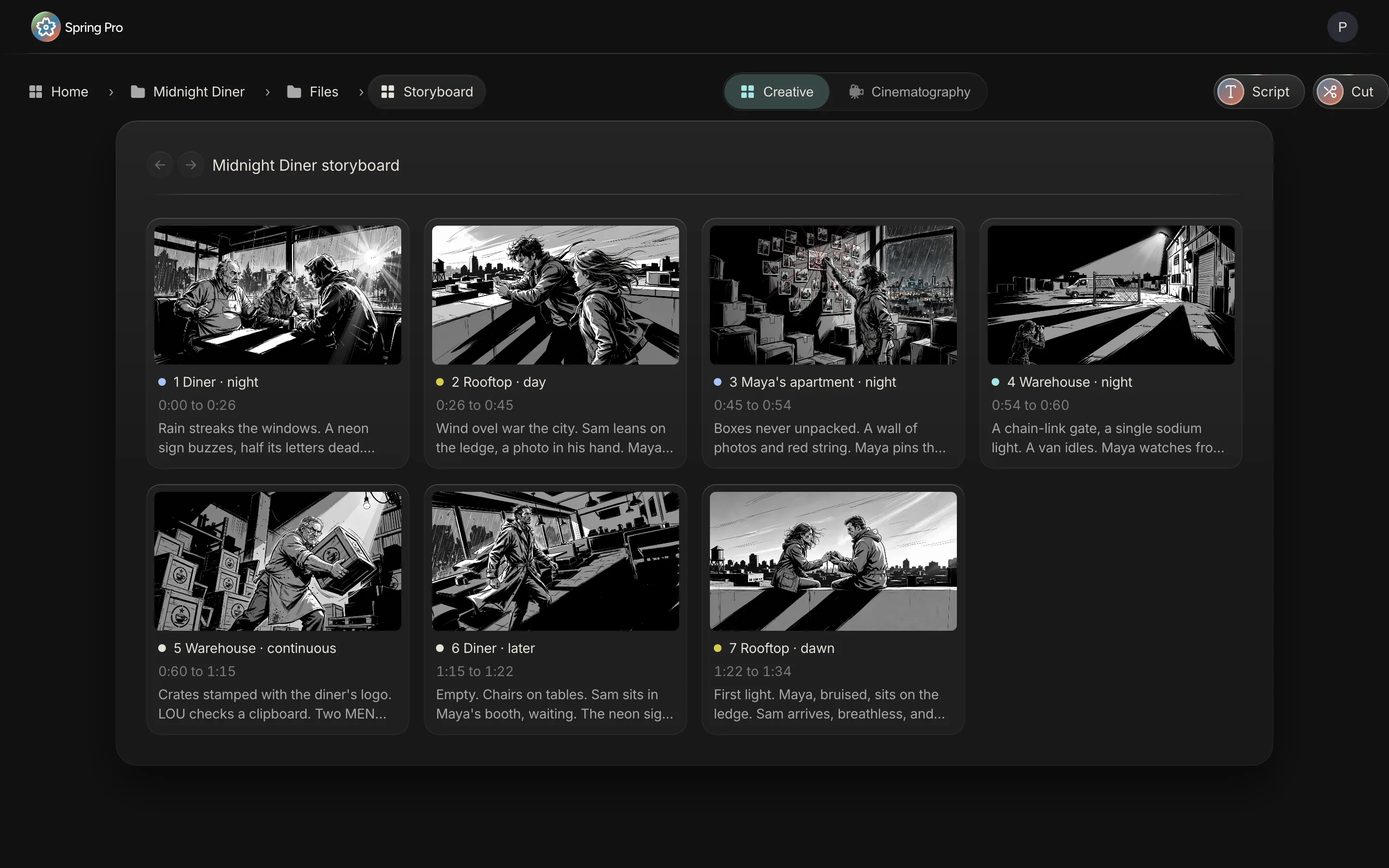
Seven scenes, 2 1/8 pages, four sets, a cast of three. Here is every scene in script order. That order is about to stop mattering.
| Sc | Set | I/E | Time | Pages | Cast |
|---|---|---|---|---|---|
| 1 | Diner | INT | Night | 4/8 | Maya, Lou, Sam |
| 2 | Rooftop | EXT | Day | 3/8 | Sam, Maya |
| 3 | Maya's apartment | INT | Night | 2/8 | Maya |
| 4 | Warehouse | EXT | Night | 1/8 | Maya |
| 5 | Warehouse | INT | Continuous | 2/8 | Lou, Maya |
| 6 | Diner | INT | Later | 2/8 | Sam |
| 7 | Rooftop | EXT | Dawn | 3/8 | Maya, Sam |
Before you start
A schedule is only as good as what it is built from. If you cannot fill the list below, wait. You will be scheduling fiction.
- A script that is stable enough. It does not have to be locked. It does have to stop changing every day.
- The breakdown. Every scene's set, light, length, cast and special needs. If you have not done it, do the breakdown first.
- Your locations, or your best candidates. A location you have not secured is a guess.
- Cast availability. Who is free, and when. One actor's two-week window can decide the shape of the whole shoot.
- Crew rules. Working hours, meal breaks and rest between days. Your agreements set these.
- A start date and a ceiling. The number of days you can afford.


Step 1: Size every scene in eighths
Measure every scene in eighths of a page. A page is cut into eight parts, so a scene that fills half a page is 4/8, and a scene of two lines is 1/8. See script eighths for the convention.
Why not whole pages? Because rounding wrecks the sums. Round every scene in Midnight Diner up to a full page and a 2 1/8-page film becomes seven pages. That is more than three times its real size.
The longest scene here is scene 1 at 4/8. The shortest is scene 4 at 1/8. Together they add up to 2 1/8 pages.
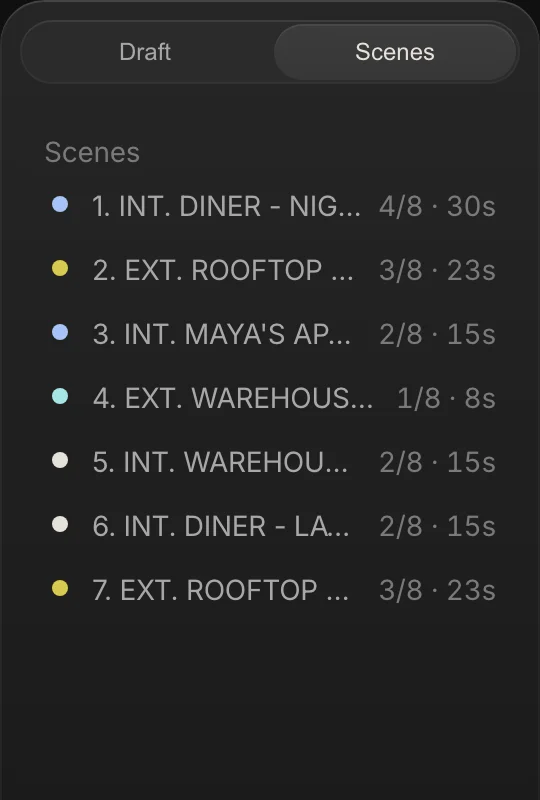
Eighths also give you screen time. A page is roughly a minute, so this film is about two minutes long. Small numbers. Same method as a feature.
Step 2: Decide how many days you can afford
Now work out how many days you actually have. Start from money, not from pages.
Every shoot day has a price. In Midnight Diner the 4 shoot days are planned at $21,733 to $26,247, and the average is about $23,540. So one more day costs roughly one more average day. That is the number to hold up against your budget.

Use the calculator as a rough starting point. Pages set one limit and the number of sets sets another. The schedule needs whichever is larger.
Step 3: Group scenes by location
This is where schedules are made or broken. Every time the crew changes location, you lose hours: wrap the gear, load the trucks, drive, unload, set up again. Those hours get paid whether the camera rolls or not.
So gather every scene at the same set into the same day. Script order stops mattering. Location grouping is the whole game.
Midnight Diner has four sets: the diner (scenes 1 and 6), the rooftop (scenes 2 and 7), Maya's apartment (scene 3) and the warehouse (scenes 4 and 5).
Scenes 1 and 6 are both at the diner but sit far apart in the script. Shoot them on the same day and you rig the set once.
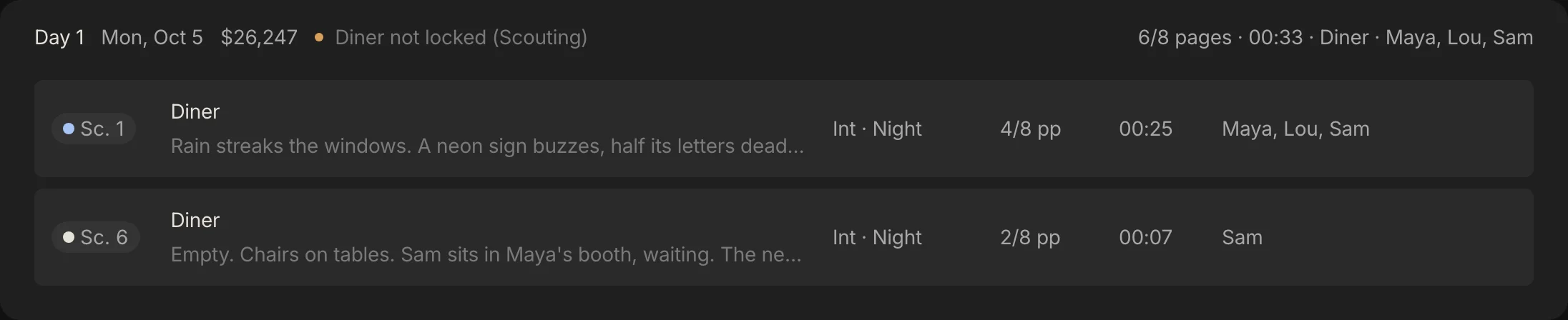
Count the cost of script order. Shoot Midnight Diner scene by scene and the crew changes location 5 times. Grouped by set, it never moves inside a day.
A day with two sets is a company move. Sometimes it is worth it.
When two places are next door, a move costs little. When they are across town, it can eat half a day. Decide it on purpose.
Step 4: Split each location by light
Inside each location, split scenes by interior or exterior and by day or night. That is the light, and the light decides when you can shoot.
On a stripboard the strips carry colours so you can see this at a glance. By common convention: white for day interiors, yellow for day exteriors, blue for night interiors and green for night exteriors.
The diner scenes are both interior nights, so they share a day easily. The rooftop is the interesting one. Scene 2 is a daytime exterior and scene 7 is dawn.
Dawn is not daytime. The light you want is a short window, not a long afternoon. A dawn scene needs a pre-dawn call, a crew ready when the sun clears the skyline, and a plan for what you shoot after the light goes flat. Put it first in the day, and the ordinary daylight scene after it.
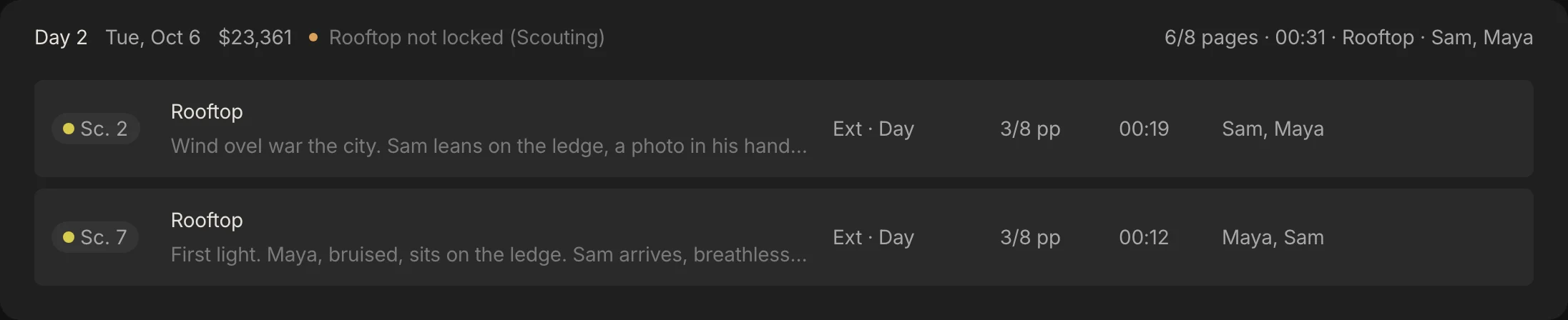
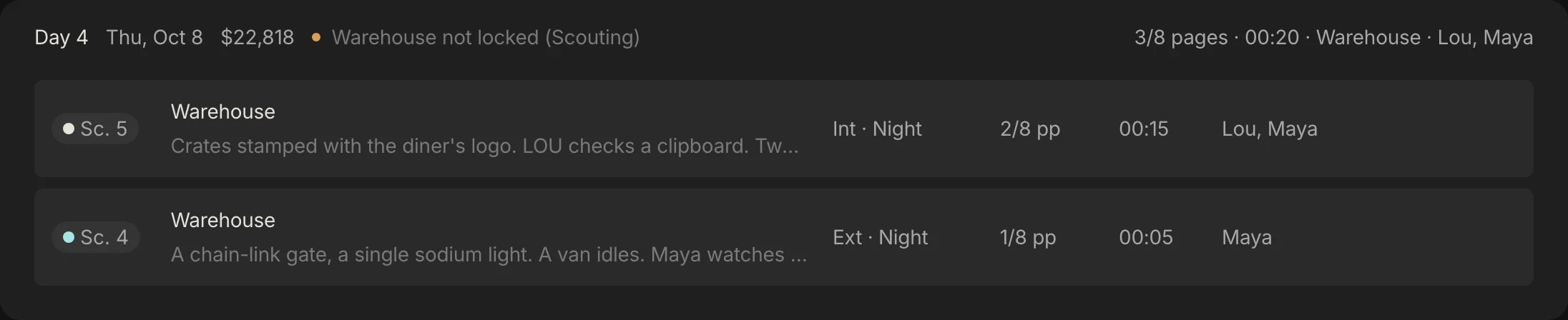
One honest note. The call times in this sample are the app's defaults, not a real plan. A true night day calls in the afternoon, not at seven in the morning. Flip the clock for night work.
Step 5: Fill the days
Now stack the groups into days. Fill each day until you reach a page target you can hit, then stop. The page target is the first check on a day. It is not the only one.
Midnight Diner is only 2 1/8 pages, so by pages alone it would fit in one day. It runs over 4 days because the sets decide. A night diner with a rain rig is a day of its own, and so is a rooftop at dawn.

Here is the finished schedule, the sample you can copy. Click a heading to sort it. The free schedule template has the same rows as a spreadsheet.
| Day | Date | Scenes | Set | Pages | Planned cost |
|---|---|---|---|---|---|
| 1 | 2026-10-05 | 1, 6 | Diner | 6/8 | $26,247 |
| 2 | 2026-10-06 | 2, 7 | Rooftop | 6/8 | $23,361 |
| 3 | 2026-10-07 | 3 | Maya's apartment | 2/8 | $21,733 |
| 4 | 2026-10-08 | 5, 4 | Warehouse | 3/8 | $22,818 |
Step 6: Set the order inside each day
A day has an order too. The rule of thumb is simple: schedule whatever the clock controls first, and whatever you control last.
Common rules for ordering a day:
- Light windows first. Dawn, golden hour and sunset scenes go where the light is. Everything else fills the gaps.
- Anyone who has to leave early shoots first. Child performers, animals and actors with a hard stop go early. Child performers have legal hour limits in many places, so check yours.
- Shoot out the big rigs once. If a rain rig, a crane or a stunt is rigged, shoot every angle that needs it before you strike it.
- Put the risky scene where you have room to recover. If it runs long, you want slack, not a wrap time.
| Shoot order | Scene | Light | Why |
|---|---|---|---|
| First | Scene 7, 3/8 | First light | The window is short and fixed, so the clock decides |
| Second | Scene 2, 3/8 | Ordinary daylight | Daylight lasts, so this scene absorbs any slip |
Take Day 2. The app lists scene 2, the daytime rooftop, before scene 7. Shoot them the other way round: first light cannot wait, and the daytime scene can.
Step 7: Check the cast across the days
Now ask the question every first schedule skips: who is waiting? The tool is a day out of days, a grid with cast down the side and shoot days across the top.
Each cell has a code. SW is start work, W is work, WF is work finish, and SWF is a one-day actor. H is a hold: a day between an actor's first and last in which they do not work. A hold is usually still paid.
Here is Midnight Diner's grid over its 4 shoot days:
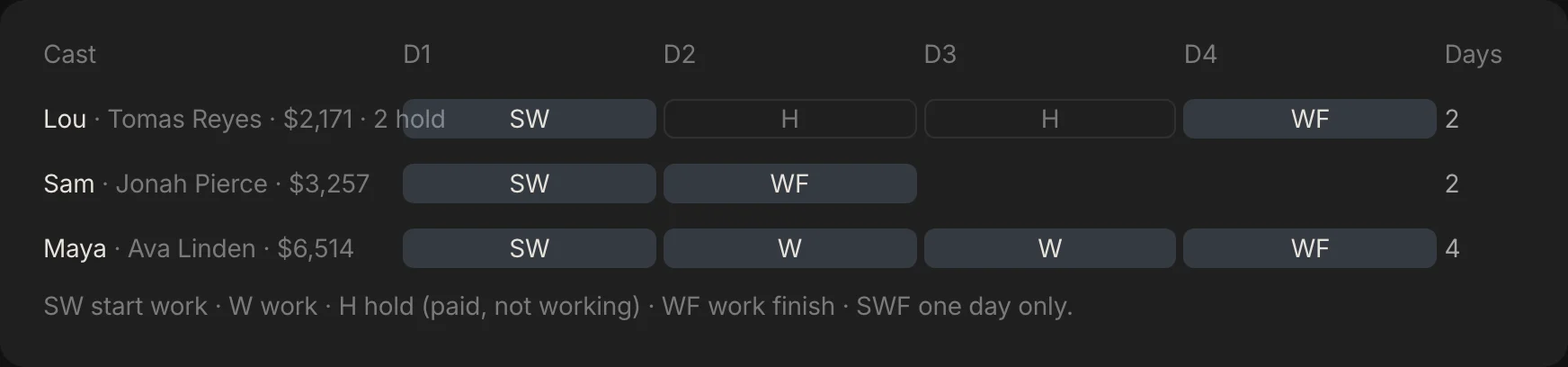
- Maya (Ava Linden): SW, W, W, WF. 4 days.
- Lou (Tomas Reyes): SW, H, H, WF. 2 days, 2 hold days.
- Sam (Jonah Pierce): SW, WF, -, -. 2 days.
Step 8: Fix the holds, and see what it breaks
Maya works every day and Sam is done after Day 2. Lou is the problem. He works Day 1, sits through Day 2 and Day 3, and works again on Day 4.
His deal is $800 a day. If holds are paid, two of them cost $1,600 for sitting still.
Lou's scenes are 1 and 5. The second is the warehouse, on Day 4. Move it to Day 2 and both holds disappear. In Spring Pro you right-click the scene and pick the day.
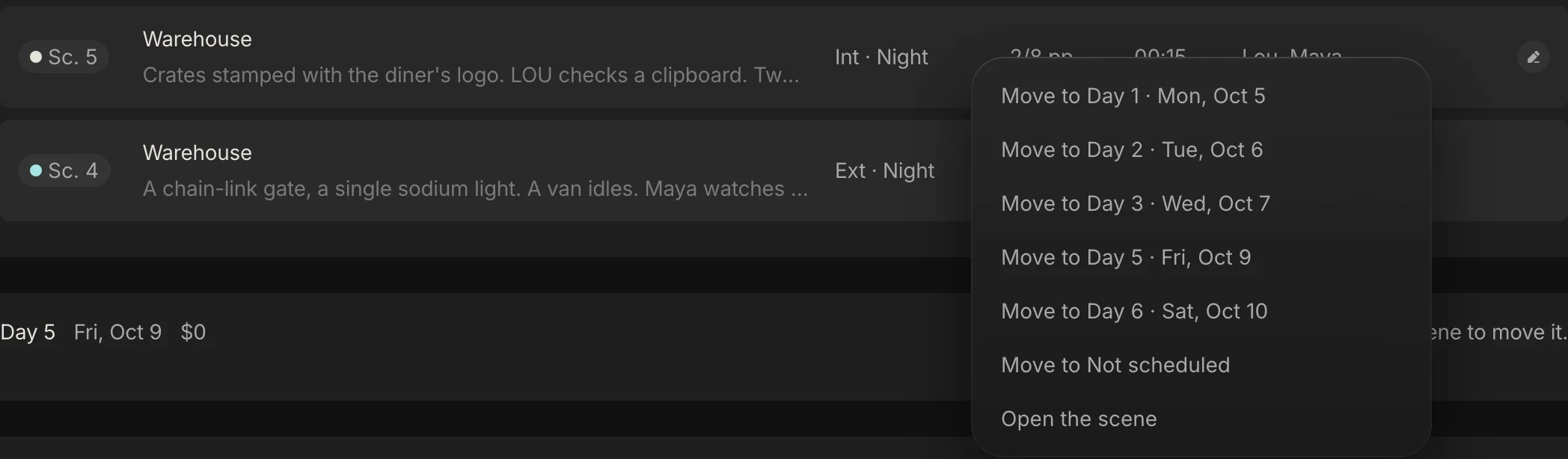
Now see what that breaks. Here is the schedule before and after the move, computed from the same project with the app's own engines.
| What | Before | After |
|---|---|---|
| Lou on the day out of days | SW, H, H, WF | SW, WF, -, - |
| Lou hold days | 2 | 0 |
| Day 2: pages and sets | 6/8 pages, Rooftop | 1 page, Rooftop and Warehouse |
| Day 2: warnings | none | More than one set; Day and night mixed |
| Day 2: planned cost | $23,361 | $24,447 |
| Day 4: pages | 3/8 pages | 1/8 pages |
| Day 4: planned cost | $22,818 | $21,733 |
| All four days together | $94,159 | $94,159 |
The move costs nothing in total. About $1,086 of cost shifts from Day 4 to Day 2, mostly Lou's day, because costs follow the scenes. It takes away two paid waiting days. What it adds is a day with two sets and both day and night, which means a company move and a change of light.
That is the real job. You are not finding the perfect schedule, you are choosing which problem you would rather have: pay for two holds, or pay for a company move. Put a price on both. Two holds cost $1,600, and one overtime hour on Day 2 costs $2,851, so if the move makes Day 2 run more than about 34 minutes longer, paying the holds is the cheaper choice.
The numbers make the trade visible, and they are only visible when the cast report, the cost and the warnings all read the schedule you just changed. The day out of days guide works the same trade in more detail.
Step 9: Check turnaround, meals and hours
Crews are people. They need rest between days, a meal break within a few hours of call, and a cap on the length of the day. Your agreements set the exact numbers, and they differ by country and by union.
Two real examples, both from summaries, so the contract text controls. The IATSE Basic Agreement summary from 2021 sets 10 hours minimum turnaround for productions with established terms, and 54 hours of weekend rest after a five-day week, and the 2024 memorandum raised the penalty for invading rest to additional double time. The Australian agreement summary asks for 10 hours between consecutive days and 34 hours after one day off.

Meals work the same way. In US film practice the crew works about six hours before a 30-minute meal, and a late meal costs a penalty per person that grows every half hour. The classic schedule trap is a night shoot followed by an early call.
Day 1 here is a night diner. Day 2 is a rooftop that opens at first light. The calculator below runs the check on a plausible night: a 17:00 call, an 11-hour day, and a dawn call the next morning.
On those times the day wraps at 04:00, the earliest legal call is 14:00 the next day, and a 05:00 call is 9 hours short of 10 hours of rest. Those clock times are an illustration, not the sample's own calls. The fix is a rest day, a later call, or a different order, and the rules in full are in the guide to turnaround and meal breaks.
Check the meal break too. Put it where the day breaks naturally, between setups, not in the middle of a scene.
Step 10: Plan for the weather
Exteriors belong to the weather. Every exterior day needs a plan for rain, wind and cold, and the plan is an interior you can swap in.
Midnight Diner has a ready one. Day 2 is the rooftop. Day 3 is Maya's apartment, an interior. If it rains on Day 2, you shoot the apartment first and push the rooftop back.
The swap has a price. Sam works the rooftop. If the days swap, Sam works Day 1, sits Day 2 and works Day 3, which is 1 hold. A cover plan is only a plan once you have checked the cast.
| What | As planned | If it rains on Day 2 |
|---|---|---|
| Day 2 shoots | The rooftop (scenes 2 and 7) | Maya's apartment (scene 3) |
| Day 3 shoots | Maya's apartment (scene 3) | The rooftop (scenes 2 and 7) |
| Sam on the day out of days | SW, WF, -, - | SW, H, WF, - |
| Day 2 planned cost | $23,361 | $21,733 |
| Day 3 planned cost | $21,733 | $23,361 |
Write the weather call down. Decide who calls it, by what time the evening before, and who gets told. A plan nobody owns is just an idea.
Step 11: Add the days nobody schedules
Shooting days are not the whole schedule. Around them sit days that cost real money and that people forget:
- Prep days and the tech scout
- Rehearsals and camera tests
- A company move day, if you change cities
- Pickups and reshoots
- A buffer day for weather or illness
- Holidays, and days an actor or a location is not available
- The wrap day, for returning gear and striking sets

Step 12: Put a price on every day
A schedule without a price is half a schedule. Every day has a cost: the crew who work it, the cast, and the rentals that run on every shoot day. If you can see the cost of a day, you can see which day to protect.
In Midnight Diner, Day 1 is the most expensive at $26,247. Three actors are on it, and it is a night shoot. Day 3 is the cheapest at $21,733, with one actor and one scene.
Moving a scene between days moves its cost with it. That is why the budget and the schedule should read the same data. Otherwise you update the schedule and find the budget is wrong at the end of the month.
If you change one thing, change the number of shoot days. It is the biggest lever on the budget. One more average day here costs about $23,540.
What a mistake costs, on a real day
Almost every dollar of a shoot day is people. In Midnight Diner, people are 88% to 94% of each shoot day, so a scheduling mistake is paid in hours. The production plans an 11-hour day, with overtime after hour 10 at 1.5 times the rate and 18% fringes.
Here is what hours cost on Day 1, the costliest day, computed by the app's own cost engine.
| If this happens on Day 1 | What it costs | How it is worked out |
|---|---|---|
| The day runs to plan | $26,247 | People, fringes, kit and the daily rentals |
| One extra hour on set | +$2,993 | Overtime for 34 paid people at 1.5 times |
| Two extra hours, say a company move that pushes the wrap | +$5,986 | The same overtime, twice |
| A 14-hour day | +$8,979 | Three hours past the plan, 34% more than the day's cost |
| One more shoot day | about $23,540 | The average of the four planned days, before contingency |
| An actor on hold for two days | $1,600 | Lou's $800 day rate, if holds are paid |
The calculator above opens on the real Day 1, so its first answer is the app's own. These are worked examples on one production, not benchmarks, so put in your own crew and rules.
Time is not the only way a day grows. A line producer notes that an untrained animal can put a shoot behind by hours, leading to overtime or an extra day, and that child performers work fewer hours and need a studio teacher. A late meal adds penalties per person on top of the overtime.
We found no reliable industry average for the cost of a shoot day at a given budget, so we do not quote one. Your own numbers beat a made-up average.
Step 13: Publish it, then keep it alive
When the schedule is agreed, publish it in three forms: the full shooting schedule for the department heads, a one-line version for everyone, and a call sheet for each day.
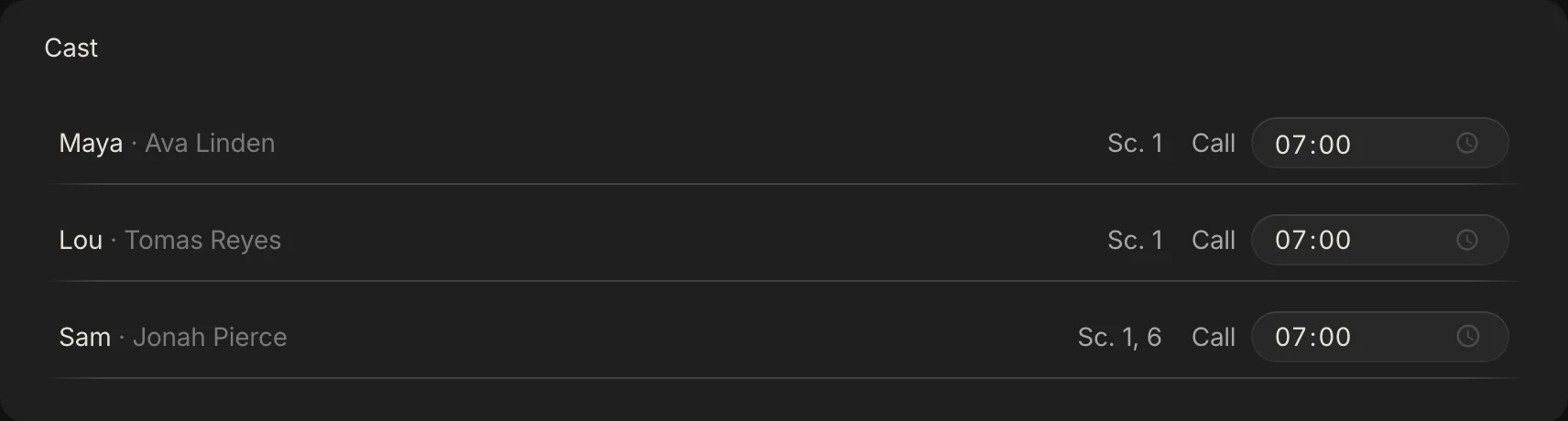
Then comes the work nobody mentions. The schedule will change. Every time it does, three things must change with it: the cast's days, the location bookings, and the budget.
Keep a version for every change, with the date and the reason. Tell people the same day. A schedule that changes quietly is worse than one that was wrong from the start.
From a short to a feature: what changes
The method does not change with size. What changes is how many things can go wrong between two days. These sizes are rough labels, not industry definitions.
| Size | What hurts most | How to schedule it |
|---|---|---|
| Solo or YouTube video, 1 to 2 days | No plan, forgotten shots, re-shoots | A shot list and a one-day plan. Skip the day out of days. |
| Short film, 2 to 10 days | One actor's window or one lost location breaks it | The 13 steps, a day out of days, a cover day for every exterior |
| Commercial, 1 to 3 days | Many cutdowns, a tight day, client approvals | One set a day, a strict order inside the day, slack for approvals |
| Indie feature, 15 to 40 days | Overtime, revisions, extra days, cash | A price on every day, rest checks, a revision routine, a weekly review |
| Series or episodes | Several scripts and units shot in blocks | Not Spring Pro yet. Use a schedule per block and your agreements. |
| Game cutscenes | Capture days, voice, an orphaned scene when a level is cut | Treat capture days as shoot days. The game page shows how. |
If you run several units or episodes at once, the method holds but this tool does not yet. Plan on a spreadsheet for each block until it does. For games, see game preproduction.
Paper, spreadsheet or software: what breaks when a scene moves
There are four ways to build a schedule. We compared them on one thing, because it is when you find out: what you must redo when a scene moves. This is our view, from our own work, not a lab result.
| Way of working | Good for | When a scene moves you must |
|---|---|---|
| Paper strips on a board | Thinking with your hands, in one room | Photograph the board, retype the change, tell everyone |
| A spreadsheet | A short with a few locations, and it is free | Recount the pages, recheck the cast, retype the cost and the call sheet |
| Scheduling software kept apart from the budget and call sheets | A big schedule that changes weekly | Enter the change again in the budget and the call sheets |
| One project where the schedule, cast report, call sheets and cost read the same scenes (Spring Pro) | A schedule that changes weekly and is read by many people | Read the new warnings. Call sheets print but do not email, and it handles one unit and one script |
Our view: the gap between a good spreadsheet and any tool is smaller than vendors say. It opens when the schedule starts changing every week.
Eight mistakes that cost real money
These show up again and again. Every one is visible on the schedule before the shoot, which is the point of reading it.
- Shooting in script order. It feels natural and moves the crew constantly.
- Ignoring company moves. Two sets in a day is a decision. A move that pushes the wrap by two hours is $5,986 on Day 1 here.
- Rounding pages. Whole pages hide the real size of the film.
- No weather cover. An exterior day with no interior to swap in is a gamble.
- Never reading the day out of days. Holds are paid waiting.
- One call time for everyone. Actors and crew rarely need the same one.
- Packing Day 1. The first day is the slowest. Do not give it your hardest pages.
- No buffer. One sick actor and the whole thing breaks.
The checklist
Copy this. Tick it before you send the schedule anywhere.
- Every scene has its set, light, length in eighths and cast
- Scenes are grouped by set first, then by day or night
- No day is over your page target, or you know why
- No day has two sets, or you have decided it on purpose
- No day mixes day and night, or you have allowed for it
- The day out of days is read, and every hold is a decision
- Rest between each pair of days is checked against your agreement
- Every exterior day has a cover day
- Prep, tests, pickups, a buffer and wrap are on the calendar
- Every day has a price, and the total fits the budget
- Call sheets are built from this schedule, not retyped
- There is a version, a date and a reason for every change
Doing it in Spring Pro
In Spring Pro every scene is already a strip: sized from its own pages, with its set, light and cast. Plan the shoot builds a first schedule by set and by day or night, filled up to your pages-a-day target. Then you move strips between days.
Each dated day shows its pages, cast, warnings and planned cost. The warnings are the three checks above: too many pages, more than one set, day and night mixed. Reports opens on the risks, each with an owner.

Move a scene and these update from the same data: the day's pages, sets and cast, its warnings and cost, the day out of days and its holds, the call sheet's scenes and cast, and the location flags. Nothing is retyped, which is the point of the seven handoffs above.
Ask Gaffer, the assistant, a question about the whole production, such as "are we ready for Day 1?". It answers from the schedule, the people, the locations and the money together. It changes things only when you say, and one "undo that" reverts a run.
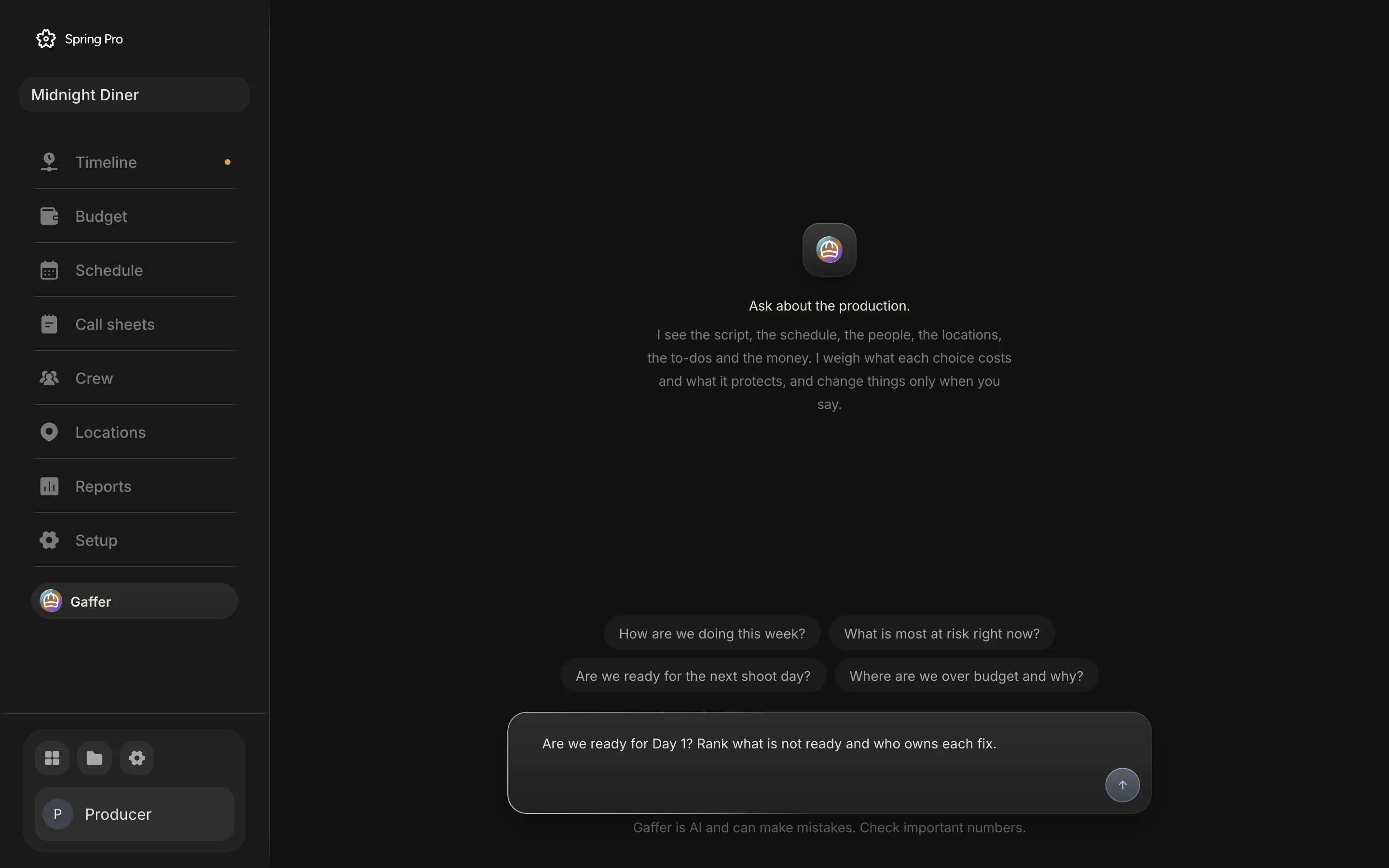
What it does not do yet: call sheets print but do not email, it does not check turnaround or meal breaks, and it handles one unit and one script, not several episodes. If you need those, use something else for now.
So what should you actually do?
There is no single right way. The real question is what you need.
- A short with one or two locations? A spreadsheet and the checklist above.
- A feature or a series, with a schedule that changes weekly? Scheduling software. Keep the budget and the call sheets in the same place if you can.
- Want the schedule, the cast report, the call sheets and the cost to move together? That is what Spring Pro is for. See shooting schedule software.
- Several units or several episodes? Not Spring Pro yet.
How these numbers were made
Every number about Midnight Diner comes from the project itself, computed with Spring Pro's own scheduling and budget engines, then matched to the screens on this page. The planned day is 11 hours, overtime starts after hour 10 at 1.5 times, fringes are 18% and contingency is 10%. The calculator uses the same formula and the build refuses to publish if it disagrees with the engine on Day 1.
Midnight Diner is a demonstration production, not a case study of a real shoot. The figures for rest and meals come from union and industry summaries dated in the sources below, and the contract text controls.
What we could not verify: an average cost per shoot day by budget level, and the share of productions that still schedule in spreadsheets. We found no reliable survey for either, so we state neither.
Your turn
What breaks first on your schedule: the cast, the location or the weather? Build the first version with the steps above, then run it through the checklist. The problem you find first is usually the one that would have cost you most.
Questions people ask
What is the first step in making a shooting schedule?
Break the script down. List each scene's set, interior or exterior, day or night, length in eighths and cast, then group the scenes into shoot days. The breakdown guide shows how.
How long does a shooting schedule take to make?
The first pass is quick once the breakdown exists. The slow part is everything upstream: the breakdown, cast availability and locking locations. Expect to revise the schedule many times.
Do you shoot a film in script order?
Almost never. Scenes are grouped by location, day or night and cast availability to save moves and money, then arranged to suit the production.
What does a shooting schedule sample look like?
One row per shoot day: the day, the date, the scenes, the set, the pages and the planned cost. The sample above has four days for 7 scenes, and the free schedule template gives you the same rows as a spreadsheet.
What do the stripboard colours mean?
By common convention, white is a day interior, yellow a day exterior, blue a night interior and green a night exterior, so the shape of a day is visible at a glance.
How many shooting days does a film need?
Work back from your budget. Pages set one floor and the number of sets sets another, so use whichever is larger. Midnight Diner is 2.13 pages, which fits in one day by pages and needs 4 by sets.
How much rest does a crew need between days?
Your agreement sets it. The IATSE 2021 summary sets 10 hours minimum turnaround for productions with established terms. The Australian agreement summary asks for 10 hours between consecutive days and 34 after one day off. Check your own contract, and see turnaround and meal breaks.
What does a day over plan cost?
On the costliest day of Midnight Diner, a 14-hour day costs $8,979 more than the 11-hour plan, and each extra hour costs about $2,993. The calculator in this guide runs your own numbers.
Can I make a shooting schedule in a spreadsheet?
Yes. For a short with a few locations a spreadsheet works. It will not add eighths, flag two sets in a day or show actors on hold, so you have to check those yourself.
Sources
Every outside claim that names a source comes from one of these, read on the date shown. Standard conventions, such as the eighths rule and the usual specialist cases, are common practice. Figures from agreements and summaries change at each negotiation, so check the current text before you rely on a number.
- IATSE Basic Agreement, 2021 negotiations summary (Editors Guild, a union summary). Checked 2026-10-12.
- IATSE Basic Agreement, 2024 memorandum of agreement (a copy held by the Berkeley Labor Center). Checked 2026-10-12.
- Motion Picture Production Certified Agreement, summary (MEAA, Australia). Checked 2026-10-12.
- Wrapbook, meal penalties: a producer's guide (a payroll vendor). Checked 2026-10-12.
- Scriptation, script revision colors (an app vendor). Checked 2026-10-12.
- Film Independent, a line producer on building a better budget. Checked 2026-10-12.
- Filmustage, the role of script breakdown in scheduling (a vendor). Checked 2026-10-12.
More about shooting schedule
A schedule is a labour bill. The cost of an error is paid in hours.
- Film production scheduling: the whole picture. The complete guide
- Scenes become strips. Strips become shoot days. The tool
- A film shooting schedule template, laid out as a stripboard.
- Turnaround and meal breaks on a film shoot: the rules and a calculator.
- What a day out of days report is, and how to read one.
- One line schedule vs stripboard: the same four days, three ways.
- How to schedule a night shoot for film: the calls, the meals, the rest and the loadings.
- Film weather cover day: how to swap a rain day, with worked costs.
- Scheduling through script revisions: the colours, the routine and what each change costs.
- What is a stripboard?
- What is a day out of days?
- What is turnaround on a film set?