One line schedule vs stripboard: the same four days, three ways.
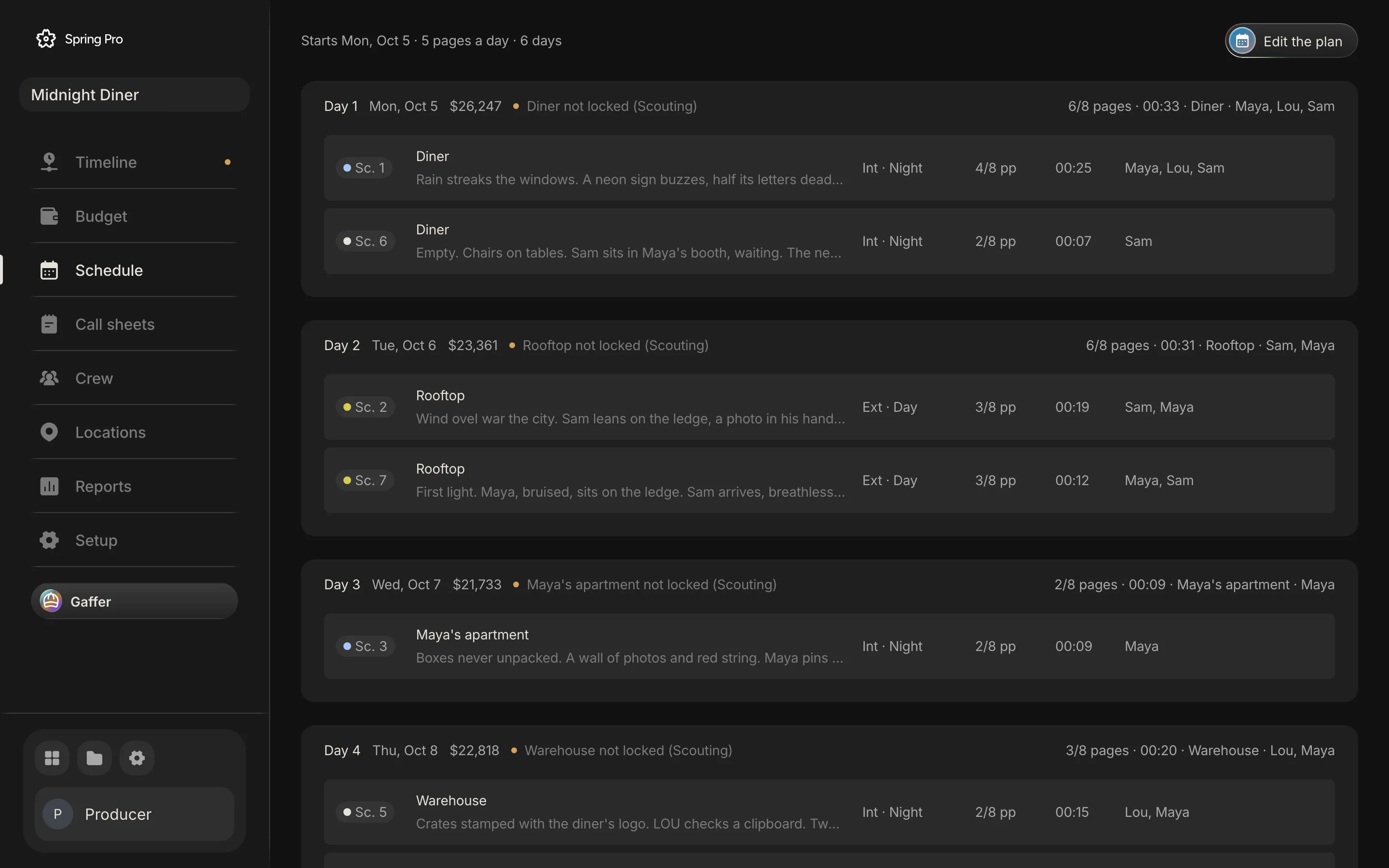
Real screen: Midnight Diner, our demo production, in Spring Pro.
The short answer. A stripboard is the working board: one coloured strip per scene, moved between day breaks until each day works. A one line schedule is a copy made from the finished board, one line per scene under each shoot day. A dated schedule, our own term, reads the same plan one line a day. Change the board, then make the copies again.
People use these words as if they were one thing. They are one plan drawn at three sizes, for three kinds of reader. This guide, part of film production scheduling: the whole picture, shows the same four shoot days of Midnight Diner as a stripboard, a one line schedule and a dated schedule (our term for the plan read one line a day), all computed from the project. It says who reads which, where the strip colours stop being reliable, and what Spring Pro shows: one view, a dated board of strips, and no separate one-line schedule.
In this guide 16 sections
- Quick answers
- One plan, three readers, and what a wrong one costs
- The film and its four shoot days
- The stripboard: strips, colours and day breaks
- Reading the colours, and where tools differ
- The one line schedule: one line a scene, made from the board
- Making a one-liner from a board, in five steps
- The dated shooting schedule: one line a day
- One move, three documents
- How people keep all three today, and what breaks when a strip moves
- From a short to a feature: which of the three you need
- Doing it in Spring Pro: one dated board of strips
- The checklist
- How these numbers were made
- Questions people ask
- Sources
Quick answers
What is the difference? A stripboard is the working board: one strip per scene, coloured by interior or exterior and day or night, moved between day breaks until each day works. A one line schedule is a copy made from the finished board, one line per scene under each shoot day. A dated schedule, our own term, reads the same plan one line a day.
Which comes first? The board. StudioBinder says a one-liner can only be made once the main schedule is populated, and in its software it is the shooting schedule report with the elements and scene notes hidden.
Who reads which? HowToFilmSchool names producers, assistant directors, coordinators, department heads and other crew as readers of a one-liner. StudioBinder says the full schedule usually goes to department heads only.
Do I need all three? It depends on who reads the plan and how often it changes. Our view, not a sourced rule: a solo project can run on one list of scenes by day, and the three pay off when many people read a plan that changes. See how to make a shooting schedule.
Is this the electronics stripboard? No. A stripboard is also a perforated circuit board, and Wikipedia warns against the mix-up. This page is about the film production board.
What does Spring Pro show? One view: a dated board of strips. It has no separate one-line schedule, no day-break strips and no Print button on the Schedule page (Reports has its own Print button).
One plan, three readers, and what a wrong one costs
All three are one plan. The trouble starts when they live as separate files: the board changes, a printed or sent copy does not, and someone holds an old one-liner on the wrong morning. The first three columns below come from the sources we read, and the last is our reading of what goes wrong. The full shooting schedule is the document a one-liner is cut down from, and the dated schedule is our own term, not a document the sources name.
| Document | One row is | Read by | What a wrong one does |
|---|---|---|---|
| Stripboard | One strip per scene, with a day break after each day | The people who build and approve the shooting order: the 1st AD, the unit production manager and the producer, with the director giving feedback (the sources differ on who builds it) | A bad day shape (two sets, changing light) stays hidden until the crew is on the road |
| One line schedule | One line per scene, under each shoot day | Producers, assistant directors, coordinators, department heads and other crew | A stale copy sends people to the wrong day |
| Full shooting schedule | A scene with its cast, props, equipment and notes | Department heads, usually | A department misses a prop or a rig it never saw listed |
| Dated schedule (our term) | One line per shoot day: date, scenes, set, pages, cast, cost | Producers, production managers, locations and finance (our reading) | Dates and money drift from the plan |
In our reading, a wrong document costs hours. On Midnight Diner a shoot day plans at $21,733 to $26,247, and one extra hour on Day 1 adds $2,993 (the planned day is 11 hours, with overtime after hour 10). A one-liner that sends a department to the wrong set can cost the crew hours.
StudioBinder notes that a one line schedule is typically found on or attached to a call sheet, which covers one day. See how to make a call sheet.
The film and its four shoot days
Midnight Diner is a short crime film: seven scenes, 2 1/8 pages, four sets. The schedule has six days on its board. Four of them hold scenes, and Day 5 and Day 6 are held dates with nothing on them yet.
Shooting order is not script order. Day 1 pairs scene 1 with scene 6, which sit far apart in the script, and Day 4 shoots scene 5 before scene 4. Every table below is computed from the project, so the three always agree.
The stripboard: strips, colours and day breaks
A stripboard puts scenes in shooting order as colour-coded strips of three types, says StudioBinder: a scene strip, a day break and a banner. Traditionally they were paper strips on cardboard charts.
A scene strip carries the scene number, interior or exterior, the script set, a description from the first action line, day or night, cast IDs, the shooting location and the pages in eighths. A day break ends a day and usually shows the day, the shoot date and the page total. A banner marks something that takes real time, such as a meal break or a company move.
Here is the Midnight Diner board. Each day's strips sit above a black day break (StudioBinder says black or grey), and the colour column applies the usual convention to the light each scene is shot in, as the planner reads it.
| # | Strip | Colour | Int or ext, light | Set, or the day it ends | Pages | Cast |
|---|---|---|---|---|---|---|
| 1 | Sc. 1 | Blue | Int, night | Diner | 4/8 | Maya, Lou, Sam |
| 2 | Sc. 6 | Blue | Int, night | Diner | 2/8 | Sam |
| 3 | Day break | Black | - | Day 1, Mon 5 Oct | 6/8 | - |
| 4 | Sc. 2 | Yellow | Ext, day | Rooftop | 3/8 | Sam, Maya |
| 5 | Sc. 7 | Yellow | Ext, day | Rooftop | 3/8 | Maya, Sam |
| 6 | Day break | Black | - | Day 2, Tue 6 Oct | 6/8 | - |
| 7 | Sc. 3 | Blue | Int, night | Maya's apartment | 2/8 | Maya |
| 8 | Day break | Black | - | Day 3, Wed 7 Oct | 2/8 | - |
| 9 | Sc. 5 | Blue | Int, night | Warehouse | 2/8 | Lou, Maya |
| 10 | Sc. 4 | Green | Ext, night | Warehouse | 1/8 | Maya |
| 11 | Day break | Black | - | Day 4, Thu 8 Oct | 3/8 | - |
Read down the colour column and the shape of each day shows without a word: Day 1 is two blue strips; Day 2, two yellow strips; Day 3, one blue strip; Day 4, one blue strip and one green strip. That is the point of a board: you rearrange strips, not sentences, and a day that mixes colours is a day to look at again. Day 4 puts an interior and an exterior at one warehouse, both at night.
Reading the colours, and where tools differ
The usual convention is white for a day interior, yellow for a day exterior, blue for a night interior and green for a night exterior. StudioBinder lists exactly these, says tools vary a little and some add dawn or dusk colours, and advises sticking with the standard.
Tools differ, and Movie Magic lets you change its colours. Its manual says strip colours are set by the user for each time of day, and Wikipedia's table lists Movie Magic with night interior green and night exterior blue, citing a training video. A rental house's blog post about Movie Magic calls the four colours above the standard in Hollywood, adds pink for dawn and orange for dusk, and points to its strip colour settings under Design to change them. We could not open the software to see its defaults, so check the legend in yours.
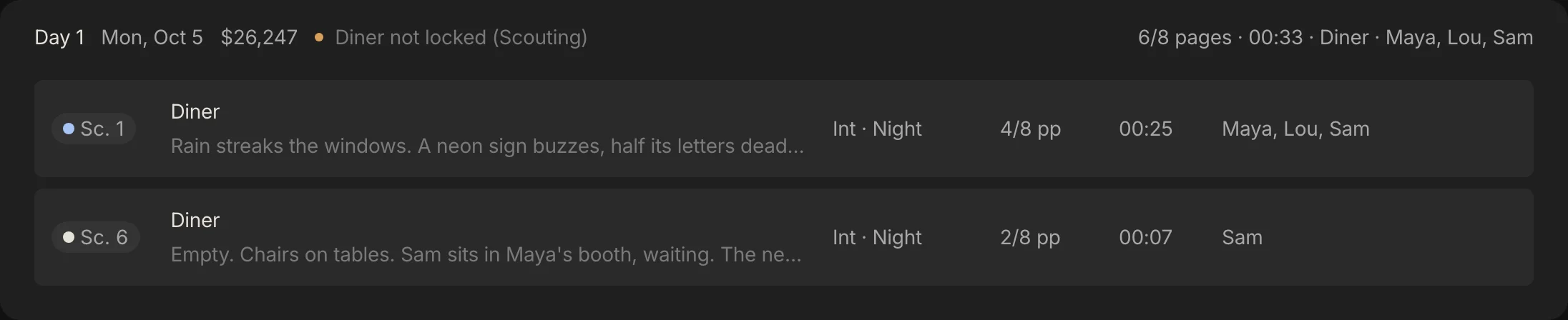
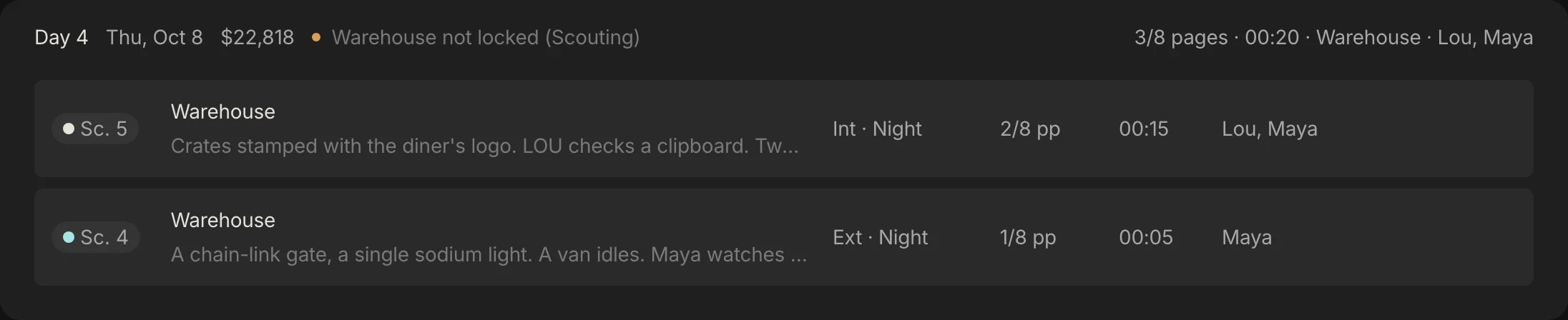
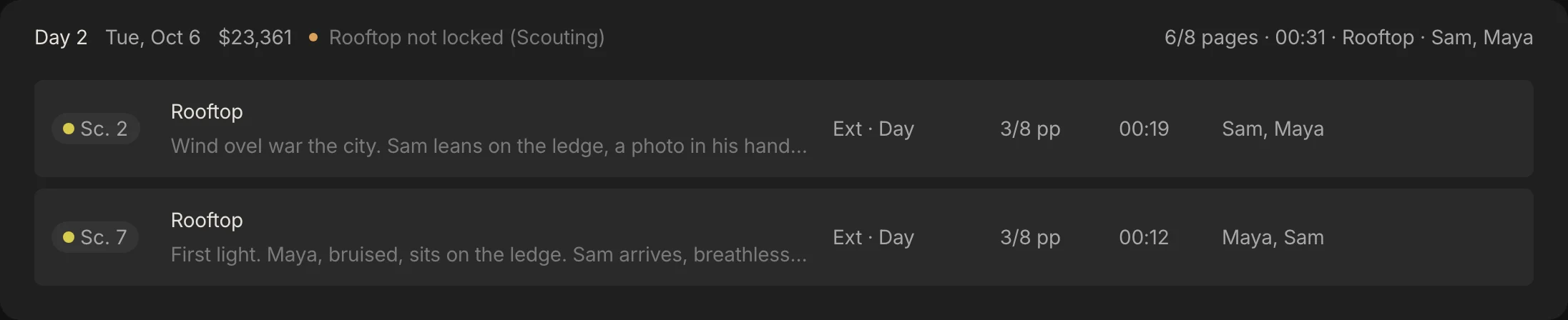
Spring Pro does not draw coloured strips. It puts a dot beside each scene number, coloured from the scene heading: interior or exterior, and night if the heading time says night, dusk, evening or dark. The dots are a warm white, a yellow, a pale blue and a pale aqua, so exterior night is aqua, not green.
That has a catch. A heading that says continuous or later names no light, so the dot reads it as day, while Spring Pro's planner gives it the light of the scene before, a rule of ours that can be wrong for a later scene shot in a different light. Filmustage's help page says its strip colours come from the scene heading, and does not say how it colours a heading that names no light, so ask your tool.
| Scene | Heading | Dot in Spring Pro | Light the planner reads | Strip colour, read from that light |
|---|---|---|---|---|
| Sc. 1 | Int. Diner - Night | Pale blue | Night | Blue |
| Sc. 2 | Ext. Rooftop - Day | Yellow | Day | Yellow |
| Sc. 3 | Int. Maya's Apartment - Night | Pale blue | Night | Blue |
| Sc. 4 | Ext. Warehouse - Night | Pale aqua | Night | Green |
| Sc. 5 | Int. Warehouse - Continuous | Warm white | Night | Blue |
| Sc. 6 | Int. Diner - Later | Warm white | Night | Blue |
| Sc. 7 | Ext. Rooftop - Dawn | Yellow | Day | Yellow |
Scenes 5 and 6 are headed continuous and later. Their dots read as a warm white day interior, but the planner, and the label beside them on screen, reads night. Read from that light, the usual convention would make them blue strips, though the sources do not say how to colour a heading of continuous or later, so that is our reading. So Day 1 shows a pale blue dot and a white one, and Day 4 a white dot and a pale aqua one, although both days are all night.
The planner follows the label, not the dot, so neither day is flagged for mixing day and night. If you read colours alone you would flag them yourself. Scene 7, headed dawn, is day to both and sits yellow beside scene 2, though a tool with a dawn colour would draw it differently (Wikipedia's table lists pink for a sunrise exterior in one tool and for morning in another).
The one line schedule: one line a scene, made from the board
A one line schedule is an abridged version of the shooting schedule, with scenes in shooting order and broken up by shoot day, says StudioBinder, which calls it the most commonly distributed schedule. HowToFilmSchool says it is called a one-liner because each scene is cut to one line, not the full format of a stripboard.
The line varies by source. StudioBinder lists the scene number, interior or exterior, the set, the time of day, a brief description, the shooting location, the page length and an estimated shoot time. HowToFilmSchool lists the day number, scene numbers, a brief description and the page count, often the location or company move, and says a one-liner may leave out full cast lists and props notes unless they matter.
Here is the Midnight Diner one-liner. Real ones add a short description and often an estimated shoot time, which we leave out to keep the table narrow. Cast is in because it answers who is working, though the sources differ on it.
| Day | Date | Scene | Int or ext, light | Set | Pages | Cast |
|---|---|---|---|---|---|---|
| 1 | Mon 5 Oct | Sc. 1 | Int, night | Diner | 4/8 | Maya, Lou, Sam |
| 1 | Mon 5 Oct | Sc. 6 | Int, night | Diner | 2/8 | Sam |
| 2 | Tue 6 Oct | Sc. 2 | Ext, day | Rooftop | 3/8 | Sam, Maya |
| 2 | Tue 6 Oct | Sc. 7 | Ext, day | Rooftop | 3/8 | Maya, Sam |
| 3 | Wed 7 Oct | Sc. 3 | Int, night | Maya's apartment | 2/8 | Maya |
| 4 | Thu 8 Oct | Sc. 5 | Int, night | Warehouse | 2/8 | Lou, Maya |
| 4 | Thu 8 Oct | Sc. 4 | Ext, night | Warehouse | 1/8 | Maya |
Only days with scenes get lines, so four of the six days appear. StudioBinder calls it a print-friendly compacted view, made by hiding detail from the fuller report, and Movie Magic's manual lists the One-line Schedule and the Shooting Schedule as separate reports. Its release notes say a layout built on the board shows up in the one-line report.
The weakness is the one every copy has: it is only as current as the day you made it. StudioBinder's guide offers a view-only share link as well as print, and says this cuts paper waste because the schedule is likely to change as you go. It does not say whether a shared link follows the board by itself, so put a date on every copy and check.
Making a one-liner from a board, in five steps
This follows the method StudioBinder and HowToFilmSchool describe, with one addition of ours: date every copy.
- Finish the board first. A one-liner is made from a populated schedule, so fix the order and the day breaks before you print.
- One line per scene, under each shoot day. Put the day and its date above the lines, in shooting order.
- Keep the essentials. The scene number, interior or exterior, the set, the time of day, the pages and a short description. Hide the elements and the scene notes.
- Decide who gets which. Department heads usually get the full schedule and everyone else the one-liner, but the production coordinator or manager decides, says StudioBinder.
- Date it, send it with the call sheet, and make a new copy on any change. A copy is only as current as its date.
The dated shooting schedule: one line a day
StudioBinder uses "shooting schedule" for the full report, the one-liner plus each scene's elements. In film production scheduling the shooting schedule means the dated shoot days inside the wider plan. Here the dated schedule is those days read one line a day: the day, its date, what is shot, where, who is on it and what it costs.
Dates turn a position on the board into a calendar day. In Spring Pro every day's date follows from the start date and the days you shoot, so a scene that moves takes the date of the day it joins.
| Day | Date | Scenes | Set | Pages | Cast | Planned cost | Flags |
|---|---|---|---|---|---|---|---|
| 1 | Mon 5 Oct | 1, 6 | Diner | 6/8 | Maya, Lou, Sam | $26,247 | Diner not locked (Scouting) |
| 2 | Tue 6 Oct | 2, 7 | Rooftop | 6/8 | Sam, Maya | $23,361 | Rooftop not locked (Scouting) |
| 3 | Wed 7 Oct | 3 | Maya's apartment | 2/8 | Maya | $21,733 | Maya's apartment not locked (Scouting) |
| 4 | Thu 8 Oct | 5, 4 | Warehouse | 3/8 | Lou, Maya | $22,818 | Warehouse not locked (Scouting) |
| 5 | Fri 9 Oct | none yet | - | 0 | - | $0 | none |
| 6 | Sat 10 Oct | none yet | - | 0 | - | $0 | none |
The flags are what a producer reads first. Every shoot day here carries the same one: its set is not locked, because the Locations page has it at Scouting. The planner's own warnings (over the page target, more than one set, day and night mixed) are all clear.
The four shoot days cost $94,159 to plan. Day 5 and Day 6 keep their dates and cost nothing until scenes move in, and a one-liner has no line for them. That is one difference between the two.

One move, three documents
Here is why the three must come from one plan. Take scene 3, Maya's apartment, a night interior of 2/8 of a page on Day 3, and move it to Day 1 with the diner. In Spring Pro you drag the strip to Day 1, or right-click it and pick the day. Every document changes, in a different way.
| Document | Before | After the move |
|---|---|---|
| Stripboard | Day 1's break follows strips 1 and 6, and Day 3's break follows strip 3 | Day 1's break follows strips 1, 6 and 3, and Day 3's break follows nothing |
| One line schedule | 7 lines over 4 days, with one line under Day 3 | 7 lines over 3 days, with nothing under Day 3 |
| Dated schedule, Day 1 | 6/8 pages, Diner, flagged: Diner not locked (Scouting) | 1 page, Diner and Maya's apartment, flagged: More than one set; Diner not locked (Scouting); Maya's apartment not locked (Scouting) |
| Dated schedule, Day 3 | 2/8 pages, $21,733 | 0 pages, $0 |
| The four days together | $94,159 | $72,427 |
Read the last row with care. The engine prices who works each day and the daily costs. Everyone who works Day 3 already works Day 1, so Day 1 costs the same and Day 3 drops out, and the saving is Day 3's whole planned cost, $21,733. Each dollar figure on this page is rounded on its own, so $94,159 less $21,733 adds up to $72,426, a dollar under the $72,427 in the table.
It does not know that a company move takes time. One extra hour on Day 1 costs $2,993, so about 7 extra hours would use up the saving. This is a what-if, not advice: a night move for a 2/8-page scene may or may not be worth it.
The point is the documents. In a spreadsheet, how much you redo depends on how you built it: formulas and filters can carry some of it, and any separate one-liner, day total or cost that you typed in is yours to update. In Spring Pro you change the board, because the day headers, the warnings, the cost, the day out of days and the call sheets all read it. The empty Day 3 stays on the board with its date until you remove it from the day's right-click menu, and later days then move up a date.
How people keep all three today, and what breaks when a strip moves
People keep these documents in different ways, and the ways differ in what you redo when a strip moves. This is our view, from the pages we read and our own work, not a test of products.
| Way of working | How the three relate | When a strip moves you must |
|---|---|---|
| A spreadsheet | Strips are rows, and the one-liner is a filtered copy or a printout. Wikipedia says a spreadsheet can serve, and StudioBinder warns of repetitive entry and human error | Re-sort the rows, then update whatever is not a formula: colours, day totals and any separate one-liner |
| Scheduling software where the one-liner is a report from the board (Movie Magic Scheduling, StudioBinder) | The board is the source, and each document is a report or a filtered view | Check whether each report and shared link follows the board, and send a new copy where it does not. Check whether the budget and call sheets read the board too |
| One list in two layouts (Filmustage) | A list view of rows and a stripboard view of strips. Its help page says switching changes the layout only | Move it once and both layouts show it. Check how it prints or exports a one-liner |
| One project where the schedule, cost, call sheets and cast report read the board (Spring Pro) | One view, a dated board of strips, and no separate one-liner | Look at the new flags and cost. There is no separate one-liner to remake or send |
Our view: the useful question is how many files a strip move has to touch. If you are weighing tools on that, the StudioBinder alternative page says what Spring Pro does and does not do.
From a short to a feature: which of the three you need
The documents do not change with size. What changes, in our view, is how many people read the plan and how much a stale copy costs. The sizes and day counts are our own rough labels, not industry definitions, and not from a survey.
| Size | What you need | What to watch |
|---|---|---|
| Solo or YouTube video | A dated list of shots. No board, no one-liner | Nothing. Keep one list |
| Short film, 2 to 10 days | The board is the plan. A one-liner is the same list for crew who will not open the board | A day that mixes colours. Read the board before you copy it out |
| Commercial, 1 to 3 days | A one-liner for readers who will not open a board, such as a client | Approvals change the order. Send a new dated copy |
| Indie feature, 15 to 40 days | The board for the ADs, the full schedule usually for department heads, the one-liner for others, as the coordinator decides | Three documents, one board. Date every copy |
| Series or episodes | Several boards across units and blocks | Not Spring Pro yet: one unit and one script per project |
Doing it in Spring Pro: one dated board of strips
The Schedule page is a dated board of strips. Every scene is a strip, and Plan the shoot builds a first board by set and by day or night, filled to your pages-a-day target, never mixing two sets or day and night in one day. Drag a strip to a day, or right-click it to move it to another day, to Not scheduled, or to open the scene.
| Document | Where Spring Pro shows it | What it lacks |
|---|---|---|
| Stripboard | The Schedule page. A strip is one wide row in a dated section for each day, with the scene, the set and the first line of its action, interior or exterior and the light, the pages, the screen time and the cast. Scenes no day holds wait in Not scheduled, the nearest thing to the boneyard StudioBinder describes | Coloured strip bars (the colour is a dot), day-break strips and banners |
| One line schedule | No separate view. The rows under each dated day read as one line a scene on screen | A one-line view or report, a filter that hides detail, a Print button on the Schedule page itself |
| Dated schedule | Each day header: the date, the planned cost once there is a budget, the flags, the pages, the set and the cast. Reports has a Schedule tab with the pages behind, the forecast wrap and a pages-per-day chart, and a Print button for the tab | One unit and one script only |
The same board feeds the rest. A day out of days is read from the schedule, each shoot day's call sheet reads its scenes and cast from it and prints, and Gaffer, the assistant, reads the schedule and answers questions about a day in the chat. See shooting schedule software for the whole tool.
For a one-liner today, build it from the film schedule template, which lays the board out as strips with an end-of-day row, or copy the rows from the screen.
The checklist
Copy this. Tick it before you print or send any of the three.
- Every day is one set and one kind of light, or you know why not
- The legend is on the board, and you know which colour your tool gives night interior and night exterior
- A scene headed continuous or later has a light you chose on purpose (Spring Pro's planner uses the scene before), and its colour agrees
- Each day break shows the day, the date and the page total
- The one-liner has the scene, interior or exterior, the set, the time, the pages and each day's date, and no elements
- You know who gets the full schedule and who gets the one-liner, as the production coordinator or manager decided
- Every copy carries a date, and a new one goes out when the board changes
- Empty days are on the board with a date on purpose, or removed
- The call sheet for each day is built from the same board, not retyped
How these numbers were made
Every number about Midnight Diner comes from the project, computed with Spring Pro's own scheduling and cost engines (the functions the Schedule page calls). The three tables are built from the same days, scenes and heading times, and the build stops if the project, the colour tokens or the app's code change so that a claim here no longer holds. The planned day is 11 hours with overtime after hour 10 at 1.5 times, and an extra hour covers crew and cast labour only.
Midnight Diner is a demonstration production, not a case study. What the sources say was read on 2026-10-12 from the pages linked below. What Movie Magic Scheduling and Filmustage do comes from their own manual, release notes or help page, what StudioBinder does from its published guides, not its help centre, and Movie Magic's strip colours from only Wikipedia's table and one rental house's blog post. We found no survey of how many productions use each document, so we state none, and we could not settle Movie Magic's default night colours.
Questions people ask
What is the difference between a one line schedule and a stripboard?
A stripboard is the working board, with one coloured strip per scene and a day break after each day, which the 1st AD rearranges. A one line schedule is a copy made from the finished board, one line per scene under each shoot day, for the whole crew. StudioBinder says it can only be made once the main schedule is populated.
What is a one-liner in film?
A one-liner is the shooting schedule cut down to one line per scene, grouped by shoot day. HowToFilmSchool says it gives producers, assistant directors, coordinators, department heads and other crew a quick overview of the whole schedule.
What do the stripboard colours mean?
By the usual convention, white is a day interior, yellow a day exterior, blue a night interior, green a night exterior and black a day break, as StudioBinder lists them. Tools vary, so check your legend. In Spring Pro the colour is a dot beside the scene number, and exterior night is a pale aqua.
What is a stripboard schedule?
A shooting schedule drawn as a stripboard: scenes as strips in shooting order, with day breaks between the days. See the stripboard glossary entry and the film schedule template for a sample.
What is a film strip board, and is it the electronics kind?
A film strip board, also called a production board, is a chart of colour-coded strips, one per scene. It is not the perforated circuit board that shares the name, and Wikipedia says so. Movie Magic Scheduling renamed its stripboard the Board in a December 2024 release.
Who makes the stripboard and the one line schedule?
The sources differ on the board. StudioBinder's stripboard guide says the shooting schedule is developed by the 1st AD and producer in pre-production, and Wikipedia says the board is used by the unit production manager, or sometimes the 1st AD, to develop the order scenes are shot in. The one-liner is cut from the finished schedule, and who gets which document is a call for the production coordinator or manager, says StudioBinder.
Can I make a stripboard in Excel or Google Sheets?
Yes. Wikipedia notes that general spreadsheet software can serve as a digital strip board, and StudioBinder warns of repetitive data entry and human error. How much you redo when a strip moves depends on how you build it: colours, day totals and the one-liner update only as far as your formulas and filters carry them.
Does Spring Pro have a one line schedule?
No. Its Schedule page is one view, a dated board of strips, with the date, planned cost and flags on each day. It has no one-line view or report and no Print button on that page. The call sheets and the Schedule tab in Reports each have a Print button. See shooting schedule software.
Sources
Every outside claim that names a source comes from one of these, read on the date shown. Standard conventions, such as the eighths rule and the usual specialist cases, are common practice. Figures from agreements and summaries change at each negotiation, so check the current text before you rely on a number.
- StudioBinder, how to create a one line schedule for any production (a competitor's guide, published June 2020). Checked 2026-10-12.
- StudioBinder, how to make a better shooting schedule with a stripboard (a competitor's guide, April 2025). Checked 2026-10-12.
- Wikipedia, production board. Checked 2026-10-12.
- HowToFilmSchool, one liner (a filmmaking dictionary entry, on a site that also sells products). Checked 2026-10-12.
- Movie Magic Scheduling manual, release notes and report list (Entertainment Partners, a vendor). Checked 2026-10-12.
- Movie Magic Scheduling manual, strip display and strip colours (Entertainment Partners, a vendor). Checked 2026-10-12.
- Filmustage help, switch between list view and stripboard view (a vendor help page, August 2026). Checked 2026-10-12.
- Camaleon Rental, all about Movie Magic Scheduling (a rental house blog, updated July 2023). Checked 2026-10-12.
More about shooting schedule
A schedule is a labour bill. The cost of an error is paid in hours.
- Film production scheduling: the whole picture. The complete guide
- Scenes become strips. Strips become shoot days. The tool
- A film shooting schedule template, laid out as a stripboard.
- How to make a shooting schedule for a film, with a real sample.
- Turnaround and meal breaks on a film shoot: the rules and a calculator.
- What a day out of days report is, and how to read one.
- How to schedule a night shoot for film: the calls, the meals, the rest and the loadings.
- Film weather cover day: how to swap a rain day, with worked costs.
- Scheduling through script revisions: the colours, the routine and what each change costs.
- What is a stripboard?
- What is a day out of days?
- What is turnaround on a film set?